
Some people are just naturally disorganized. Spoiler alert: I am one of them. If you’re like me, there are times you’ll find that being disorganized can have a real impact on your life. In the workplace, you might struggle to finish projects or miss important deadlines. Meanwhile, at home, you might forget someone’s birthday or can’t remember that one important item you needed to pick up from the store.
Luckily, you can find a ton of help with organizing just by using your smartphone. You can find apps designed for the workplace, note apps, time-management apps, password-management apps, and even apps to help you build healthy habits.
Let’s dive into the world of organization apps and help you get your life together.
How we picked the best organization apps
-
Easy to use
We picked apps that are intuitive and simple to learn. Let’s face it: If you’re already disorganized, the last thing you need is an app that requires reading a manual to use. -
Free
We prioritized apps that are free or offer free features. While all of these apps offer some usability without needing to pay, some offer better experiences for a price. -
Security
We checked to ensure these apps are secure and will protect your privacy and data.
Compare the best organization apps
| App | Best for | |
|---|---|---|
| Asana | Workplace and teams | View app |
| Todoist | Notes | View app |
| Calendy | Calendars and events | View app |
| Bitwarden |
Password management | View app |
| Fabulous | Building organization habits | View app |
Best workplace organization apps
Disorganization at work doesn’t just impact you. It can drag down the productivity of your entire team. Check out these apps to get your workplace flow back on track.
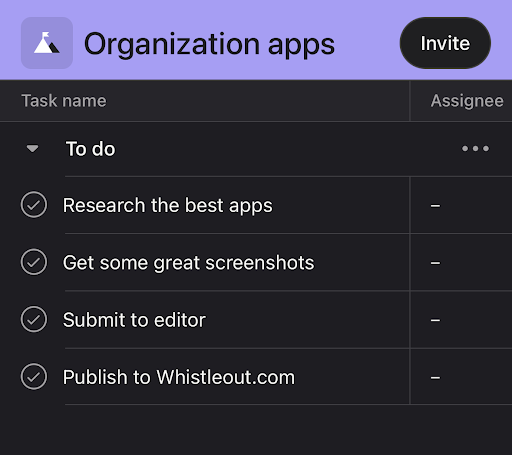

Asana
Asana is a workplace productivity app designed for teams. It streamlines workflows, connects you with other team members, and allows you to track projects from start to finish. It helps with organization by acting as several apps in one platform. You don’t need different apps for tasks like sending messages and assigning work anymore. It’s all handled within Asana.
The app is free for small teams of up to 10 people. If your workplace is larger than that—or you want access to nifty AI-driven features—you’ll need a paid subscription. It’s one of the most popular productivity and organization apps on both app stores with millions of downloads and glowing reviews.
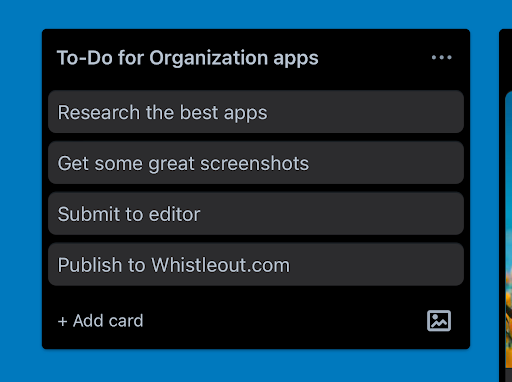

Trello
Trello is the other most popular productivity and organization app. It offers many of the same features as Asana such as assigning tasks and streamlining your production process. However, Trello uses a different interface that works better for some people. Trello is a “Kanban tool.” Don’t worry, I had to Google it too. Kanban is a visual project management method that uses tiles for each phase of a process. As your project progresses, you simply drag tasks into the next tile. Asana, by contrast, is more traditional with lists and tasks held within a single project interface.
If you’re a visual learner and like seeing the big picture for your project, Trello might be a great option. It’s free for small groups but requires a monthly subscription if you have a large team. Trello has been downloaded over 10 million times on the Google Play store and is highly rated for both iPhones and Android devices.

Dropbox
Dropbox is a cloud storage service. It allows you to save files and sync them with other people. It’s more useful than simply emailing your files to your coworkers and losing track of them in your inbox. Having easy access to your files helps with organization and productivity.
Personal users can get 2GB of storage for free. Businesses or people needing more storage space will need to sign up for a subscription. Dropbox is one of the most popular cloud storage services with millions of downloads. It is rated 4.7 on the iOS store with almost 950,000 reviews.
Best apps for notes and lists
These apps are the perfect replacement for that desk full of post-it notes.
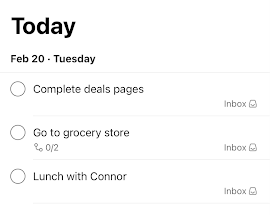

Todoist
Todoist brands itself as a “to-do list app to organize your life,” so it makes sense it would be one of the best apps for organization. The app allows you to create checklists for anything from work to your grocery list. You have customization options for specific dates, priority levels, and even the ability to create sublists for different projects. Plus, it’s collaborative so your lists can be shared with others.
Todoist offers a free subscription that allows 5 active projects at a time. If you want more you’ll need a paid subscription. It’s been downloaded over 30 million times across the Apple App and Google Play stores and is highly rated. We appreciate it so much that we also included it on our list of the five best apps for students.

Joplin
Joplin is an open-source app that helps you organize your notes. It’s highly customizable, allowing you to create notes for almost anything. Everything is organized in different “notebooks” for your projects. You can also share notes with others and sync through other platforms like Dropbox.
The app is free and was built to be a competitor with Evernote, which was the leading note app until its best features were locked behind a paywall. While it’s still a newer app with only a few thousand downloads, it’s highly rated scoring a 4.4 on the iOS App Store.

Remember The Milk
Remember The Milk is an online to-do list app. It doesn’t offer quite as many customization and collaboration features as Todoist, but it’s perfect for your personal life. You can easily make checklists, break down jobs into subtasks, attach files, and share your lists with others. Plus, you can even have the app send your notifications through email or text.
The app is free but there is a premium edition with a few extra features. It’s rated 4.4 on the Google Play store with over 50,000 reviews.
Best apps for time management
Time getting away from you? Here are some great options for keeping up with your calendar and tracking your time spent on projects.

Calendly
Calendly is a scheduling app that is designed for individuals and small businesses. It’s easy to use with a simple interface and takes the guesswork out of your calendar. If you need to set up a meeting with someone, you simply send them a link to your calendar and they can choose their own time. It’s especially useful for people who have a side hustle, like tutoring or sports training, because it lets clients build your schedule for you.
The free version of the app only allows one kind of appointment and limits the kind of customization options you have. For people who need more complexity, there are tiered subscriptions with more options. The app is rated 4.8 on the Google Play Store with over 500,000 downloads.
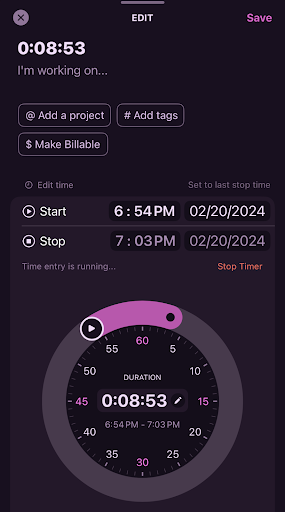

Toggl Track
At its core, Toggl Track is a timer. However, the features attached to that timer are what make it special. When you open the app, Toggl immediately starts counting the minutes and seconds of your session. When you’re finished, it’ll create a record of how much time you just spent. From there, you can customize the record for specific tasks, share it with others, and maintain a running list of timed sessions for projects. Toggl even supports browser extensions for Chrome and in the background of desktops with all your sessions kept on the app.
Toggle is a great way to record how long a project is taking and keep records for billing. The app and most of its features are free, though extra features like automatic billing rates and calendar integration are locked behind a paywall. The app is highly rated with thousands of downloads on the Google Play and Apple App Store. That said, some iPhone users have complained that at times the iOS version of the app struggles to sync with Macbooks. While the problem seems to have been solved, it’s something to keep in mind if you’re planning on using this app in a business setting.
Best apps for Password management
Passwords are crucial for security… but only work if you can remember them. Let these apps do the remembering for you while they keep your passwords safe.

Bitwarden is an open-source password manager that has earned a cult following. What makes it so good? All your data, including passwords, is stored in an encrypted vault. Even if someone breaks in, they likely can’t read your data. Plus, most of the best features are free. Basic accounts get unlimited password entries, device syncing, two-factor authentication, and all other core functions. If you’d like emergency access to your account and encrypted file sharing, an annual plan costs just $10.
The app is rated 4.5 on the Apple App Store with thousands of reviews.

LastPass
LastPass is by far the most popular password management app. With over 10 million downloads on the Google Play Store, it has certainly earned a spot on this list. It offers many of the same features as Bitwarden, though device syncing is limited on free accounts.
Despite LastPass being the most popular password app on either app store, we still recommend Bitwarden instead. LastPass had a security breach in 2022 that resulted in some user data being stolen. Though the company has been reluctant to release details, it did confirm some password information was accessed. The information remained encrypted, so it's unlikely a bad actor would be able to use most of it, but that’s still not a comforting thought. While it remains the most popular password app with millions of customers—which is why we felt compelled to include it—we’re reluctant to give it a full-throated endorsement because of that security breach.
Best apps for habit changes and mental health
Being organized isn’t just keeping your schedule and lists in order. Sometimes it requires building good habits and changing your mental state. A disorganized mind can create a disorganized life.

Fabulous is a daily habit tracker that is designed to help you build good habits. While it’s designed for people who get easily distracted, it’s perfect for anyone looking to push for improvement in their life. It’s a goal-oriented app, meaning you choose a specific goal and the app will walk you through achieving it. While “getting organized” is too broad to be a specific goal, there are tasks you work on that will help in that department. Many of them revolve around taking control of your time, practicing mindfulness, and building a daily schedule.
The app is highly rated on both the Apple and Google Play stores with millions of downloads. That said, this app won’t work for everyone, which is why we encourage you to take advantage of the free trial. Some people loved this app while other reviews stated it just didn’t motivate them enough. Since everyone’s personality is different, everyone’s experience with this app will be different too.
Do I have enough data for my apps?
For most of these organization apps, you’re going to need an internet connection. While some—like password management apps—can live directly on your phone, others will need the internet to stay up to date. This is especially important for workplace apps with collaboration features.
Phone apps use more data than almost any other function of your phone, so check out our data usage guide to figure out how much high-speed data you normally use. Needing a ton of data may not be a problem if you spend most of your time at home or the office. That said, you’ll need a data plan for anywhere you don’t have a free Wi-Fi connection. Luckily there are plenty of great unlimited plans you can take advantage of that won’t destroy your wallet.
Best MVNO plans for apps and data
You don’t have to hook up to an expensive data plan from a major carrier to get good service. Smaller carriers called MVNOs offer coverage at discounted rates on the larger carrier’s networks. While they may not have as many perks, you can typically find excellent plan options with plenty of priority data at a much friendlier price than carriers like AT&T, T-Mobile, and Verizon.
Mint Mobile offers service on T-Mobile’s network. You can snag an Unlimited Data plan with 50GB of premium data and a 20GB mobile hotspot starting at just $30/month ($15/month for new customers). You do have to prepay for at least three months in advance for Mint, but the overall cost is much cheaper than many other carriers.
Mint Mobile Unlimited Data Plan

| Carrier | Mint Mobile |
|---|---|
| Data | Unlimited Data |
| Type | No Contract |
| Current Deal | Get this plan for just $25/mo. when you switch to Mint Mobile using promo code 15OFF at checkout. Upfront payment required |
| Total Price |
$25 per month
$75.00 upfront payment for 3 months (equals to $25.00/month). Intro pricing for new customers only.
|
| View Plan |

Visible offers great service on the Verizon network. The $35/month Visible+ plan and $45/month Visible+ Pro plan include unlimited premium 5G ultra-wideband data. Plus, it includes an unlimited mobile hotspot with speeds limited to 5-15Mbps.
Visible $35 Visible+ Plan

| Carrier | Visible |
|---|---|
| Data | Unlimited Data |
| Type | No Contract |
| Total Price |
$35 per month
Taxes & Fees included
|
| View Plan |
Max McCaskill
Sr. Staff Writer

Find a better phone plan
Thousands of cell phone plans unpacked. All the facts. No surprises.


.png?w=280&h=280&usm=20&usmrad=0.8&fit=crop "Best Cell Phone Deals for June 2026: Get the New iPhone 17 for Free")



