

There's a specific kind of panic that sets in when you're in a Japanese restaurant, staring at a menu full of words you can't understand, with the waiter ready to take your order. That's exactly the moment Google Translate was built for.
With two weeks across Belgium, Spain, Germany, and Austria under my belt, I can confirm Google Translate is a must-have for travel.
Ways to translate—and when to use each one
Google Translate includes many distinct modes, and understanding when to use each one is key.
- Text input is the most common feature. All you have to do is type a phrase, and you get a translation. It sounds basic, but it's what you'll want when precision matters.
- Conversation mode is best for on-the-go translation. You speak into the phone in your native language, and the app speaks back in your target language out loud. There's no typing, and most importantly, no passing the phone back and forth between people awkwardly. I used it when I needed directions in Austria, and the person I stopped didn't speak a word of English. We sorted out the route in about 90 seconds, and it handled the exchange more smoothly than I expected.
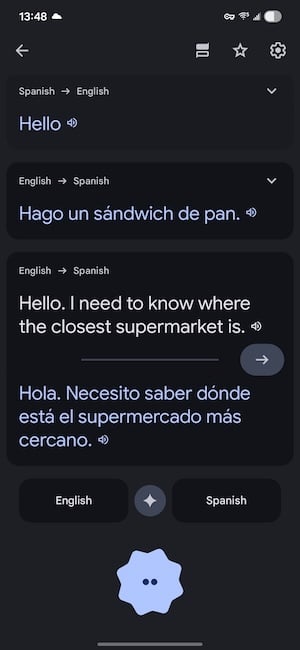
Image: Max McCaskill | WhistleOut
- Camera translation is by far the most practical feature, and is my personal favorite too. Just point your phone at any text, like a menu or a museum information placard, and the app overlays a live translation directly onto what you're seeing through the lens. In Spain, I used it constantly with handwritten specials boards at tapas bars. Whatever is in front of you becomes readable in seconds.
Google Translate also offers a new set of nifty features, including: Document Translation, Listening Mode for offline real-time translation with headphones, and offline translation in general.
Translation apps eat data. Make sure you've got enough to spare.
Most translation apps need a live internet connection to function, especially for camera and voice features. Before your trip, make sure your plan includes international roaming data.
Below are some of the best phone plans that include international perks:
|
Visible

$25 Visible Plan
$25.00/mo
Taxes & Fees included
|
|
Mint Mobile

Unlimited Data Plan
$25.00/mo
$75.00 upfront payment for 3 months (equals to $25.00/month). Intro pricing for new customers only.
|
|
XFINITY Mobile

Mobile Select Plan
$0.00/mo
(for the first year of service) <br>Regular rate of $30/mo. thereafter
|
Consistent and intuitive when it matters most
Google Translate isn't better than other translation apps because of a single feature—it's the ease of the ecosystem and consistently accurate results that make it a top choice. The interface is clean and offers all of its features in a single screen. That way, you don't have to dig through menus to switch modes or use multiple apps to get the best features. When you need it, you open it, and it works. And its immediacy is unmatched.
I saw accurate translations across all four countries, including some trickier regional expressions in Belgium that I half-expected would trip it up. The one honest caveat is that Google Translate needs a data connection for most of its features. You can download language packs for offline text translation, which is worth doing before you land, but camera and voice modes require internet access.
Planning your trip? Your phone can do a lot more than translate.
From booking flights to finding off-the-beaten-path activities, there are apps that make every part of international travel easier. Check out our guide to the best travel apps for your phone—we test everything so you only pack what's actually worth it.
Why Google Translate is a must-have for international travel
If you're traveling internationally and you only download one translation app, make it this one. It's not perfect, but it's the most reliable. While the offline mode isn't as robust as some premium alternatives, and the conversation feature can occasionally stumble on strong accents, it's always worked well for me. For a free app that covers 133 languages with text, voice, and camera translation, it's the best travel tool available.
You can see how it stacks up against other options in our full roundup of the best translation apps for international travel—but if you're short on time before your flight, just download this one first.
How WhistleOut reviews apps
Our mobile experts scour the app stores, looking for the best new apps for Android and iPhone. Before recommending an app, we use the app for at least one full workday, testing its basic functionality and evaluating whether or not it delivers on its promises.
- Easy to use
Great apps simplify your phone. We selected the tools that don't require a complicated instructional manual. - Affordability
The internet is filled with expensive price tags, but we're not buying what they're selling. We leaned into inexpensive, quality apps. Extra points if they're free! - Hands-on testing
We played around with these before recommending them, ensuring they're worth your download.
From there, we weigh the app's pros and cons and then determine whether or not it's a worthwhile download for the wider population of cell phone users.
Jessica Santero
Staff Writer

Find a better phone plan
Thousands of cell phone plans unpacked. All the facts. No surprises.


.png?w=280&h=280&usm=20&usmrad=0.8&fit=crop "Best Cell Phone Deals for June 2026: Get the New iPhone 17 for Free")



