

Microsoft Translator has always been the translation app built for group chat live translation—but not anymore. As of June 30, 2026, Microsoft is doing away with its beloved Converse feature. Basically, Converse allowed each participant to speak their own language from their own device in a group chat. Every message would automatically translate, and it was genuinely brilliant.
With the retirement of Converse, is the Microsoft Translator app even worth using? For some users, that's a workable shift, but for others (especially casual travelers), it's a real loss.
Continue reading for all details and what you need to know about the Microsoft Translator app.
Goodbye Converse, the beloved group chat translation feature
The Microsoft Translator Converse feature allowed users to create group chats that translated as you typed. Once you created a conversation group, you shared a code with whoever needed to join, and then everyone spoke in their own language from their own device.
Whatever any participant typed was translated in real time and displayed to everyone simultaneously. You didn't have to pass your phone to other people or even be in the same city. Better yet, you didn't have to copy and paste your colleague's message into a third-party translator.
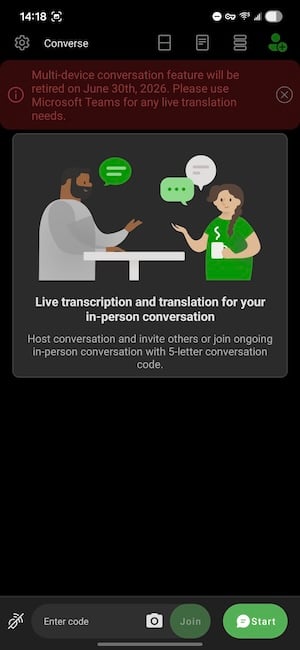
Image: Jessica Santero | WhistleOut
It wasn't just useful for corporate boardrooms either. People used it for everyday multilingual moments, with neighbors, family members, and anyone who needed to have a real back-and-forth conversation across a language barrier. One Reddit user on r/apps put it well: "Microsoft Translator has been the best for my use case so far. I have a Polish neighbor—we use it in real-time discussions with each of us speaking our own language. Speech-to-text is pretty good and way better than Google Translate."
The retirement of Converse leaves a real gap for anyone who depended upon the translated chats.
Timeless features here to stay
Converse was Microsoft Translator's standout feature, but it wasn't its only trick. Microsoft Translate still offers all the basic uses you'll find on any translation app, with an extremely practical interface geared towards real communicative translation. So much so that the text translation box displays translations upside-down, for the other person to read easily.
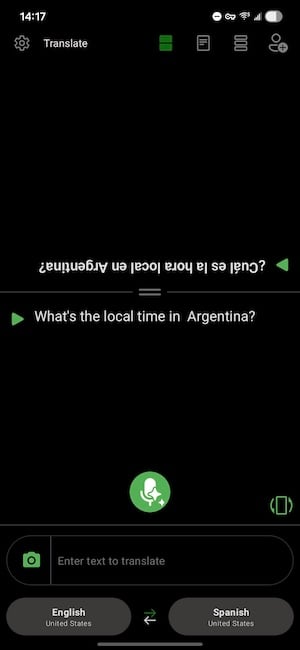
Image: Jessica Santero | WhistleOut
In the app you can find text translation, voice translation, and camera translation for signs and menus across all 129 supported languages. Microsoft holds one of the broadest free libraries available, and the accuracy holds up well even for less common language pairs.
There's also a phrasebook with pre-loaded phrases, which is more useful than it sounds when you're jet-lagged and need a reliable fallback. And the profanity filter remains, for anyone who needs translated conversations to stay workplace-appropriate. It's a small detail, but it says a lot about how carefully Microsoft built this for professional environments.
Don't let your phone bill be the reason your translation app stops working abroad.
Voice and camera translation need a solid data connection to work—especially abroad. Make sure you're covered with the right travel-friendly phone plan before you land.
|
Visible

$25 Visible Plan
$25.00/mo
Taxes & Fees included
|
|
Mint Mobile

Unlimited Data Plan
$25.00/mo
$75.00 upfront payment for 3 months (equals to $25.00/month). Intro pricing for new customers only.
|
|
XFINITY Mobile

Mobile Select Plan
$0.00/mo
(for the first year of service) <br>Regular rate of $30/mo. thereafter
|
Is Microsoft Translator still worth it after June 2026?
For most travelers, the answer is yes, Microsoft Translator is still an amazing translation app. The app's language coverage, voice accuracy, and camera translation are all on par with top competitors. Losing Converse doesn't change any of that since it's still a capable, polished translation tool.
However, those who relied on Converse for the neighbor-to-neighbor conversations, informal multilingual meetings, and real-time exchanges might think it's lost its luster. The honest truth is that nothing currently replicates what Converse did for casual users quite as cleanly.
Download Microsoft Translator for its individual translation features—they're genuinely good. See how it compares to the rest of the field in our full guide to the best translation apps for international travel.
Meet your new favorite app (that you don't even know about yet)
With over 50,000 new apps released every month, how can you possibly find that hidden gem that will bring your life a smidge more joy?
Leave it to us!
From gaming to gardening, we're constantly testing the latest and greatest apps that we actually want to use on our own phones. Check out our most recent finds in our monthly roundup of the best new apps for iPhone and Android.
How WhistleOut reviews apps
Our mobile experts scour the app stores, looking for the best new apps for Android and iPhone. Before recommending an app, we use the app for at least one full workday, testing its basic functionality and evaluating whether or not it delivers on its promises.
- Easy to use
Great apps simplify your phone. We selected the tools that don't require a complicated instructional manual. - Affordability
The internet is filled with expensive price tags, but we're not buying what they're selling. We leaned into inexpensive, quality apps. Extra points if they're free! - Hands-on testing
We played around with these before recommending them, ensuring they're worth your download.
From there, we weigh the app's pros and cons and then determine whether or not it's a worthwhile download for the wider population of cell phone users.
Jessica Santero
Staff Writer

Find a better phone plan
Thousands of cell phone plans unpacked. All the facts. No surprises.


.png?w=280&h=280&usm=20&usmrad=0.8&fit=crop "Best Cell Phone Deals for June 2026: Get the New iPhone 17 for Free")



