
Image: Apple
Apple has made it official: There is no iOS 19.
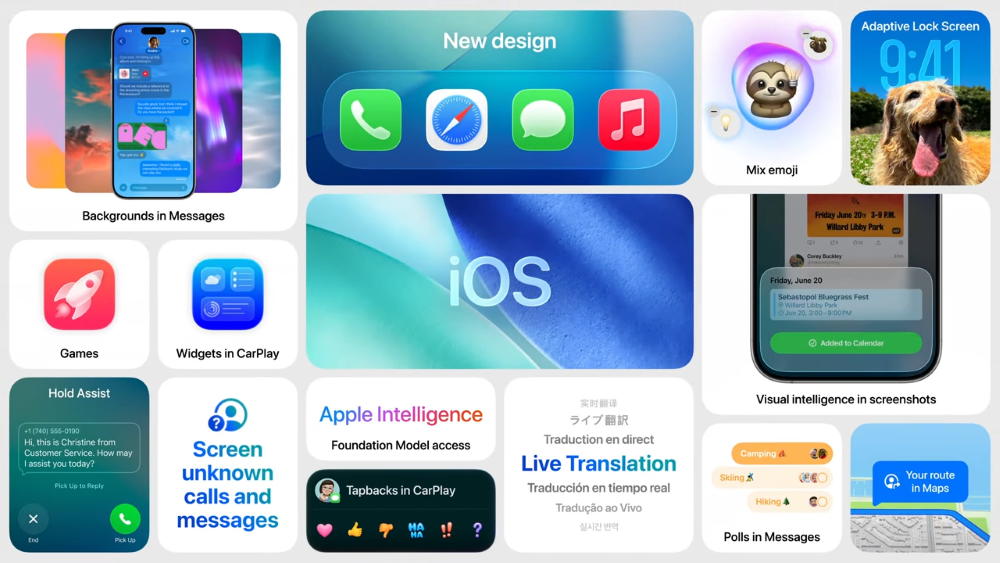
Instead, the company just announced iOS 26 at the 2025 WWDC. This new release represents one of the largest iOS updates in years, with a complete redesign of the iPhone's interface and a streamlining of the user experience across Apple products.
While the bulk of the update will go towards the redesigned interface, iOS 26 will also offer exciting new features like Hold Assist, Call Screening, Live Translation, and new iMessage features.
After digging through the details from Apple’s latest announcement, here are the new iOS 26 features we’re most excited about. Plus, we'll also cover when we expect iOS 26 to be released, predict compatible iPhones, and tell you how to download the newest iOS.
Wondering about the next iOS? iOS 27 has already been announced
Apple has already announced iOS 27 is coming in the fall of 2026. Learn about new features like Siri AI, parental controls, and new Apple Intelligence photo editing features in our iOS 27 guide.
Best new iOS 26 features
Every new iOS update is packed with features. Some can completely change how you use your iPhone, while others are quality-of-life updates to make your device easier to use. These are the five newest iOS 26 features that excited our team and will likely have the biggest impact on your device.
1. New design and Liquid Glass
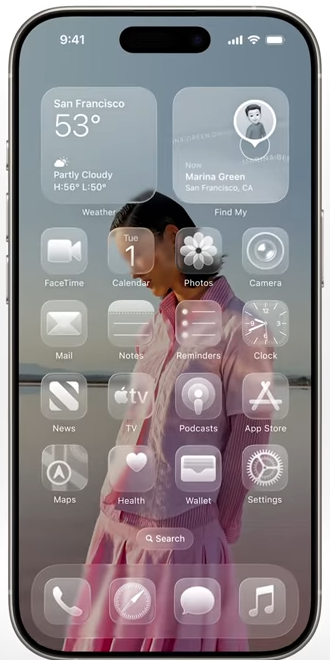
Image: Apple
The biggest new feature to come out with iOS 26 is a major redesign of the iPhone's interface. Everything from app icons to the Notifications Center is getting a new look inspired by an aesthetic that Apple calls Liquid Glass. Essentially, your tools, menus, widgets, and apps (if you choose) will remain clear, looking like a drop of liquid on your screen. The areas behind the Liquid Glass are slightly blurred to make it easier to read.
This style is being replicated across all of Apple's products, including the Apple Watch, iPad, and Mac. The last major iOS redesign was with iOS 7 around 12 years ago, and Apple has never offered a truly unified design like this, so this shift represents a big development.
2. iMessage updates
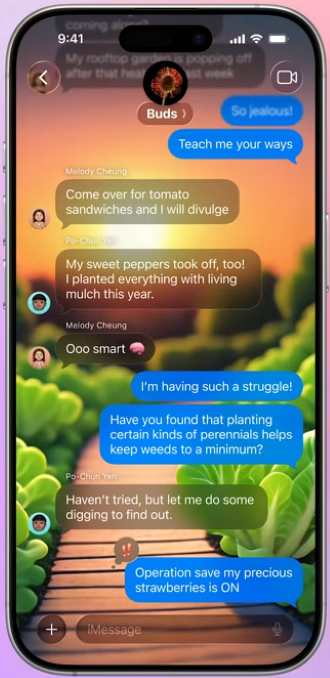
Image: Apple
iMessage is getting several new features to make your texting more interesting and improve the quality of group messages.
One of the biggest developments is the ability to add backgrounds to your iMessage chats. All participants will be able to see and change the background whenever they want.
As for group chats, Apple is adding customizable polls and Apple Cash compatibility.
3. Call Screening
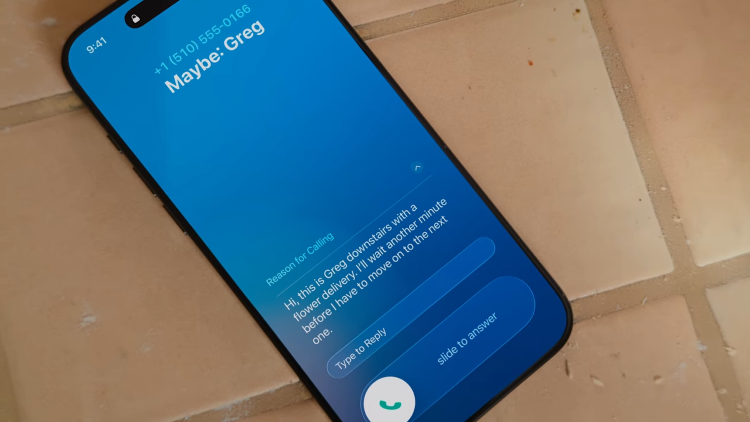
Image: Apple
With Call Screening, your iPhone will automatically answer phone calls from unknown numbers in the background of your device. It allows callers to explain who they are and why they are calling before sending the phone call notification to your screen. The feature is designed to weed out spam calls and prevent scammers from ever reaching you.
4. Live Translation
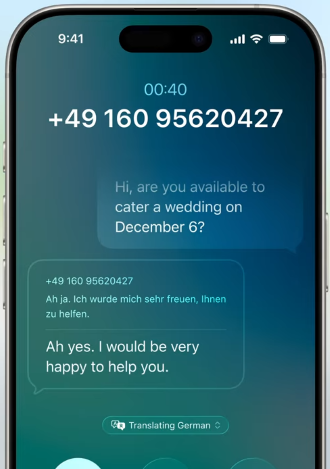
Image: Apple
Live Translation is an AI-powered translation feature that functions across iMessage, FaceTime, and your Phone app. It offers live translation—in audio and written format—when it detects you're speaking to someone using another language. It's currently unknown how many languages will be supported when the feature is released.
5. Hold Assist
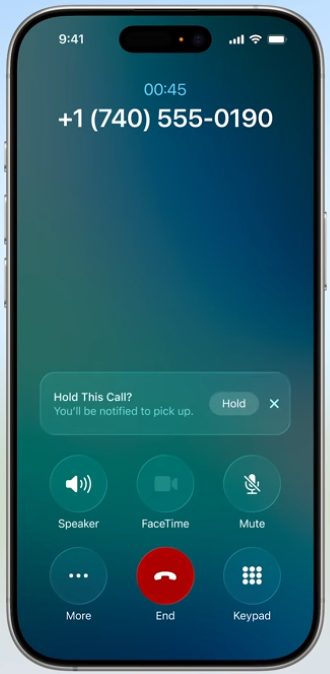
Image: Apple
Hold Assist is another new feature coming to your Phone app. When your iPhone detects holding music, it will automatically ask if you want to enable the feature. From there, your iPhone will keep the line active, but allow you to leave the call and do other things with your phone. When the iPhone detects the hold has ended, it'll notify you to return to the call.
What is iOS 26?
iOS 26 is Apple's next operating system for iPhones.
A smartphone's operating system (OS) is the software that runs the device. Apple iPhones use iOS, and most other smartphones are built on Android. Each year, Apple typically launches a new version of its OS to power the latest iPhone and give quality-of-life updates to past models.
The current version is iOS 18, which was launched with the iPhone 16 in 2024. Unlike previous editions, Apple is not naming this next operating system sequentially, so there is no iOS 19. Instead, iOS 26 is named after 2026, the year that most of its features will be released and perfected. Apple is also unifying all of its operating systems around a common design and the 2026 name. In addition to iOS 26, the new software systems will also include:
- watchOS 26
- tvOS 26
- macOS 26
- visionOS 26
- iPadOS 26
When is the iOS 26 release date?
iOS 26 is expected to be released in September 2025. While we don't have official confirmation, the release date may be around September 16, which is when we expect the iPhone 17 to go on sale.
Like most tech companies, Apple has a set calendar when it likes to release new devices and software updates. Apple usually announces the next iOS version at the World Wide Developers Conference (WWDC) in June. This year's WWDC keynote event and iOS 26 announcement were on June 9, so that prediction was correct and Apple followed its typical pattern.
As for the actual iOS 26 release date, the newest iOS version typically launches when the new iPhone series goes on sale in the fall. Apple prefers announcing new iPhones during the first or second week of September, followed by a 10-day preorder period. The new iOS usually comes out a week after the event, just before the iPhone is officially available. Based on that calendar, we expect the iPhone 17 to be announced on September 9 and iOS 26 to go live one week later on September 16.
You can see the release dates of recent iOS versions below:
Recent iOS release dates
| iOS release dates | |
|---|---|
| iOS 26* | September 16, 2025* |
| iOS 18 | September 16, 2024 |
| iOS 17 | September 18, 2023 |
| iOS 16 | September 12, 2022 |
| iOS 15 | September 20, 2021 |
| iSO 14 | September 16, 2020 |
| iSO 13 | September 19, 2019 |
| iSO 12 | September 17, 2018 |
| iSO 11 | September 19, 2017 |
| iSO 10 | September 13, 2016 |
*Expected release date.
What iPhones will get iOS 26?
Currently, iOS 26 is expected to cover almost all the same devices as iOS 18. This means it'll include the upcoming iPhone 17 and current popular models like the iPhone 16 and 15. However, the iPhone X series (XR, XS, and XS Max) devices have been dropped from support.
Here's the full list of expected iOS 26-compatible iPhones:
Expected iOS 26-compatible iPhones
| iPhone 17, 17 Plus, 17 Pro, 17 Pro Max* |
| iPhone 16, 16e, 16 Plus, 16 Pro, 16 Pro Max |
| iPhone 15, 15 Plus, 15 Pro, 15 Pro Max |
| iPhone 14, 14 Plus, 14 Pro, 14 Pro Max |
| iPhone 13, 13 mini, 13 Pro, 13 Pro Max |
| iPhone 12, 12 mini, 12 Pro, 12 Pro Max |
| iPhone 11, 11 Pro, 11 Pro Max |
| iPhone SE 2nd and 3rd gen |
*Expected 2025 models.
How to update to iOS 26?
iOS 26 isn't out yet, but when it is released, you can easily update to it by following the steps below. If you haven't updated your device in a while, these same instructions can help you update to iOS 18. No matter what the current iOS version is, the best practice is to keep your iOS current to protect your data and keep your iPhone running smoothly.
Here’s how to update to the latest version of iOS:
- Head to Settings > General > Software Update
- Choose Download and Install to obtain the most recent software release for your iOS device.
Since upgrades are typically large, we suggest downloading over Wi-Fi.
You can also enable automatic iOS updates by:
- Navigating to Settings > General > Software Update
- Tapping Automatic Updates
- Toggling on Download iOS Updates and Install iOS Updates.
Max McCaskill
Sr. Staff Writer

Thousands of cell phone plans unpacked. All the facts. No surprises.





.png?w=280&h=280&usm=20&usmrad=0.8&fit=crop "The Best Cheap Phone Plans for 2026: We Tested Them All to Help You Save")


