
Apple originally revealed its version of artificial intelligence at the 2024 World Wide Developers Conference (WWDC). Called Apple Intelligence, it promised to alter the way we use our iPhones by integrating AI features directly into our most-used apps.
Apple Intelligence offers generative AI features like writing tools and on-device photo editing. It also upgrades Siri by allowing it to tailor responses to your specific needs instead of being a generic chatbot. Finally, it also empowers your device to respond to things it detects and hears on your screen using features like Visual Intelligence and Live Translation.
We'll cover what Apple Intelligence is, what features it offers, and how to get it on your iPhone in this guide.
What is Apple Intelligence?
Apple Intelligence is Apple's proprietary AI system for the iPhone, iPad, and Mac. It includes generative AI features like image editing, generative writing, device organization, and a more personalized Siri experience.
For iPhones, Apple Intelligence system requirements include:
- A compatible iPhone 15 Pro model, iPhone 16 series, or iPhone 17 series device.
- 7GB of memory storage.
- Current version of iOS.
- Device language and Siri language set to the same supported language.
- Residing outside of China.
The system is designed to offer a high level of privacy, with most tasks completed on your device. If Apple Intelligence detects it needs more computing power, it can access cloud servers through a system called Private Cloud Compute that extends privacy protections to keep your data safe.
While Apple has taken more precautions than some other companies, if the idea of any AI system accessing your personal messages, photos, and data makes you uncomfortable, you can opt out of Apple Intelligence in your device's settings.
How to turn on Apple Intelligence
Apple Intelligence is automatically enabled when setting up new, compatible devices. If you have the newest iPhone, you probably turned it on when setting up your iPhone the first time.
If you turned it off at some point, or you're on an older device that skipped the automatic setup, you can enable it manually by following these directions:
- Open Settings on your iPhone, iPad, or Mac.
- Tap Apple Intelligence & Siri.
- Enable the feature or tap Turn on Apple Intelligence if a separate option comes up instead.
From there, your device will download the newest on-device AI models it needs. Remember this can eat into a chunk of your storage and may take a while depending on your internet connection. Make sure to keep your device connected to Wi-Fi and plugged in so it's completed without any issues.
What about Google Gemini and Galaxy AI?
Apple Intelligence is not the only smartphone AI in town. If you're looking at AI systems for your next smartphone, you should also consider Google Gemini and Galaxy AI, which are native to Android systems. Check out our versus guides to see how both compare to Apple Intelligence:
Siri AI in Apple Intelligence
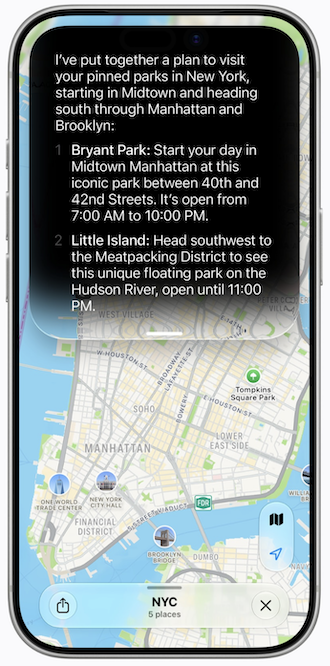
Image: Apple
While Apple Intelligence has been out for two years, Siri is only recently getting the AI overhaul Apple promised back in 2024. iOS 27 introduces Siri AI, a rebuilt version of the virtual assistant that can dig into the data on your device, search the web for answers, and understand what's on your screen.
Siri was rebuilt from the ground up around three new core capabilities:
- Personal context understanding: Siri can search your device's data to answer questions, like pulling a restaurant recommendation out of a text thread or finding a flight confirmation number buried in your email inbox.
- Broad world knowledge: Siri can search the web for current answers on questions you ask.
- Onscreen awareness: Siri can see and analyze what's on your screen to answer questions about it.
history across all your Apple devices.
Image: Apple
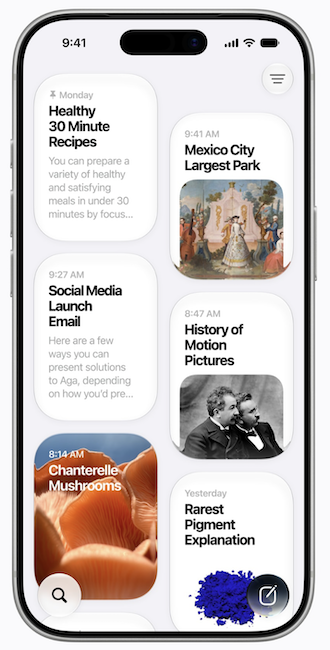
iOS 27 also introduces a new dedicated Siri app. It syncs your Siri AI conversation history across all Apple devices, including iPhone, iPad, Mac, Apple Watch, and Apple Vision Pro. That means you can start a conversation on one device and pick it up on another.
Unfortunately, not every iPhone will get the full experience. Siri AI is limited to the iPhone 15 Pro, 15 Pro Max, and any iPhone 16 or later. Advanced features like expressive voices and upgraded dictation are limited to the iPhone Air, iPhone 17 Pro, and iPhone 17 Pro Max. Older iPhones that don't meet Apple Intelligence's hardware requirements will keep the current version of Siri.
Visual Intelligence
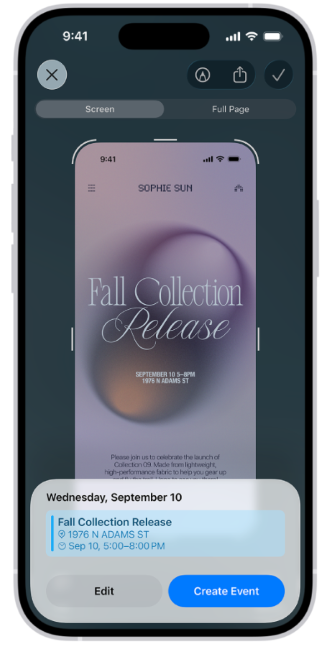
Image: Apple
Visual Intelligence lets your iPhone's camera identify and act on whatever you're looking at. You can point it at things like plants, landmarks, or posters, and Apple Intelligence can tell you what it is, make notes, or translate the text.
You access it through the Camera app. Simply swipe over to Visual Intelligence, snap a picture, and Siri can tell you about whatever's in frame, then take follow-up questions the same way you'd talk to it normally.
Apple Intelligence photo editing: Reframe photos and generate new backgrounds
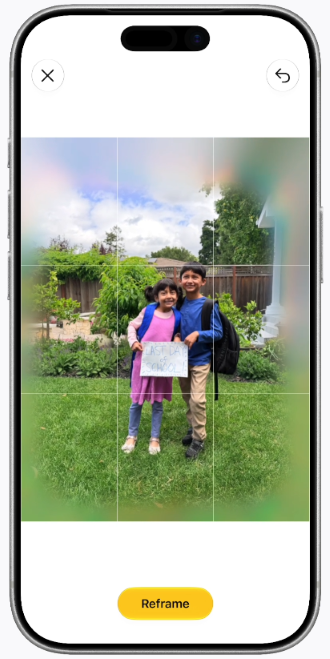
Image: Apple
iOS 27 also introduced new editing features to the Photos app that are powered by Apple Intelligence's generative tools:
- Clean Up: The Clean Up tool received a major upgrade, so removing unwanted objects from photos now produces higher-quality results.
- Extend: A new Extend tool lets users expand the edges of an image to give subjects more breathing room, then uses Apple Intelligence to generate new content to fill in missing areas.
- Reframe: Spatial Reframing lets users adjust the composition of a photo by touching and dragging to shift the perspective in real time. It's designed to feel like a photographer physically repositioning the camera when taking the shot. New content is only generated where the perspective changed, keeping most of the original image intact.
Other Apple Intelligence features
Apple Intelligence offers a lot of different features to help improve your life, from organization and productivity tools to ways to flex your creativity.
Genmoji

Image: Apple
One of the first Apple Intelligence features released, Genmoji is a generative AI feature that allows users to create custom emojis for their messages and stickers. All you have to do is type a description, and the system will automatically generate emoji options.
Image Playground

Image: Apple
Image Playground is another original generative AI feature released with Apple Intelligence. It allows users to create custom images in seconds by typing out a description. The feature comes with a dedicated app and is available in iMessage.
While it was originally designed for limited, artistic creation, Image Playground picked up photo-realistic image generation with iOS 27. Users can also modify existing images using natural language or by tapping and circling objects directly.
Writing Tools
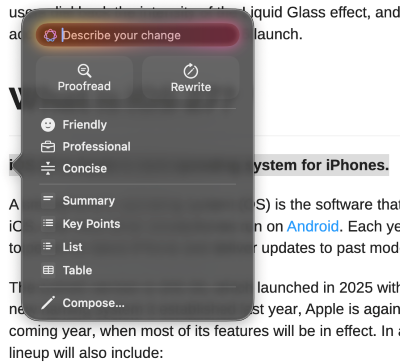
Image: Max McCaskill
Get help with proofreading, rewriting, and summarizing with on-device generative AI. The Siri AI update also introduced features that allow Apple Intelligence's tone to adapt to how you normally write with each contact. It knows to write with an informal text lingo to your best friend on iMessage and stick to a professional tone with your boss in emails.
While the tool defaults to Apple's native models, users can also select whichever outside model they prefer, including Claude, Gemini, or ChatGPT.
Live Translation
Live Translation breaks down language barriers across native Apple apps like Messages, FaceTime, and Phone. In Messages, whatever you type gets translated into the recipient's language automatically, and their replies come back translated into yours. FaceTime calls get live captions while you still hear the other person's actual voice. The Phone app translates your words as you speak them to the person on the other end of your call, and theirs come back to you the same way.
Notification organization
Apple Intelligence also helps cut down on notification clutter across the native Mail and Messages apps. It organizes your inbox and conversations, flags priority messages, and generates AI summaries so you can catch up without reading every line. Just note that the system doesn't always read sarcasm or jokes correctly, so make sure to read individual messages if a summary sounds odd.
Safari
iOS 27 lets Safari automatically organize your open tabs into topics based on what you're browsing. A new Notify Me feature can also monitor webpages for changes and send you notifications when it detects one, like a price change on a pair of shoes you want. Safari can also build custom extensions just by describing what you want in plain language.
Shortcuts
A new Describe a Shortcut feature lets you build on-device automations by describing what you want in plain language. Apple Intelligence assembles the steps for you, and you can refine the result just by describing what to change.
Passwords
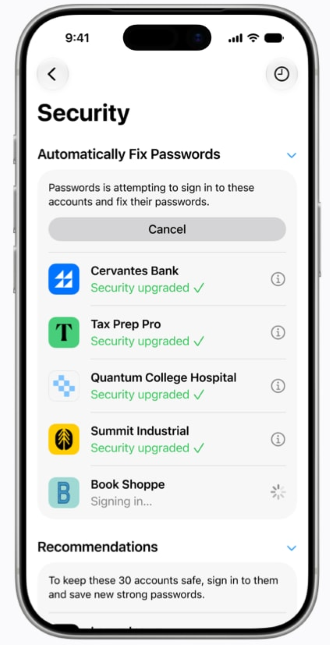
Image: Apple
Apple Intelligence can now fix weak or compromised passwords with a single tap, navigating to the website on your behalf and updating your credentials automatically.
Home app
Smart home notifications now get grouped into a single activity, cutting down on alert noise. HomeKit Secure Video cameras also picked up generated video descriptions and a searchable clip history, so you can find specific footage without scrubbing through hours of recordings.
Call Context
When you call a business, the Phone app can now preemptively surface relevant information from your device, like a confirmation number or reservation code from other apps on your phone. As a privacy feature, it does not listen in on your call. It simply guesses what might be helpful.
What iPhones have Apple Intelligence?
Apple Intelligence is available in the newest iPhone, iPad, and Mac models. So if you want it but have an iPhone 14 or earlier, you'll need to upgrade.
Currently, iPhones with Apple Intelligence include:
- iPhone 17 series
- iPhone Air
- iPhone 16 series
- iPhone 15 Pro and 15 Pro Max
Siri AI also has its own hardware requirements for specific features. The base experience is open to all iPhones that can run Apple Intelligence.
If you want expressive voices and upgraded dictation, you'll need an iPhone Air, iPhone 17 Pro, or iPhone 17 Pro Max.
iPhone 17 256GB

| Description | |
|---|---|
| Screen Size | 6.3" |
| Available On | 173 Plans from 20 carriers |
| Available From |


|
| Priced From | $929.99 upfront |
| View Full Details |
 Apple's 2025 model featuring Improved Apple Intelligence with iOS26, custom-designed A19 Bionic chip, Brighter display with ProMotion up to 120Hz refresh rate, and the new iPhone 17 camera system.

Apple Intelligence: FAQ
Can I still use ChatGPT with Apple Intelligence?
Yes, ChatGPT is still available with Apple Intelligence, but it's not the default option. iOS 27 introduces a new Extensions framework, letting you set ChatGPT, Claude, or Gemini as the AI behind Siri, Writing Tools, and Image Playground. You can pick your provider in the Settings app.
Is Siri AI free?
Yes, Siri AI is free with iOS 27 on compatible devices with no subscription required. However, Apple may introduce subscriptions for heavy users or add usage caps in the future, similar to what other smartphone companies have done. An example is the Google AI Pro plan with Gemini for Pixel devices.
Will my iPhone lose Apple Intelligence if I don't update to iOS 27?
No, your iPhone won't lose Apple Intelligence because you skip iOS 27. Anything you already have access to keeps working. However, you'll miss out on new features like Siri AI, the updated Photos editing tools, and the Extensions framework. Plus, new iOS updates generally add security patches to keep your device safe and bug fixes to make it run more smoothly. While you can skip iOS 27 when it initially comes out to avoid launch bugs, you should still update your phone within a few weeks.
Can you turn off Apple Intelligence?
Yes, you can turn off Apple Intelligence on any Apple device. Just go into your device's settings, find the Apple Intelligence tab, and disable the feature. That said, Apple has been known to reenable Apple Intelligence during major iOS updates, so make sure to check after each update that it's still turned off.
Max McCaskill
Sr. Staff Writer

Thousands of cell phone plans unpacked. All the facts. No surprises.





.png?w=280&h=280&usm=20&usmrad=0.8&fit=crop "The Best Cheap Phone Plans for 2026: We Tested Them All to Help You Save")


