
Gemini Live for iPhones: Fast facts
- Google just announced Gemini Live support for all compatible Android and iOS devices at Google I/O 2025. Previously, support was limited to Google Pixel devices and new Samsung phones.
- Gemini Live allows users to have real-time, voice-based conversations with the Gemini AI model. Users can ask questions, brainstorm ideas, and share their live camera for real-time assistance.
- The feature is located in the Gemini app, which is available for Android and iOS devices.
Google is expanding its AI suite across the smartphone landscape. Today at the Google I/O 2025 event, Google announced that some of its most exciting Gemini features are rolling out to the Gemini app to be used with all compatible phones, including non-Pixel Android and iOS devices.
The most important feature to note is the expansion of Gemini Live, which lets users have voice-based conversations with the Gemini AI model. Users can ask it questions, brainstorm, and even share their camera for live assistance.
The addition of Gemini Live for iPhones shows that Google is taking the AI battle directly to Apple, which is steadily designing its own features with Apple Intelligence. Read on to learn how to get Gemini Live on your iPhone today.
What is Gemini Live?
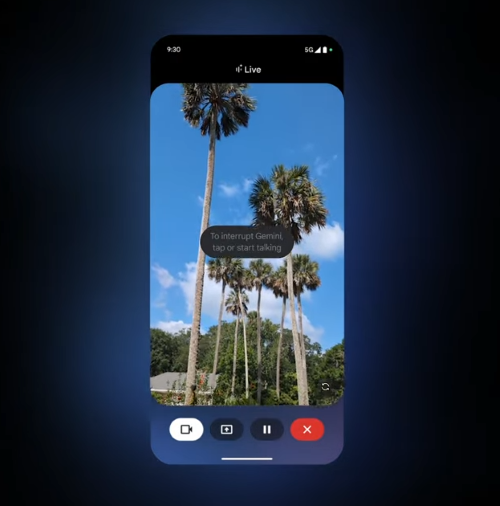
Image: Google
Gemini Live is an AI feature that allows users to have voice-based conversations with Gemini AI. It's designed for fluid and real-time interactions, as opposed to traditional AI models that rely on text.
Users can ask Gemini Live questions and then follow up for more information in a natural and dynamic way. It's great for brainstorming, exploring topics, and even asking questions about your surroundings. Gemini Live can also integrate with the live feed of your camera to do a live search of things you see in the real world.
How to get Gemini Live on iPhones and other devices
Gemini Live lives in the Gemini app. Previously, Google limited the feature to its lineup of Pixel phones and the newest Samsung models like the Galaxy S25. Today's expansion announcement means that the feature is now available for other Android devices (like older Samsungs and compatible Motorolas) and the iPhone.
To get Gemini Live on an iPhone, simply download the Gemini app to your device. From there, press the Live button in the app and begin talking to your device. That's all you have to do.
Using Gemini Live on an Android is even easier, and you may not even need the app if Gemini is designated as your AI assistant. Simply long-press the Action button and say, "Hey Google, let's talk." That will automatically start the feature.
This update means it's now possible to have Apple Intelligence and Gemini on the same device. Check out our Apple Intelligence vs. Google Gemini guide to figure out which system is better for your needs.
Need a new iPhone?
One area where Google is currently beating Apple is the wide variety of devices that can use its AI. Apple decided to limit Apple Intelligence to the iPhone 15 Pro models and the iPhone 16 series, locking out older phones. Apple continues to create features that compete with Gemini Live, like Visual Intelligence. Unfortunately, if you have an older iPhone, you simply can't use these features.
Luckily, with the Gemini app, older iPhones can still have access to Gemini Live even if Apple doesn't expand its AI features. This means you can save money by purchasing an older model, like the iPhone 15, and still have access to AI.
Best iPhone for Gemini Live: iPhone 15

- Display: 6.1"
- Cameras: Rear-48MP, 12MP; Front-12MP
- A16 Bionic processor
We think the iPhone 15 is the best iPhone for Gemini Live because of its excellent features and lower price. The iPhone 15 is ineligible for Apple Intelligence, meaning Google's AI suite through the Gemini app is one of the only compatible AI options.
The iPhone 15 includes a 48MP main camera, just like the iPhone 16. You'll also find excellent photography features like Next-Generation Portraits and 4K recording. It's also run by the A16 Bionic processor, which is an incredibly powerful chip that's perfect for mobile gaming or editing photos.
While it is an older series, the iPhone 15 still has several years of support left. Plus, its MSRP is $699, which is cheaper than the current iPhone 16.
View at AT&T View at T-Mobile View at Verizon View at AmazonAll the latest cell phone news and deals, delivered every Thursday.
Max McCaskill
Sr. Staff Writer

Thousands of cell phone plans unpacked. All the facts. No surprises.





.png?w=280&h=280&usm=20&usmrad=0.8&fit=crop "The Best Cheap Phone Plans for 2026: We Tested Them All to Help You Save")


