
APN (Access Point Name) settings allow your phone to use your mobile carrier’s network, enabling internet and data access for messaging and more. These settings serve as a gateway, providing the configuration your phone needs to communicate with your provider’s cellular network. Without the correct APN settings for your carrier, you won’t be able to access your mobile data or the internet.
Most modern smartphones automatically configure APN details when you insert a SIM card or activate an eSIM. However, you might need to manually adjust them if you encounter data connectivity problems or switch to Consumer Cellular and bring your own device.
Below, you’ll find device-specific instructions to check or update your Consumer Cellular APN settings.
Since 2024, Consumer Cellular activates all new lines on AT&T's network. T-Mobile settings apply only to existing legacy customers. If you are a new customer, use the AT&T settings.
How to view and edit Consumer Cellular's APN settings on Android
Note: These instructions are based on a Pixel 6 running Android 15 and above. Steps may vary for your particular device or if you’re using an older version of the Android operating system.
Follow these steps to view or update your Consumer Cellular APN settings on an Android device:
- Under your phone’s Settings, tap Network and Internet or Connections.
- Select Mobile Networks, Cellular Networks, or SIMs. If you don’t see these options, you’ll need to tap More first.
- If your phone shows the SIMs option, continue by tapping your carrier’s SIM two times to access your APN settings. If not, then skip to the next step.
- Tap Access Point Names to view your current APN settings.
- To change your APN settings, either tap + to add new APN settings or update your settings by tapping each field and enter Consumer Cellular’s APN settings.
Your APN settings will differ based on which network you have in your plan. Choose your network from the options below and enter the corresponding APN information. Make sure to leave all other fields not listed in the table blank. - Restart your phone.
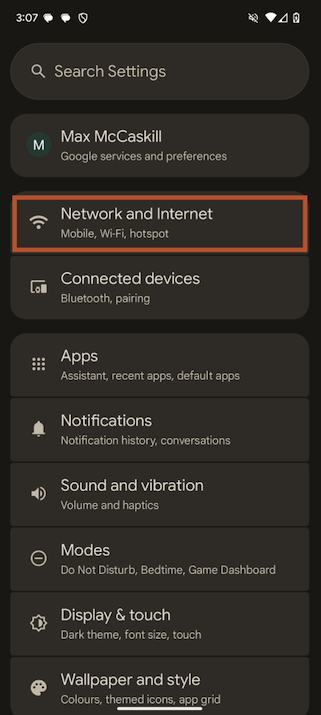
Image: Max McCaskill | WhistleOut
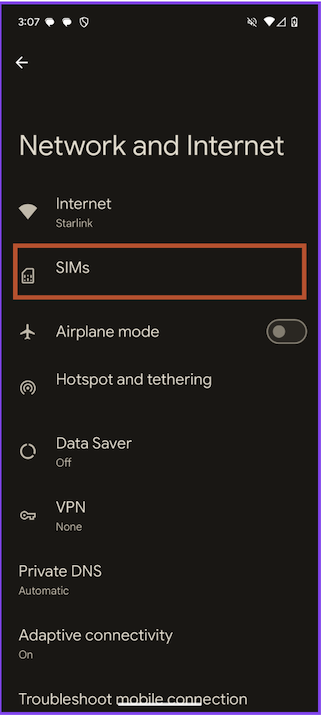
Image: Max McCaskill | WhistleOut
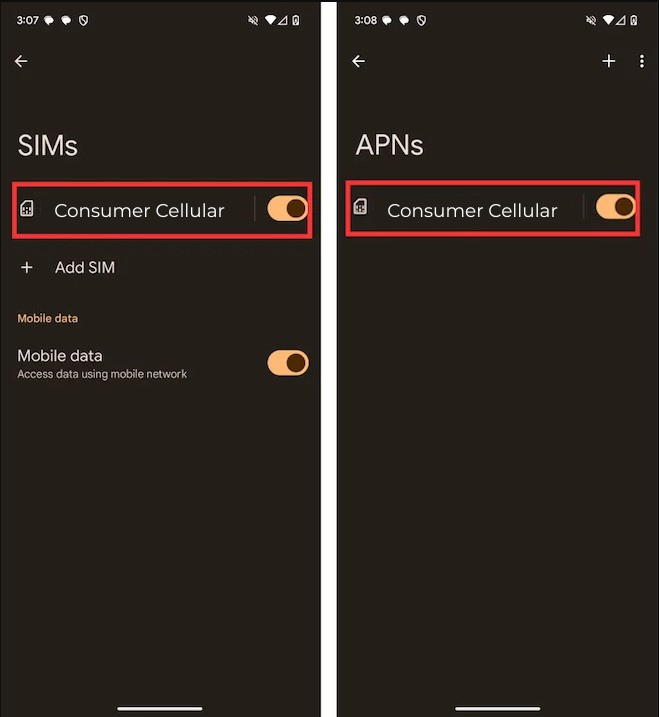
Images: Max McCaskill | WhistleOut
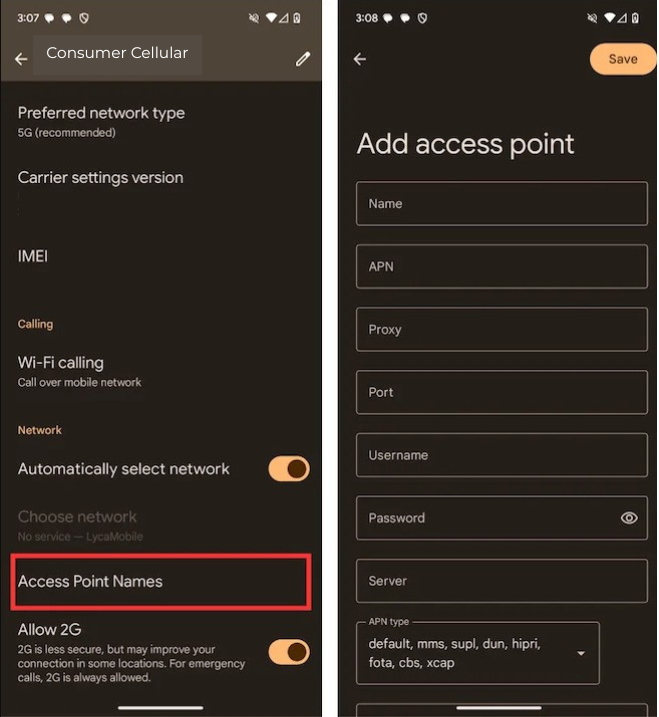
Images: Max McCaskill | WhistleOut
Consumer Cellular's AT&T network APN settings
| APN name | Consumer Cellular AT&T |
| APN | ccdata |
| MMSC (MMS Center) | http://mmsc.mobile.att.net |
| MMS proxy | proxy.mobile.att.net |
| MMS port | 80 |
| MCC (Mobile Country Code) | 310 |
| MNC (Mobile Network Code) | 410 |
| APN protocol | IPv4/IPv6 |
| APN type | default,mms,supl or default,mms,agps,supl,fota |
Consumer Cellular's T-Mobile network APN settings
| APN name | Consumer Cellular T-Mobile |
| APN | fast.t-mobile.com |
| MMSC (MMS Center) | http://mms.msg.eng.t-mobile.com/mms/wapenc |
| MCC (Mobile Country Code) | 310 |
| MNC (Mobile Network Code) | 260 |
| MMS port | 8080 |
| APN protocol | IPv4/IPv6 |
| APN type | default,supl,mms or default,mms,agps,supl,fota |
You’ll see your network carrier’s name at the top of your screen if your SIM setup is successful. However, if these steps don’t work for manual changes to your phone’s APN settings, reach out to Consumer Cellular’s customer service for further help.
Get better home internet near you
APNs connect your phone to mobile internet—but how's your home internet doing? If you’re tweaking phone settings to get online, it might be time to check your home connection too. Enter your zip code to compare the best internet plans in your area.
How to view and edit Consumer Cellular's APN settings on iPhone
Note: These instructions are based on the iPhone 15 running iOS version 18 and above. Steps may vary for your particular device, iOS version, or carrier restrictions.
Follow these steps to view or modify your Consumer Cellular APN settings on an iPhone:
- In your phone’s Settings, tap Cellular or Mobile Service.
- Tap Cellular Data Network or Mobile Data Network.
- To change your APN settings, tap each field and enter Consumer Cellular’s APN settings.
Your APN settings will differ based on which network you have in your plan. Choose your network from the options below and enter the corresponding APN information. Make sure to leave all other fields not listed in the table blank. - Restart your phone.
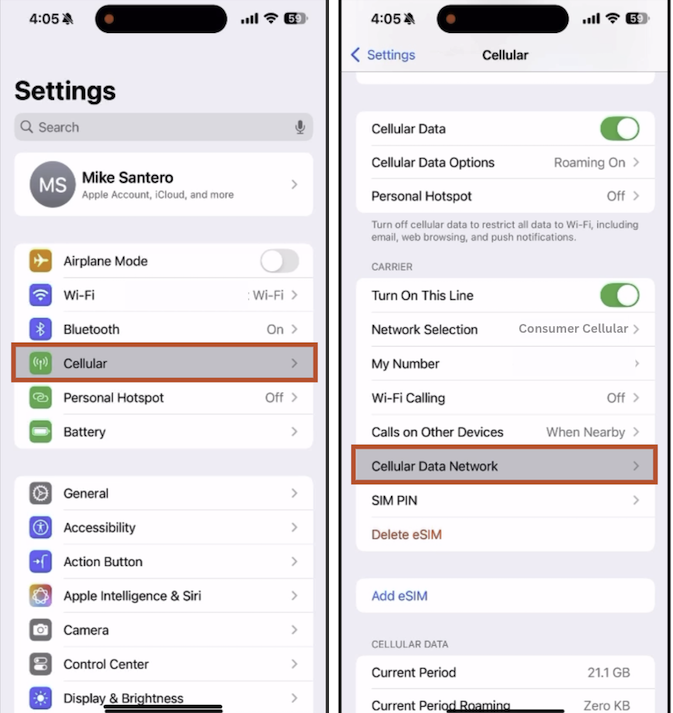
Image: Michael Santero | WhistleOut
Consumer Cellular's AT&T network APN settings
| APN name | Consumer Cellular AT&T |
| APN | ccdata |
| MMSC (MMS Center) | http://mmsc.mobile.att.net |
| MMS proxy | proxy.mobile.att.net |
| MMS port | 80 |
| MCC (Mobile Country Code) | 310 |
| MNC (Mobile Network Code) | 410 |
| APN protocol | IPv4/IPv6 |
| APN type | default,mms,supl or default,mms,agps,supl,fota |
Consumer Cellular's T-Mobile network APN settings
| APN name | Consumer Cellular T-Mobile |
| APN | fast.t-mobile.com |
| MMSC (MMS Center) | http://mms.msg.eng.t-mobile.com/mms/wapenc |
| MCC (Mobile Country Code) | 310 |
| MNC (Mobile Network Code) | 260 |
| MMS port | 8080 |
| APN protocol | IPv4/IPv6 |
| APN type | default,supl,mms or default,mms,agps,supl,fota |
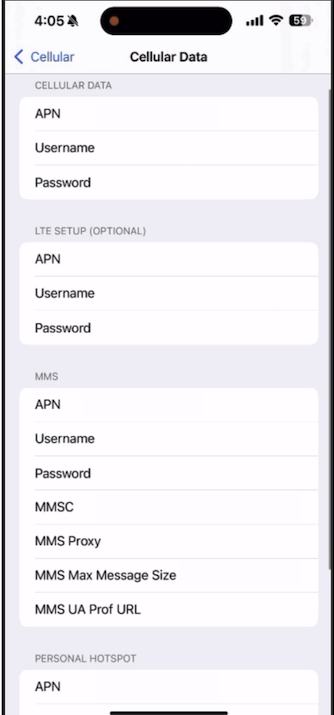
Image: Michael Santero | WhistleOut
If your SIM setup is successful, you’ll see Consumer Cellular at the top of your device’s home screen. Contact Consumer Cellular if your SIM setup doesn’t work or you continue experiencing issues connecting to your cellular network.
Seniors save even more with Consumer Cellular
Consumer Cellular caters to the whole family with cheap data and reliable service. Even the most experienced members of your family can score an AARP discount on the Unlimited for Ages 50+ plan. It includes 50GB of premium data, reliable coverage on either AT&T’s or T-Mobile’s network, and hotspot data.
Check out more details about why we voted Consumer Cellular’s Unlimited for Ages 50+ plan one of the best phone plans for seniors.
|
Consumer Cellular

Unlimited for Ages 50+ Plan
$35.00/mo
+ $10 Upfront
|
When should you update your APN settings?
You should update your APN settings if you can’t access your Consumer Cellular plan’s mobile data or have recently switched carriers. While most smartphones set up APNs automatically, you may need to manually update them if your data isn’t working despite having an active plan. However, before you start adjusting technical settings, check out our data connection troubleshooting guide to make sure your mobile data is properly configured.
Be careful when updating your APN settings, since Consumer Cellular offers service on two different networks: AT&T and T-Mobile. Always use the exact APN details provided by Consumer Cellular to make sure you connect to the right network, and restart your device after applying changes. Incorrect APN edits can disrupt your service, so only modify these settings if you’re certain your phone is unlocked and compatible with Consumer Cellular.
Jessica Santero
Staff Writer

Thousands of cell phone plans unpacked. All the facts. No surprises.





.png?w=280&h=280&usm=20&usmrad=0.8&fit=crop "The Best Cheap Phone Plans for 2026: We Tested Them All to Help You Save")


