

Apple's standalone Translate app has been on iPhones since iOS 14 since iOS 14 and the iPhone 12 in 2020. It was a useful travel tool, up until Apple Intelligence emerged in 2024.
The Apple Translate app was decent and easy to use, but you no longer have to switch to an app to translate on newer iPhones. Apple Intelligence is built right into the iOS and can translate anything anywhere on your phone—as long as it's an iPhone 15 Pro, iPhone 16, or a more recent model.
If you have an Apple Intelligence-compatible iPhone, the conversation about translation apps has moved on. Keep reading to learn all about translation in the iPhone ecosystem.
- Translate is free for iPhone and pre-installed on iOS 14 and later versions.
- 11 languages offered (including multiple dialects).
What the standalone Translate app actually does
Translate is a solid app that handles translation just like its biggest competitors (like Google Translate). It supports text entry, a conversation mode for back-and-forth exchanges, and a camera feature for translating written text like signs and menus. The interface is minimal and clean, quite on-brand for Apple.
Translate even includes an offline mode without having to pay for a subscription. All you have to do is download a language pack in advance, and it'll translate text and voice without any data connection at all. Being able to use a translator offline is one of the best features among all translation apps, and the fact that it's free is impressive.
The catch-all, however, is that it only offers 19 languages, including English, Spanish, French, German, Mandarin Chinese, and Japanese, among others. That covers a lot of popular destinations, but it leaves out sections of Southeast Asia, Eastern Europe, and others.
Here's the full list of supported languages for the iOS Translate app:
- Arabic
- Chinese (Mandarin—China Mainland)
- Chinese (Mandarin—Taiwan)
- Dutch
- English (US)
- English (UK)
- French (France)
- German (Germany)
- Hindi
- Indonesian
- Italian (Italy)
- Japanese
- Korean
- Polish
- Portuguese (Brazil)
- Russian
- Spanish (Spain)
- Thai
- Turkish
- Vietnamese
There's also the fact that it's iOS only—Android users need not apply.
Ready to switch to iPhone? Snag the latest and greatest models
Apple Intelligence is cutting-edge, but you need a newer iPhone to use it. Check out the latest models below, and see what carriers offer the best iPhone deals too.
iPhone 17e 256GB
- 6.1 inch display
- Rear Camera: 48MP
- Front Camera: 12MP

iPhone 16 128GB
- 6.1 inch display
- Rear Cameras: 48MP, 12MP
- Front Camera: 12MP
iPhone 17e 512GB
- 6.1 inch display
- Rear Camera: 48MP
- Front Camera: 12MP


Why Apple Intelligence Live Translation changes everything
With Apple Intelligence enabled, Live Translation isn't a separate app you open—it's built into the apps you're already using. And here's the kicker: You don't need to have the Translate app installed in order to use Live Translation through Apple Intelligence.
Live Translation isn't limited to text boxes either. You can translate:
- During a phone call: You can tap Live Translation and both parties hear a spoken translation of what the other says in real time.
- In Messages: Translations appear as you type, and the other person receives both your original message and the translated version automatically.
- On FaceTime: Translated live captions appear on screen as both callers speak.
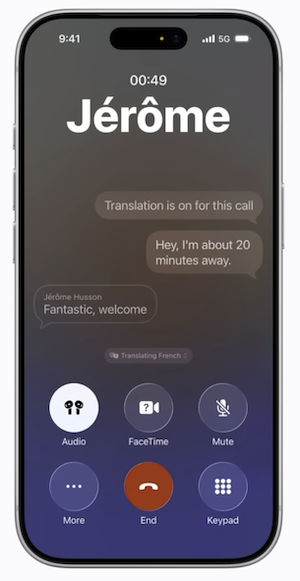
Image: Apple
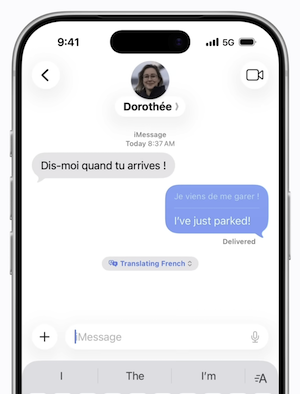
Image: Apple
Live Translation is still in beta and isn't available in every region or language yet, but the direction is clear. Apple is building translation into the fabric of how the iPhone communicates, not treating it as a standalone utility.
Not on a compatible iPhone? T-Mobile just launched its own Live Translation beta—on any device.
T-Mobile announced in February 2026 that it's the first carrier to build real-time AI translation directly into its network. That's right, no more device-specific restrictions. That means Live Translation works on any phone on the T-Mobile network. It supports over 50 languages and is free during the beta. Register for the beta here if you want to test it out.
Not a T-Mobile member? Switch now and snag one of the nation's best phone plans (it only takes 15 minutes).
|
T-Mobile

Essentials Saver
$50.00/mo
with Auto-Pay - Taxes & Fees NOT included
|
|
T-Mobile
Experience More
$85.00/mo
with Auto-Pay + Taxes and fees
|
|
T-Mobile
Experience Beyond
$100.00/mo
with Auto-Pay + Taxes and fees
|
Which one should you actually use?
If your iPhone supports Apple Intelligence, skip the Translate app and use Live Translation instead. The experience of having a real phone call translated in real time is much more advanced than opening a separate app to translate word by word.
The only benefit of the Translate app is offline translation. If you've downloaded a language pack, you can still use it without data for your next trip. So just in case, keep it installed and save it for travel.
Not convinced? Check out our full guide to the best translation apps for international travel.
Meet your new favorite app (that you don't even know about yet)
With over 50,000 new apps released every month, how can you possibly find that hidden gem that will bring your life a smidge more joy?
Leave it to us!
From gaming to gardening, we're constantly testing the latest and greatest apps that we actually want to use on our own phones. Check out our most recent finds in our monthly roundup of the best new apps for iPhone and Android.
How WhistleOut reviews apps
Our mobile experts scour the app stores, looking for the best new apps for Android and iPhone. Before recommending an app, we use the app for at least one full workday, testing its basic functionality and evaluating whether or not it delivers on its promises.
- Easy to use
Great apps simplify your phone. We selected the tools that don't require a complicated instructional manual. - Affordability
The internet is filled with expensive price tags, but we're not buying what they're selling. We leaned into inexpensive, quality apps. Extra points if they're free! - Hands-on testing
We played around with these before recommending them, ensuring they're worth your download.
From there, we weigh the app's pros and cons and then determine whether or not it's a worthwhile download for the wider population of cell phone users.
Jessica Santero
Staff Writer

Find a better phone plan
Thousands of cell phone plans unpacked. All the facts. No surprises.


.png?w=280&h=280&usm=20&usmrad=0.8&fit=crop "Best Cell Phone Deals for June 2026: Get the New iPhone 17 for Free")



