

Filing your taxes doesn't have to cost you anything — and with Chime, it doesn't. Chime lets you file your federal taxes completely free, right inside the app. You can forget about TurboTax, H&R Block, or anyone taking a part of your refund as payment.
Plus, filing through Chime can get you your refund up to 5 days earlier than it would arrive at a traditional bank. Other services file your taxes for free, but Chime files them for free and gets your money back to you faster.
Whether you're already a Chime member or considering signing up just for tax season, here's everything you need to know.
What is Chime?
Chime is a mobile banking app that works like a traditional checking account—without the fees. There are no monthly fees, no overdraft fees, and no minimum balance requirements. It's not technically a bank, but a financial technology company that partners with FDIC-insured banks, so your money is protected either way.
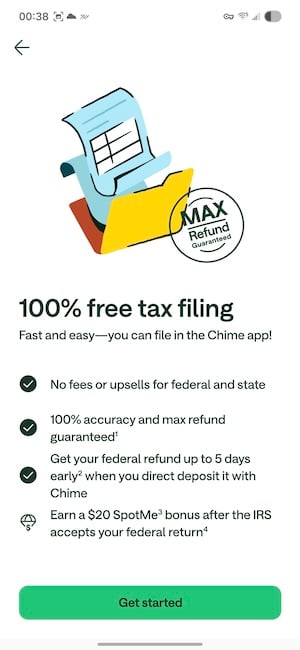
With Chime, you can also file your federal and state taxes completely free right inside the Chime app. Direct deposit your refund into your Chime account and you could get it up to five days before it would land at a traditional bank.
What you need to file your taxes with Chime
Before you dive in, make sure you have your documents ready. The filing process is smooth, but it goes a lot faster when you're not hunting for paperwork mid-session.
Essential documents
- Social Security Number (SSN): Required for all filers, plus any dependents you're claiming.
- W-2 forms: Your employer should have sent this by the end of January. It shows your wages and taxes withheld for the year.
- Last year's tax return (Form 1040): Chime may prompt you to upload this for faster filing. This is your actual prior-year return, not your W-2. If you didn't file last year, your Adjusted Gross Income (AGI) will be zero.
Additional documents you might need
- 1099 forms: For freelance work, contract gigs, interest income, or other non-W-2 earnings.
- Bank interest statements: If you earned interest from a savings account, you'll need documentation of the amount.
- HSA or FSA contribution records: These can be written off, so have those ready if applicable.
- IRA contribution statements: Contributions to a traditional IRA can reduce your taxable income.
- Childcare expenses: Gather receipts and provider info if you paid for daycare or childcare.
Chime's system guides you as you go. You don't need to figure out which forms apply to you upfront. The app asks targeted questions and tells you exactly what to upload based on your answers. Plus, Chime saves your progress as you go, so if you need to step away and come back, you won't lose your work.
Prefer a different app? Cash App files your taxes for free, and filing through it can earn you $5
Chime isn't the only free option out there. Cash App also offers completely free federal tax filing, and if you use a referral code when signing up, you can earn $5 when you file.
Check out our full guide on how to file your taxes with Cash App.
Step-by-step filing: How to file your taxes with Chime
Everything happens inside the Chime app. Don't have it yet? Download it first:
- Download Chime for iPhone on the App Store.
- Download Chime for Android on Google Play.
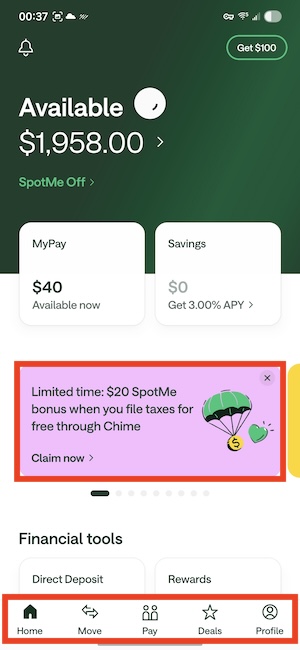
- Open the Chime app and tap Taxes on your home screen.
- Enter your personal information, including your Social Security Number and filing status.
- Upload your tax documents, like your W-2 and any other relevant forms. The app tells you exactly what it needs.
- Work through your deductions and credits. The app walks you through each one.
- Review everything, confirm your direct deposit details, and hit Submit.
|
|
Image: Jessica Santero | WhistleOut
You can save your progress and come back at any time—Chime picks up right where you left off. Once submitted, you can track your return status directly in the app.
Important filing details (for special cases)
Chime covers a wide range of tax situations, but a couple of things are worth flagging before you start.
Chime does not support income from more than one state, or income from overseas. If either applies to you, you'll want to file elsewhere.
And a reminder worth repeating: To get your refund deposited to your Chime account—especially for early deposit—you must be listed as the primary filer. It's a small detail that can make a real difference in how quickly your money arrives.
Need help? Here's how to contact Chime customer service
If something goes wrong during filing (or any time with your account) Chime customer service is available to help you whenever you need it. Here's how to reach them:
- By phone: Call the Chime phone number at 1-844-244-6363. This is the fastest route if you have an urgent issue.
- By email: For non-urgent questions, you can email Chime at [email protected].
Don't fall for the $20 SpotMe boost
When you file your taxes through Chime, you'll be offered a $20 SpotMe boost. But as a word to the wise, proceed with caution. SpotMe is a temporary increase to your overdraft limit. It sounds like a nice bonus, but let's be clear about what it actually is: An invitation to spend money you don't have.
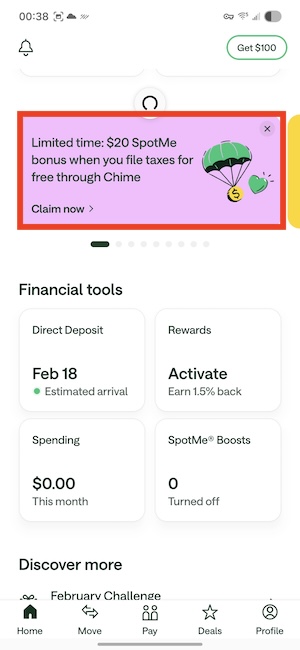
Image: Jessica Santero | WhistleOut
Overdrafting is a bad habit. You get cash out of your empty account, and usually pay it back with interest. Chime's bonus allows you to get $20 (from your zero balance) for free, but you have to pay it back. But the best use of a SpotMe boost is to never need it in the first place, so this perk just encourages bad habits.
Get your tax refund up to 5 days early
When you file through Chime and have direct deposit set up, you could get your federal tax refund up to five days before it would typically arrive.
To understand why, it helps to know how traditional banks actually handle direct deposits. When your employer or the IRS sends a payment, they notify your bank in advance with a scheduled release date.
Most traditional banks simply hold your money until that date—even if they already have your funds sitting there waiting. Chime releases the payment the moment it receives the file, which can be several days earlier.
I noticed this firsthand with my own paychecks. At my old big bank, my paycheck with direct deposit would reliably hit on Friday. Since switching to Chime, I consistently see it land on Wednesday. Same employer, same paycheck, just two fewer days of waiting. The same idea applies to your tax refund.
Save money on your phone bill while you're at it
If you're looking for more ways to cut costs this tax season, your cell phone bill is one of the easiest places to start. Switching to a more affordable phone plan can save you hundreds of dollars a year. That's money that could go straight into savings or pay down debt.
Compare top plans below to find a better deal:
|
Visible

$25 Visible Plan
$25.00/mo
Taxes & Fees included
|
|
Mint Mobile

Unlimited Data Plan
$25.00/mo
$75.00 upfront payment for 3 months (equals to $25.00/month). Intro pricing for new customers only.
|
|
XFINITY Mobile

Mobile Select Plan
$0.00/mo
(for the first year of service) <br>Regular rate of $30/mo. thereafter
|
Filing taxes with Chime: FAQs
Is tax filing through Chime really free?
Yes, filing your taxes through Chime is completely free. Chime supports a wide range of tax situations including W-2 income, freelance work, unemployment, retirement income, and stock or crypto sales, all at no cost.
How do I get my tax refund early with Chime?
To get your tax refund early with Chime, all you have to do is file your federal taxes through the Chime app and make sure you have direct deposit set up on your account. Chime will make sure your refund is available as soon as possible (up to 5 days earlier than a traditional bank).
What is the $20 SpotMe boost?
Chime's SpotMe boost is a fee-free overdraft feature. Filing through Chime earns you a temporary $20 boost to your overdraft limit, but don't let the boost label fool you. Overdrafting is still spending money you don't have, and it's a habit worth avoiding.
What tax situations does Chime not support?
Chime does not currently support filings with income from more than one state or income from overseas.
Do I need a Chime account to file taxes through the app?
Yes, you need a Chime account to file through the app. Signing up is free with no monthly fees or minimum balance requirements.
How WhistleOut reviews apps
Our mobile experts scour the app stores, looking for the best new apps for Android and iPhone. Before recommending an app, we use the app for at least one full workday, testing its basic functionality and evaluating whether or not it delivers on its promises.
- Easy to use
Great apps simplify your phone. We selected the tools that don't require a complicated instructional manual. - Affordability
The internet is filled with expensive price tags, but we're not buying what they're selling. We leaned into inexpensive, quality apps. Extra points if they're free! - Hands-on testing
We played around with these before recommending them, ensuring they're worth your download.
From there, we weigh the app's pros and cons and then determine whether or not it's a worthwhile download for the wider population of cell phone users.
Jessica Santero
Staff Writer

Find a better phone plan
Thousands of cell phone plans unpacked. All the facts. No surprises.


.png?w=280&h=280&usm=20&usmrad=0.8&fit=crop "Best Cell Phone Deals for June 2026: Get the New iPhone 17 for Free")



