
Nobody likes moving house. Sure, the thought of living in a new place might be nice, but the actual moving process is physically and emotionally draining (take it from me: I just did one myself). Plus you have to set up new utilities and make sure you have good cell coverage in your new neighborhood.
But fear not, for technology has come to the rescue once again. With the help of some amazing apps, your moving experience can be much smoother and hassle-free.
We tested and reviewed several moving apps to bring you the best of the best—from comprehensive, all-in-one platforms that manage every aspect of your move to specialized apps focusing on packing, hiring help, or selling unwanted items. Each of these apps offers unique features to help you stay organized, reduce stress, and make your move as smooth as possible.
How we rated the best apps for moving
WhistleOut searches for Android and iPhone apps that are easy to use and affordable. We evaluate apps through hands-on testing and rate them on a five-star scale based on the following criteria:
- User experience: We search for apps that enhance the user experience, improving the power of your phone and making your life less complicated. The apps we recommend are intuitive, allowing users to put them to use as soon as they open them.
- Price & value: We select apps that charge minimal download fees and tend to favor apps that don't charge anything. We do include some apps that charge fees, though we guarantee that they're worth the price tag.
- Efficacy: App developers like to talk a big game; we test their products to see if they deliver on their promises.
- Practicality: Your phone has a limited amount of storage, so you don't want to clog it with single-use apps that don't improve your day-to-day life. We reward apps that are worth their weight in data.
- Privacy & security: We evaluate the permissions an app requests, sussing out the legitimate from the suspect. We also scour user reviews on relevant app stores to see if customers are reporting security concerns and investigate the veracity of those complaints.
The 5 best apps for moving

MoveAdvisor
Your moving guide and planner
MoveAdvisor is an essential app for anyone planning a move. It offers a comprehensive suite of tools that help you stay organized and reduce the stress associated with relocating. With MoveAdvisor, you can easily create a moving timeline, inventory your belongings, and find professional movers—all from one convenient platform.
MoveAdvisor provides a step-by-step checklist tailored to your moving date, ensuring you complete all necessary tasks in a timely manner. You’ll get reminders for important activities such as booking movers, packing, and notifying utility companies of your move. This feature helps you stay on track and ensures you don’t overlook any critical steps.
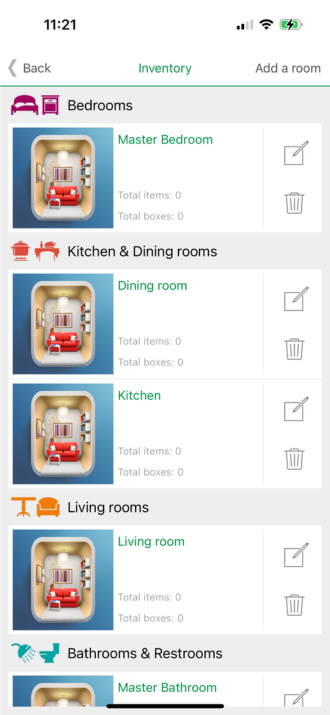
MoveAdvisor also excels in helping you inventory your belongings. You can create a detailed catalog of your possessions, complete with photos, descriptions, and estimated values, You can further organize your inventory by room, making it easier to manage packing and unpacking. The app’s intuitive interface lets you quickly add items and update their status, providing a clear overview of your moving progress.
Finding reliable movers is another key feature of MoveAdvisor. The app connects you with reputable moving companies in your area, complete with reviews and ratings from previous customers. You can request quotes, compare prices, and book services directly through the app, ensuring you get the best deal for your moving needs.
Additionally, MoveAdvisor offers useful tools for calculating moving costs and tracking your budget. By entering details about your move, such as the size of your home and the distance of your move, the app provides an estimate of your moving expenses. This feature helps you plan your budget and avoid unexpected costs.
The verdict:
- User experience
- Price and value
- Efficacy
- Practicality
- Privacy & security

Taskrabbit
Hire help for every moving task
Taskrabbit connects you with local freelancers who can assist with various moving tasks, from packing and loading to assembling furniture. This app is perfect for those who need a helping hand but don't want to hire a full-service moving company. Whether you need someone to help with heavy lifting, cleaning your old place, or setting up your new home, Taskrabbit has you covered.
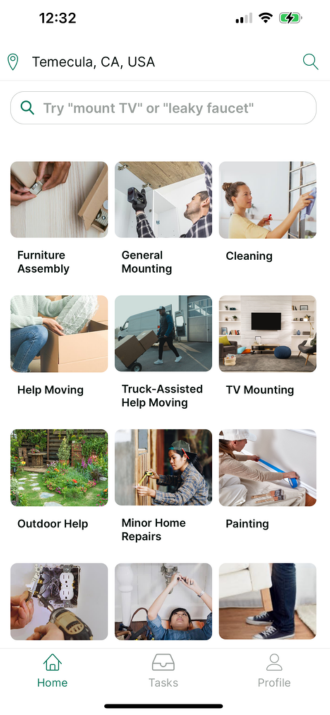
The app’s user-friendly interface allows you to quickly find and book skilled Taskers in your area. You can browse profiles, read reviews, and see ratings to ensure you’re hiring reliable and experienced help. Each Tasker sets their own rates, so you can find assistance that fits your budget. Taskrabbit also provides transparent pricing and no hidden fees, making it easy to manage your moving costs.
With Taskrabbit, you can schedule help for a specific date and time that works best for you. If your plans change, rescheduling is simple. Taskrabbit offers a wide range of services beyond just moving, including handyman tasks, furniture assembly, and even cleaning, making it a versatile tool for any homeowner or renter.
Additionally, Taskrabbit ensures safety and security by conducting background checks on all Taskers. You can communicate directly with your Tasker through the app, providing clear instructions and ensuring that your moving tasks are completed to your satisfaction. This level of personalization and reliability makes Taskrabbit an invaluable resource for anyone preparing for a move.
The verdict:
- User experience
- Price and value
- Efficacy
- Practicality
- Privacy & security

OfferUp
Buy and sell stuff for your move with ease
OfferUp is a great platform for selling items you don't want to take with you and finding new ones for your new home. It's user-friendly and allows you to quickly list items, negotiate prices, and arrange pickups with buyers in your area. Whether you’re looking to declutter before a move or find affordable furniture and household items for your new place, OfferUp makes the process simple and efficient.
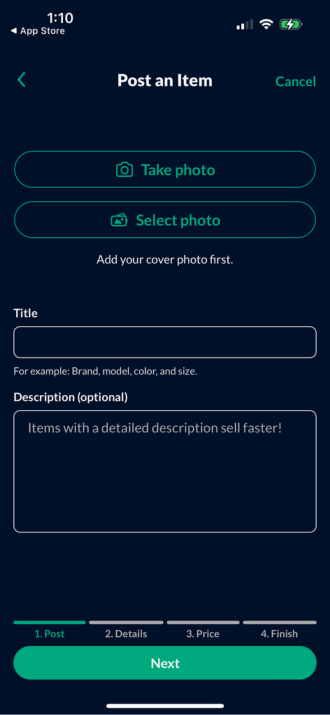
The app’s interface is designed for easy navigation. You can create listings in minutes by uploading photos, writing descriptions, and setting your price. OfferUp’s messaging feature enables direct communication with potential buyers, making it easy to negotiate and finalize sales. The app also offers secure payment options, ensuring safe transactions for both buyers and sellers.
Another great feature of OfferUp is its community-oriented approach. Users can rate and review each other, helping to build trust and ensure a positive experience. This feature also allows you to see the reputation of buyers and sellers before engaging in a transaction. Additionally, OfferUp offers a shipping option for items that aren’t convenient to pick up locally, expanding your buying and selling opportunities.
OfferUp also includes a feature called TruYou, which allows users to verify their identity with a government-issued ID. This adds an extra layer of security, giving you peace of mind when meeting up with strangers. Whether you’re downsizing, upgrading, or just looking to make some extra cash, OfferUp is an invaluable tool for managing your belongings during a move.The verdict:
- User experience
- Price and value
- Efficacy
- Practicality
- Privacy & security

Updater
Streamline your move
Updater is an all-in-one moving platform that helps you manage everything from address changes to setting up utilities and forwarding mail. It simplifies the moving process by consolidating all the necessary steps into one easy-to-use app, making your move less stressful and more organized.
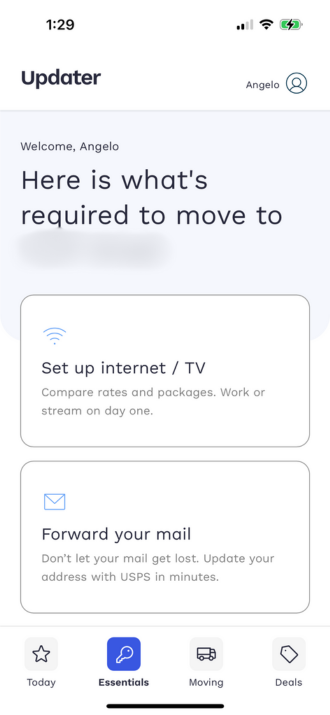
The app provides a comprehensive checklist to guide you through each phase of your move, from planning and packing to settling into your new home. You can update your address with various organizations, including the postal service, banks, and subscription services, all within the app. Updater also offers services to help you find and connect utilities, transfer your internet, and set up other essential services at your new location.
Updater also simplifies the process of notifying friends and family of your new address, allowing you to send digital change-of-address notifications. The app’s partnership with various service providers can offer exclusive deals and discounts on moving-related services, saving you time and money.
Privacy and security are top priorities for Updater. The app ensures that your personal information is protected while providing seamless and efficient moving solutions. With its user-friendly interface and comprehensive features, Updater is the ultimate tool for managing a move of any size.
The verdict:
- User experience
- Price and value
- Efficacy
- Practicality
- Privacy & security

Magicplan
Plan your space with precision
Magicplan lets you create detailed floor plans of your new home using just your phone’s camera. This app is invaluable for outlining where your furniture will go and ensuring everything fits perfectly in your new space. By generating accurate floor plans, Magicplan helps you visualize your new home and arrange your belongings efficiently.
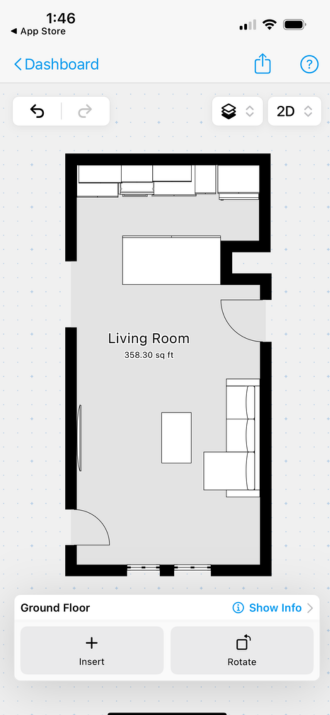
The app’s augmented reality (AR) technology lets you capture room dimensions by simply pointing your phone’s camera. You can then use these measurements to create precise floor plans, add furniture, and even simulate different room layouts. Magicplan’s easy-to-use interface allows you to drag and drop items into your floor plan, providing a realistic view of how your space will look.
Magicplan is not just for planning layouts; it also helps with renovations and remodeling. The app can generate estimates for materials and labor costs, making it easier to budget for any home improvements. Additionally, Magicplan allows you to export your floor plans in various formats, such as PDF, JPG, and DXF, which can be shared with contractors, movers, or real estate agents.
The verdict:
- User experience
- Price and value
- Efficacy
- Practicality
- Privacy & security
How WhistleOut reviews apps
Our mobile experts scour the app stores every month, looking for the best new apps for Android and iPhone. Before recommending an app, we use the app for at least one full workday, testing its basic functionality and evaluating whether or not it delivers on its promises.
-
Easy to use
Great apps simplify your phone. We selected the tools that don't require a complicated instructional manual. -
Affordability
The internet is filled with expensive price tags, but we're not buying what they're selling. We leaned into inexpensive, quality apps. Extra points if they're free! -
Hands-on testing
We played around with these before recommending them, ensuring they're worth your download.
From there, we weigh the app's pros and cons and then determine whether or not it's a worthwhile download for the wider population of cell phone users.
Angelo Ilumba
Senior Writer

Find a better phone plan
Thousands of cell phone plans unpacked. All the facts. No surprises.


.png?w=280&h=280&usm=20&usmrad=0.8&fit=crop "Best Cell Phone Deals for June 2026: Get the New iPhone 17 for Free")



