
Most safety situations don't give you time to dial a number, explain your location, or wait on hold—Noonlight puts a panic button on your phone screen that silently dispatches emergency services to your location the moment you need it.
Hold it when you feel unsafe, release it without entering your PIN, and local emergency services are automatically dispatched with no sound, no call, and no explanation required mid-crisis.
After testing it personally as part of our solo female travel safety app guide, it's the one app I'd put on every woman's phone before a solo trip.
Download Noonlight now:
Get international data to use Noonlight abroad
Noonlight dispatches emergency services using your GPS location, which means it requires cellular data to function abroad.
If your current plan doesn't include international data, here are the most popular options that do.
|
T-Mobile

Experience More
$85.00/mo
with Auto-Pay + Taxes and fees
|
|
Verizon

Unlimited Ultimate
$85.00/mo
+ Taxes & Fees. Price includes AutoPay & Paperless discount.
+ $40 Upfront
|
|
AT&T

Premium 2.0℠
$90.00/mo
+ $35 Upfront
|
Noonlight: A silent SOS button that stays on your screen
Noonlight is a personal safety app built around a single hold-to-cancel panic button that silently alerts emergency services if you release it without entering your PIN. It's designed for situations where calling 911 would make things worse: someone following you home, a rideshare that feels wrong, a late-night walk where you want a safety net within reach.
The free version includes the panic button and a safety timeline for logging your plans in advance. You may have already heard of Noonlight since it's a part of Tinder, Uber, and Lyft. That way, all solo travelers have an extra safety measure to keep travel secure.
Not sure how to update your apps?
Keeping your apps up to date ensures you're always getting the latest features, bug fixes, and security improvements. Learn how to update the apps on your iPhone and your Android. It takes less time than you think.
How the panic button actually works
Using the Noonlight panic button is simple and super effective. Open Noonlight to have it ready if you have a creeping sensation that things could get dangerous (like walking to your car alone at night, waiting outside a bar for your cab, taking a solo rideshare in an unfamiliar city). Then, hold the button. If everything is fine, lift your thumb and enter your four-digit PIN within ten seconds to deactivate the panic button.
But if you do find yourself in a sticky situation, lift your thumb and don't enter your PIN. Noonlight calls you directly to check in and activates the local emergency services if you're in serious need.
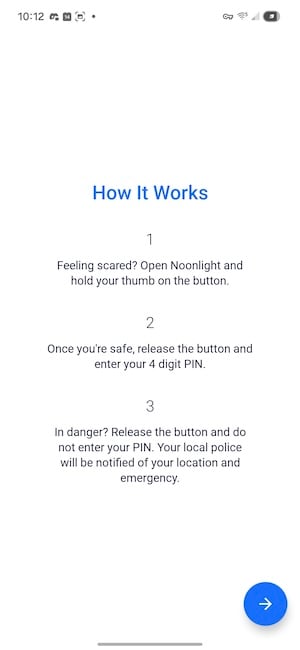
Image: Jessica Santero | WhistleOut
What makes Noonlight so effective is that it's a preventative panic button. There's no harm in holding the button if you don't feel safe. You can simply release it and tap in your PIN when you're home or at your destination.
Noonlight's panic button prevents attacks on solo travelers.
Plus, there's no audible call, conversation, or signal that you've contacted the authorities. Sometimes threatening to call 911 can actually make situations worse, so a silent panic button is your best bet for sure-fire safety.
You can also build a safety timeline before heading out that logs where you're going, who you're meeting, and what time you're expected back, so if the alert triggers, that information reaches emergency services alongside your real-time location.
Tinder, Uber, and Lyft all include Noonlight
Tinder's safety toolkit includes a Noonlight integration that lets you add your date's profile details, location, and time to a live timeline before meeting a stranger. Uber and Lyft both integrated Noonlight to protect solo riders in cars with unfamiliar drivers.
Whether you've downloaded the standalone Noonlight app or not, Noonlight works to keep you safe—but having the app itself means you're covered in every other situation too.
The free version covers everything you need for travel
The free tier gives you the panic button, the safety timeline, and all three app integrations—everything most solo travelers will ever need from it.
Premium unlocks an Apple Watch app so the button stays on your wrist, a lock screen widget for instant access without opening the app, and Automatic Crash Response that detects car accidents and dispatches help even if you can't press anything.
Premium comes with a one-month free trial in case you aren't sure you need the extra features. My suggestion is to start the trial before you leave on a solo trip, use it for the duration, and the free version handles everything else before and after. Noonlight is the kind of app that should live on your home screen permanently.
How WhistleOut reviews apps
Our mobile experts scour the app stores, looking for the best new apps for Android and iPhone. Before recommending an app, we put it to the test to evaluate whether it delivers on its promises.
- Easy to use
Great apps simplify your phone. We select tools that don't require a complicated instructional manual to figure out. - Affordability
We lean into quality apps that don't cost a fortune. Extra points if they're free. - Hands-on testing
We tested Noonlight as part of our solo female travel safety app series, including setup, alert flow, and timeline features.
Noonlight: FAQ
Is Noonlight free?
Noonlight's panic button and safety timeline are free. A premium Noonlight subscription includes an Apple Watch app, a lock screen widget, and Automatic Crash Response.
Does Noonlight work internationally?
Noonlight contacts local emergency services based on your GPS location, so it can work internationally—but it requires a live cellular data connection to send your location. A phone plan with international data is essential before relying on it abroad.
What happens if I accidentally trigger the Noonlight alert?
After you release the button, you have ten seconds to enter your PIN to cancel. If you miss the window, Noonlight calls you directly to confirm before escalating to emergency services—so an accidental trigger won't automatically bring the police to your door.
Does Noonlight work without Wi-Fi or a data connection?
No. Noonlight requires cellular data to transmit your location and dispatch help. It won't function in airplane mode or without a signal, which is why sorting out your international data plan before travel is a practical safety step, not just a convenience.
Jessica Santero
Staff Writer

Find a better phone plan
Thousands of cell phone plans unpacked. All the facts. No surprises.


.png?w=280&h=280&usm=20&usmrad=0.8&fit=crop "Best Cell Phone Deals for June 2026: Get the New iPhone 17 for Free")



