
Solo travel is one of the most freeing things you can do. There's no group consensus on where to eat and no waiting for someone else to be ready. But traveling alone as a woman in a foreign country also means taking your safety more seriously, which is exactly why safety apps for female travelers are necessary.
I tested the top travel safety apps for women myself to see which ones were actually worth taking on a solo trip. Some are panic buttons for sketchy situations, while others help you pick a safe travel destination, connect with other women while abroad, or book a safe rideshare. These 6 apps are the best safety apps for female travelers that make solo travel so much easier.
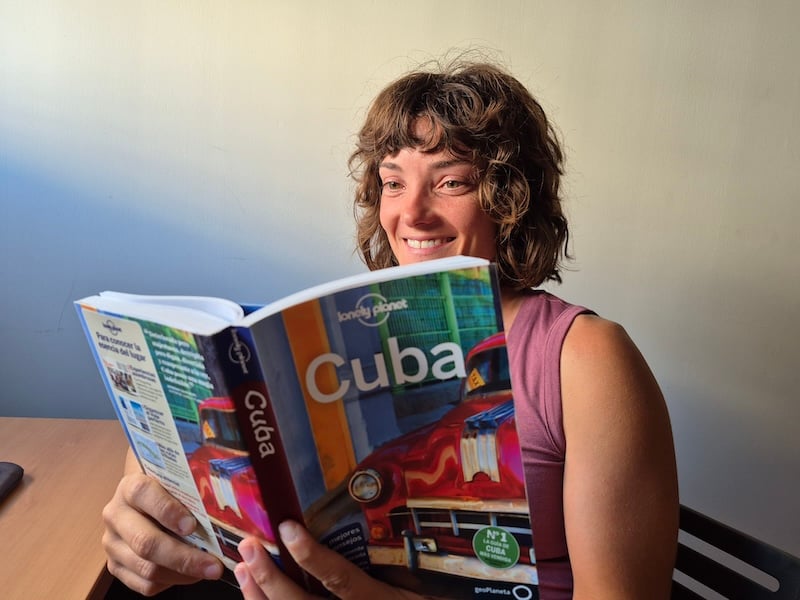
Image: Jessica Santero | WhistleOut
Here are my solo travel app recommendations for modern women traveling alone.
📱 Heading somewhere international?
Before you land, make sure your phone plan actually works where you're going. International data doesn't have to be expensive, and staying connected is one of the most important safety tools you have.
Check out our guide to the best phone plans for international travel, or compare popular options with global coverage below:
|
Visible

$25 Visible Plan
$25.00/mo
Taxes & Fees included
|
|
Mint Mobile

Unlimited Data Plan
$25.00/mo
$75.00 upfront payment for 3 months (equals to $25.00/month). Intro pricing for new customers only.
|
|
XFINITY Mobile

Mobile Select Plan
$0.00/mo
(for the first year of service) <br>Regular rate of $30/mo. thereafter
|
Why solo female travelers should use safety apps
As a woman who has been openly attacked on the streets before, I know firsthand how fast a situation can change and how unprepared you can feel in that moment. Traveling solo as a woman is one of the most rewarding things you can do, but it also comes with situations that are just harder to navigate without a group.
The right apps for women traveling alone make a real difference in moments like these:
- Walking back to your accommodation alone at night
- Taking a rideshare by yourself after dark
- Going on a solo hike or run with no one who knows your route
- Keeping your data safe on public Wi-Fi
- Arriving somewhere new with no sense of which areas are safe
- Keeping people back home in the loop without texting every hour
Technology won't eliminate every risk, but it gives you a safety net that travels with you. With the best apps to stay safe when traveling alone already on your phone, solo travel stops feeling like something to be nervous about and starts feeling like an adventure.
If you haven't already decided on a location-sharing app, check out our guide to the best options.
Why you can trust WhistleOut
.svg)
15+
years of mobile industry experience

900+
published wireless guides

35+
firsthand carrier reviews
We've been around since the birth of the iPhone. Along the way, we've learned how to spot the best deals for your wallet (and your sanity). We spend our days researching informative guides and writing insightful reviews on every kind of wireless plan, distinguishing what matters from what doesn't. We played around with these plans before recommending them, ensuring they're worth your hard-earned money.
Want to know more? Check out how we review every cell phone plan we rank.
Best SOS and panic buttons for solo travelers
1. Noonlight: The app I wish every woman already had on her phone
- Free (paid plans available with a one-month free trial)
- Available for iOS and Android
Noonlight turns your phone into a panic button, keeping it on your screen at all times so it's there the moment you need it. If you're in a sketchy situation or notice someone following you, press and hold the button. If it turns out you were just being paranoid on a late-night walk, lift your thumb and enter your PIN to deactivate the button (you've got about ten seconds, so no need to worry about accidentally triggering an emergency response). If you don't enter the PIN, the app automatically contacts the local authorities with your information and location.
All women traveling alone need Noonlight, myself included.
What makes Noonlight different from just calling 911 is the silence. If you're in a situation where speaking or shouting could escalate things, Noonlight does it for you without a sound. Plus, you can have it prepared as a preventative measure instead of having to panic dial in the middle of a tussle.
Having been attacked on the streets before in my own hometown, I know firsthand how valuable it is to have something like this ready. It shows you're prepared, and in a moment of panic when you can't scream for help, this app will.
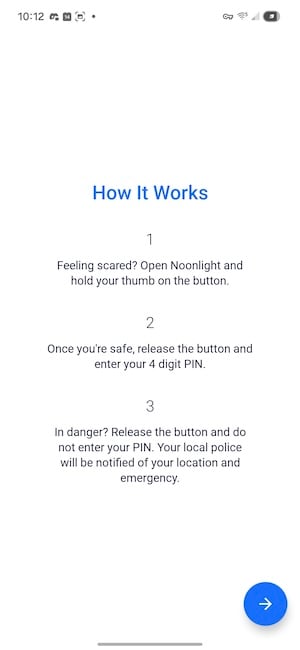
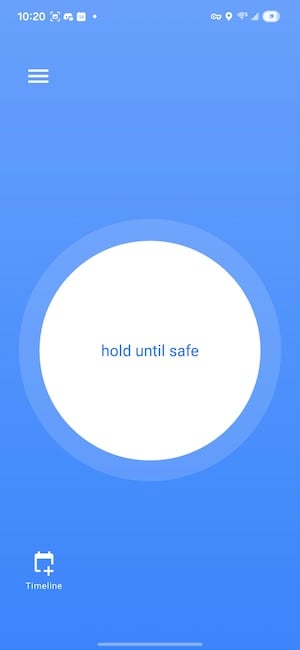
Image: Jessica Santero | WhistleOut
You may have seen or heard of Noonlight already. If you're a Tinder user (even though there are better dating alternatives), you may already have come across it. Tinder partnered with Noonlight so you can add your date's details (time, location, and their profile info) to a safety timeline before you meet up. If you trigger the alarm, that information goes directly to emergency services. Both Uber and Lyft also integrated Noonlight into their apps to keep riders safe in situations where you're alone with someone you don't fully know yet.
All you need is the free version of Noonlight, which includes the panic button and timeline features as well. Upgrading to premium unlocks an Apple Watch app, a lock screen widget, and Automatic Crash Response. But for solo ladies traveling the world, Noonlight is an absolute must.
What Reddit says about Noonlight
u/SoloAventurera raved about Noonlight in r/femaletravels, saying, "Noonlight is a permanent resident on my home screen now. The 'hold the button' feature gives me so much peace of mind when I'm walking back to my Airbnb at night. If I feel safe, I just release and put in my code. If not, help is already coming. It's the ultimate 'just in case' app that I hope I never actually have to use."
Best app for finding your travel community
2. NomadHer: The women-only community that tells you what guidebooks won't

- Free
- Available for iOS and Android
NomadHer is a destination safety community built entirely by and for solo female travelers. You can find real women sharing honest advice about the places they've been and are planning to visit. Read up on all the essential information on popular or trending travel destinations, including which neighborhoods to avoid at night.
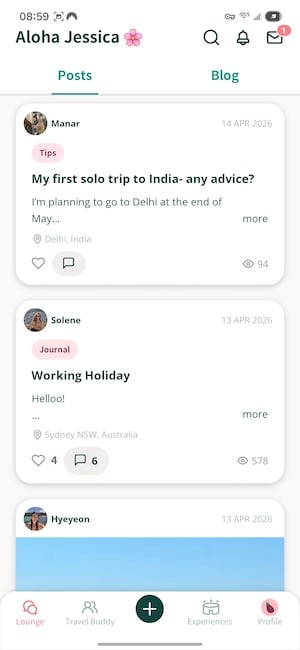
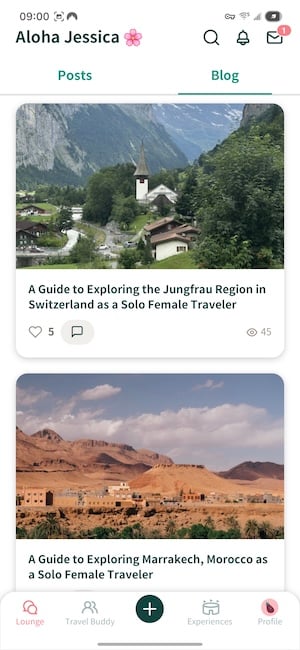
Image: Jessica Santero | WhistleOut
NomadHer is probably the app that surprised me most on this list. As a seasoned solo-traveling woman, I still get nervous about what I'm getting myself into. And sometimes you just want to know whether the place you're thinking of going is actually safe before you commit. The community guidelines, blog posts, and guides in NomadHer are detailed and share real experiences. These are women who have traveled alone and share their honest advice, including what they found useful in a specific city and which neighborhoods to avoid.
NomadHer is an app for women, verified and true.
You can also connect with other solo female travelers heading to the same destination at the same time. In the first week of April alone, the app saw significant activity around South Korea, Malaysia, and Bali. So you can either find a travel companion or connect with someone already in the area if you want a bit of human interaction on your solo journey.
The verification process is very strict, which is exactly what you want from a community app where you're sharing your travel plans. It requires a selfie and either a passport or ID, and it took about three days for my account to be approved.
A note on privacy within verified communities
NomadHer's identity verification adds an important layer of safety, but it's still a community of strangers. When using any app that connects you with other travelers, always meet in a public place first before sharing details about your specific hotel or accommodation.
Having to go through a verification process means the other users are serious about safety rather than just lurkers or men looking to take advantage of vulnerable travelers. NomadHer is more than just travel connections, and also hosts community meetups in different cities. You can participate in raffles for prizes too. There was one going for FIFA World Cup tickets when I signed up.
NomadHer is completely free to use. You can sign up for some cool events in the app, but those are charged separately.
What Reddit says about NomadHer
u/MeredithTravels praised the app's verification system in r/femaletravels, commenting, "I think one of the greatest features on the app is that you have to validate that you are indeed a woman. Having this feature adds a layer of security and peace of mind when you know this space is for women only. I had such a good time spending my evening with the girls, getting to know them, and developing a friendship."
Solo travel with a group
3. TourRadar: Solo but not alone
- Free
- Available for iOS and Android
There's safety in numbers, and TourRadar is the easiest way to find it without giving up your independence while solo traveling. It's a platform for finding small-group guided tours, which means you get to explore on your own terms while traveling alongside others who are doing the same. It's free to browse, and you only pay for what you book.
You can choose day tours or sign up for a full round-trip package. I stumbled across TourRadar while looking for options in Southeast Asia and couldn't believe how affordable and varied the packages are. Right now, Mongolia is trending, and there are 16-day trips at prices that make the flight feel like the expensive part. I'm seriously considering a Vietnam, Cambodia, and Thailand trip that clocks in at just over a grand for two weeks.
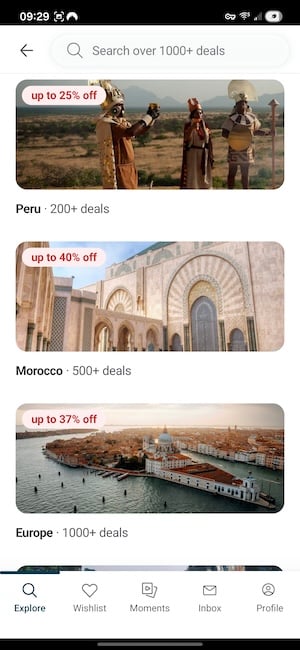
Image: Jessica Santero | WhistleOut
Traveling with a small group means someone always knows where you are, and late-night arrivals in unfamiliar cities feel a lot less daunting when you're not doing them completely alone. For example, I've always wanted to try a cycling trip but never felt comfortable doing it alone as a woman. But going with a very small group through TourRadar would be really fun.
If you want to read more about planning a group trip before you book, take a look at our guide to group travel planning apps.
Save on a brand-new phone before your trip
If you're due for an upgrade before your next adventure, check out the best deals on a new iPhone. That way, you can handle travel details, take quality photos, and stay safe with the best travel apps available.
Here are some of the best carrier deals to help you save:
iPhone 17e 256GB
- 6.1 inch display
- Rear Camera: 48MP
- Front Camera: 12MP

iPhone 16 128GB
- 6.1 inch display
- Rear Cameras: 48MP, 12MP
- Front Camera: 12MP
iPhone 17e 512GB
- 6.1 inch display
- Rear Camera: 48MP
- Front Camera: 12MP


4. Strava Beacon: Share your live location while you run, hike, or explore
- Free (premium costs $11.99/month)
- Available for iOS and Android
If you're the kind of traveler who finds a trail and just starts running, Strava has a built-in safety feature that broadcasts your live location to up to three contacts for every second you're out exploring. I've been a longtime Strava user for running and biking, and only recently discovered Beacon, but I think every solo traveler should know about it.
Strava Beacon lets you share your real-time location with up to three contacts for the entire duration of an activity—whether that's a morning run through an unfamiliar neighborhood, a solo hike on a trail you've never done, or just a long walk back from dinner in a city you don't know well.
And setting it up takes about two minutes. All you have to do is select your activity, hit record, tap 'Share Live Location' from the menu, and add up to three safety contacts. Strava sends each contact a unique link via text. Better yet, your contacts don't need the app or a Strava account to use it, and all they have to do is open the link in a browser to see your current location, your route so far, where you started, and how much battery you have left. Plus, your location updates every 15 seconds, so they can be with you every step of the way. Just be careful when sharing your location, and make sure to only send it to trusted contacts.
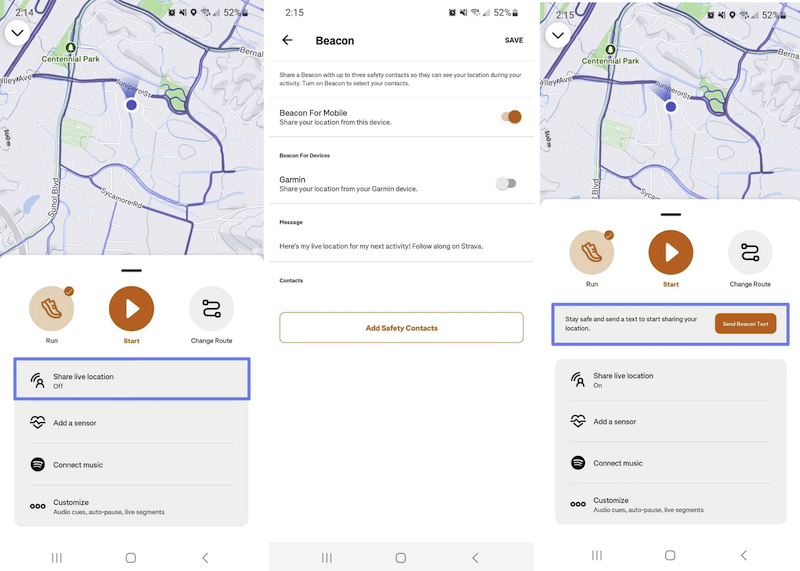
Image: Jessica Santero | WhistleOut
You can also send a Beacon link to someone who isn't one of your saved contacts at any point during your activity, which is handy if plans change mid-route. When you end your activity recording, the link stops working, and so does your location sharing.
If you are in a foreign country, you will need a travel SIM or eSIM to use this app. Beacon requires cellular service to update your location (like all location-sharing apps). If you lose signal mid-hike, your contacts will see your last known position until service returns.
Beacon doesn't work in airplane mode either, so make sure you have a data connection sorted before heading out—another good reason to get your international-friendly phone plan figured out before landing.
Cheap unlimited data to keep you safe
Strava Beacon (and many other location-sharing apps) require mobile data to stay connected while out and about. Make sure you've got enough data without breaking the bank.
Check out the best MVNOs for solid coverage on major networks at a fraction of the price.
|
Visible
$25 Visible Plan
$25.00/mo
Taxes & Fees included
|
|
Mint Mobile
Unlimited Data Plan
$25.00/mo
$75.00 upfront payment for 3 months (equals to $25.00/month). Intro pricing for new customers only.
|
|
XFINITY Mobile
Mobile Select Plan
$0.00/mo
(for the first year of service) <br>Regular rate of $30/mo. thereafter
|
Staying safe online while traveling
5. NordVPN: Protects your data on public Wi-Fi while you travel
- From $3.99/month (with annual plan)
- Available for iOS and Android
Every time you connect to the hotel Wi-Fi without a VPN, you're putting your personal details at risk—including your banking details, login passwords, and personal accounts. NordVPN is an additional layer of safety to protect your information.
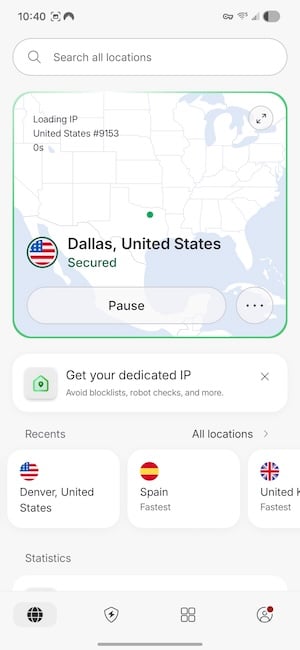
Image: Jessica Santero | WhistleOut
Physical safety gets most of the attention when it comes to solo female travel, but your digital safety matters just as much. Every time you connect to public Wi-Fi (like at a cafe or airport), you're potentially exposing your personal data to anyone on the same network. A VPN encrypts that connection so nobody else can see what you're doing.
After testing the most popular VPNs available, NordVPN is hands down the best for travel. It's super easy and intuitive to use, offers coverage in popular locations all around the world, and includes autoconnect, so it kicks in automatically whenever you join an unfamiliar network. It also includes deep web threat protection, which adds even more security, beyond just encrypting your connection.
Never connect to public Wi-Fi without a VPN; your personal information could be at risk.
NordVPN doesn't have a free tier, but the annual plan lowers the monthly cost to just a few bucks. If you travel regularly, it's one of the most practical subscriptions you can have and one of the best premium subscriptions worth paying for.
What Reddit says about NordVPN for travel
NordVPN is a must-have app to take on your travels. So much so, u/TechieTravels_26 argued that everyone going on vacation should download it, stating, "NordVPN is a non-negotiable for me. When you're solo, your phone is your lifeline—it's your map, your bank, and your flight tickets. I never log into my bank or even check my email on public Wi-Fi without it. It's a small price to pay to make sure my identity doesn't get swiped while I'm halfway across the world."
Safe transport for women by region
6. Grab and BlaBlaCar: Know which app to use before you land
Downloading the wrong ride app before you land means either paying too much for a cab or scrambling to figure out what locals actually use—all while you're standing outside arrivals with your luggage.
Never hail a random cab when you can book a safer, tracked ride through an app instead. When you book through an app, the driver's name, photo, vehicle, and license plate are all confirmed before you get in. But the app you need depends entirely on where you're going.

- Free
- iOS and Android
- Thailand, Vietnam, Indonesia, Malaysia, Philippines, Singapore, and more
Grab is the Uber of Southeast Asia, and it's the most important transport app to download before arriving. In cities like Bangkok, Bali, Ho Chi Minh City, and Kuala Lumpur, Grab is the best travel option to save you money and keep you safe. The fare is set upfront, the driver is verified, and you can share your ride status directly with a safety contact, too. It's the app that solo female travelers in Southeast Asia always recommend.

- Free to browse, small booking fee applies
- iOS and Android
- 22+ countries across Europe and Latin America
BlaBlaCar connects drivers who have empty seats in their cars to people looking for a ride. It really is like a modern hitch-hiking app, but it's completely safe. I exclusively used BlaBlaCar when I lived in Spain for 8 years.
Every driver and passenger has a verified profile with ratings and reviews built up over time, and the platform has been operating across Europe since 2006. It's much cheaper than trains for intercity routes like Paris to Lyon or Madrid to Seville. Drivers even rate themselves on chattiness, so you know what kind of journey you're signing up for before you get in.
Get official safety updates: Enroll in STEP before any international trip
The US State Department's Smart Traveler Enrollment Program (STEP) is a free service that registers your trip with the nearest US embassy and sends you safety alerts for your destination. Believe it or not, I do this every time I travel abroad.
You can enroll directly on the government MyTravel website. If there's a natural disaster or a family emergency back home, the embassy can find and contact you. It takes five minutes and most travelers have never heard of it.
Solo female travel safety apps: FAQ
What features should a good travel safety app include?
A good travel safety app should include the following features: real-time location sharing with trusted contacts, a quick-access SOS or panic button, emergency contact alerts, and offline functionality.
What safety app has an SOS button for emergencies?
Noonlight is the best panic button app and women's solo travel safety tool available. Just press and hold the button, and if you release it without entering your PIN, emergency services are dispatched to your location automatically and silently.
What is the best safety app for international travel?
Noonlight is the overall best safety app for international travel. Use the panic button to connect with the local authorities in case anything happens while you're abroad.
Do safety apps work without data or Wi-Fi?
Some apps depend on data or Wi-Fi, while others don't. Noonlight, for example, requires a data connection to send alerts and location information. For offline location sharing, Google Maps works without data once the share link has already been sent, which is why it's worth setting that up before you leave the hotel Wi-Fi.
How do I stay safe when traveling alone as a woman?
Apps are one layer of a larger safety approach. On the tech side, share your location with a trusted contact before you head out, enroll in STEP if you're traveling internationally, use a VPN on public Wi-Fi, and have a panic button app like Noonlight set up and ready.
Jessica Santero
Staff Writer

Find a better phone plan
Thousands of cell phone plans unpacked. All the facts. No surprises.


.png?w=280&h=280&usm=20&usmrad=0.8&fit=crop "Best Cell Phone Deals for June 2026: Get the New iPhone 17 for Free")



