
I've been a Strava user for years, tracking my running, cycling, and hiking. Only recently did I discover that it has a built-in safety feature most people don't know exists.
Strava Beacon broadcasts your live GPS position to up to three safety contacts for the entire duration of any activity, updating every 15 seconds, and your contacts receive a browser link via text—no Strava account or app download required on their end. If you already have Strava on your phone, you already have this.
Before you head out, make sure you check out the other best apps for solo travel in our guide.
Download Strava now:
Strava Beacon: Live GPS tracking sent to three contacts the moment you start moving
Strava Beacon is a live location-sharing feature built into the Strava fitness app that sends a real-time tracking link to up to three pre-selected safety contacts when you start an activity. It's designed for exactly the kind of solo outdoor activities that make the people who care about you nervous: a trail run in a new city, a long coastal walk, a solo hike on an unfamiliar route.
The tracking link shows your current location, your route so far, your starting point, and your remaining battery percentage—all updating every 15 seconds for as long as your activity is running. When you end your recording, the link stops working and location sharing ends automatically.
Not sure how to update your apps?
Keeping your apps up to date ensures you're always getting the latest features, bug fixes, and security improvements. Learn how to update the apps on your iPhone and your Android. It takes less time than you think.
Two-minute setup: Add contacts, hit record, and send
Setting up Beacon isn't any different than starting your Strava activity. All you have to do is open Strava, select your activity, tap Record, and look at the activity menu. You'll see "Share Live Location." Just add in up to three safety contacts—either from your phone contacts or by entering numbers manually. Strava sends each contact a unique tracking link via SMS, immediately.
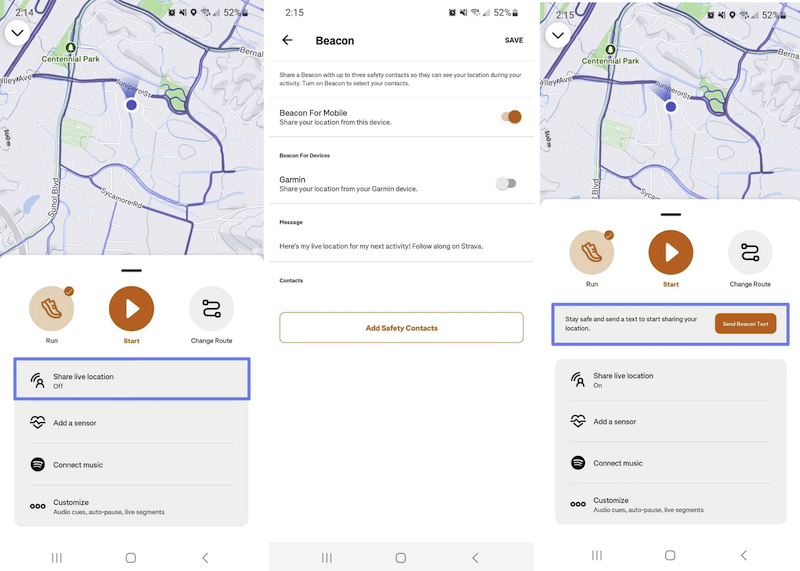
Image: Jessica Santero | WhistleOut
You can also send a Beacon link to someone outside your saved contacts during an activity. If plans change mid-route or you end up somewhere unexpected, you can always send out your location just in case something happens.
However, only share your location with people you fully trust—location data is sensitive, and solo travel already requires careful judgment about who has access to your whereabouts.
Cover your data before you head out
Strava Beacon needs cellular data to broadcast your location. AT&T MVNOs offer the same reliable network at a lower monthly cost.
Check out the most popular plans that share AT&T's network below:
|
US Mobile

Unlimited Premium Plan
$39.00/mo
|
|
Cricket

Supreme Unlimited Plan
$55.00/mo
with AutoPay; $60 for the first month.
+ $9.99 Upfront
|
|
Consumer Cellular

Unlimited for Ages 50+ Plan
$35.00/mo
|
Beacon doesn't work without mobile data
Beacon requires an active cellular data connection to keep your location updating in real time. In airplane mode, or without a signal, your contacts will see your last known position until service resumes. This makes it critical to have a travel SIM or eSIM sorted before relying on Beacon in a foreign country.
Also, don't forget to let your safety contacts know you're sending a Strava tracking link. Otherwise, they might mistake it as spam and hit delete. Send them a message before your activity explaining that the link is coming and what to do with it.
Beacon works for any activity type in Strava, such as runs, hikes, rides, walks, and even long strolls in an unfamiliar city. Any time you're moving alone in a place where someone should know your route, it's worth switching on.
Beacon is free—and so is most of Strava
Strava Beacon is available on the free plan, which is the main reason it belongs on this list. You don't need a premium subscription to share your live location.
Premium (currently $11.99/month) unlocks route planning, segment leaderboards, detailed performance analytics, and training plans. But if you aren't a serious athlete looking to track stats while on vacation, the free version is just fine.
If you already have Strava for fitness purposes, Beacon adds a safety layer at zero extra cost. If you're downloading Strava specifically for Beacon, the free version covers everything you need.
How WhistleOut reviews apps
Our mobile experts scour the app stores, looking for the best new apps for Android and iPhone. Before recommending an app, we put it to the test to evaluate whether it delivers on its promises.
- Easy to use
Great apps simplify your phone. We select tools that don't require a complicated instructional manual to figure out. - Affordability
We lean into quality apps that don't cost a fortune. Extra points if they're free. - Hands-on testing
We tested Strava Beacon by activating live location sharing across multiple activity types and verifying contact notifications and tracking link behavior.
Strava Beacon: FAQ
Does Strava Beacon require a subscription?
No, Strava Beacon doesn't require a subscription. Strava Beacon is available on the free plan. Your safety contacts don't need Strava accounts either—they just need to receive the SMS tracking link and open it in a browser.
Does Strava Beacon work without mobile data?
No, Beacon requires a cellular data connection to broadcast your live location. Without a signal, your contacts will see your last known position, which is why having reliable international data is important when using it abroad.
How many contacts can I add to Strava Beacon?
You can add up to three safety contacts, each of whom receives a unique tracking link via SMS. You can also send a Beacon link to someone outside your saved contacts at any point during an active recording.
When does Strava Beacon stop sharing my location?
Beacon stops automatically the moment you end your Strava activity recording. Once you stop tracking, the shared link becomes inactive, and your contacts can no longer see your location.
Jessica Santero
Staff Writer

Find a better phone plan
Thousands of cell phone plans unpacked. All the facts. No surprises.


.png?w=280&h=280&usm=20&usmrad=0.8&fit=crop "Best Cell Phone Deals for June 2026: Get the New iPhone 17 for Free")



