
Airport Wi-Fi feels like a gift when you're stuck at your gate for three hours. The problem is that public Wi-Fi networks aren't secure, and connecting puts your personal information at risk.
A VPN (virtual private network) encrypts your connection so anyone snooping on the same open network can't see what you're doing. That includes pulling up your banking app, opening your email, and accessing your Netflix account. Using a VPN is one of the simplest things you can do to protect yourself online while you travel. And if you use it right, it can also get you cheaper car rentals, flights, and hotel rates.
I compared the top VPN services on ease of use, server coverage, and price to find the best option while vacationing.
Here are the five best VPN apps for travel this year.
Best VPNs for travel at a glance
You'll find plenty of VPNs available, but not all of them offer top-notch security at a reasonable price. Check out the monthly price comparison in the table below, but keep in mind that many VPN suppliers offer cheaper pricing when you sign up for a full year.
Top VPNs in 2026
| VPN | Best for | Available on | Price/month |
|---|---|---|---|
| Proton VPN | Best free option | Free plan available. Paid plans start at $9.99. $2.99/mo. for 2 years. |
|
| NordVPN | Best overall | Plans start at $12.99. $3.39/mo. for 2 years. |
|
| ExpressVPN | Simplest to use | Plans start at $12.99. $3.49/mo. for 2 years. |
|
| Surfshark | Best budget | Plans start at $15.45. $1.99/mo. for 2 years. |
|
| CyberGhost | Best for streaming | Plans start at $12.99. $2.03/mo. for 2 years. |
*For the lowest price possible, you have to sign up for two years of service.
Why you can trust WhistleOut
.svg)
15+
years of mobile industry experience

900+
published wireless guides

35+
firsthand carrier reviews
We've been around since the birth of the iPhone. Along the way, we've learned how to spot the best deals for your wallet (and your sanity). We spend our days researching informative guides and writing insightful reviews on every kind of wireless plan, distinguishing what matters from what doesn't. We played around with these plans before recommending them, ensuring they're worth your hard-earned money.
Want to know more? Check out how we review every cell phone plan we rank.
Why you need a VPN when you travel
A VPN helps keep your personal details safe while connecting to open networks or navigating unknown websites. Given how digitally dependent most people are today, an added layer of cybersecurity keeps your information safe.
Here's why you need a VPN for travel:
Public Wi-Fi is risky
When you connect to public Wi-Fi at an airport or hotel, anyone else on that network may see what you're doing online. Any information you send or receive that isn't encrypted can be read and accessed.
That means your personal details are at risk, even if you pull up your bank app for a quick check or browse your emails for bookings. In fact, using your roaming data is safer than using public Wi-Fi if you don't have a VPN.
Hackers use fake hotspots
Hackers set up fake Wi-Fi networks in busy travel spots like airports and hotels, designed to look like the real thing. If you connect to one, the creator can see everything you do online. A VPN encrypts your traffic so that even on a fake network, your data is unreadable.
Some countries restrict or block websites and apps
Depending on your destination, you may not be able to access Google, WhatsApp, or Instagram (among others) without a VPN. If you're heading to a country with government-controlled internet access (like China, Russia, and parts of the Middle East), a VPN lets you access services that might otherwise be blocked. You essentially bypass all restrictions by connecting to an external server.
Before heading out on your trip, check out how you can use your phone overseas to make sure your device is prepped.
Your bank might lock you out
Logging into your bank from an unfamiliar country can trigger fraud alerts and freeze all transactions on your card. I've had this happen a few times, and it isn't easy to call your bank from abroad. Use a VPN set to your home country specifically to avoid your bank freezing your account mid-trip.
Keep your phone bill low while you're abroad
A VPN protects your personal details, but it can't help your phone bill if you're not on the right plan. Before you travel internationally, make sure you're covered with international data.
Here are some of the most affordable options for staying connected overseas without the bill shock:
|
Visible

$25 Visible Plan
$25.00/mo
Taxes & Fees included
|
|
Mint Mobile

Unlimited Data Plan
$10.00/mo
$60 for 6 months of service
|
|
Spectrum Mobile®

Unlimited
$30.00/mo
+ $20 Upfront
|
The best VPNs for travel in 2026

Proton VPN: Best free VPN
Available for iPhone and Android.Free to download and use.
If you're heading out on a trip and don't want to commit to a lengthy subscription, Proton VPN offers a completely free plan. For a traveler who just needs basic protection on airport or hotel Wi-Fi, Proton is ideal since there's no subscription necessary (unless you want to stream).
But does the free version actually work? I put Proton to the test to see if the free app was worth downloading, and I was pleasantly surprised. It worked really well and I even saw similar speeds to the best overall VPN while connected. For reference, I usually get speeds around 150Mbps on my phone using Visible's network. While connected to Proton's VPN, I saw a slight dip to 130Mbps, which is still excellent, and didn't notice a big difference while using my phone.
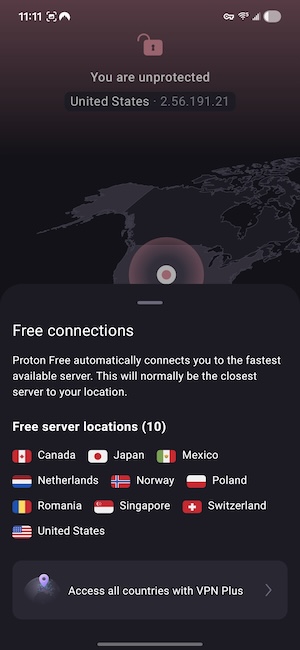
Image: Jessica Santero | WhistleOut
The free plan includes servers in ten different countries to keep you safe while browsing, including Canada, Japan, Mexico, the Netherlands, Norway, Poland, Romania, Singapore, Switzerland, and the United States.
The only downside is that Proton doesn't allow for streaming while using the free version. So if you need a VPN to change server locations for a better selection on Netflix or Disney+, you'll need a paid subscription. That said, for protecting your connection while you check email, use online banking, or browse on an unfamiliar network, Proton's free plan is a solid option for travel.
Pronton's paid VPN Plus plan costs $9.99/month, making it one of the cheaper VPNs available. It's a fan-favorite among Redditors, too. In fact, many Proton users rave about it just like u/xnfra in r/it, commenting, "Proton and Mullvad are so goated that they can easily fulfill your requirements... I've been using Proton for 3 years now and still great."
However, if you want full server access and to stream while on vacation, the upgrade is a must. But if you just need a VPN for simple tasks on unsecured Wi-Fi, then download Proton's free plan.
Travel tip: Use a VPN before booking to save money
A VPN can also save you money on travel bookings. Car rental sites, airlines, and hotels sometimes show higher prices based on where you're browsing from. Switch your server location before you search and you might be surprised at the difference.
NordVPN: Best overall VPN
Available for iPhone and Android.Plans start at $12.99/month.
NordVPN is easily the most well-known security provider and VPN service on the market. So much so that my father (who isn't very tech-savvy) has been a NordVPN user for around a decade and has never felt the need to switch.
NordVPN is fast, includes thousands of servers, and runs so quietly in the background that you'll forget it's even on. You can pick and choose your ideal server for the best connection, or set up Autoconnect so you never have to wonder if you remembered to turn it on. NordVPN allows you to choose a server in a country, region, or city to get the strongest signal possible.
Nord's server network is the largest with over 9,000 servers across 129 countries. More servers mean less congestion, giving you the best chance of a fast connection. Since using a VPN inherently lowers your speeds—since you're rerouting your digital footprint—it's important that you connect to a lower-trafficked server so your speeds don't dip any further. That said, when I connected to Dallas, I only noticed a drop of 15Mbps in my speeds.
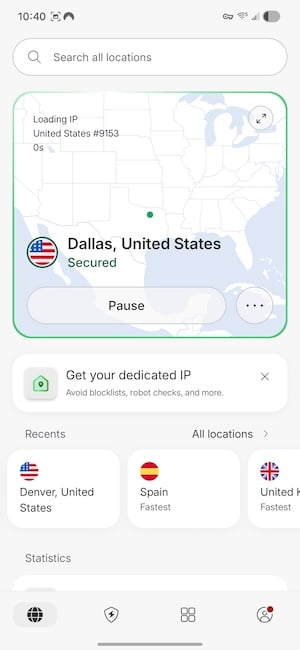
Image: Jessica Santero | WhistleOut
The best feature for travel is NordVPN's Threat Protection. It's a built-in ad and malware blocker that works even when the VPN isn't actively connected, so you're still protected when you aren't connected and use a banking app or booking portal. Most VPNs only protect you while the tunnel (or connection) is active, but NordVPN keeps working either way.
The NordVPN app is very easy to use, including the server map. All you have to do is tap the app and choose where you want to connect. Nord also saves your frequent connections to make it even more intuitive. The same goes for the desktop version as well.
Although NordVPN isn't the cheapest option, it offers the most features for its price point. It offers the most servers, bonus features, and trustworthy performance that works wherever you go. NordVPN has very loyal customers, just like Redditor u/WorriedYam898, who raves, "I use NordVPN and have not had an issue in 5 years of use on multiple devices, also no slowdowns... If you want one that just works for streaming, go with Nord, no question."
Without a doubt, a NordVPN subscription is a worthwhile financial investment.
Keeping costs down on the road? Start with your phone plan.
If you're watching your travel budget, your phone bill is one of the easiest places to save. Switch to a cheaper phone plan and start saving; it's simple and only takes a few minutes.
Check out the cheapest plans available right now:
|
Mint Mobile
Unlimited Data Plan
$10.00/mo
$60 for 6 months of service
|
|
Lyca Mobile

Unlimited Plus Plan
$12.50/mo
Pay $12.50/month for the first 9 months<br>Regular rate is $49/month
|
|
Cricket

3-Month Unlimited Plan
$15.00/mo
$45 advance payment for 3 months (equals to $15/month)<br>regular rate for 3 months is $120 (equals to $40/month)
+ $9.99 Upfront
|
ExpressVPN: Best for simplicity
Available for iPhone and Android.Plans start at $12.99/month.
Some VPNs can be confusing and difficult to use, but ExpressVPN is the simplest, where you hit a button and know you're protected. All you have to do is open the ExpressVPN app and tap connect to join the fastest server available.
ExpressVPN does something other apps don't, which is show you signal strength right next to the best servers. You'll see little green (or red) bars with either excellent, good, or bad right in the app before you connect. It's a small detail, but it makes a world of difference when you want to connect quickly without experiencing any slowdowns or issues.
ExpressVPN offers servers in 105 countries, fewer than more competitive VPN platforms like NordVPN, but there's still enough variety to keep your data safe. It also handles network switching smoothly, so when you leave the hotel's Wi-Fi, it'll jump to cellular data without needing any manual changes.
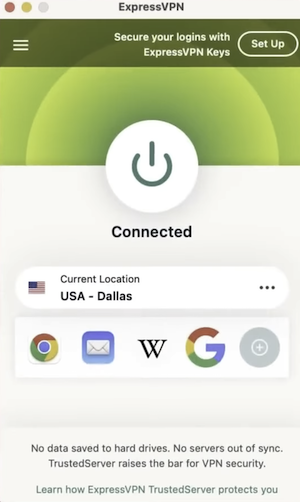
Image: Jessica Santero | WhistleOut
ExpressVPN also offers a travel router called Aircove Go, but you have to pay for the device separately. It's a small device you can bring in your bag, plug into a hotel ethernet port, and instantly create a secure VPN-protected Wi-Fi network in your room—without installing the app on every device. It's really best for families who have tablets, phones, and laptops all connected at the same time. The kids can watch cartoons on the tablet while Mom and Dad can get some work done, all safely.
Before settling on ExpressVPN, keep in mind that not every feature is included in every plan. In fact, some think it's overpriced, like u/Express_Reviewer noted in the subreddit r/VPN_Question, explaining, "It's the most expensive mainstream VPN. Not a bad VPN at all but overpriced for what you get in 2026." The Basic plan is best for most travelers, since it includes server connectivity and allows for up to 10 devices at once. But if you want ad-blocking and malware protection, the mid-tier plan includes both features.
Skip the risky public Wi-Fi with an unlimited data plan
The safest option when traveling is using your own data instead of public networks, but will you have enough?
These are the best unlimited plans to keep you connected on the go:
|
Visible
$25 Visible Plan
$25.00/mo
Taxes & Fees included
|
|
Mint Mobile
Unlimited Data Plan
$10.00/mo
$60 for 6 months of service
|
|
Spectrum Mobile®
Unlimited
$30.00/mo
+ $20 Upfront
|

Surfshark: Best budget VPN
Available for iPhone and Android.Plans start at $15.45/month but drop to $1.99/month when you sign up for two years.
Surfshark works out to $1.99/month on a two-year plan, which is less than a single airport coffee for a full-featured VPN to protect your personal information. Surfshark is the most affordable VPN, but only if you commit for a long time. Otherwise, check out Proton's free VPN option if you don't want to spend a cent.
Surfshark lets you connect as many devices as you want under a single subscription with its unlimited device policy. Some VPNs limit how many connections you can have simultaneously, like ExpressVPN's 10 device cap.
In fact, it's a major selling point for most customers, as u/FrontPorchGirl explained, saying, "Surfshark is lowkey the best value if you don't wanna overspend... That unlimited devices thing is honestly what sold me too. No way I'm paying extra just to connect more stuff." If you travel with a phone, laptop, and tablet, you can also cover your travel companion's multiple devices.
The server network covers 100 countries with over 4,500 servers. That's a decent number of servers, so you won't experience much network congestion, which could lead to slower speeds.
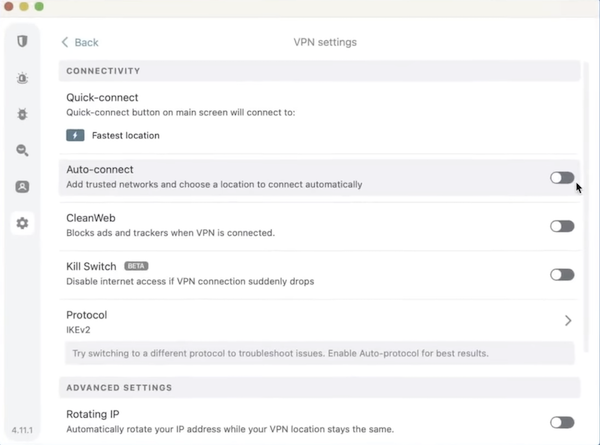
Image: Jessica Santero | WhistleOut
The Starter plan includes a quick connect, split tunneling, and an ad and tracker blocker. But for antivirus protection, you'll need to upgrade to a more expensive plan. Either way, both plans are still cheaper than NordVPN (for instance), but you have to commit for 24 months. Surfshark is also one of the only VPNs to offer a 7-day free trial so you can test it before committing.

CyberGhost: Best for streaming
Available for iPhone and Android.Plans start at $12.99/month.
While security is important while traveling, the main reason most vacationers use a VPN is to keep watching your favorite shows while they're abroad. CyberGhost is the best VPN for streaming because it offers dedicated streaming servers labeled by platform. Directly in the app, you'll see "Netflix US," "BBC iPlayer UK," and "Disney+ US" so you can easily pick the best for your preferred platform.
CyberGhost has 11,500+ servers in 100 countries, and makes streaming a no-brainer (unlike other VPNs that restrict streaming). It unlocks over 15 Netflix regional libraries, meaning you can access content from other countries you may not even be visiting. It includes most server coverage across Europe, making it ideal for your next big Euro Disney trip (or starting a Europe-based series).
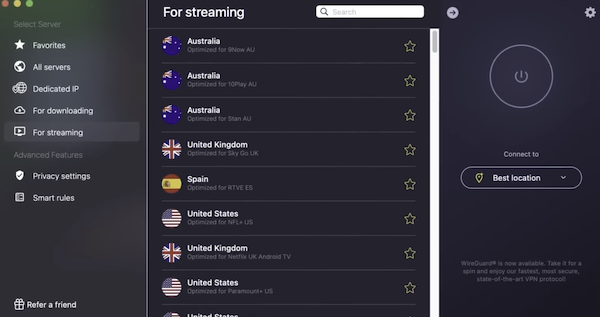
Image: Jessica Santero | WhistleOut
One practical perk that doesn't get enough attention is CyberGhost's 45-day money-back guarantee on long-term plans. That's the longest trial window of any VPN on this list, and it gives you time to really use it on a trip before you commit.
Make sure your data plan travels with you
Streaming abroad is only half the equation. You need enough data to actually do it. Here are the most popular international-friendly phone plans:
|
Verizon

Simplicity Plan
$30.00/mo
+ Taxes & Fees. Price includes AutoPay & Bring a Number discount
|
|
AT&T

Premium 2.0℠
$90.00/mo
+ $35 Upfront
|
|
T-Mobile

Experience Beyond 2.0
$100.00/mo
with Auto-Pay + Taxes and fees
|

How I evaluated the best VPNs
I made sure to review each service's features, including server coverage, pricing tiers, and published independent testing results side-by-side. The main criteria I focused on, specifically for travel, were:
- Server coverage in popular travel destinations
- App availability on both iPhone and Android
- VPN connection and server switching
- Ease of setup for non-technical users
- Price-value comparisons
I may be biased (since my dad's been a long-time NordVPN user), but after testing the other platforms, NordVPN really is the best.
Best VPN for travel: FAQ
Are VPN apps necessary when traveling?
VPNs are not necessary when you're traveling, but they are highly recommended to keep your digital personal details safe. A VPN encrypts your online habits so that even if someone were to hack your activity, they wouldn't be able to read it.
Do VPNs slow down your internet speed?
Yes, VPNs slow down your internet speed. It isn't a very noticeable drop in speed, unless you're a professional online gamer or streaming in 4K.
Can I use a VPN on airport Wi-Fi?
Yes, you can use a VPN on airport Wi-Fi—and you should. In fact, that's a scenario where a VPN is a travel must-have to stay safe. Connect to your VPN before you join any airport network and keep it running until you disconnect.
Which VPN is best for international travel?
The best VPN for international travel is NordVPN. With over 9,000 servers in 129 countries, you'll easily get fast speeds with that many options. Plus, it includes Threat Protection and alerts you when you're at risk.
Jessica Santero
Staff Writer

Thousands of cell phone plans unpacked. All the facts. No surprises.





.png?w=280&h=280&usm=20&usmrad=0.8&fit=crop "The Best Cheap Phone Plans for 2026: We Tested Them All to Help You Save")


