
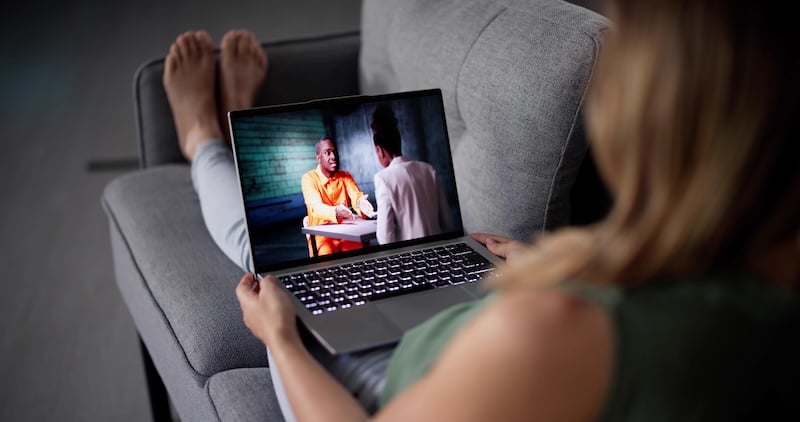
One in three people have already ditched cable for streaming apps—but which is the best? The mobile and internet experts at WhistleOut polled 1,000 people and found that 32% of mobile users now prefer streaming apps over broadcast TV. Between the annual price hikes, the ad tiers, and the password-sharing crackdowns, the math just doesn't add up.
What most people don't realize is that some of the best streaming options available right now cost absolutely nothing. I tested 8 streaming apps (and watched a full movie on each) to see which were worth your time.
Read on to learn which app suits your streaming preferences and which has the fewest ads.
Looking to watch The One Piece anime? It's a Netflix exclusive, so you might have to shell out for a subscription to follow the series.
Watch out! Free streaming apps use data in the background
Most streaming apps keep video running continuously in the background. That means if you're watching on your phone over cellular (rather than Wi-Fi), your data will disappear faster than you expect. If you're on a limited data plan, make sure to check out our data usage guide below so you don't run out before the end of the month.
Don't feel like calculating? Just upgrade to an unlimited data plan for unlimited streaming. Here are the most popular plans today:
|
Mint Mobile

Unlimited Data Plan
$10.00/mo
$60 for 6 months of service
|
|
US Mobile

Unlimited Starter Plan
$25.00/mo
|
|
Tello

Unlimited Text, Talk, and Data Plan
$25.00/mo
|
Best free streaming apps at a glance
| App | Available for | Best for |
|---|---|---|
| Tubi | iOS, Android, web, smart TVs, streaming sticks | Biggest library |
| Pluto TV | iOS, Android, web, smart TVs, streaming sticks | Live TV and channel surfing |
| Sling Freestream | iOS, Android, web, Roku, Fire TV, Samsung TV, Xbox | Most live channels of any free service |
| Plex | iOS, Android, web, smart TVs, streaming sticks, desktop | Personal media libraries and free streaming |
| Samsung TV Plus | Samsung Galaxy devices, Samsung smart TVs | Samsung device owners |
| Kanopy | iOS, Android, web, Roku, Apple TV, Chromecast | Film lovers who want ad-free streaming |
1. Tubi: The biggest free streaming library

- Free
- Available for iOS and Android
If you want volume and variety without spending anything, Tubi is the best free streaming app for movies.
Tubi has more free content than any other free streaming app by a long shot. Fox-owned and regularly updated, Tubi offers viewers cost-free access to countless TV shows and movies. All you have to do is download the app (or visit the Tubi website) and click play. You don't need an account or subscription to stream for free with Tubi. Start by checking out Live TV or searching for any genre, including horror, romance, action, true crime, anime, kids' programming, and so much more.
Your free horror movie marathon starts with Tubi
Tubi has one of the biggest free horror libraries around, making it the best horror movie streaming service. Browse hundreds of scary movies to stream at no cost, from slasher classics to campy cult favorites. You can also rewatch classics like It's the Great Pumpkin, Charlie Brown or Practical Magic to get in the mood before new releases drop.
Tubi is a must-have app for sports fans since Tubi streamed the FIFA World Cup games this year and Tubi also streamed Super Bowl LIX in 2025 (in 4K). You can browse Tubi's library of live sports channels, including NFL highlights and NHL draft coverage.
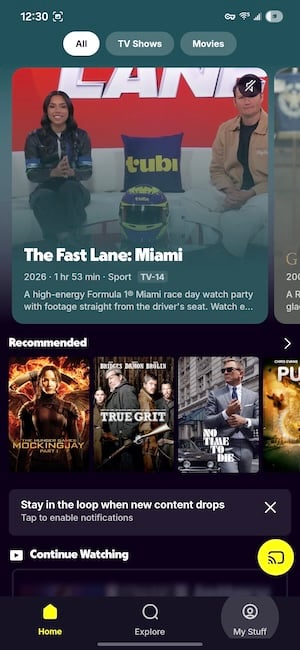
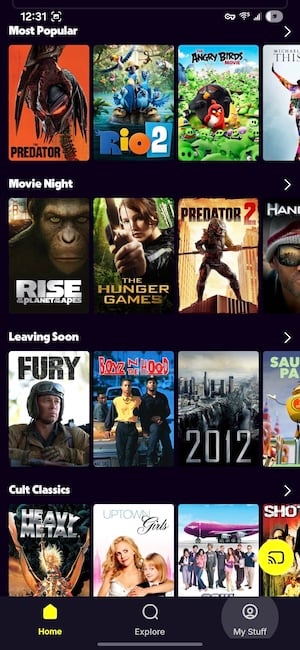
Image: Jessica Santero | WhistleOut
Every time I open Tubi, I'm shocked by how great the movie selection is. I instantly find a top hit within the first five titles, whereas I have to sift through Netflix's picks for a solid 10 minutes (at least). The "Most Popular" list is current and changes every week, so you're likely to find something good to watch.
Tubi is family-friendly and includes a dedicated kids section in the library, featuring childhood classics and fan-favorite films. If you don't want something for young viewers, you can choose from the seemingly endless category selection. Browse by genre, decade, mood, or just scroll through what's trending. There are even niche topics, like "Cult Classics," if it suits your fancy.
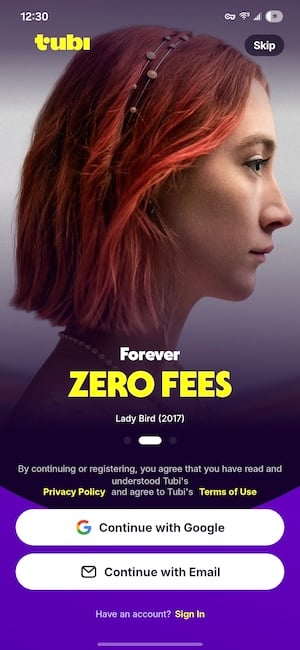
Image: Jessica Santero | WhistleOut
While you don't need an account to start watching on Tubi, creating one allows you to save your progress in movies and series. If you can't finish a certain flick, having an account will automatically save your place. Otherwise, you have to check what minute you're on so you can get back to it the next day.
The only downside to Tubi is the ad breaks. You'll hit an ad every 15–20 minutes (without fail), and you can't skip them. Luckily, they're short compared to cable programming and don’t interrupt important plot twists (like Netflix does). But that's the cost of free streaming.
I don't mind free Tubi's ads, especially considering I pay for Netflix…with ads.
Keep in mind that Tubi keeps video running continuously in the background, so if you're watching on cellular data rather than Wi-Fi, your data will add up faster than you'd expect.
Netflix and YouTube just got more expensive
If you've noticed your streaming bill creeping up, you're not imagining it. Netflix raised its plan prices for Standard and Premium in early 2026, and YouTube Premium also increased pricing shortly after. If you're reconsidering your subscriptions, you're in the right place.
For my test run on Tubi, I watched Matthew McConaughey in Fool's Gold from start to finish. It was great; the full movie loaded with no problem, I had no buffering issues, and it was completely free. I also checked out all seven seasons of The Shield, multiple seasons of Alone, and even relived my younger years with a few episodes of Ed, Edd n Eddy in the kids' section.
Curious how the top two free streaming apps stack up? Check out our head-to-head Tubi and Pluto TV versus review.
Redditors agree: Tubi is the best streaming platform
Tubi has an updated library with tons of the latest films. Reddit user u/throwaway always finds something to watch and posted in r/Letterboxd, commenting, "Tubi is legit one of the best current streaming platforms. Any time I'm looking for a movie, 70% of the time it ends up being on Tubi, not to mention every other platform has ads too now yet you still pay for them, and the ads on Tubi are less than YouTube videos by far."
2. Pluto TV: Free live TV, 250+ channels and on-demand movies
- Free
- Available for iOS and Android
Pluto TV is the best streaming app for live TV, and it's all free.
Open the Pluto TV app and tap any show on the TV guide to start watching. It's that easy. Pluto is best if you make a free account with your email, since the pickings are slim on the accountless version. It took me 2 minutes to set it up, and I was watching Blue Bloods after a few taps. The TV guide is just like any cable or DirecTV programming.
Pluto is owned by Paramount, which means you'll find dedicated channels for CBS News, MTV Hits, and Comedy Central classics running round the clock. Plus the latest seasons of Survivor and 60 Minutes, and select episodes of current CBS series. Pluto has more current content than you'd expect at zero cost.
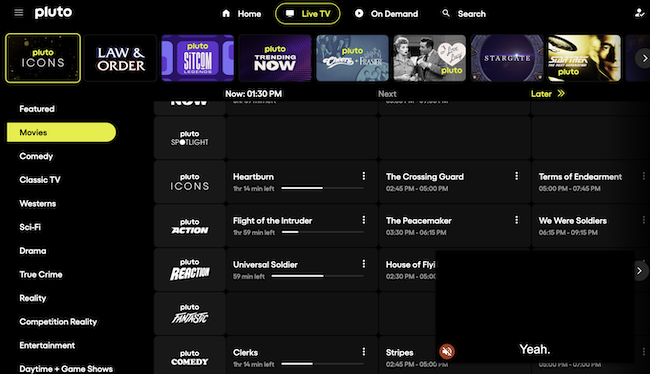
Image: Jessica Santero | WhistleOut
Pluto isn't filled with public-domain no-name content nobody's heard of, either. As soon as I switched to the movies, I saw one of my favorite Adam Sandler films. I immediately popped a bag of popcorn, grabbed a grape soda, and sat down for a movie session. You still get the same amount of ads just like on cable TV, but think of them as intermissions to go to the bathroom.
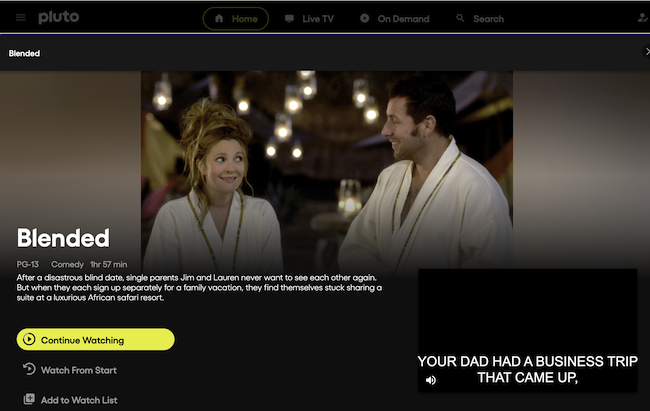
Image: Jessica Santero | WhistleOut
I settled for the first movie I saw, but there are lots of options to choose from on Pluto. The category setup is easy to navigate. There's an "On Now" section so you can jump straight into whatever's currently streaming, plus other labeled sections like Recently Added, Last Chance to Watch, News + Opinion, Recent Releases, and more.
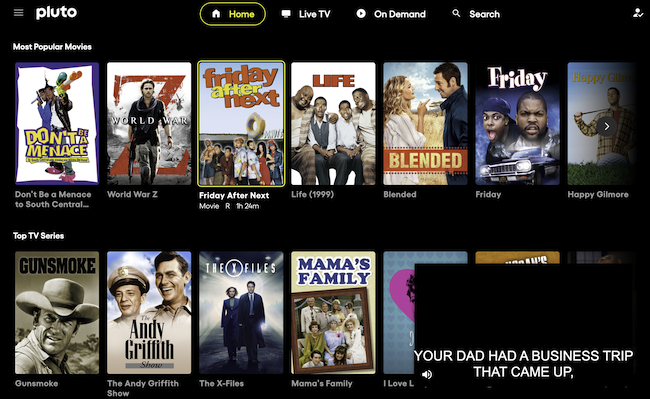
Image: Jessica Santero | WhistleOut
There's one snag, though. On both the app and desktop, there's a persistent pop-up window in the lower right corner that you can't close out of. It's not a dealbreaker, but it's annoying enough to actively bother viewers while searching for something to watch. It runs smoothly on mobile, but it keeps video playing in the background (like most streaming apps), so watch your data if you're on cellular.
Pluto TV is my personal top pick on this list, even though it isn't as impressive as Tubi. Blended was the film that won me over, but Trekkies can also relive Captain Kirk's and Spock's exploration with a dedicated Star Trek: Voyager channel, catch the latest news with 60 Minutes, or enjoy the full Mission Impossible saga. The content quality surprised me, and the live channel experience is the closest thing to actual cable TV—for free.
What does Reddit think about Pluto?
I wasn't the only one impressed by Pluto. The subreddit r/cordcutters is riddled with positive supporters, with comments such as, "I find [Pluto] is great if you want to watch older movies from the 80s and 90s—better than something like Netflix or Hulu. They show older stuff also, but Pluto seems to have more of it on hand compared to those two, and Paramount Plus also. Plus, it's free, which is even better!"
3. Sling Freestream: 650+ free live channels with no account required
- Free
- Available for iOS and Android
Sling Freestream is Dish Network's free streaming tier, and it's the underdog on this list. Most people know Sling as a paid service, but Freestream is completely separate, entirely free, and doesn't require a credit card or even an account to start watching. With over 650 live channels and 41,000+ hours of on-demand content, it's the streaming app that offers the most channels.
Psst! Did you know you can get full access to the NFL with Sling? It does cost a little, but it might be worth it if you're a football fan. Sling sells $5 day passes that let you watch select NFL games without committing to a season-long subscription. Or watch the free NFL channel for game day highlights and play-by-play analysis on Pluto TV and Tubi.
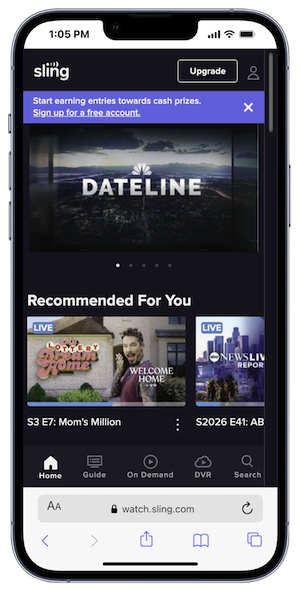
Image: Jessica Santero | WhistleOut
Choose from a wide range of categories, like Live News and Weather, Crime TV, Trending, and even more movie genres. Sling is worth downloading for the news lineup alone. You can check out ABC News Live, CBS News, Bloomberg Quicktake, Al Jazeera, and France 24, which are all available with 24/7 streams. You'll also find an unexpected bonus—there's a free music streaming section, which is an excellent alternative for anyone who's tired of Spotify's ad-heavy free tier.
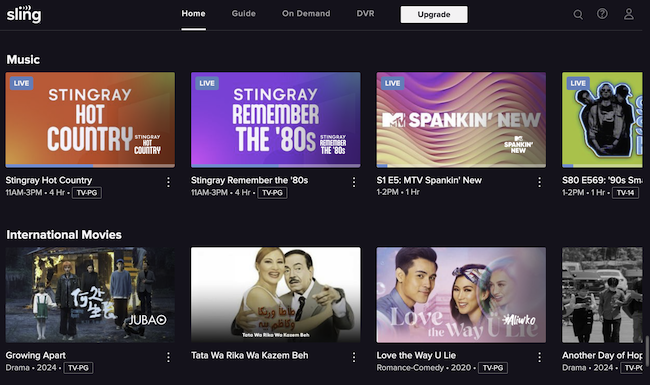
Image: Jessica Santero | WhistleOut
Make sure you take Sling's Freestream with a grain of salt, though; sometimes it's hit or miss. I tested the "Hot Country" music channel and immediately got a Taylor Swift Christmas song (in May), which tells you to adjust expectations a little. But MTV's "Spankin' New" channel held up much better with recent hits I heard on the radio.
Sling Freestream doesn't get enough credit with 650+ free channels.
Most of Sling's content skews toward 2010s-era movies and TV shows, so don't expect this year's releases. Loading can be a little slow, and every time you skip forward or backward, the player takes a moment to catch up. Plus, you get an ad roughly every ten minutes and can't skip them, plus a mandatory 30- or 60-second ad at the start of each session.
For live sports, you're limited to whatever happens to be on in the moment—if there's a cricket championship, that's what you've got. The channel count is staggering, but the majority are niche F.A.S.T. (free ad-supported streaming TV) channels rather than cable mainstays.
What happened to Peacock's free tier?
Peacock removed its free tier in 2023 and moved entirely to paid subscription plans. Pluto TV and Sling Freestream are the closest free replacements in terms of live channel availability and on-demand content depth.
I watched How to Lose a Guy in 10 Days and enjoyed the free streaming. Again, you have to put up with ads, but I already do that with Netflix anyway. If you're cutting the cord on cable and want the most live channels free, Sling FreeStream is a solid alternative. Just go in knowing the content leans nostalgic rather than current.
Sling has the most channels of any free streaming app, but is it the best? See which is the winner in our Sling vs. Pluto TV guide.
What Reddit says about Sling Freestream
U/qtrim in r/slingtv offered a fair comparison, stating that "Broadcast and regular cable have the same amount of ads. The only difference is, on free streaming services, they tend to repeat the same ads over and over in the same show, whereas cable networks usually don't do that." I personally don't mind the amount of ads, especially since it's a free streaming service, but if you can't, consider upgrading to a premium subscription.
4. Plex: Best for your own media library
- Free (Plex Pass from $4.99/month)
- Available for iOS and Android
Plex is part media aggregator and part free streaming service, which makes it harder to categorize than anything else on this list—but that's also what makes it worth explaining properly. With Plex you can stream films and shows for free, or find out where to find specific titles to buy or rent (that's what an aggregator is).
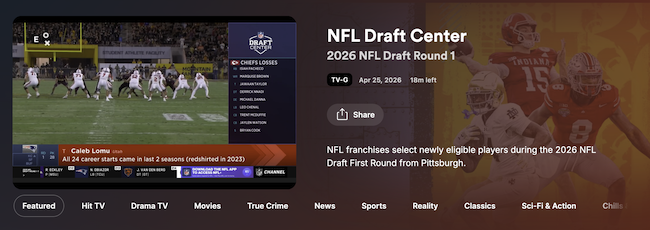
Image: Jessica Santero | WhistleOut
The live TV guide is the real highlight. It's a full channel listing, organized and browsable just like a premium cable guide, and you can watch whatever's currently airing right now. The live channel categories cover HIT TV, Drama, Movies, News, Sports, Reality, Comedy, Game Shows, and more. The sports coverage is excellent too.
I watched a full hour of NFL Draft on Plex without hitting a single ad.
I also stumbled upon Teen Wolf through the channel guide without even searching for it. Browse the live guide instead of hunting on-demand, and you'll find something worth watching in about two minutes.
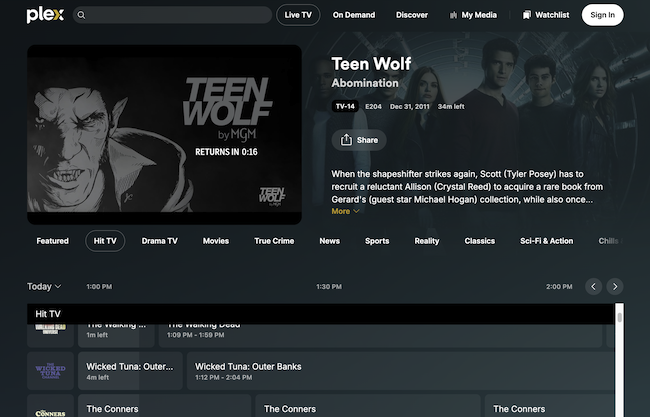
Image: Jessica Santero | WhistleOut
Plex has the best ads among all free streaming apps. Instead of commercial breaks, you get static show or series poster cards—no audio, no video, no aggressive tracking. It's a quiet pause you can use as a bathroom or snack break without missing a beat. If you're used to Netflix with ads and the constant interruptions that come with it, Plex's treatment feels remarkably civilized by comparison.
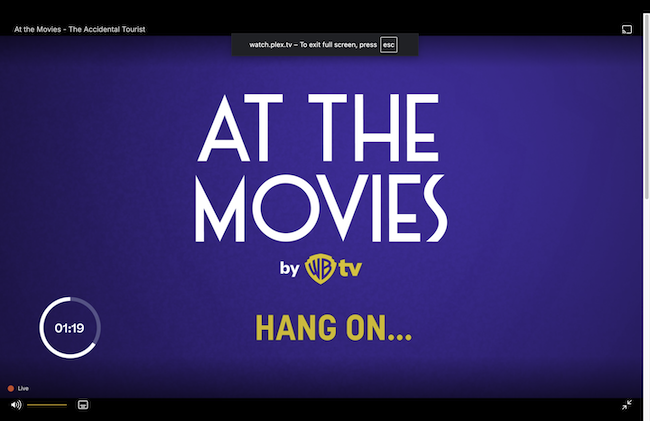
Image: Jessica Santero | WhistleOut
Plex also shows you where to watch specific shows or movies across your connected services, which is handy when you're trying to track something down without opening five different apps. Otherwise, you can stream for free. Plex Pass, the optional paid upgrade, unlocks offline downloads and DVR recording if you connect a TV tuner. Plex is the streaming app that gives you the closest thing to a real TV experience without paying for cable.
By the way, I compared Plex against Kanopy and found both were worth downloading. Read my full review to find out why.
What Reddit says about Plex
A user in r/PleX shared their theory on building the perfect Plex library: "My list is more collections of movies I think everyone might not watch, but would never get rid of either. Important collections to have on hand…and there is never anything boring: 1) all Academy Award winners, 2) all Academy Award nominees, 3) movies of best actors and actresses, 4) Alfred Hitchcock films."
Get our best tips for saving on streaming, mobile, and internet, plus deals actually worth knowing about.
Please complete all fields to subscribe.
An error has occurred. Please try again.
Success! You're in.
5. Samsung TV Plus: Best for Galaxy device owners
- Free
- Available for Samsung Galaxy devices and Samsung smart TVs
I've had a Samsung phone for a year and had no idea this app existed. Samsung TV Plus comes pre-installed on Galaxy devices and gives you access to over 200 live channels—completely free, with no account required. It's the most underrated app on this list, and discovering it honestly made me feel better about my phone choice.
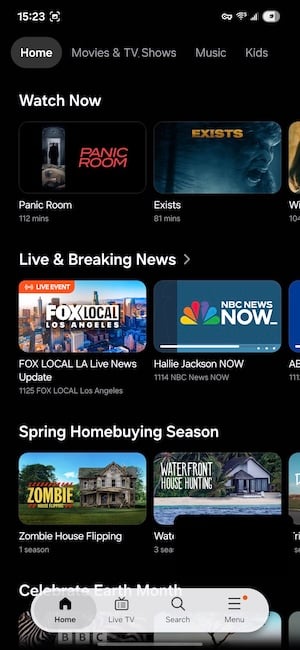
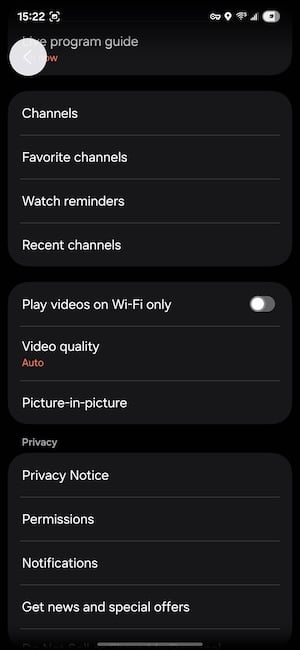
Image: Jessica Santero | WhistleOut
The categories are almost limitless, and the kids' section has the best picks of the year. You can also filter content by age, which is important if you're handing your phone or tablet to a younger viewer. Between the range of genres and the dedicated family-friendly options, there's really something for everyone.
You also get Samsung's minimalist ads, so instead of blaring commercials, you get a simple countdown timer. You won't find jingles or jump scares on the Samsung TV Plus app, just a quiet pause before playback resumes. It doesn't distract from what you're watching at all.
I had CBS News running live on my phone and it loaded instantly with no buffering or lag. The sports and entertainment channels are strong too—scroll the full guide before you decide what to watch because the category list is longer than you'd expect.
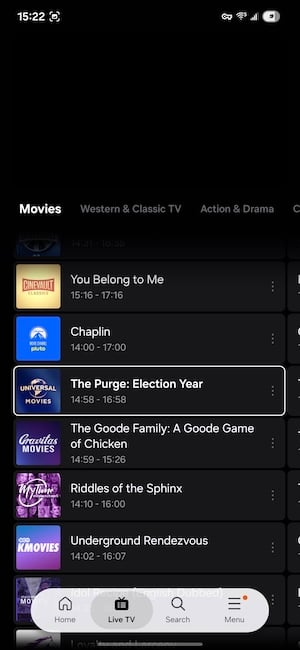
Image: Jessica Santero | WhistleOut
If you have a Samsung Galaxy device (TVs included), this app is already installed. But this app is only available within the Samsung ecosystem, so if you're on an iPhone or a non-Samsung Android device, this pick isn't for you. However, if you do have a Samsung (like me), it's a free TV upgrade you already own and probably haven't used yet.
What Reddit says about Samsung TV Plus
Just like me, u/rasbobbbb in r/samsung had the same reaction most Galaxy owners do the first time they find the Samsung TV Plus app: "I pressed it by accident the other day and I love this service! Not sure how long it's been on my TV but wish I discovered it sooner. I really like the 'show is a channel' concept. So far I've left it on the Kitchen Nightmares channel for the past 48hrs lol."
A better screen makes free content look expensive
One of the most underrated upgrades for phone streaming is the display you're watching on. If you're squinting at a dim screen or waiting on slow load times, even the best free app starts to feel like a chore.
Check out the best phone deals right now to find a device that does your watchlist justice.
Here are some of the best carrier deals available:
Moto G 5G (2026) 128GB
- 6.7 inch display
- Rear Cameras: 50MP, 2MP
- Front Camera: 32MP

Galaxy A26 5G
- 6.7 inch display
- Rear Cameras: 50MP, 8MP, 2MP
- Front Camera: 13MP

Galaxy A27 5G 128GB
- 6.7 inch display
- Rear Cameras: 50MP, 5MP, 2MP
- Front Camera: 12MP


6. Kanopy: Best for film lovers with a library card
- Free with a library card (from a participating branch)
- Available for iOS and Android
Kanopy is the app on this list that nobody talks about. If you have a library card, you can access the best niche film collections you'll find on any platform—paid or otherwise. Most major U.S. public library systems are connected, so it's worth checking before you assume yours isn't. And the best part is that all movies are ad-free.
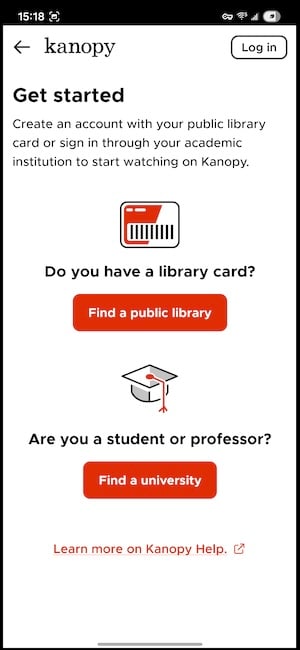
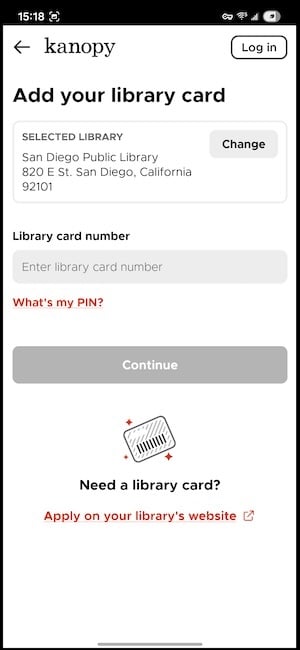
Image: Jessica Santero | WhistleOut
The Kanopy library leans toward critically acclaimed independent films, foreign cinema, classic Hollywood, and documentaries. Honestly, it's exactly the kind of catalog you'd expect if your public library built a streaming service. Oscar nominees and winners show up regularly, including some films that you'd probably need to pay to rent on other platforms.
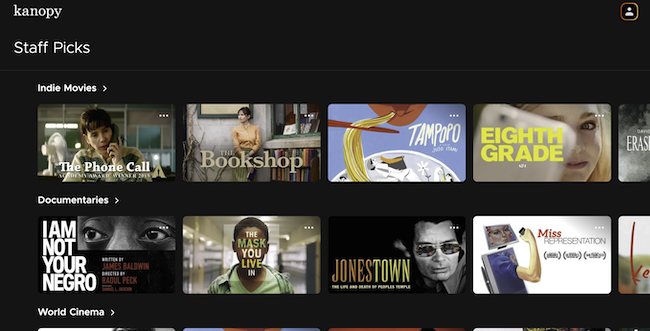
Image: Jessica Santero | WhistleOut
There's one thing you should understand about how Kanopy works before you sign up. Your library gives you a set number of tickets each month—typically somewhere between 5 and 25, depending on your library's budget. Each film you start costs one ticket, but once you press play, you have 72 hours to watch it (as many times as you want without using additional tickets). That's more than enough time for most casual viewers, and if you really liked it, you can watch it again.
I watched the 2015 Academy Award winner for the Best Live Action Short Film, The Phone, and I didn't need to wait to check it out. If you aren't sure what you want to watch, browse Kanopy's own Staff Picks lists for inspiration.
What Reddit says about Kanopy
A Reddit user in r/movies described Kanopy as their favorite streaming service for international content: "I love that you can travel around the world in movies on Kanopy… Inside the Yellow Cocoon Shell, An Elephant Sitting Still, Beyond the Infinite Two Minutes, The Innocents (2016), The Wall (2012), Embrace of the Serpent, The Worst Person in the World, Lunana: A Yak in the Classroom, Better Days (2019)."
How much data do free streaming apps actually use?
Free streaming apps are great on Wi-Fi, but on cellular they'll burn through your data cap faster than you might expect—especially on a long commute, at a hotel with unusable Wi-Fi, or during a summer road trip.
Here's a realistic look at how much data you're actually using while streaming:
How much data does free streaming use per hour?
| App | Approx. data per 2-hour movie | Quality control |
|---|---|---|
| Kanopy | 3–4 GB | Auto-adjusts (up to 1080p) |
| Plex | 1.4–6 GB | Manual (SD to 1080p) |
| Sling | 6 GB | Auto-adjusts (up to 1080p) |
| Tubi | 1.4–4 GB | Auto-adjusts to bandwidth |
| Samsung TV Plus | 3–6 GB | Auto-adjusts (up to 1080p) |
| Pluto TV | 3–4 GB | No manual control |
Most free streaming apps default to a quality setting based on your connection speed. If you're on cellular and want to stretch your data, dropping to standard definition (SD) makes a dramatic difference—and on a phone screen, you'll barely notice the drop in resolution.
Pluto TV and Samsung TV Plus auto-adjust based on your connection, which is convenient but gives you less control over data usage. Tubi and Plex let you set streaming quality manually in their settings menus.
For regular cellular streaming, a plan with at least 10–15GB per month will keep you comfortable for casual daily use. Heavy streamers watching an episode a day on their commute will want unlimited data to avoid data throttling mid-binge.
Find a plan with enough data to stream all summer
If you're shifting more of your watching to free apps on your phone, your data plan starts to matter a lot more.
Check out our guide to the best MVNOs for solid coverage at a fraction of the price, or compare popular plans below:
|
Visible

$25 Visible Plan
$25.00/mo
Taxes & Fees included
|
|
RedPocket

Premium Monthly Plan (GSMA)
$30.00/mo
|
|
Twigby Mobile

Unlimited Talk, Text and Data
$25.00/mo
for the first 3 months then $35.00/month
|
 How I tested the top free streaming apps
I personally tested Tubi, Pluto TV, Sling Freestream, and Plex on desktop and mobile, browsing categories, testing playback quality, timing ad breaks, and checking which content was actually available (not just listed).
For the remaining apps, I evaluated based on platform availability, content library depth, ad frequency, and current user and industry reports. Kanopy was assessed based on library card access at a participating US public library. All pricing, terms, and availability were verified at the time of writing.
Why you can trust WhistleOut
.svg)
15+
years of mobile industry experience

900+
published wireless guides

35+
firsthand carrier reviews
We've been around since the birth of the iPhone. Along the way, we've learned how to spot the best deals for your wallet (and your sanity). We spend our days researching informative guides and writing insightful reviews on every kind of wireless plan, distinguishing what matters from what doesn't. We played around with these plans before recommending them, ensuring they're worth your hard-earned money.
Want to know more? Check out how we review every cell phone plan we rank.
Free streaming apps: FAQ
Are free streaming apps actually legal?
Yes, every free streaming app on this list is a legitimate, licensed service that pays rights holders for the content it distributes. They are funded through advertising rather than subscriptions, just like broadcast TV. Kanopy is funded through library licensing agreements.
Which free streaming service has the most channels?
Sling Freestream leads with the most free channels, including 650+ free live channels. It's closely followed by Pluto TV with 250+ channels.
Is there a free streaming app with no ads?
Kanopy is the only fully ad-free option on this list, available free via a participating library card. Plex has the lightest ad load among the ad-supported apps, though it still runs occasional breaks on free streaming content.
Do free streaming apps require an account?
Several don't. Tubi, Pluto TV, and Sling Freestream all let you watch without creating an account—though signing up unlocks features like watchlist saving and, in Sling's case, a free cloud DVR. Kanopy does require a free account to use.
Is Samsung TV Plus really free with no subscription?
Yes, Samsung TV Plus is completely free and comes pre-installed on Samsung Galaxy phones and smart TVs—no account, no credit card, and no subscription required. You do see occasional ads during playback, but they're a simple countdown rather than a full video commercial.
Can I watch free streaming apps on my TV, not just my phone?
Every app on this list works on smart TVs and streaming sticks, not just phones and tablets. Tubi, Pluto TV, Sling Freestream, and Plex are all available on Roku, Fire TV, and most major smart TV platforms, so you're not limited to a small screen.
Can I watch live sports for free?
Yes! You can watch major sports events live on many of these apps, but I personally recommend Tubi. Not only did Tubi stream the Super Bowl in 2025, but it streamed all the FIFA World Cup games this year.
Jessica Santero
Staff Writer

Thousands of cell phone plans unpacked. All the facts. No surprises.





.png?w=280&h=280&usm=20&usmrad=0.8&fit=crop "The Best Cheap Phone Plans for 2026: We Tested Them All to Help You Save")


