


Picking out a solid phone plan for seniors is important, but choosing the right device is crucial. The best phones for seniors are easy to use, built to last, and packed with accessibility features. Older adults can enjoy any phone, from basic flip phones to advanced smartphones, but there are a few devices that top our list.
- We recommend the iPhone 16 Plus for seniors looking for an advanced smartphone that can do it all. Older adults with vision, hearing, or cognitive issues will have no problem maneuvering Apple’s accessibility features. Plus, Siri can help you set everything up for a totally customizable phone.
- If you just want the basics in a pocket-sized flip phone, the Jitterbug Flip2 is ideal. Designed with larger buttons and bigger numbers, this non-smartphone is heavy-duty and doesn’t require any setup. Pair it with a no-data phone plan for a no-fuss cell phone experience.
- You can even choose a phone that takes care of your health, such as the RAZ Memory Cell Phone. Made with both seniors and caretakers in mind, the RAZ features one-touch calling, GPS tracking, and even remote access, so your loved ones can connect anytime, from anywhere.
The list doesn’t stop there. Read on for more details about our top picks for senior phones and our guidelines for what to look for in a device.
Why you can trust WhistleOut
.svg)
15+
years of mobile industry experience

900+
published wireless guides

35+
firsthand carrier reviews
We've been around since the birth of the iPhone. Along the way, we've learned how to spot the best deals for your wallet (and your sanity). We spend our days researching informative guides and writing insightful reviews on every kind of wireless plan, distinguishing what matters from what doesn't. We played around with these plans before recommending them, ensuring they're worth your hard-earned money.
Want to know more? Check out how we review every cell phone plan we rank.
Best phones for seniors
| iPhone 16 Plus | Google Pixel 9 Pro | Jitterbug Smart4 | |
|---|---|---|---|
| Display | 6.7” super Retina XDR
(1290 x 2796) |
6.3” 120Hz QHD+
(1280 x 2856) |
6.75”
(720 x 1520) |
| Cameras | 12MP wide 48MP ultra-wide 12MP front |
50MP wide 12MP ultra-wide 48MP telephoto 42MP front |
13MP wide 8MP ultra-wide 8MP rear |
| Processor | Apple A18 | Google Tensor G4 | MediaTek Helio G37 |
| Storage capacity | 128GB 256GB 512GB |
128GB 256GB 512GB 1TB |
32GB Up to 1TB (via microSD card) |
| RAM | 8GB | 16GB | 4GB |
| Battery capacity | 4674mAh | 4700mAh | 5000mAh |
| 5G support | Yes | Yes | No |
| Starting MSRP | $899 | $999 | $119 |
| Learn more | View on Amazon | View on Amazon | View on Amazon |
Best smartphones for seniors
Today’s smartphones are designed with all audiences in mind, offering a more intuitive phone experience. Features like simplified home screens, magnification tools, and voice assistance make the latest smartphones perfectly suited for seniors who want something modern yet familiar.
Top choices from iPhone and Android provide reliable performance without the hassle, thanks to automatic software updates for the latest iOS version or most recent Android update that run seamlessly in the background. Whether you prefer Apple’s straightforward interface, Android’s customizable options, or Pixel’s helpful Google integration, there’s a senior-friendly smartphone that fits your needs.
Top smartphones for seniors
 |
iPhone 16 Plus | Best overall | See at Amazon |
 |
Google Pixel 9 Pro | Best display | See at Amazon |
 |
Samsung Galaxy S25 | Best value | See at Amazon |
|
Samsung Galaxy A16 | Best budget phone | See at Amazon |
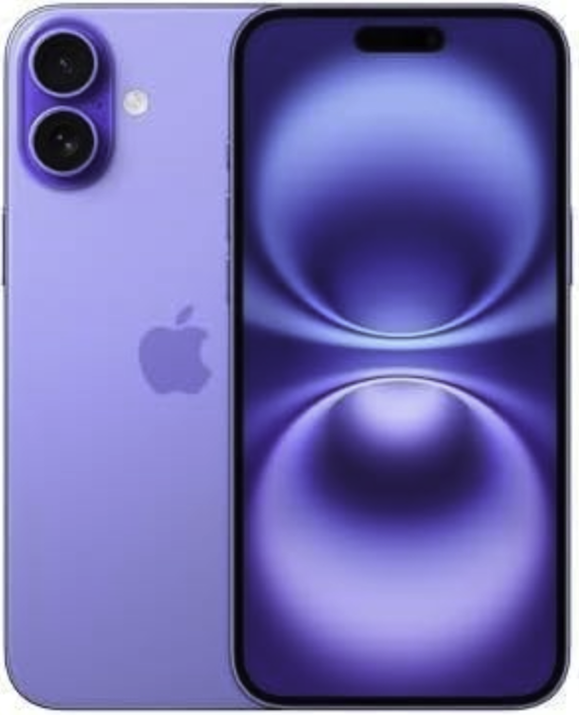
iPhone 16 Plus | Best overall phone for seniors
The iPhone 16 Plus is an outstanding phone for seniors, combining powerful performance with practical accessibility features. Its advanced A18 Pro chip helps it run smoothly for anything you need, from video calls to health apps. With storage options up to 1TB, there’s plenty of room for photos, music, and much more without constant cleanup. Not only do family photos and pet videos look stunning, but reading text is easier than ever before with its 6.7-inch Super Retina XDR display. You won’t have to carry around your charger with the iPhone 16 Plus either, since its battery can last a full day—even longer with lighter use.
The iPhone 16 Plus puts seniors first with built-in assistive technology like Dynamic Type for adjustable text sizes, Magnifier for reading small print, and VoiceOver for audible navigation. Crash Detection and Emergency SOS provide even more safety while on the go for seniors who travel frequently.
Between its senior-friendly display, reliable battery, and robust safety features, the iPhone 16 Plus is the best choice for older adults who want a premium smartphone that’s both capable and comfortable to use.
- Pros: Large display, long battery life, emergency safety
- Cons: Pricier smartphone, no physical buttons
Seniors save even more on devices and plans
Not only can seniors snag discounts on standard plans through major carriers, but may also qualify for a free phone. Eligible low-income consumers can get a free phone through the government’s Lifeline program, while others can take advantage of deals from carriers that offer free cell phones. Even the Big Three (AT&T, Verizon, and T-Mobile) provide trade-in deals that can get you a free smartphone.
Before you purchase your new phone, check out our guide to getting a free phone to see if you can save even more as a senior.
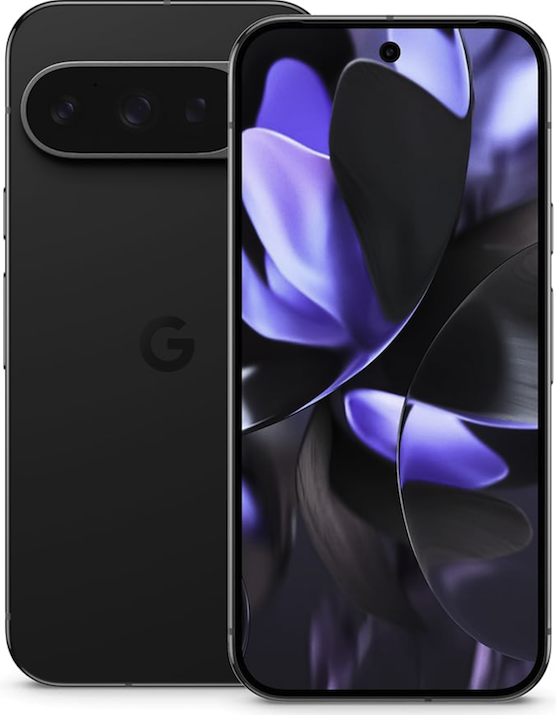
Google Pixel 9 Pro | Best display
The Google Pixel 9 Pro is a top-tier Android choice for tech-savvy seniors, packed with premium features and integrated AI assistance. Its 6.7-inch Actua display provides crisp and clear images that automatically adjust brightness for comfortable viewing. You won’t have to squint to see text or your grandkids on a video call anymore.
Just like the iPhone 16 Plus, the Pixel 9 Pro offers tools like TalkBack for voice-guided navigation, Magnification for zooming anywhere on screen, and Google Assistant that handles tasks with simple voice commands.
More practical perks for your day-to-day include Adaptive Battery to keep your phone powered for more than 24 hours, 7 years of software updates guaranteed to keep your phone current, and emergency services like Car Crash Detection, Emergency Sharing, and Medical ID.
- Pros: Biggest display, safety features
- Cons: Expensive, learning curve with AI features
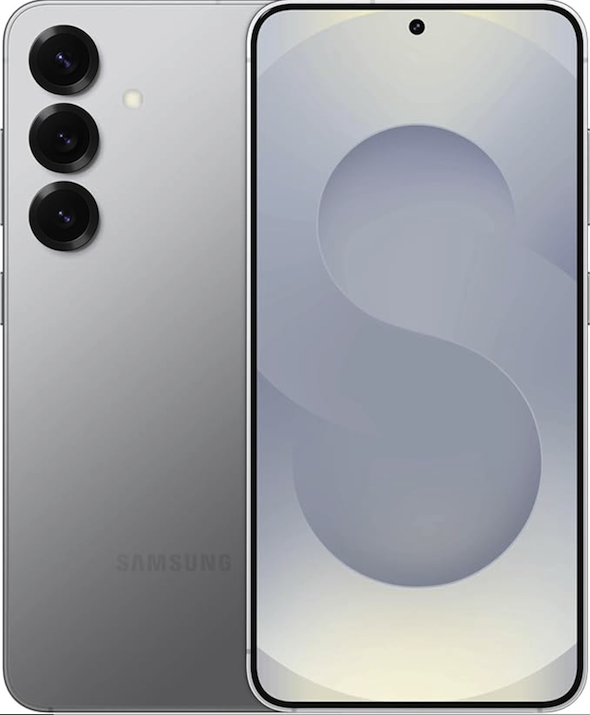
Samsung Galaxy S25 | Best value
The Samsung Galaxy S25 is among the best Android phones and is ideal for older users given its no-nonsense approach to cell phone use. The side button can be set as an emergency SOS trigger, just like on the Z Flip7, and you can zoom in anywhere on the 6.5-inch display with magnification. The long-lasting battery easily powers through a full day, and the one-handed mode makes typing and scrolling easier for those who prefer smaller devices.
While it has all the modern features like a great camera and 5G connectivity, Samsung’s clean interface avoids unnecessary clutter. It’s slightly cheaper than other flagship phones from top brands, making it our pick for best value. For seniors who want a full-featured smartphone that stays simple, the Galaxy S25 strikes the right balance.
- Pros: Physical side button, long-lasting battery life
- Cons: Slab design doesn’t fit in pockets
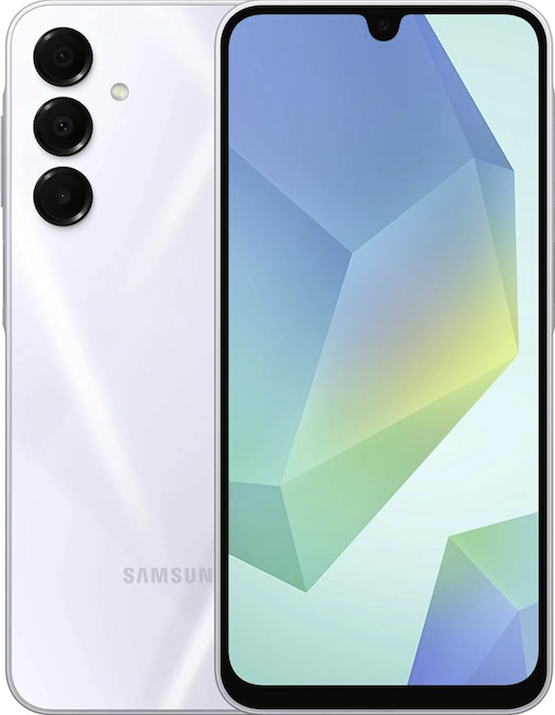
Samsung Galaxy A16 | Best budget smartphone
This budget-friendly smartphone keeps things easy with a 6.5-inch HD+ display that's perfect for reading and video calls. As one of the cheaper smartphone options, the Samsung A16’s Easy Mode includes large icons and text on the homescreen, while the brightness automatically adapts to your surroundings, ensuring comfortable viewing anywhere.
Its surprisingly powerful 5,000mAh battery lasts all day, and the emergency SOS button (activated by pressing the side key twice) provides peace of mind. It also comes with a decent 50MP main camera to capture clear family photos, and a rare headphone jack so you can use your favorite wired headphones without any extra adapters.
- Pros: Cheap smartphone, uncomplicated accessory use
- Cons: Lower-resolution cameras
Video calls can be a fun way to enrich social connections. Learn how to FaceTime with friends on Android.
Best basic and flip phones for seniors
From high-tech smartphones to classic flip phones, pick exactly what fits your lifestyle. If you want to keep things simple, basic phones still offer reliable service without the fuss.
Top basic and flip phones for seniors
 |
Jitterbug Flip2 | Best basic flip phone | See at Amazon |
| |
Samsung Galaxy Z Flip7 | Best modern flip phone | See at Amazon |

Jitterbug Flip2 | Best flip phone for seniors
The aptly-named Jitterbug Flip2 is a small, budget-priced flip phone that performs calling and texting with ease. Its modest specs include a 3.2-inch display alongside 16GB of internal storage space. There's an 8MP rear-facing camera and a 5MP front-facing selfie camera.
Internet connectivity isn't great, so the Jitterbug Flip2 is better as a basic feature phone. And the camera quality pales compared to even most budget Android or Apple iPhone devices. Yet, it's unfair to contrast a flip phone and a smartphone—so if you don’t need the high-tech features, don’t worry about them.
- Pros: Flip phone, extremely affordable, good for calling and texting
- Cons: Not a smartphone, only from Lively
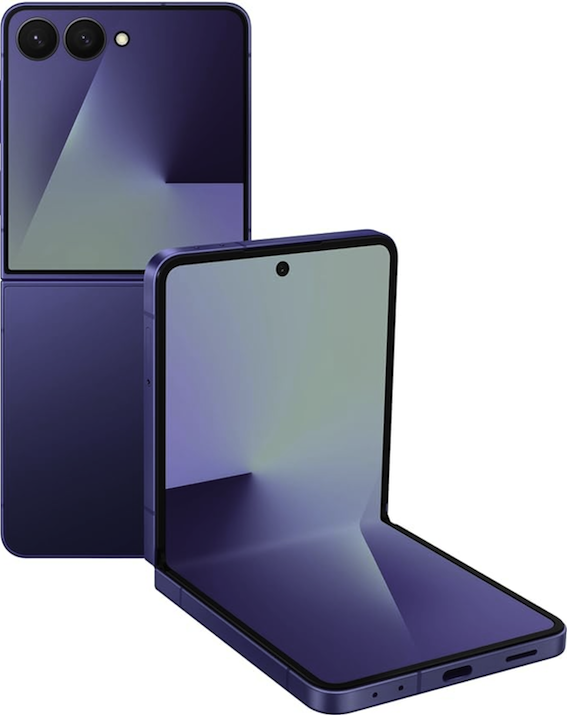
Samsung Galaxy Z Flip7 | Best compact design
The Samsung Galaxy Z Flip7 is the best flip phone for seniors who want a large display without a bulky phone. Its clamshell design makes it compact and pocket-friendly when closed, opening to reveal a full 6.7-inch touchscreen.
This phone is easy to use with bigger icons on the homescreen and larger text. It also comes with helpful tools like magnification and voice commands to make navigation straightforward. Better yet, the outer cover screen shows notifications, time, and weather at a glance, so you don’t need to open the phone for quick checks.
For safety, the side button can be set to call emergency contacts with a quick press, and the durable hinge withstands daily use. Its battery life lasts all day, and the clear cameras take sharp photos of Kodak moments. While it’s more advanced than basic senior phones, the flip design adds a layer of simplicity without overcomplicating the phone itself.
- Pros: Compact flip phone, Emergency contact side button
- Cons: More expensive than basic brick phones
Best phones with emergency and health features
While many Android and iOS devices work well for older adults, senior-specific mobile phones offer niche features like an SOS button, and larger physical controls. Here are the best phones designed with emergency and health features in mind for older adults.
Top phones with health features
| |
Jitterbug Smart4 | Best for emergencies | See at Amazon |
 |
RAZ Memory Cell Phone | Best for memory help | See at RAZ Mobility |
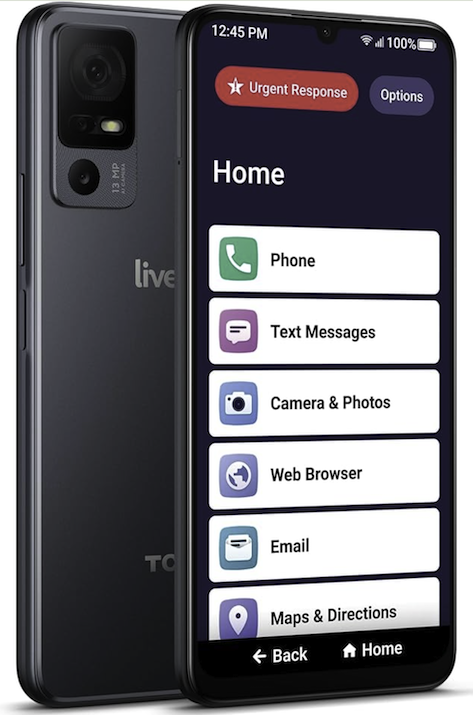
Jitterbug Smart4 | Best for emergencies
Although Jitterbug isn’t the only device manufacturer focusing on senior cell phones, it offers some of the top options. Its Smart4 is an easy-to-use mobile phone with a large screen, voice-typing functionality, and a slew of safety features. These features include SOS buttons for urgent response, urgent care, fall detection, and even a personal operator. Jitterbug’s Smart4 is hearing-aid compatible with an M4/T4 rating and includes a powerful speaker. The large 6.6-inch screen, simplified menu, and large text foster clear readability.
This device is exclusive to mobile carrier Lively, but there’s potential for it to work with another carrier. The Jitterbug Smart4 only offers 4G LTE support, but that should be adequate for most people. While this device isn’t as robust as options from Samsung, Google, and Apple, its usability makes the purpose-built Smart4 an excellent choice for anyone older looking for something clear and direct.
- Pros: Senior-specific health and safety features, easy mode, loud speakers
- Cons: Only available from Lively, limited to 4G LTEView on Amazon
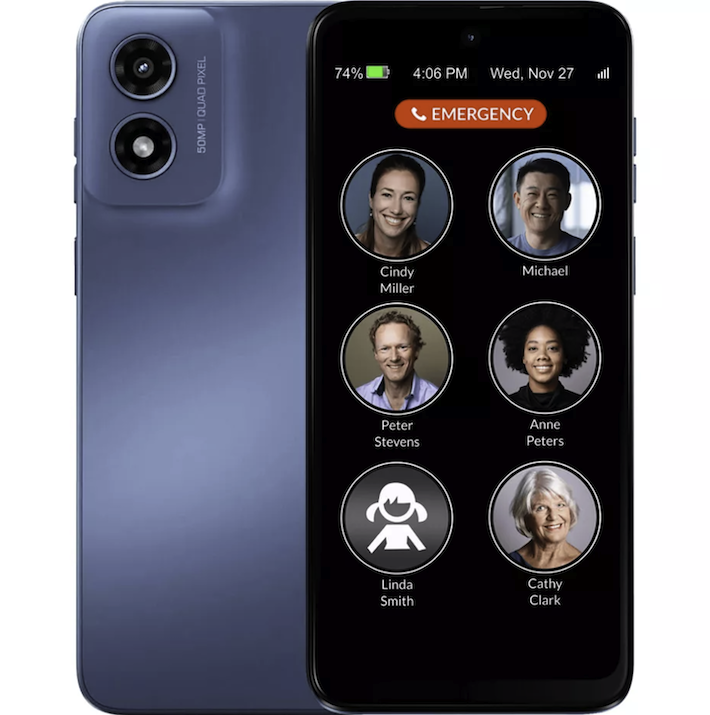
RAZ Memory Cell Phone | Best for memory help
Designed specifically for seniors with dementia or memory impairments, the RAZ Memory Cell Phone strips away all complexity, focusing only on essential communication. Unlike traditional smartphones, it features large, photo-based buttons pre-programmed with familiar faces, eliminating the need to remember names or numbers.
Its main safety features include:
- One-touch calling with customizable photo buttons
- No internet, apps, or touchscreen to avoid accidental use
- Extra-loud speaker and hearing aid compatibility (M3/T4)
- Optional GPS tracking (via caregiver’s smartphone)
- 10-day standby battery life (no daily charging stress)
- Pros: Best phone for health and emergencies, large buttons
- Cons: Not a smartphone
Are you receiving unwanted calls? Learn how to stop robo calling and block a number on Android.
Best cell phone plans and carriers for seniors
Our favorite cell phone plans for seniors hail from smaller carriers that operate on large networks like Visible, Mint Mobile, Consumer Cellular, and Lively.
Major carriers also offer compelling senior plans, with the best being T-Mobile’s 55+ discount. Seniors can snag one of T-Mobile’s standard plans at a serious discount. AT&T’s singular senior plan comes at a low price, while only Florida-based seniors can access Verizon’s 55+ plan. When searching for any plan, look for deals such as AARP discounts.
|
#1
|
Verizon

Unlimited Plan for 55+
$45.00/mo
+ Taxes & Fees. For age 55+ in Florida with AutoPay.
+ $40 Upfront
|
|
#2
|
T-Mobile

Essentials | Unlimited 55+ YRS ONLY
$40.00/mo
with AutoPay. Taxes and fees NOT included.
|
|
#3
|
AT&T

Unlimited 55+
$60.00/mo
with AutoPay & Paperless billing discount
+ $35 Upfront
|
|
#4
|
Mint Mobile

6GB Mint 55+ Data Plan
$15.00/mo
$45.00 upfront payment for 3 months <br>(equals to $15.00/month). <br>Intro pricing for new customers only.
|
How to choose the best phone for seniors
Here’s what to consider when selecting a phone suitable for older adults.
1. Price
Phones cost anywhere from under $100 to well over $1,000. Set a budget, then find a device within that price range. You can see from our picks that there’s a phone option for any price point.
2. Ease of use
Depending on user familiarity, a streamlined phone works well. For instance, large buttons, a big screen, and simple menus make everyday navigation a breeze. Folks with hearing or vision impairments should consider a handset with hearing aid compatibility, a loud speaker, and large font options.
3. Android vs. iOS
Generally, smartphones fall into two camps: Android and iOS. Apple iPhones exclusively run iOS, while many manufacturers, including Google, Samsung, and Motorola, offer Android devices. iPhones integrate better with Apple laptops, desktops, and iPads. But there are more choices in each pricing tier with Android. Typically, we recommend sticking with the operating system you know best.
4. Smartphone vs. basic phone
Although smartphones are all the rage, a simple phone for calling and texting provides fundamental communication capabilities. Additionally, basic phones, like flip phones, cut out the clutter for an easier-to-use experience.
5. Senior-specific vs. general-purpose
While companies like Jitterbug make purpose-built senior cell phones, most devices work just fine. Simply pick up an Android, iPhone, or “dumb” phone, then add any required apps and customize settings like font size or audio. While senior-oriented phones come ready to use out of the box, they’re often limited in available features, so we suggest general smartphones for tech-savvy seniors.
6. Hardware specifications
What’s under the hood dictates a phone’s capability to multitask and run demanding apps. Here are the hardware specs to look at:
- Processor: Enables running demanding apps and games.
- RAM: Aids multitasking, like switching between apps.
- Camera: Determines picture and video quality.
- Screen: Larger and higher resolution screens are easier to read.
- Battery capacity: Bigger batteries operate longer away from a charger.
Best phones for seniors: FAQs
What are the best phones for seniors?
Our favorite smartphones for seniors include the iPhone 16 Plus, Google Pixel 9 Pro, and Samsung's Galaxy S25. The best basic phones for seniors with emergency features range from the Jitterbug Smart4 and Flip2, to the RAZ Memory Cell Phone.
How do seniors get free phones?
Seniors can get free phones through the Lifeline program, a federal initiative that provides subsidized phone service and devices to low-income individuals and families. Eligibility often includes participation in other government assistance programs like Medicaid, SNAP, or SSI.
Seniors can also explore discounts offered by major carriers or explore options like MVNOs (mobile virtual network operators) or AARP partnerships.
Do any phones have built-in emergency alert buttons?
Several senior-friendly phones have built-in emergency alert buttons. The Jitterbug Smart4 and RAZ Memory Phone offer simple one-touch SOS buttons, while iPhones, Pixels, and Galaxies add car crash and even fall detection with automatic alerts.
For straightforward emergency access or premium smartphones for advanced protection, choose one of Jitterbug’s devices or opt for the RAZ Memory Cell Phone.
What are the best cell phone plans for seniors?
The best cell phone plans for seniors include the Big Three’s offerings, as well as cheap unlimited plans from smaller MVNOs that operate on the same networks.
We recommend T-Mobile 55+ discounted plans for the best value and fun deals every Tuesday. AT&T also offers a cheaper nationwide senior plan, and Florida-based senior citizens can benefit from Verizon’s limited offering.
Jessica Santero
Staff Writer

Thousands of cell phone plans unpacked. All the facts. No surprises.





.png?w=280&h=280&usm=20&usmrad=0.8&fit=crop "The Best Cheap Phone Plans for 2026: We Tested Them All to Help You Save")


