
I've been on multiple group trips, and I've used Splitwise every single time. I thought I knew exactly what expense-splitting apps were capable of—until I found Splid. I deleted Splitwise the same week. I even felt a small twinge of guilt for every friend I've ever made download something inferior.
Splid is completely free, requires no account, and still manages to outperform every other must-have travel app I've tested. It's one of those rare finds that makes you wonder why you ever settled for anything else.
Download Splid now:
📱 There's a best app for everything—let us find them for you
With thousands of new apps released every month, finding the ones actually worth your time is a job in itself. We do that job so you don't have to. Check out our monthly roundup of the best new apps for iPhone and Android to stay ahead of the curve.
Getting started: No account needed
Here's what sets Splid apart from everything else: you don't need an account to use it. No email address, no password you'll forget three weeks after the trip, no setup screen asking for permissions before you've even opened the app properly.
You open Splid, create a group, give it a name, and add participants—either from your contacts or by typing names in manually. You can also generate a group code and let others join. I was tracking expenses in under two minutes. For a group trip where you're trying to get five people organized at once, that friction-free setup makes a real difference.
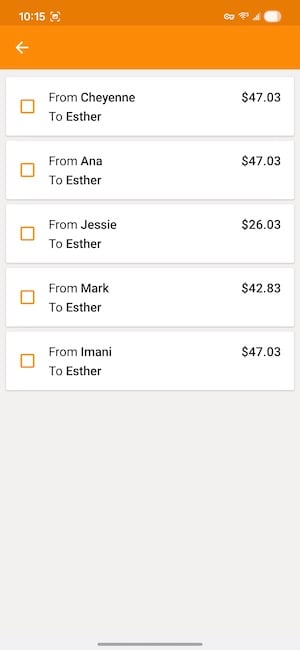
Image: Jessica Santero | WhistleOut
Not sure how to update your apps?
Keeping your apps up to date ensures you're always getting the latest features, bug fixes, and security improvements. Learn how to update the apps on your iPhone and your Android. It takes less time than you think.
Tracking expenses in real time
Tap the orange plus button to add a new expense, log a payment between group members, or add someone new to the split. Every expense updates in real time, so everyone in the group always sees an accurate running total—no one has to ask "wait, who paid for dinner?" at the end of the night.
Splid also handles mid-trip joiners correctly. If someone joins the group a few days into the trip, it doesn't apply earlier expenses to them. It only counts them in from the point they joined, which sounds like a small detail until you're the one who had to manually recalculate that in a spreadsheet on a previous trip.
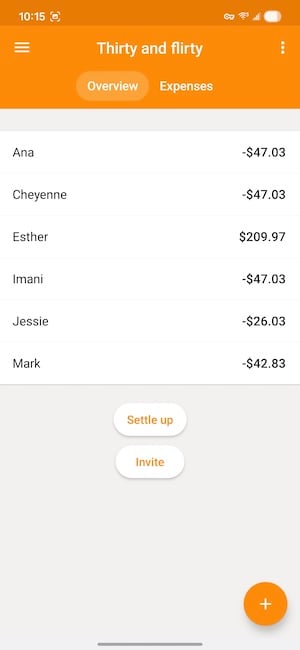
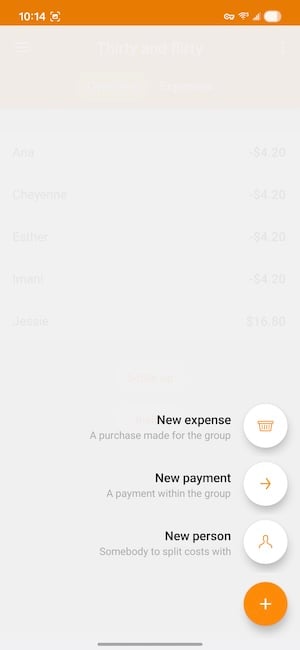
Image: Jessica Santero | WhistleOut
Settling up and exporting your summary
When the trip ends, tap "Settle Up," and Splid calculates exactly who owes what to whom, minimizing the number of individual transfers so you're not all sending $4.50 to six different people. As each payment goes through, you tick it off and it disappears from your to-pay list. Clean, satisfying, done.
The expense summary export is the feature I didn't know I needed until I used it. Pull a full trip breakdown as a PDF or Excel file in seconds. I usually track travel spending in a running Google Sheet, but Splid's export is cleaner, faster, and honestly better-looking. It's the kind of feature that makes you realize how much unnecessary work you've been doing on every trip before this one.
Splid is completely free. No premium tier, no paywall on any feature that actually matters. It beats Splitwise, it beats Tricount, and it now lives permanently on my phone. Download it before your next trip and don't look back.
How WhistleOut reviews apps
Our mobile experts scour the app stores, looking for the best new apps for Android and iPhone. Before recommending an app, we use it for at least one full workday—and often much longer—testing core functionality and evaluating whether it delivers on its promises.
- Easy to use
Great apps simplify your phone. We select tools that don't require a complicated instructional manual to figure out. - Affordability
We lean into quality apps that don't cost a fortune. Extra points if they're free. - Hands-on testing
We tested Splid while tracking real group expenses across a week-long trip to Dublin, Ireland.
Jessica Santero
Staff Writer

Find a better phone plan
Thousands of cell phone plans unpacked. All the facts. No surprises.


.png?w=280&h=280&usm=20&usmrad=0.8&fit=crop "Best Cell Phone Deals for June 2026: Get the New iPhone 17 for Free")



