
I tested the top travel apps to see if they are worth the hype while planning a real trip to Dublin, Ireland, with my girlfriends. Trip planning is stressful enough on its own, and adding a group into the mix is even moreso.
Keeping track of tickets, hotel bookings, and food allergies can quickly become a travel nightmare. But it doens't have to be. Planning a trip with your people is supposed to be part of the fun. These apps let you focus on the fun of planning without getting bogged down by the burden of organization.
I'm honestly mad I didn't find some of them sooner.
Why you can trust WhistleOut
.svg)
15+
years of mobile industry experience

900+
published wireless guides

35+
firsthand carrier reviews
We've been around since the birth of the iPhone. Along the way, we've learned how to spot the best deals for your wallet (and your sanity). We spend our days researching informative guides and writing insightful reviews on every kind of wireless plan, distinguishing what matters from what doesn't. We played around with these plans before recommending them, ensuring they're worth your hard-earned money.
Want to know more? Check out how we review every cell phone plan we rank.
 How I tested the top travel apps
I put these apps to the test while planning a week-long trip to Dublin, Ireland, with my closest friends. Here's what I used each app to do:
- Created group polls to align on dates and activities
- Built a shared master itinerary
- Generated a packing list tailored to Dublin's weather and our planned activities
- Scouted savory pubs and local spots for authentic Irish food
- Tracked and split shared expenses across the group
- Tested communication tools
I started by Googling the best apps, but out of the 9 most recommended apps, only 5 are actually worth downloading (and even keeping).
Quick comparison: Best group travel apps at a glance
Best group travel apps in 2026
| App | Best for | Price | Available on |
|---|---|---|---|
| Wanderlog | Itinerary planning | Free, Pro starts at $39.99/year | iOS, Android, Web |
| TripIt | Linking bookings | Free, Pro starts at $49/year | iOS, Android |
| Splid | Expense splitting | Free, Pro costs a one-time purchase of $4.99 | iOS, Android |
| Splitwise | Expense tracking | Free, Pro starts at $3.99/month | iOS, Android, Web |
| PackPoint | Smart packing lists | Free, costs a one-time purchase of $2.99 | iOS, Android |
| Group communication abroad | Free | iOS, Android |
Not sure how to update your apps?
Keeping your apps up to date ensures you're always getting the latest features, bug fixes, and security improvements. Learn how to update the apps on your iPhone and your Android. It takes less time than you think.
Best app for itinerary planning
Wanderlog: The all-in-one trip planner that genuinely surprised me

I hadn't used Wanderlog before this round of testing, and I was genuinely floored. A colleague used it to plan a trip to Germany and raved about it, so I went in with high expectations. It met my expectations, and then some.
There is a setup process, and it's not exactly quick. But hang in there because it's very much worth it. You start by going through the initial Wanderlog onboarding. It walks you through all of Wanderlog's features and then gives you a separate tutorial on how to use each one (you can skip them too).
It took me a solid six minutes before I even started planning anything. If you're the impatient type, prepare yourself. But once you're through it, you're rewarded with what I can only describe as a travel agent in a single app.
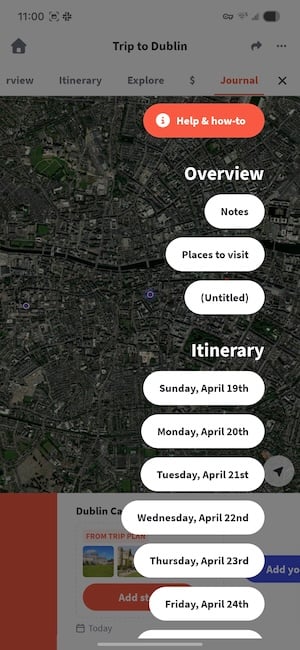
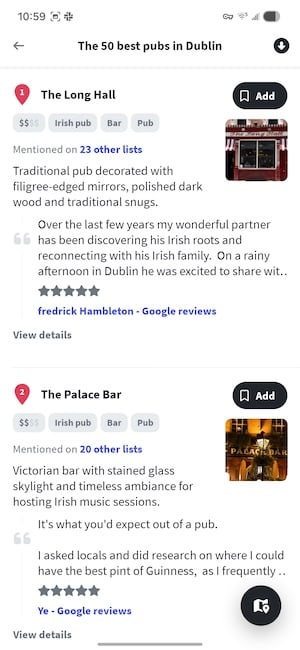
Image: Jessica Santero | WhistleOut
Multiple people can add places, build out daily plans, and view everything on a shared map simultaneously. This map could easily be Wanderlog's top feature. For Dublin, I used the integrated map to plan each day geographically, plotting out the Guinness Storehouse, a walking tour of Temple Bar, and (without fail) a handful of savory pubs for some proper Irish food along the way.
The suggested activities were genuinely useful and not just the obvious tourist traps, which was appreciated since I ended up being the main planner.
There's even a journal built into the Wanderlog app. However, if you're a paper-and-pen person like me, you probably won't find it useful.
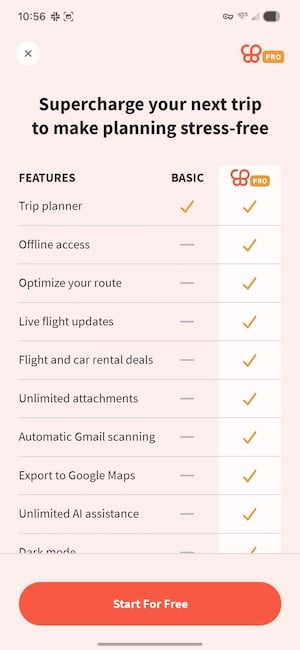
Image: Jessica Santero | WhistleOut
Wanderlog's free version offers a lot, but some of its best features (like offline access) are locked behind the Pro subscription. The smart move is paying for Pro during the month of your trip, then cancel and keep the app for future planning.
Wanderlog is absolutely worth downloading, using, and keeping on your phone. If you want one app to handle your entire group trip from planning to arrival, look no further. Wanderlog makes collaborative travel planning actually enjoyable, and that's saying something.
Worried about making sure your flight isn't cancelled? Check out the best flight tracking apps available now.
Don't let international data charges ruin your trip
Roaming fees can turn a $500 trip into a $700 one before you've even unpacked. Before you leave, make sure you've got the right plan in place.
Check out the most affordable phone plans with international perks to stay connected without coming home to a massive phone bill.
|
T-Mobile

Essentials Saver
$50.00/mo
with Auto-Pay - Taxes & Fees NOT included
|
|
Verizon

Unlimited Plus
$70.00/mo
+ Taxes & Fees. Price includes AutoPay & Paperless discount.
+ $40 Upfront
|
|
AT&T

Value 2.0℠
$50.00/mo
+ $35 Upfront
|
Best app for bookings
TripIt: Your master itinerary, built automatically from your inbox

TripIt was built with email confirmations in mind. Let's say you booked the flight, your friend booked the hotel, and someone else handled the rental car. But everyone has confirmation emails scattered across different inboxes. Tripit automatically gathers your information and creates a tailored itinerary for you.
Our tester, Adam Roach, used the free version to plan a trip to Paris with one other person. He found it especially useful for managing reservations, organizing flights, and planning activities entirely through the app.
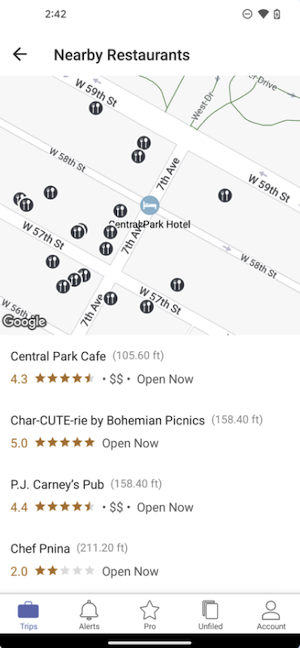
Image: Google Play Store
The best feature on Tripit is the email forwarding. Forward your confirmation emails to TripIt, and it automatically pulls in all the details and assembles them into a clean, organized itinerary. As Adam put it, "I like how you can email your confirmations and it auto pulls in that information."
For Adam, TripIt became the go-to reference point for everything trip-related:
"It helped me feel more in control and have a one-stop spot for all my reservations and plans."
It's very intuitive and easy to share, so all parties in a group always know where to look instead of digging through a week's worth of confirmation emails.
The free version covers everything most travelers need. Adam would use it again without hesitation, and after seeing how cleanly it handles the organizational side of a group trip, it's easy to see why.
Upgrade to a new phone and spectacular camera
If you've been meaning to upgrade before your next trip, now's a good time to look at what's out there. Check out our picks for the best camera phones. Whether you want pro-level zoom, low-light performance, or just something that doesn't make your friends look blurry at golden hour.
iPhone 17e 256GB
- 6.1 inch display
- Rear Camera: 48MP
- Front Camera: 12MP

iPhone 16 128GB
- 6.1 inch display
- Rear Cameras: 48MP, 12MP
- Front Camera: 12MP

iPhone 17e 512GB
- 6.1 inch display
- Rear Camera: 48MP
- Front Camera: 12MP


Best app for splitting expenses
Splid: The expense app I'm genuinely mad I didn't know about sooner

I've been on multiple group trips, and I've used Splitwise every time. I thought I knew what expense-splitting apps were capable of. Then I found Splid, and I immediately deleted Splitwise. I even felt the need to apologize to every friend I've ever split costs with for making them use something inferior.
Splid is superior because you don't need an account to use it. That means you don't have to add an email address or password you'll forget shortly after setting it. All you have to do is create a group, give it a fun name, and add participants. Add members directly from your contacts or by typing names in manually. Plus, you can share a group code, and others can join. That's literally it.
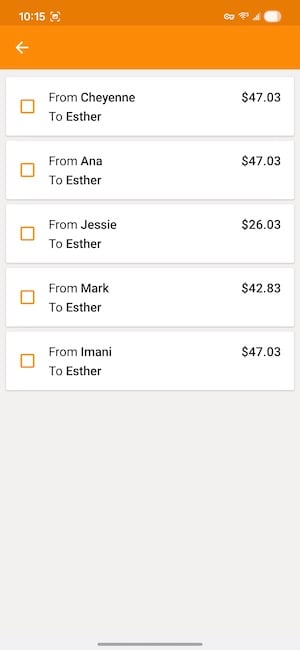
Image: Jessica Santero | WhistleOut
Tap the orange plus button to add a new expense, log a payment between group members, or add someone new to the split. Every expense is tracked in real time. When the trip is over, tap "Settle Up" and Splid tells you exactly who owes what to whom. It even remembers if someone joined later and doesn't make them pay for things they didn't participate in.
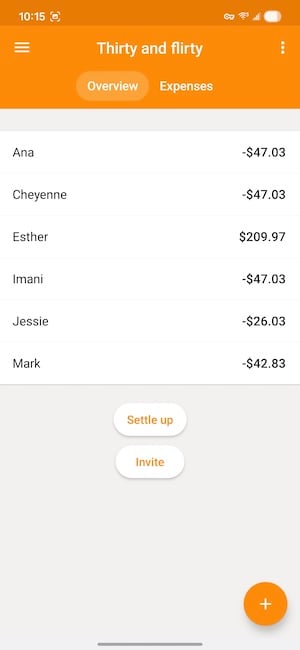
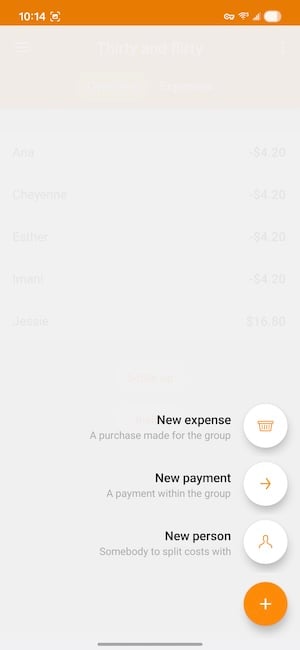
Image: Jessica Santero | WhistleOut
What I love most is the expense summary export. When you're done, you can pull a full breakdown as a PDF or Excel file. I usually track my travel spending in a running Google Sheet, but Splid's summary is cleaner, faster, and honestly looks better. As you settle up and send money to group members, you tick the box, and it disappears from your to-pay list.
Let me repeat, Splid is completely free. You don't need a premium tier for the features that actually matter. Without a doubt, Splid is the best expense-splitting app for group travel. In my opinion it beats Splitwise and Tricount (my usual go-to), and now lives permanently on my phone.
Planning a trip with someone you just met? That happens.
If Spring Break has you thinking about making new connections before you even pack a bag, we've got you covered. Check out our guide to the best friendship apps because sometimes the best trip starts with meeting the right people first.
Runner-up for expense tracking
Splitwise: A solid option if you're already in a group

I've used Splitwise on two different trips: Once deep water solo climbing in Mallorca, and once free diving in the Canary Islands. And it works well, but after testing Splid, I probably won't use it again.
The biggest downside to Splitside for me is the sign-up requirement. You need an email address to create an account, which means every time you delete and reinstall the app after a trip (because let's be real, that's what we all do), you're back to setup. It's minor, but it adds up.
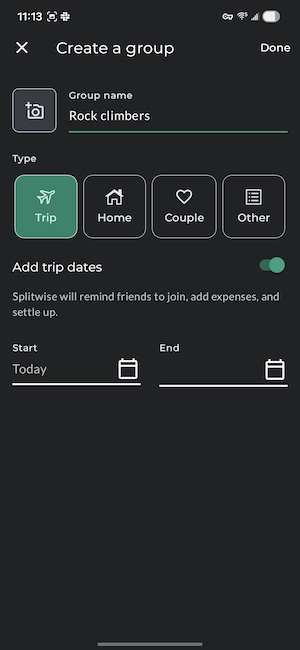
Image: Jessica Santero | WhistleOut
That said, there are two things Splitwise does that Splid doesn't. You can attach receipt photos directly to expenses, which is useful if you're keeping accurate records. And you can connect your bank account to settle up within the app. But to be able to access these features, you have to pay for Pro. If those features matter to you, Splitwise is worth keeping around and investing in.
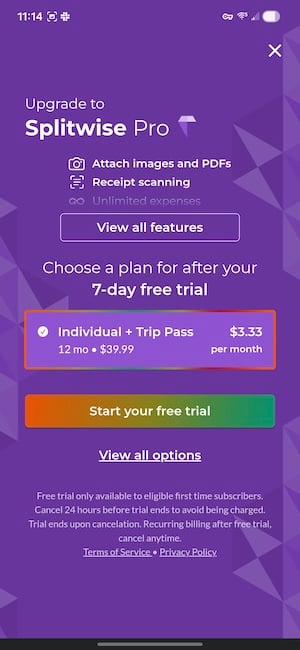
Image: Jessica Santero | WhistleOut
Splitwise is worth using if you're already in a Splitwise group with friends. Stick with it since there's no reason to switch mid-trip. But if you're starting fresh, Splid is the better first choice.
📱 Looking for more app recommendations?
We cover the best apps for every corner of your travel experience—from booking to navigating to staying in touch. Check out our full guide to the best apps to master travel for more picks that'll make every trip smoother.
Best app for packing lists
PackPoint: The app that's about to save someone in your group from themselves

I consider myself an excellent packer. I make lists, and I check them twice. I have never, in my adult life, forgotten my wetsuit on a surf trip, but my boyfriend has. So when I discovered PackPoint, I wasn't excited for myself—I was excited for every chaotic packer in every friend group who just needs a little structure.
PackPoint automatically generates a custom packing list based on your destination, trip dates, and planned activities. It factors in the weather forecast too, so if you're headed somewhere that's rainy and 50°F (say, Dublin in spring) it's not going to suggest you pack a sundress.
You just follow the list. For our Ireland trip, it nailed the layers-and-waterproof-jacket combo without me having to think twice about it.
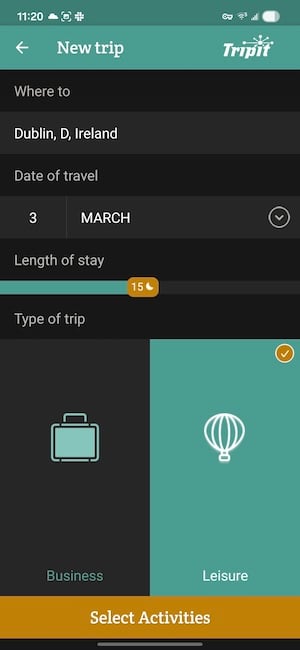
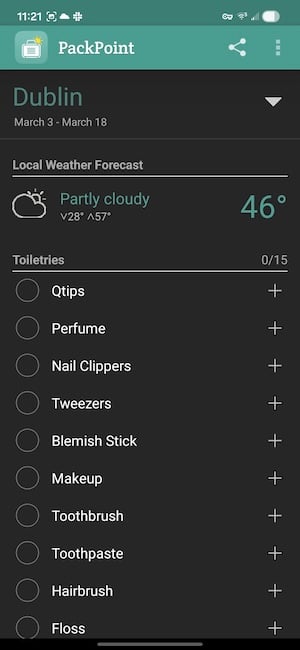
Image: Jessica Santero | WhistleOut
The Premium version adds TripIt integration, so your TripIt itinerary syncs directly with PackPoint and the packing list reflects your actual activities. Premium may not be worth paying for because how often are you really going to reference a packing list once you're already on the ground? But for the pre-trip planning phase, having everything connected is a nice touch.
PackPoint is worth it for both detail-oriented packers and travelers who just need to save time and get a solid packing list.
Best app for staying connected abroad
WhatsApp: The no-brainer for group communication without surprise charges
If you're traveling internationally with your group, close your native Messages app and use WhatsApp instead.
WhatsApp runs entirely on data, which means you're not triggering per-message international charges when you're abroad. That might sound counterintuitive (data sounds expensive, right?), but data is actually cheap. It's downright affordable if you're using a travel or international eSIM. Besides, most travel eSIMs don't even include texts at all.
WhatsApp also works over Wi-Fi, which means even without a data plan, you can probably find a McDonald's somewhere in the world and stay in touch with your group. Group chats, voice messages, photo sharing, location pinning, it's all there, and it's all free. WhatsApp is my personal favorite among international messaging apps, and for group travel, it's the easiest way to make sure everyone can communicate no matter what carrier they have.
For more on staying connected while you travel, check out our full guide to the best messaging apps.
Apps you've seen recommended, and whether to bother
Here's a fair warning: While researching the best travel apps, a lot of lists floating around online are either outdated or haven't been hands-on tested. Here's what I found when I actually downloaded and used the apps that keep showing up in those roundups.
Flowtrip: Interesting concept, not quite there yet
Flowtrip promises you can plan a perfect trip in one minute using AI. It sounds too good to be true (spoiler, it is). Basically, you answer a quick survey about your budget, vibe, and accommodation preferences, and it supposedly generates a full itinerary for you.
I went through the whole process for our Dublin trip, and the idea score feature is fun. But then it suggested there were only three restaurants in all of Dublin. That's right, only three in a city famous for its pub culture and food scene. That's a data problem that makes the app hard to trust for real trip planning.
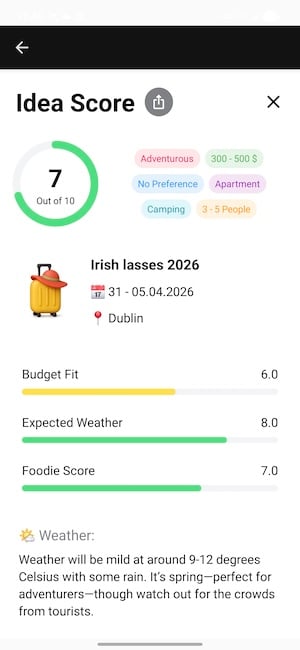
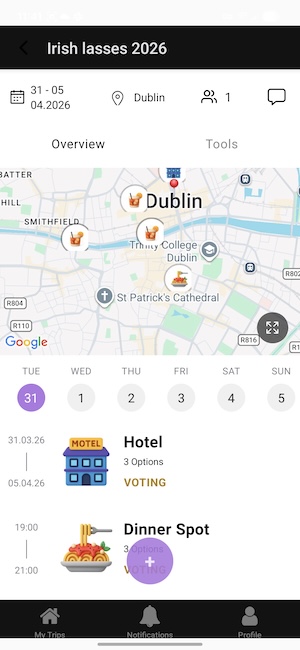
Image: Jessica Santero | WhistleOut
It does have a live poll feature where group members can vote on dates in the app, and a comments section for trip ideas, but you can replicate both with a WhatsApp group. Skip Flowtrip for now unless the underlying location data improves significantly.
Let's Jetty and SquadTrip: Don't waste your time
Both Let's Jetty and SquadTrip show up regularly in travel app roundups, and both are web-based. That means you're opening a browser every time you want to check your trip plans, not an app.
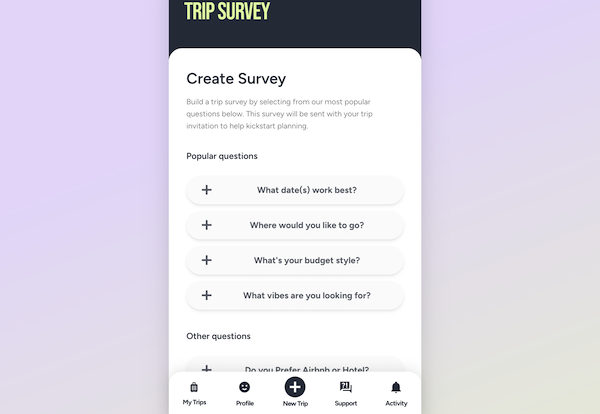
Image: Jessica Santero | WhistleOut
Let's Jetty lets you create polls around dates and activities, but you can already do that in WhatsApp. SquadTrip aims to centralize RSVPs and payment collection and has a polished look, but the functionality doesn't hold up next to a dedicated app like Wanderlog or Splid. Neither is worth adding to your routine when you can download better, purpose-built apps for free away.
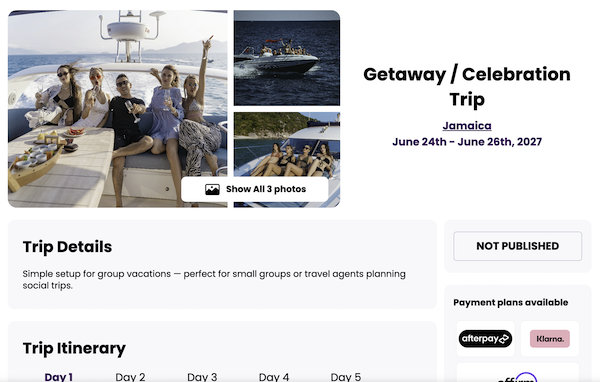
Image: Jessica Santero | WhistleOut
What happened to Troupe?
Troupe used to be one of the best travel apps, but it isn't available anymore. It was launched by JetBlue in 2022 and allowed groups to vote on destinations and dates in-app. It has since been discontinued and is no longer available for download.
Best group travel apps: FAQ
What is the best group travel planning app?
Wanderlog is the best all-around group travel planning app, with collaborative itineraries, an integrated map, and activity suggestions all in one place. The free version covers most of what you need, so there's no need to spend extra.
Is there a free group travel app?
Yes, Wanderlog and Tripit are free group travel apps.
What app helps split vacation costs?
Splid is the best app for splitting vacation costs. It's completely free, requires no sign-up, and generates a clean settle-up summary at the end of your trip. Splitwise is a close second, though.
Is there an app that tracks group trip expenses?
Both Splid and Splitwise track group trip expenses in real time. Splid is the easier option, while Splitwise is worth considering if you want receipt photo attachments or bank account linking.
Jessica Santero
Staff Writer

Find a better phone plan
Thousands of cell phone plans unpacked. All the facts. No surprises.


.png?w=280&h=280&usm=20&usmrad=0.8&fit=crop "Best Cell Phone Deals for June 2026: Get the New iPhone 17 for Free")



