
I love to travel, but I hate planning—and going on a trip requires a lot of it. I used to spend hours building a Google Doc with links and booking reference codes, top activities and sights to see—all to never reference it again once abroad.
Little did I know there is an app that does it all, as if it were my personal pocket travel agent. After putting Wanderlog to the test, I guarantee it'll become your go-to app for everything travel. Not only does it save time from being wasted on pre-trip admin, but it's extremely helpful during a trip, too. Plus, you can use the app to coordinate with a group or use it as a solo traveler.
Honestly, I'm annoyed it took me this long to find Wanderlog.
Download Wanderlog now:
Ready to take your phone (and data) abroad?
Wanderlog is only as useful as your ability to access it—and roaming fees can rack up fast if you're not on the right plan. That way, you can use your phone stress-free and make sure a surprise phone bill isn't the souvenir you bring home.
Check out our guide on how to prepare your phone for travel, and the best phone plans with international data.
|
T-Mobile

Essentials Saver
$50.00/mo
with Auto-Pay - Taxes & Fees NOT included
|
|
Verizon

Unlimited Plus
$70.00/mo
+ Taxes & Fees. Price includes AutoPay & Paperless discount.
+ $40 Upfront
|
|
AT&T

Value 2.0℠
$50.00/mo
+ $35 Upfront
|
What is Wanderlog?
Wanderlog is a free collaborative trip planning app that lets you build a shared itinerary, plot stops on an interactive map, and coordinate activities with your group.
Wanderlog setup takes six intense minutes
Wanderlog has an onboarding process, and it is not the fastest among apps. It walks you through all the app features with individual tutorials for each one. You can skip them (and on your second trip, you probably will), but they are really helpful when you use the app for the first time.
I clocked six minutes from download to actually planning something. I may have skipped one (or two) tutorials, but it certainly was a detailed walkthrough. If you're impatient, it may seem frustrating, but trust me, it's worth it.
Once you're settled into the app, Wanderlog makes trip planning a cinch. The shared Google Doc you spent two hours building for your group trip? Gone, in a matter of seconds, and replaced by an app that actually works.
Group setup is even easier with Wanderlog
Wanderlog is even more impressive if you're planning a group trip. Everyone in the party needs to download the app, and all you have to do is create a trip and send out the invite email.
You and your group all have access to the same trip in Wanderlog, and see the same plan in real time. One person can pin an interesting restaurant, someone else drops in on the day trip, and it all stays in one organized place without anyone having to deep dive into email inboxes.
For our Dublin trip, I was the main planner, and Wanderlog made it manageable rather than all-consuming and anxiety-inducing. I could see exactly what each day looked like, spot the gaps, and fill them in without ever leaving the app to cross-reference another tab or dig through another email chain.
Not sure how to update your apps?
Keeping your apps up to date ensures you're always getting the latest features, bug fixes, and security improvements. Learn how to update the apps on your iPhone and your Android. It takes less time than you think.
The map alone might be worth the download
Most itinerary apps give you a list, but Wanderlog gives you a full-fledged (and functioning) map. It's no small difference either, and matters more than you'd expect once you're actually on the ground trying to figure out where to go next.
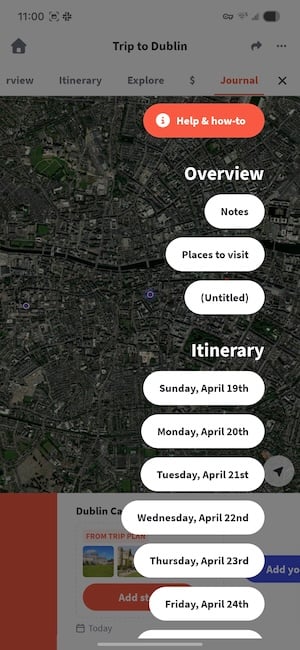
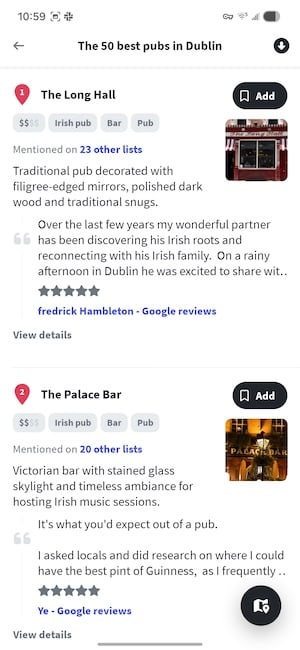
Image: Jessica Santero | WhistleOut
Seeing your stops plotted geographically means you can build each day so you're not doubling back across the city for no reason. For Dublin, I used the map to cluster activities by area: the Guinness Storehouse and Kilmainham Gaol on one day, a walking tour around Temple Bar on another, and a very deliberately planned pub crawl route on a third. It also made it much easier to get the rest of the group on board, because showing someone a visual plan is a lot more persuasive than sending them a wall of text in a Google Doc.
The built-in activity suggestions are worth calling out, too, because they weren't just the obvious tourist highlights. Wanderlog surfaced local spots I wouldn't have found on my own.
There's also a built-in journal for documenting the trip as you go. I'm more of a paper-and-pen person, so I skipped it, but it's best for the group historian who wants memories and an itinerary to live in the same place.
Free gets you far, but Pro gets you offline
The free version covers the entire planning phase, including the shared itinerary, collaborative map, activity suggestions, and journal—all without spending a cent. For everything leading up to the trip, you genuinely don't need to upgrade.
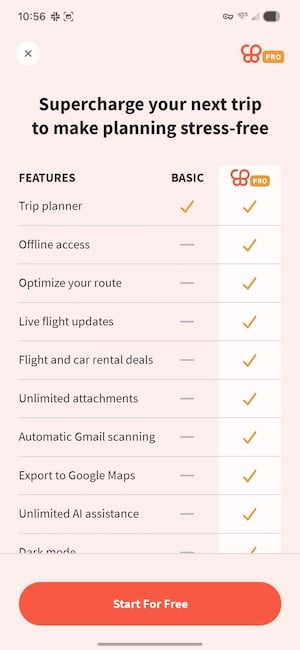
Image: Jessica Santero | WhistleOut
However, free starts to feel limiting during the trip itself, especially when offline access is more important. Pulling up your itinerary without a data connection sits behind the Pro paywall, which is a game-changer when you're abroad, navigating an unfamiliar city, and can't always count on a reliable signal. The last thing you want is to hunt for Wi-Fi to load your museum tickets.
Don't buy a full year upfront. Pay for Pro for the month of your trip, then cancel. At $39.99 a year, that's just over $3 for a single month of offline access exactly when you need it, with the free version handling everything else before and after.
Wanderlog is worth downloading, keeping, and using for every trip you plan from here on out. It replaced my Google Docs, my scattered browser bookmarks, and endless hours of pre-trip admin. If you're the person who always ends up organizing everything for everyone, this app is going to feel like a very long-overdue promotion.
How WhistleOut reviews apps
Our mobile experts scour the app stores, looking for the best new apps for Android and iPhone. Before recommending an app, we put it to the test to evaluate whether it delivers on its promises.
- Easy to use
Great apps simplify your phone. We select tools that don't require a complicated instructional manual to figure out. - Affordability
We lean into quality apps that don't cost a fortune. Extra points if they're free. - Hands-on testing
We tested Wanderlog while planning a real week-long group trip.
Wanderlog FAQs
Is Wanderlog or TripIt better?
Wanderlog is better for building and planning your trip since it includes collaborative itineraries, map plotting, and activity suggestions. TripIt is better for organizing confirmed bookings after you've made them. If you're serious about group travel, use both.
Is there a better route planner than Google Maps?
For trip planning, Wanderlog can be more useful than Google Maps, but only if you pay for Pro. You can plot multiple stops across multiple days and share the whole plan with your group, and even use it offline.
What is the best group travel itinerary app?
Wanderlog is the best travel itinerary planning app. It handles everything, from activity suggestions to shared maps.
Jessica Santero
Staff Writer

Find a better phone plan
Thousands of cell phone plans unpacked. All the facts. No surprises.


.png?w=280&h=280&usm=20&usmrad=0.8&fit=crop "Best Cell Phone Deals for June 2026: Get the New iPhone 17 for Free")



