

Anyone who has organized a trip knows the chaos that follows the bookings. There's the flight, the hotel, and the rental car, all with separate confirmation emails scattered across your inbox. Piecing it all together into a single coherent travel itinerary takes time. TripIt organizes your booking confirmation emails into a single itinerary.
Our WhistleOut tester, Adam Roach, used the free version to plan a family trip to Paris and was very impressed by how cleanly it handled organization. It helped him feel in control and gave him one reliable place to check everything. Instead of losing confirmation emails, just forward them to TripIt. It's one of the best apps for group travel for a reason.
Download TripIt now:
Ready to take your phone (and data) abroad?
TripIt is only useful if you can actually access it when you land. Roaming fees can rack up fast on the wrong plan—so before you go, check out our guide on how to prepare your phone for travel and the best phone plans with international data.
|
T-Mobile

Essentials Saver
$50.00/mo
with Auto-Pay - Taxes & Fees NOT included
|
|
Verizon

Unlimited Plus
$70.00/mo
+ Taxes & Fees. Price includes AutoPay & Paperless discount.
+ $40 Upfront
|
|
AT&T

Value 2.0℠
$50.00/mo
+ $35 Upfront
|
What is TripIt?
TripIt is a travel organizer app that creates an itinerary from your booking confirmation emails. You forward your flight, hotel, car rental, and restaurant confirmations to the app, and TripIt pulls all the details together into a single, shareable, day-by-day travel plan.
Instead of hunting through your inbox every time someone asks a simple question about the trip, everything is in one place—and it's accessible to everyone in your group.
How TripIt's email forwarding works
TripIt automatically takes your booking information from emails you forward. All you have to do is send your emails to [email protected], and the app pulls in all the details. Flight times, hotel check-in information, car rental pickups, restaurant reservations, TripIt organizes it all into a clean, organized itinerary.
When you're coordinating a group where different people have booked different things, each person can still forward emails to TripIt and contribute to a single itinerary. Technically only one person needs to have an account to plan, while everyone in your group forwards their emails. TripIt handles all the rest. That said, to see live itinerary updates on their own phones, each traveler needs to download the app.
It's more intuitive than it sounds
The app is easy to navigate once your bookings are in. Everything is organized chronologically, so you can scroll through your entire trip in order (morning to night, day to day) without switching between tabs. Adam described it as having a one-stop spot for all his reservations and plans, and that's exactly the right way to put it.
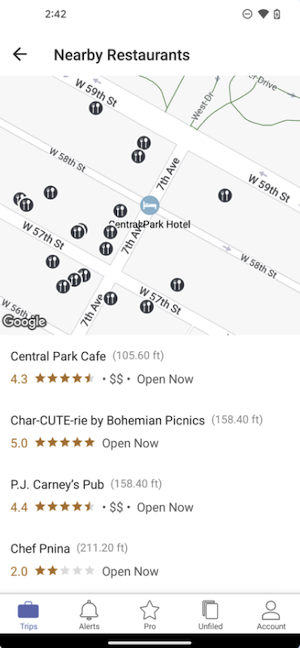
Image: Google Play Store
Not sure how to update your apps?
Keeping your apps up to date ensures you're always getting the latest features, bug fixes, and security improvements. Learn how to update the apps on your iPhone and your Android. It takes less time than you think.
Sharing the itinerary with your group
Once your itinerary is built, sharing it takes seconds. All you have to do is select your trip, find Manage Sharing, and tap Share Trip. Copy the link and send it to your friends and family using your favorite messaging app. Everyone in the group gets access to the same view. If you don't have the app downloaded, you can still see the itinerary in your phone's browser as a webpage.
That way, when someone asks what time checkout is, or whether the reservation is under your name or theirs, there's only one place to look.
Free vs. Pro: What's worth paying for
The free version handles everything most travelers need. Email forwarding, automatic itinerary building, and group sharing are all free features. For a standard group trip, you don't need to upgrade.
TripIt Pro, at $49 per year, adds real-time flight alerts, seat tracking, and a travel rewards summary. I personally don't think these features are worth paying a subscription for, but they can be useful if you're a frequent flyer. For a once-a-year group trip, they're largely optional. Start with the free version and see if you ever feel the need for more.
Keep in mind that TripIt won't build you a map of recommended restaurants or suggest activities. That's not what it's for. TripIt is a bookings organizer, and it does that job better than anything else available. If you want collaborative itinerary planning on top of that, check out Wanderlog instead.
How WhistleOut reviews apps
Our mobile experts scour the app stores, looking for the best new apps for Android and iPhone. Before recommending an app, we use it for at least one full workday—and often much longer—testing core functionality and evaluating whether it delivers on its promises.
- Easy to use
Great apps simplify your phone. We select tools that don't require a complicated instructional manual to figure out. - Affordability
We lean into quality apps that don't cost a fortune. Extra points if they're free. - Hands-on testing
We tested TripIt on a real two-person trip to Paris—not just a quick tap-around on the couch.
Jessica Santero
Staff Writer

Find a better phone plan
Thousands of cell phone plans unpacked. All the facts. No surprises.


.png?w=280&h=280&usm=20&usmrad=0.8&fit=crop "Best Cell Phone Deals for June 2026: Get the New iPhone 17 for Free")



