
Splitwise is one of the most popular expense-splitting apps on the market, and for good reason. It's reliable, intuitive, and has been one of the best apps for group travel for years.
I used Splitwise on two recent group trips of my own, deep water solo climbing in Mallorca and free diving in the Canary Islands. Splitwise worked seamlessly and split our group expenses easily.
That said, I have since switched to Splid because it makes dividing money even simpler, and I don't see myself going back. But that's my preference, and it doesn't change the fact that Splitwise is a solid app with a few features that Splid still can't match. If you're weighing your options, here's everything you need to know to make the right call for your trip.
Download Splitwise now:
Thinking about upgrading before your next trip?
A new phone with a great camera can make a real difference when you're somewhere worth photographing. Check out our picks for the best camera phones, whether you want pro-level zoom, low-light performance, or just something that doesn't make golden hour look like a blur.
iPhone 17e 256GB
- 6.1 inch display
- Rear Camera: 48MP
- Front Camera: 12MP
iPhone 16 128GB
- 6.1 inch display
- Rear Cameras: 48MP, 12MP
- Front Camera: 12MP

iPhone 17e 512GB
- 6.1 inch display
- Rear Camera: 48MP
- Front Camera: 12MP

What is Splitwise?
Splitwise is a free expense-splitting app designed to track shared costs between friends, housemates, or travel groups. You log expenses as they happen, and Splitwise keeps a running tally of who owes what. When you're ready to settle up, it tells everyone exactly what they owe and to whom.
The sign-up problem
Splitwise works really well as an expense tracking app. It's easy to use and intuitive, but it isn't an app I want to keep on my phone all year long. Unless you need to frequently split expenses, it just takes up valuable storage space.
Which brings me to my biggest gripe with this app: Splitwise requires you to sign up with your email. Since you need to link an email address to get started, every time you delete and reinstall the app after a trip (and let's be honest, we all do this), you're back to the setup screen. It's a minor inconvenience, but it's a barrier that Splid doesn't have.
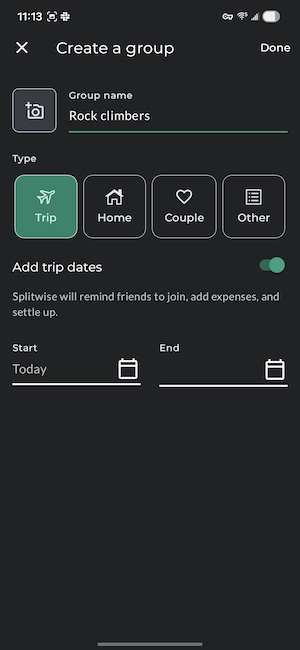
Image: Jessica Santero | WhistleOut
Not sure how to update your apps?
Keeping your apps up to date ensures you're always getting the latest features, bug fixes, and security improvements. Learn how to update the apps on your iPhone and your Android. It takes less time than you think.
Where Splitwise beats competitors
There are two things Splitwise does that other expense apps don't, and they might make Splitwise the better option. First, you can connect your bank account to settle up directly within the app, meaning you don't need to switch to a separate app to transfer. Second, you can attach receipt photos directly to expenses. But this nifty picture feature is limited to the Pro version of Splitwise.
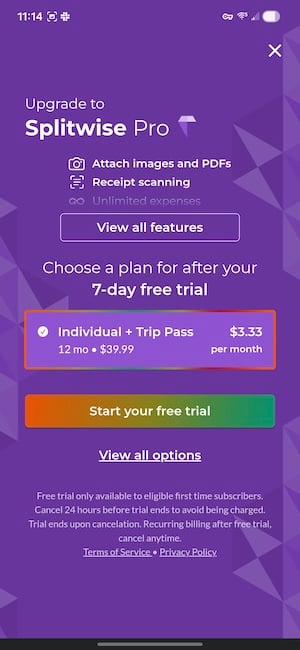
Image: Jessica Santero | WhistleOut
Splitwise Pro costs $3.99 per month. If receipt scanning and in-app bank transfers are important to you, then Splitwise Pro is worth it. For a casual group holiday where everyone's just trying to settle up fairly at the end, it's harder to justify.
Should you download Splitwise?
If you're already in a Splitwise group with your friends, stick with it. There's no good reason to disrupt a working system mid-trip, and Splitwise will handle everything you need it to.
But if you're starting fresh, download Splid first. It does the job just as well, requires no sign-up, and costs nothing. See if you ever feel the need to open anything else. Chances are, you won't.
How WhistleOut reviews apps
Our mobile experts scour the app stores, looking for the best new apps for Android and iPhone. Before recommending an app, we use it for at least one full workday—and often much longer—testing core functionality and evaluating whether it delivers on its promises.
- Easy to use
Great apps simplify your phone. We select tools that don't require a complicated instructional manual to figure out. - Affordability
We lean into quality apps that don't cost a fortune. Extra points if they're free. - Hands-on testing
We tested Splitwise across multiple real group trips, including a climbing trip in Mallorca and a free diving trip in the Canary Islands.
Jessica Santero
Staff Writer

Find a better phone plan
Thousands of cell phone plans unpacked. All the facts. No surprises.


.png?w=280&h=280&usm=20&usmrad=0.8&fit=crop "Best Cell Phone Deals for June 2026: Get the New iPhone 17 for Free")



