
Android Auto is a platform developed by Google that brings the power of Android to your car's infotainment system.
It allows you to conveniently and safely use your Android smartphone in the car without touching or looking at your phone while driving. You can listen to music, answer calls, and even use your device's GPS directly on your car's screen.
Read on as we explain what Android Auto is, how it works, and how to wirelessly connect your phone to your car.
What is Android Auto?
Essentially, Android Auto makes your infotainment system look like your Android smartphone by showing select popular apps like Google Maps, Spotify, and WhatsApp. It displays certain apps from your mobile device on your car stereo or head unit. Most modern car manufacturers support Android Auto and Apple CarPlay, but if not, you can purchase an aftermarket stereo with Android Auto compatibility.
With app interfaces optimized for distraction-free driving, you can stream music, access Google Assistant, and view directions. In its latest update, Android Auto CoolWalk brought a slew of user interface (UI) updates for easier navigation.
Virtually all newer model Android phones are compatible with Android Auto. The feature originally premiered with the Android 9 operating system, but the newest features are always available with the latest Android OS version.
How does Android Auto work?
Android Auto connects your Android phone to your car's infotainment system, usually via Bluetooth or a USB cable. While some vehicles feature wireless Android Auto, it’s not compatible with all smartphones or vehicles. However, you can use a wireless Android Auto adapter, like the Motorola MA1.
Once connected, Android Auto displays a simplified version of your phone's interface on your car stereo screen, providing access to your favorite Android apps. The user interface is designed to be intuitive with large buttons and clear graphics so you can concentrate on the road. Additionally, Android Auto supports “Hey Google” voice commands through Google Assistant for hands-free control.
How to connect your phone to your car using Android Auto

Image: Max McCaskill
To connect your Android device to Android Auto, you need a car with an Android Auto-compatible infotainment system or an aftermarket head unit that supports Android Auto. You also need an Android phone running Android 6.0 Marshmallow or later. Once you have the necessary hardware, here’s how to connect your phone with your car using Android Auto:
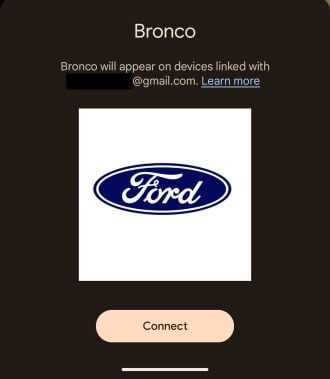
Image: Max McCaskill
- Start your car and connect your phone to your car's infotainment system using Bluetooth or a USB cable .
- Enable Android Auto on your cell phone and allow any necessary permissions.
- Tap on the Android Auto app on your car stereo to launch it if needed (it should open automatically).
Once connected, you can use Android Auto to access various apps, such as Waze for navigation, Tidal for music playback, and Google Messages for messaging. You can also make hands-free phone calls while you're on the road.
Ultimately, Android Auto is a powerful and convenient platform that puts the power of Android in your car. Whether you're looking for a safer way to use your mobile phone while driving or you just want to stay connected and entertained on the road, Android Auto has you covered.
How to turn off Android Auto
If you want to disconnect, here’s how to turn off Android Auto:
- Tap Settings > Apps > See All Apps on your Android phone.
- Select Android Auto from the list of apps and hit Disable.
- Alternatively: Fire up the Android Auto app on your phone, disable Auto-launch, and Forget your car in the Android Auto app.
Best data plans for using Android Auto in the car
Streaming music on YouTube Music and Spotify or using Google Maps for turn-by-turn navigation burns a lot of data. For example, an hour of Google Maps can consume 3-5MB per hour, and streaming a high-quality Spotify playlist might use up to 150Mbps per hour. The more tasks you have running on your Android Auto, the more data you use.
If you're unsure how much mobile data you use, check out our mobile data guide. Most customers will have a great experience with an unlimited plan. Our favorite unlimited phone plans are from Visible Wireless, Mint Mobile, and US Mobile.
|
Mint Mobile

Unlimited Data Plan
$10.00/mo
$60 for 6 months of service
|
|
Tello

Unlimited Text, Talk, and Data Plan
$25.00/mo
|
|
US Mobile

Unlimited Starter Plan
$25.00/mo
|
|
Visible

$25 Visible Plan
$25.00/mo
Taxes & Fees included
|
|
T-Mobile

Prepaid Unlimited Plan
$45.00
Per 1 Month Refill
with AutoPay - Taxes & Fees NOT included
+ $10 Upfront
|
Best Android phones
Whether you’re upgrading from an older Android phone or switching from iPhone, a new mobile device may be in order. Our favorite Android handsets are the Samsung Galaxy S25, Google Pixel 9, and Google Pixel 9 Pro Fold. That said, you can’t go wrong with any modern phones from Samsung, Google, Motorola, or OnePlus.
Moto G 5G (2026) 128GB
- 6.7 inch display
- Rear Cameras: 50MP, 2MP
- Front Camera: 32MP

Galaxy A26 5G
- 6.7 inch display
- Rear Cameras: 50MP, 8MP, 2MP
- Front Camera: 13MP

Galaxy A27 5G 128GB
- 6.7 inch display
- Rear Cameras: 50MP, 5MP, 2MP
- Front Camera: 12MP

Galaxy A37 5G 128GB
- 6.7 inch display
- Rear Cameras: 50MP, 8MP, 5MP
- Front Camera: 12MP

Edge (2026) 128GB
- 6.3 inch display
- Rear Cameras: 50MP, 50MP, 10MP
- Front Camera: 50MP

What is Android Auto: FAQs
What is Android Auto?
The Android Auto app is a platform that connects your phone with your car stereo to display apps optimized for use while driving. Its interface is clean and distraction-free.
How does Android Auto work?
Android Auto works by pairing your mobile device with your car, typically using a USB cable. Once hooked up, Android Auto allows you to control compatible apps like Amazon Music, Waze, and WhatsApp on your infotainment center while driving. You can also operate your phone hands-free with voice commands.
Is there a monthly fee for Android Auto?
No, there is no monthly fee for Android Auto. It's a free feature included on your Android device.
How do you fix Android Auto?
If Android Auto is not working, try restarting your phone, unplugging your USB cable and plugging it back in, or turning your car stereo off and then back on.
Moe Long
Senior Writer

Thousands of cell phone plans unpacked. All the facts. No surprises.





.png?w=280&h=280&usm=20&usmrad=0.8&fit=crop "The Best Cheap Phone Plans for 2026: We Tested Them All to Help You Save")


