

A mobile hotspot lets you work and play virtually anywhere—that is when it’s functioning. However, if your mobile data isn’t working for tethering, you may need to troubleshoot the issue.
Often, a hotspot doesn't work because your cell phone signal isn't strong enough or you need to adjust your phone's settings, such as turning off airplane or low power mode. You may also have exceeded your data threshold.
Why is my hotspot not working?
Here are the top mobile hotspot troubleshooting tips, from faulty settings to phone reboots and toggling airplane mode.
Check hotspot settings if you can’t connect

If you cannot connect to wireless tethering, check if you’ve enabled mobile hotspot on your phone.
- On Androids: Head to Settings > Network & internet > Hotspot & tethering and toggle on Wi-Fi hotspot.
- On iPhones: Navigate to Settings > Cellular > Personal Hotspot or Settings > Personal Hotspot. Then, hit the slider beside the Allow Others to Join prompt.
If tethering is on and you still can’t access the internet, you’ll need to try a different solution.
Check your mobile data signal strength
When you don’t have hotspot access, your device may be getting poor reception. Try using standard mobile data rather than tethering. If you’re still unable to connect to websites on your phone with mobile data or your internet is slow, you’re probably in a dead zone. Checking a coverage map gives you a sense of signal strength in your area.
Toggle airplane mode to reset your connection

Turning on airplane mode disables networking features like Wi-Fi, Bluetooth, and mobile data. However, refreshing wireless components is an easy way to fix mobile hotspot issues.
On Androids, pop into Settings > Network & internet and enable Airplane mode. For iPhones, go to Settings > Airplane Mode. Once you’ve activated airplane mode, wait about 30 seconds to a minute, then deactivate airplane mode to reengage wireless networking and see if your hotspot is working.
Reboot your phone to refresh data settings
There’s a reason many folks joke, “have you tried turning it off and back on” when a gadget isn’t functioning properly—because the trick works. Try turning your phone off and then back on to see if your hotspot will connect.
Turn off battery saver to dodge signal blockers

When your phone battery dwindles, the battery saver feature disables certain functions to conserve power. However, it may also disable networking features. Head to Settings > Battery > Battery saver on Android phones to turn off battery conservation. iOS users can go to Settings > Battery and slide Low Power Mode to the off position.
Disable VPN connections for faster data
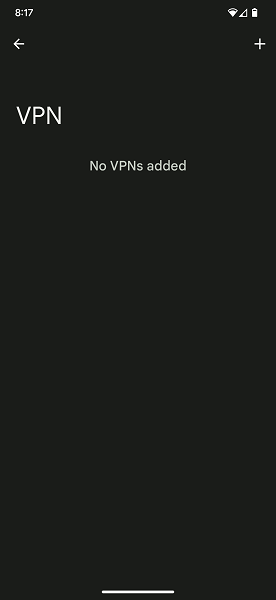
A virtual private network (VPN) reroutes your web traffic through a server located elsewhere to mask your location. VPN services are great for privacy, unlocking geo-protected streaming content from other countries, or accessing files on a home server while traveling. However, VPNs can interfere with hotspot usage, so turn them off when tethering.
- On Android devices: Go to Settings > Network & internet > VPN and stop any virtual private network connections.
- On iPhones: Head under Settings > General > VPN & Device Management > VPN > VPN Configurations and turn the setting off.
Check your high-speed data usage
Although many unlimited mobile hotspot plans exist, most feature high-speed data caps. Most carriers don’t cut off data completely after you’ve hit that threshold, but you might notice slower speeds causing you to wonder, “Why is my hotspot not working?” In reality, you’re just dealing with slower speeds that can’t handle hotspot tasks. You can easily check for throttling by reviewing your data consumption on carriers like Verizon and AT&T to see your remaining allocation.
Check your billing status
When your mobile hotspot doesn’t connect, you may have missed a payment, causing the carrier to terminate your service. Of course, you’d likely know if your carrier limited connectivity since phone calls, text messages, and non-hotspot mobile data wouldn’t function. However, if you’re experiencing internet issues outside of hotspot usage, check your account status in your carrier’s online portal.
Switch to a mobile hotspot plan with more data
If you've determined that your hotspot isn't working because you've exceeded your hotspot data limit, it might be time to upgrade to a new plan. Many plans come with hotspot allowances, so there are lots of options to choose from. Some of our favorite mobile hotspot plans include:
- Visible’s $30/month unlimited plan
- US Mobile's Unlimited Premium plan
- AT&T’s Unlimited Premium PL plan
- T-Mobile’s Experience More plan
|
#1
|
Visible

$25 Visible Plan
$25.00/mo
Taxes & Fees included
|
|
#2
|
Mint Mobile

Unlimited Data Plan
$10.00/mo
$60 for 6 months of service
|
|
#3
|
US Mobile

Unlimited Starter Plan
$10.00/mo
|
|
#4
|
AT&T

Premium 2.0℠
$90.00/mo
+ $35 Upfront
|
|
#5
|
T-Mobile

Essentials Saver 2.0
$60.00/mo
with Auto-Pay - Taxes & Fees NOT included
|
Best Portable Wi-Fi Devices
While using your cell phone as a mobile hotspot is convenient, a standalone device lets you conserve battery power and use your handset for other purposes. Our favorite portable Wi-Fi routers include the Netgear Nighthawk M5, GlocalMe Numen Air, and Orbic Speed 5G. For more hotspot fun, learn about all about MiFi, from what it is and how it's different from Wi-Fi to the best MiFi devices and plans.
While the terms are often used interchangeably, hotspot and tethering are different. For instance, a hotspot usually refers to using a portable device like a phone or dedicated pocket router for wireless internet transmission. On the other hand, tethering can be wireless via a Wi-Fi signal, Bluetooth, or with a wired USB cable. Learn more about the differences between tethering vs. hotspot.
Why Is My Hotspot Not Working: FAQs
What is a mobile hotspot?
A mobile hotspot is a device that lets you share an internet connection with other devices like laptops, game consoles, and tablets by utilizing mobile data.
Can I use my phone as a hotspot?
Yes, you can use your Android or iPhone as an instant hotspot by toggling on tethering. Alternatively, purpose-built standalone portable Wi-Fi routers provide internet anywhere.
Why isn't my mobile hotspot working?
When your mobile hotspot isn’t working, the most common issues include disabled hotspot functionality, battery saver interference, and VPN issues.
How do I get my hotspot to work again?
The easiest way to get your hotspot working again is to ensure that mobile hotspot data is enabled. Alternatively, try toggling airplane mode on and off, disabling any running VPNs, or rebooting your phone.
Why is my hotspot saying connected but not working?
When your hotspot says it’s connected but isn’t working, the most likely reasons are an exceeded data deprioritization threshold or low signal strength.
Moe Long
Senior Writer

Thousands of cell phone plans unpacked. All the facts. No surprises.

Related Articles


.png?w=160&h=160&usm=20&usmrad=0.8&fit=crop "Cell Coverage Near You: Who Has the Best 5G Network?")
Related Topics
General Mobile ExplainersPopular Topics
Featured App Reviews iOS News Coverage Device Reviews Device Explainers Carrier Explainers App Roundups T-Mobile


Free iPhone 18 Pro, up to $1,200 off, with a trade-in in any condition or a line switch on Experience Beyond





.png?w=280&h=280&usm=20&usmrad=0.8&fit=crop "The Best Cheap Phone Plans for 2026: We Tested Them All to Help You Save")

