
Image: AT&T
AT&T SplitPay: Fast facts
- AT&T's new SplitPay feature texts individual bills to each line on a family plan.
- Account owners are still responsible for ensuring the entire bill is paid, but SplitPay makes separating charges easier for adults sharing a family plan.
- SplitPay is available now for customers on AT&T's postpaid family plans.
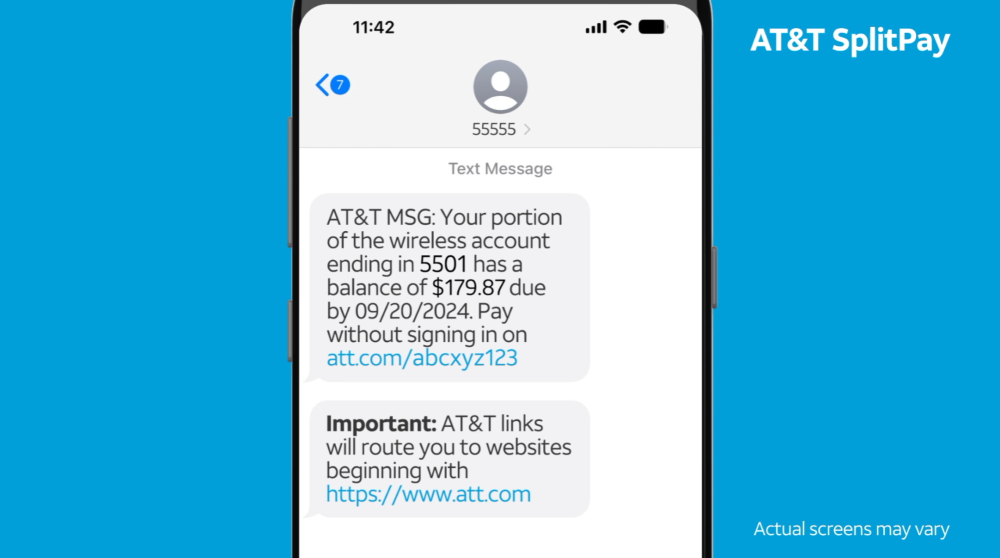
AT&T announced the carrier's new SplitPay feature that makes it easier to split wireless bills among family plans. SplitPay sends individual texts containing a bill and secure payment link to each line of a family plan. The account owner is still responsible for the whole bill if someone fails to pay, but the feature makes it easier to automatically divide charges for adults sharing a family plan. SplitPay is available now with AT&T's postpaid wireless plans.
Our recent surveys have shown 34% of adults in the US are still on their parent's phone plan to take advantage of multiline discounts. Arguments about sharing expenses have caused tension for almost half of the adult families still sharing a plan. SplitPay offers a way to relieve that tension. Now, adult families can take advantage of multiline discounts to get the best pricing on AT&T's unlimited plans and everyone will have their own bill.
Read on to learn about SplitPay and how to enable it on your account.
What is AT&T SplitPay?
SplitPay is a new billing feature that texts individual bills to members of AT&T family plans.
In the past, AT&T's family plans were all paid by the account owner. If adults wanted to share bills they needed to pay the account owner directly. SplitPay allows account owners to separate charges. It texts individual bills and a secure payment link to each line in the account at the beginning of the payment period.
While the account owner is still responsible for ensuring the bill is paid each month, this feature makes the task of separating individual lines and charges—such as device installments or international roaming fees—much easier.
What AT&T plans can get SplitPay?
SplitPay is currently limited to select postpaid wireless plans. This includes the plans eligible with AT&T's Unlimited My Way family plan, which allows customers to mix and match different lines to meet an individual family's needs.
You can get SplitPay with:
- Value 2.0
- Extra 2.0
- Premium 2.0
|
#1
|
AT&T

Premium 2.0℠
$90.00/mo
+ $35 Upfront
|
|
#2
|
AT&T
Value 2.0℠
$50.00/mo
+ $35 Upfront
|
|
#3
|
AT&T
4GB℠
$50.00/mo
with AutoPay & Paperless billing discount
+ $35 Upfront
|
How to sign up for AT&T SplitPay?
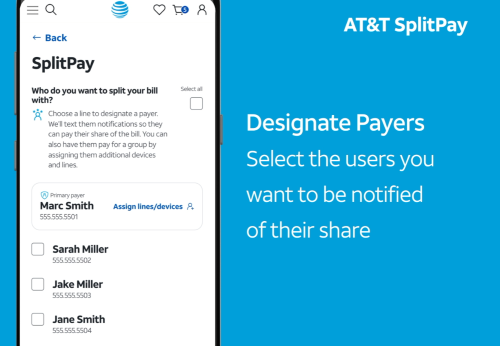
Image: AT&T
You can sign up for SplitPay on AT&T's website or the myAT&T app.
To sign up:
- Sign into your AT&T account and go to SplitPay.
- Select the Primary Payer. This is the account owner responsible for paying the bill each month.
- Designate Payers. These are the other lines that will receive a monthly bill. Any unchecked lines will remain under the Primary Payer's responsibility.
- Select Assign lines/devices if you want to create subgroups of individual payers (such as grandparents and a younger family being responsible for two bills).
- Enable "Send out reminders" to tell your family plan members they've signed up for SplitPay.
Is AT&T SplitPay right for me?
If you want to save money on an AT&T plan using a multi-line discount, SplitPay might be an excellent option for your family plan. It allows adults to share bills while still taking individual responsibility for payment.
Major carriers like AT&T are often too expensive for single people. SplitPay makes it appealing for families or groups of adults to partner up and score multi-line discounts that make premium unlimited plans more affordable.
All the latest cell phone news and deals, delivered every Thursday.
Max McCaskill
Sr. Staff Writer

Thousands of cell phone plans unpacked. All the facts. No surprises.





.png?w=280&h=280&usm=20&usmrad=0.8&fit=crop "The Best Cheap Phone Plans for 2026: We Tested Them All to Help You Save")


