

Your phone gives you access to so many things. Can't remember the name of that one actor from that one movie, who was also in that one TV show you really liked? Grab your phone and look it up. It makes sense that with this accessibility, we should be able to use our phones to get to...our phone plans.
Available free on the Apple App Store and Google Play, the myAT&T mobile app allows you to access your AT&T plan and complete a number of tasks directly on your phone. You can pay your bill, manage your plan, monitor your data usage, and get access to perks and features that can help you enhance your AT&T cell phone plan. You can also access your myAT&T account on your web browser.
Read on to learn how to access the myAT&T app, what tasks you can use it for, and how to track important parts of your phone plan.
Creating your myAT&T account
After you download the app, you will need a user ID and password to log in to myAT&T. If you haven't created an account already, you will need either your phone number or your account number, and the zip code of your billing address. Once, you've provided the necessary information, you can choose a unique user ID and create a password.
When registering your myAT&T account, make sure you create a strong password. Anyone who infiltrates your account could possibly make very expensive changes to your cell phone plan, and could potentially gain access to personal information.
NOTE: If your phone has the capabilities, you can set up your myAT&T mobile app login through fingerprint scanning.
How do I log into the myAT&T app?
You can log into the myAT&T app by entering your username and password. If it's your first time logging into the app or if you have extra security features enabled, you'll probably need to complete some extra steps.
AT&T will likely ask you to enter your AT&T account passcode. This is a four-digit number that you selected when creating your AT&T account. You may also be asked for a two-factor authentication code that is sent to your AT&T device. If you have multiple lines on your AT&T account, you'll get to choose which one you want the authentication code sent to.
Pay your bill with myAT&T
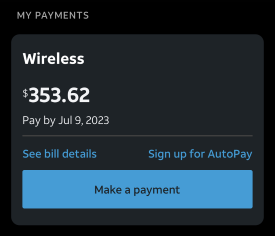
Your current bill total is the first thing you see when you open the app. To pay your bill, simply select the "Make a payment" option on the My Payments section of your main account. You'll be able to link your bank accounts and/or credit cards as methods of payments. If you're having trouble, check out our AT&T bill guide for step-by-step instructions on how to pay your bill in the myAT&T app.
In "See bill details" you'll also be able to access the full breakdown of your bill—as opposed to just your total amount due. Here, you can see where each dollar of your payment is going. If you're confused about any of the terms or fees itemized in your bill, check out our guide to understanding your AT&T wireless bill for definitions of common charges.
You can even sign up for AutoPay through your myAT&T account. AT&T offers a discount for customers on AutoPay with select plans, so make sure you take advantage.
Tracking and managing data
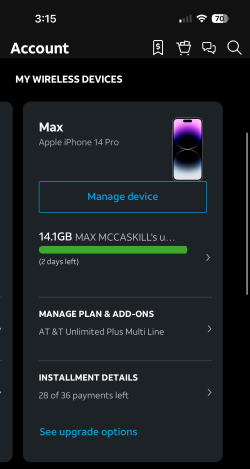
Except for the Premium 2.0 plan, most of AT&T's unlimited plans have high-speed data limits. For example, you may see your data speeds slowed during heavy traffic periods after 100GB of data usage on the Extra 2.0 plan. With this in mind, it's never a bad idea to track and manage your data usage.
Under the "My wireless devices" tab in the app's main overview screen, you'll see the data usage for your current billing cycle for all the lines on your account. Select "Manage device" and you'll find options to toggle data on/off, and, if applicable, toggle Stream Saver (limits video streaming to standard definition) on/off. You'll also see your current hotspot usage, the number of texts you've sent, and the minutes you've used.
If you notice your data usage doesn't match up with the plan you have, you might want to consider switching to a data plan that fits your needs better. Just select "Manage plan & add-ons" and you'll be able to change your data plan right there in your myAT&T app.
Finally, you'll also see the installment details of your current device and potential upgrade options. You can even use the myAT&T app to upgrade your device. My local AT&T store is notorious for long lines. Luckily, I rarely have to go anymore. During my last upgrade, I simply used the myAT&T app to select a new iPhone 14 Pro and had it shipped to my home.
Other things you can do with myAT&T
You can do more than pay your bill and check your data usage with myAT&T. If you are on AT&T's Next Up finance plan, for example, you can check to see how far along you are into the payment plan, and whether or not you are eligible for an early upgrade.
You'll also find a portal to AT&T's Support Center, where you'll find answers to some frequently asked questions, as well as contact information for their various customer service departments.
Additionally, you'll be able to locate the nearest AT&T retail store, or shop directly on the myAT&T app for:
- New devices
- New plans
- Internet plans
- TV subscriptions
- Home phone plans
On top of all this, you'll also find a portal to AT&T Thanks—a rewards program where you might find offerings like free movie tickets, or special prices and exclusive VIP offers to concerts and other events.
AT&T plans
Of course, myAT&T is no good to you if you don't have an AT&T plan. Check out some of AT&T's plans below if you are thinking about making the switch or read about AT&T's pros and cons for more information.
AT&T offers three postpaid unlimited plans. The top-tier plan is the Premium 2.0 plan starting at $90/month for one line. It includes unlimited premium data and a 100GB mobile hotspot. AT&T's mid-tier plan is the Extra 2.0 plan starting at $70/month for one line. It includes a 50GB mobile hotspot and 100GB of premium data. After you use up the 100GB, your plan is still unlimited, but your speeds may slow down due to network congestion. Finally, the Value 2.0 plan is AT&T's base-level plan starting at $50/month for a single line. It includes 5GB of premium data and a 3GB mobile hotspot.
|
#1
|
AT&T

Value 2.0℠
$50.00/mo
+ $35 Upfront
|
|
#2
|
AT&T
Extra 2.0℠
$70.00/mo
+ $35 Upfront
|
|
#3
|
AT&T
Premium 2.0℠
$90.00/mo
+ $35 Upfront
|
AT&T also offers unlimited data prepaid plans. However, these plans don't offer as many of the great perks of AT&T's postpaid plans.
|
#1
|
AT&T
Prepaid Unlimited Saver℠ Plan
$35.00
Per 1 Month Refill
+ $4.99 Upfront
|
|
#2
|
AT&T
Prepaid 12-month Unlimited + 10GB Hotspot Plan
$240.00
Per 12 Month Refill
$240 advance payment for 12 months (equals to $20/month). Online only.
+ $4.99 Upfront
|
myAT&T app: FAQs
Max McCaskill
Sr. Staff Writer

Thousands of cell phone plans unpacked. All the facts. No surprises.





.png?w=280&h=280&usm=20&usmrad=0.8&fit=crop "The Best Cheap Phone Plans for 2026: We Tested Them All to Help You Save")


