
Recipe Keeper is a recipe organizer, meal planner, and shopping list app that syncs across your phone, tablet, and computer. It earned a top spot in our roundup of the best recipe apps for iPhone and Android, and it's the app I recommend to anyone still cooking from browser bookmarks and stained index cards.
I bake Sally's Baking Addiction banana bread every time the weather cools down, and every time I Google it, click the same purple link, and scroll past pop-up ads to reach the ingredient list. Recipe Keeper ended that routine by importing the whole recipe into my own ad-free cookbook from a single pasted link.
Take your cookbook (and your data) anywhere
Recipe Keeper puts your whole recipe collection on every device, so cooking in a vacation rental kitchen abroad is as easy as cooking at home. Your phone plan has to keep up, though, because roaming charges can turn one grocery run into an expensive surprise.
Compare the most popular carrier plans that include international data before your next trip:
|
AT&T

Premium 2.0℠
$90.00/mo
+ $35 Upfront
|
|
T-Mobile

Experience Beyond 2.0
$100.00/mo
with Auto-Pay + Taxes and fees
|
|
Verizon

Unlimited Ultimate
$95.00/mo
+ Taxes & Fees. Price includes AutoPay & Paperless discount.
+ $40 Upfront
|
- Free with 20 recipe imports
- Pro removes the limit for $19.99 as a one-time purchase
- Available for iPhone, Android, and computer
What is Recipe Keeper?
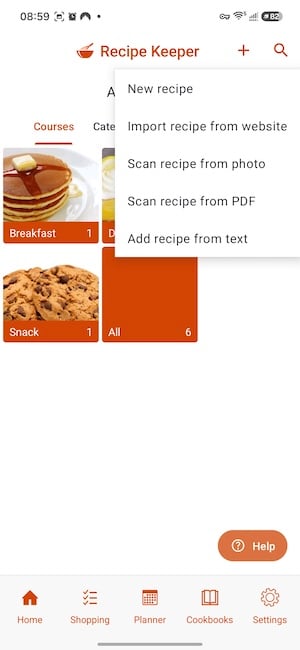
Recipe Keeper imports recipes from websites, scans them from cookbooks and handwritten cards, and lets you edit every recipe you save. The interface looks plain the first time you open it, and the starter recipes (spaghetti, pancakes, a lemon pie, and a few cookies) are basic, so the app's value depends almost entirely on the recipes you add.
Not sure how to update your apps?
Keeping your apps up to date ensures you're always getting the latest features, bug fixes, and security improvements. Learn how to update the apps on your iPhone and your Android. It takes less time than you think.
Web import is the reason to download it
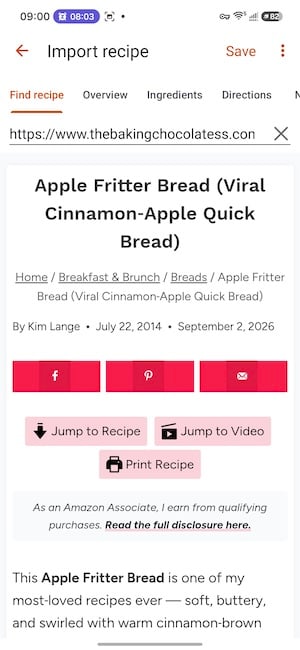
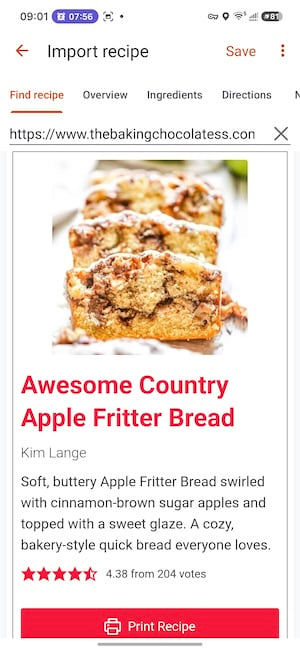
Copy a link from any recipe website, paste it into Recipe Keeper, and the app pulls in the full recipe without a single ad. I tested it with an apple fritter loaf recipe I tracked down after the loaves went viral online, and the import captured the photo, ingredient list, steps, serving size, prep time, and cook time. The finished recipe fit in roughly one scroll, while the original blog post buried the instructions under ads and backstory.
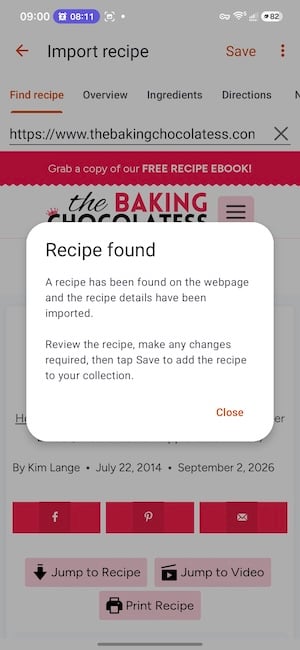
Images: Jessica Santero | WhistleOut
The imported version reads like a page from a printed cookbook, with the ingredients at the top and the steps underneath. That clean layout matters most mid-recipe, when you're glancing at your phone with flour on your hands and don't want to hunt for the next step.
Images: Jessica Santero | WhistleOut
Because Recipe Keeper syncs across devices, a recipe a friend sends you during the workday can go into your cookbook from your laptop and be waiting on your phone by the time you reach the grocery store.
Scanning, scaling, and editing fill in the gaps
Recipe Keeper also scans recipes from cookbooks, magazines, and handwritten cards, which makes it a practical way to digitize a family recipe box before the cards fade or go missing. When you change the serving size, the app recalculates every ingredient, so you won't have to multiply ⅔ cup of oil by six on the back of an envelope.
Every saved recipe is editable, too. My extra pinch of nutmeg in the apple fritter loaf now lives in the recipe itself instead of in my head, and the same goes for any swap or shortcut you've perfected over the years.
Is Recipe Keeper worth downloading?
Recipe Keeper is worth downloading if you cook the same favorites on repeat and you're tired of hunting for them online. It won't suggest new dishes the way a social recipe app does, but it turns the recipes you already love into a clean cookbook that follows you from device to device.
The free version stops at 20 imports
The free version caps you at 20 recipe imports. Twenty slots cover a weekly rotation and give you enough time to decide whether the app fits your routine, but a full digital cookbook will outgrow the free tier quickly. Recipe Keeper Pro removes the limit, and current pricing is listed on the App Store and Google Play pages.
I'll be importing every loaf I bake plus my favorite weeknight dinners, because index cards always end up splattered, smudged, or lost in a drawer.
 How I tested Recipe Keeper
- Imported recipes from popular baking blogs on Android, including a banana bread recipe and an apple fritter loaf, to see how cleanly ingredients, steps, photos, and cook times came through.
- Checked readability by following imported recipes on a phone screen without ads or extra scrolling.
- Measured free tier value by tracking how far the 20 free imports go before the Pro upgrade becomes necessary.
Recipe Keeper: FAQ
Is Recipe Keeper free?
Yes, Recipe Keeper is free on iPhone and Android with 20 recipe imports. The Pro upgrade removes the import limit.
Can Recipe Keeper import recipes from websites?
Yes, paste a link from any recipe website, and Recipe Keeper imports the ingredients, steps, photo, and cook times without the ads.
Can Recipe Keeper scan handwritten recipe cards?
Yes, Recipe Keeper can scan recipes from handwritten cards, cookbooks, and magazines.
Does Recipe Keeper sync between devices?
Yes, Recipe Keeper syncs your recipes across your phone, tablet, and computer, so a recipe you import on one device shows up on the others.
What is the best app for saving recipes from websites?
Recipe Keeper is my top pick for saving recipes from websites because it strips out ads and formats each recipe to fit in about one scroll.
Why you can trust WhistleOut
.svg)
15+
years of mobile industry experience

900+
published wireless guides

35+
firsthand carrier reviews
We've been around since the birth of the iPhone. Along the way, we've learned how to spot the best deals for your wallet (and your sanity). We spend our days researching informative guides and writing insightful reviews on every kind of wireless plan, distinguishing what matters from what doesn't. We played around with these plans before recommending them, ensuring they're worth your hard-earned money.
Want to know more? Check out how we review every cell phone plan we rank.
Jessica Santero
Staff Writer

Thousands of cell phone plans unpacked. All the facts. No surprises.

Related Articles


Related Topics
App Reviews FeaturedPopular Topics
Featured App Reviews iOS News Coverage Device Reviews Device Explainers Carrier Explainers App Roundups T-Mobile


Free iPhone 18 Pro, up to $1,200 off, with a trade-in in any condition or a line switch on Experience Beyond


.png?w=280&h=280&usm=20&usmrad=0.8&fit=crop "Best Cell Phone Deals for October 2026: Get the New iPhone 18 Pro for Free")





