
Crouton is a meal planner and pantry tracker built for Apple devices, including iPhone, iPad, Mac, Apple Watch, and Vision Pro. It made our roundup of the best recipe apps for iPhone and Android as the top pick for meal prep and pantry tracking, although it only runs on Apple devices.
Crouton is built for people who cook from a rotation and want every meal, ingredient, and grocery run mapped out before the week starts. It trades recipe discovery for structure, and if you're willing to put in the setup work, it can save you hours of list-making every week.
Put the whole household on a great network for less
Crouton works best when everyone at home shares the same meal plan, which means everyone needs a reliable connection to see it. Verizon MVNOs run on Verizon's network and often cost a fraction of Verizon's own plans, although your data may be deprioritized during busy times.
Compare the most popular Verizon MVNO plans before your next bill arrives:
|
Visible

$25 Visible Plan
$25.00/mo
Taxes & Fees included
|
|
Spectrum Mobile®

Unlimited
$30.00/mo
+ $20 Upfront
|
|
US Mobile

Unlimited Premium Plan
$20.00/mo
|
- Free with a recipe limit
- Crouton Plus removes the limit for $24.99 as a one-time purchase
- Available for iPhone, iPad, Mac, Apple Watch, and Vision Pro only
What is Crouton?
Crouton feels like a mix of Apple's Notes and Calendar apps, with simplified but dynamic sections instead of category tiles or a social feed. I saw why meal preppers love it the moment I opened it on my iPhone 11, because every screen points toward planning instead of browsing. Crouton doesn't try to be a recipe discovery app or a simple recipe book builder, and that narrow focus is exactly what makes it useful for meal prep.
Not sure how to update your apps?
Keeping your apps up to date ensures you're always getting the latest features, bug fixes, and security improvements. Learn how to update the apps on your iPhone and your Android. It takes less time than you think.
Plan meals the same way you schedule meetings
Tap a day, choose breakfast, lunch, dinner, or snacks, and pick a recipe for each meal, which makes it easy to plan around leftovers when Tuesday's dinner becomes Wednesday's lunch. You can share your meal plans with the people you live with, so the whole household sees the same week at a glance. That shared view ends the nightly back-and-forth about dinner, because the answer is already on everyone's phone.
Crouton also runs on Apple Watch, which keeps your recipe steps on your wrist while your hands are busy with dough or raw chicken.
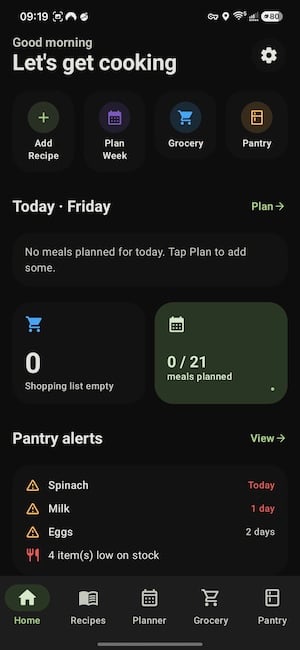
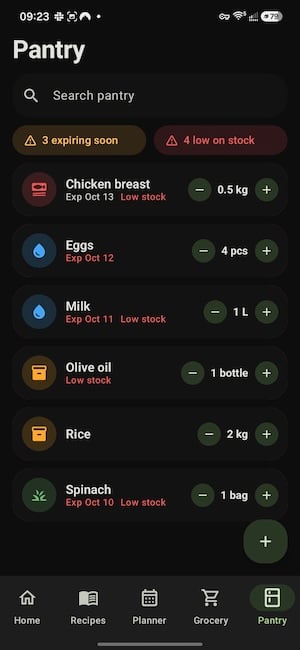
Images: Jessica Santero | WhistleOut
Pantry alerts keep your shopping list ready
The pantry alert section lets you mark ingredients as low or out, and Crouton keeps your shopping list ready to go. That replaces the weekly ritual of opening every cupboard before a grocery run with a quick scroll through the app, and serious meal preppers juggling long ingredient lists will feel those savings most. Crouton best suits cooks who keep a stocked pantry and cook from it, rather than people who buy ingredients for one saved recipe at a time.
You'll have to add your own recipes
Crouton's biggest drawback is that you have to enter your own recipes. The app comes with only five or six preloaded recipes, and typing in everything yourself takes time. If you love trying new dishes, Crouton won't offer any suggestions, so you'll need another app for inspiration.
Is Crouton worth downloading?
Crouton is worth the effort if your household runs on Apple devices and you already cook from a dependable rotation. If you want fresh recipe ideas or share meals with Android users, Pepper or ReciMe will fit your kitchen better.
A set rotation makes the setup work pay off. I cook about 20 different dishes on repeat, so entering those 20 recipes once would give me a meal planner that covers nearly every week of the year. Budget an evening for that first round of typing, since the time you invest up front is what the planner pays back every week.
Try the free version before you buy
The free version includes a recipe limit, so you can build out a few weeks of meals and test the planner before paying anything. Crouton Plus removes the limit with a one-time purchase, and current pricing is listed on the App Store page. Apple-only households get the smoothest experience, because the same plan follows you from iPhone to iPad to Mac.
 How I tested Crouton
- Planned a full week of meals on my iPhone 11 by adding recipes to specific days and meal slots.
- Tested pantry tracking by marking ingredients as low or out and checking how the app handled the shopping list.
- Measured setup effort by counting the preloaded recipes and noting how much manual entry the app requires.
Crouton: FAQ
Is Crouton free?
Yes, Crouton is free with a recipe limit. Crouton Plus removes the limit as a one-time purchase instead of a subscription.
Is Crouton available on Android?
No, Crouton only works on Apple devices, including iPhone, iPad, Mac, Apple Watch, and Vision Pro.
Can you share meal plans in Crouton?
Yes, Crouton lets you share meal plans with the people you live with so everyone sees the same weekly schedule.
Does Crouton track pantry ingredients?
Yes, Crouton's pantry alerts let you mark ingredients as low or out so your shopping list stays up to date.
What is the best meal planning app for iPhone?
Crouton is my top meal planning pick for iPhone users who cook from a set rotation, thanks to its calendar-style planner and pantry tracking.
Why you can trust WhistleOut
.svg)
15+
years of mobile industry experience

900+
published wireless guides

35+
firsthand carrier reviews
We've been around since the birth of the iPhone. Along the way, we've learned how to spot the best deals for your wallet (and your sanity). We spend our days researching informative guides and writing insightful reviews on every kind of wireless plan, distinguishing what matters from what doesn't. We played around with these plans before recommending them, ensuring they're worth your hard-earned money.
Want to know more? Check out how we review every cell phone plan we rank.
Jessica Santero
Staff Writer

Thousands of cell phone plans unpacked. All the facts. No surprises.





.png?w=280&h=280&usm=20&usmrad=0.8&fit=crop "The Best Cheap Phone Plans for 2026: We Tested Them All to Help You Save")


