

Sideloading means installing an app from somewhere other than your phone's official app store.
- On Android, that usually means downloading an APK file from a website or a third-party store.
- On an iPhone, it means using an approved alternative app marketplace, which Apple only allows in a handful of regions.
I've sideloaded apps myself, so I know the appeal. But I'd be much more wary of downloading software straight from the internet without a reputable source in between.
This guide explains how sideloading works on Android and iPhone, why people do it, and how to keep your phone safe if you try it.
What does sideloading an app mean?
Sideloading an app means installing it from a source outside the Google Play Store or the Apple App Store. Since apps are just bundles of code with a user interface to make them easy to use, you can download them from websites or even alternative app stores.
Apps in the official stores go through a review before they're listed to check the code and make sure they actually work on your phone. Sideloaded apps can skip some (or all) of that review. That means a sideloaded app's safety depends entirely on where you got it.
In short, you're downloading an app...just on the side.
How does sideloading work?
Sideloading works by giving your phone permission to install an app from a source other than its official store.
- First, you download the app, whether it was sent to you by your teacher or you found it on a website.
- Then you allow your phone to install it, and the app runs like any other app once it's on your device. You'll even have a normal app icon, too.
In the best-case scenario, you get an amazing app from a website, a third-party marketplace, or someone who shares the file with you.
But in the worst-case scenario, you download code onto your device and allow it to bypass all security checks, opening up your phone to potential malware and identity theft.
“I’ve sideloaded apps myself, so I know the appeal. When I was training as a massage therapist, I relied on a sideloaded anatomy app that showed the entire body down to every soft tissue—and I got the app from my instructor.
I’d be much more wary of downloading software straight from the internet without a reputable source in between.”
Jessica Santero, WhistleOut Staff Writer
How is sideloading different on Android and iPhone?
Android has always allowed sideloading, and it's the easiest platform for it. You give a specific app, like Chrome or your file manager, permission to install unknown apps in your settings. After that, you open the APK file and install it the same way you'd install anything else.
Android sideloading is getting stricter
Google's new developer verification rule applies to certified Android devices that have Play Protect and come preloaded with Google apps. At the moment, only developers in Brazil, Indonesia, Singapore, and Thailand are required to undergo verification, but it's predicted to expand globally across all certified Android devices in 2027.
Apple, however, keeps much tighter control over what you can install on an iPhone. Alternative app marketplaces are more available in countries in the European Union, as well as Japan and Brazil.
If you live in the United States, your options are more limited. You can join a developer's beta through Apple's TestFlight app, and developers can install their own apps with Apple's Xcode software. But other than that, iPhone is very restrictive.
Ditch your iPhone and save on an Android phone
If sideloading freedom matters to you, Android is the easier platform to live with, and you can save money when you make the switch. Carriers regularly run deals on Android phones, including trade-in credits, discounts for switching, and free phones with a new line.
Check out the best carrier offers on Android phones to find the right deal for you.
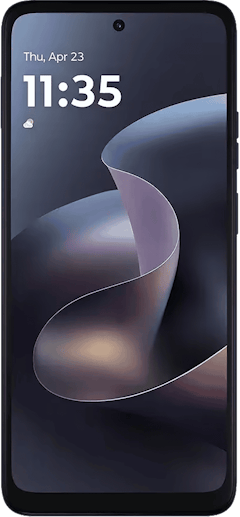
Moto G 5G (2026) 128GB
- 6.7 inch display
- Rear Cameras: 50MP, 2MP
- Front Camera: 32MP
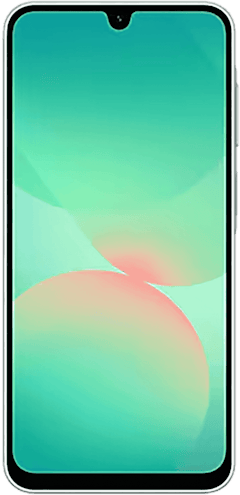
Galaxy A26 5G
- 6.7 inch display
- Rear Cameras: 50MP, 8MP, 2MP
- Front Camera: 13MP
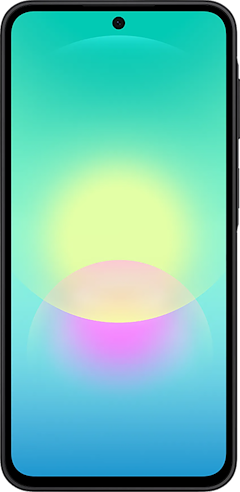
Galaxy A27 5G 128GB
- 6.7 inch display
- Rear Cameras: 50MP, 5MP, 2MP
- Front Camera: 12MP

Is sideloading apps safe?
Sideloading can be safe, but the risk depends almost entirely on the source of the app. A well-known marketplace or a developer's official website is very different from a random download link in a forum or a text message.
The biggest risks associated with sideloading apps are:
- Malware
- Fake copies of popular apps
- Apps that ask for far more access than necessary
For context, Google blocked over 1.7 million malicious Android apps in 2025. Sideloading is safe, as long as you download apps from reputable sources.
Is sideloading legal?
Technically, yes, sideloading is legal when you install a legal app on a phone you own. There's nothing illegal about downloading code onto your own personal device. Just like how some tech-savvy users download Linux as system software, you can legally download apps.
- The gray areas come from what you install rather than how you install it. A common example of an illegal sideloaded app is a modified version of a popular music streaming app that unlocks premium features without paying a subscription.
That version is a pirated app, even if a friend shared it with you and it installs without any trouble. Downloading a pirated copy of a paid app is copyright infringement no matter where it comes from.
Are apps too expensive? Save on your phone bill
App subscriptions add up fast, especially when you're paying for music, streaming, and cloud storage every month. Switching to a cheaper phone plan can free up room in your budget for the apps you use most. Many prepaid carriers and MVNOs offer plans that run on the same networks as the big carriers for a lot less each month.
Check out the most popular, cheap plans on the market:
|
TextNow

Free Flex Plan
$0.00/mo
+ $3.99 Upfront
|
|
MobileX

Build Your Own Plan
$1.98/mo
Platform fee
+ $9.88 Upfront
|
|
Twigby Mobile

Unlimited Talk, Text and 2GB Data
$5.00/mo
for the first 3 months then $15.00/month
|
Tips to stay safe while sideloading apps:
- Stick to trustworthy sites. Download apps only from the developer's official site or a marketplace with a good reputation.
- Keep Google Play Protect turned on if you use Android.
- Check app access and permissions. Make sure to look at what an app wants to access before you open it, and turn off anything that doesn't make sense, like a calculator asking for your contacts.
- If you aren't sure what to accept or not, check out our guide on how to manage app permissions on Android.
- Delete any strange-acting apps. If an app doesn't work properly or starts doing anything odd, remove it right away. You can easily delete apps on iPhone and delete apps on Android.
Why do people sideload apps?
Sideloading apps is a popular way to get software the official store doesn't offer. Some apps are only available in certain countries, so travelers or expats sideload them to keep using familiar services.
Other apps break store rules, which is why game emulators and some open-source tools spent years outside the App Store. Some people sideload beta versions to try new features early, and others install an older version of an app after an update removes something they used.
And of course there's the obvious motivation for sideloading apps—getting a copycat version of an app that you don't have to pay for. But again, that isn't legal.
Sideloading vs. jailbreaking
Sideloading installs an app from a source outside the official store, while jailbreaking removes the restrictions Apple builds into iOS. Rooting is the Android version of jailbreaking.
Sideloading works within the limits your phone's operating system allows, but jailbreaking and rooting remove some of the security protections that keep your phone safe. They can also break software updates and complicate warranty repairs.
Sideloading apps: FAQ
What does it mean when an app is sideloaded?
When an app is sideloaded, it means it was installed from a source outside the Google Play Store or the Apple App Store. Common sources include a developer's website, an APK file, or an alternative app marketplace.
Why do people sideload apps?
People sideload apps to get software that isn't available in their official app store. That includes region-locked apps, beta versions, older app versions, and apps the store doesn't allow.
Is sideloading legal?
Sideloading is generally legal when you install a legal app on your own phone. Installing pirated copies of paid apps is copyright infringement, and modified apps can break a service's terms of use.
Is sideloading safe?
Sideloading is safe when the app comes from a trusted source, like the developer's official website or a well-known marketplace. Apps from unknown links can carry malware, so check permissions and keep Play Protect on if you use Android.
What's the difference between sideloading and jailbreaking?
The difference between sideloading and jailbreaking is that sideloading installs an app from another source, while jailbreaking removes the operating system's built-in restrictions. Jailbreaking carries more risk because it turns off some of your phone's security protections.
Why you can trust WhistleOut
.svg)
15+
years of mobile industry experience

900+
published wireless guides

35+
firsthand carrier reviews
We've been around since the birth of the iPhone. Along the way, we've learned how to spot the best deals for your wallet (and your sanity). We spend our days researching informative guides and writing insightful reviews on every kind of wireless plan, distinguishing what matters from what doesn't. We played around with these plans before recommending them, ensuring they're worth your hard-earned money.
Want to know more? Check out how we review every cell phone plan we rank.
Jessica Santero
Staff Writer

Thousands of cell phone plans unpacked. All the facts. No surprises.





.png?w=280&h=280&usm=20&usmrad=0.8&fit=crop "The Best Cheap Phone Plans for 2026: We Tested Them All to Help You Save")


