
One of the most valuable smartphone features is Wi-Fi calling, which allows you to use your wireless internet signal like a phone line. Whether you're in a basement, a remote area, or a building with thick walls, Wi-Fi calling ensures you stay connected even when your cell signal struggles.
Since it doesn’t count against your cell phone plan’s minutes or data, Wi-Fi calling helps you avoid overage fees or service suspensions—as long as you have it enabled.
In this guide, we’ll show you how to check to see that your Wi-Fi calling is enabled, detail the networks that offer it, and explain how to activate the service on your phone so you can save money on your next bill.
What is Wi-Fi calling?
Wi-Fi calling is a feature that allows you to make and receive calls and texts over a Wi-Fi network instead of relying on your cellular connection. Wi-Fi calling ensures you won’t miss a call or text if you’re in an area with weak or spotty cellular coverage—as long as you have Wi-Fi.
Wi-Fi calling is included with most phone and cellular plans. In fact, you might already be using it: many phones automatically switch between Wi-Fi and traditional cellular towers, depending on which provides better service in a given location. Most of the time, Wi-Fi calling leads to better service with clearer voice quality, fewer dropped calls, and improved overall coverage.
Which networks have Wi-Fi calling?
Wi-Fi calling is widely supported by most major networks in the U.S., including all of the best cell phone providers:
- Verizon
- AT&T
- T-Mobile
- US Cellular
- Visible
- Cricket Wireless
- Metro by T-Mobile
- Mint Mobile
- Google Fi
Wi-Fi calling availability can vary depending on your plan, device, and location. Although Wi-Fi calling is included with most plans, there may be some exceptions, such as using Wi-Fi calling for international calls, that may incur additional charges. Likewise, prepaid plans might have limited Wi-Fi calling, especially when networks are congested.
As far as devices go, the Big Three major carriers support Wi-Fi calling on smartphones dating back to at least the iPhone 6 and later, with T-Mobile supporting 5c and later. Mobile virtual networks, known as MVNOs, typically follow the same model as their parent networks, though that’s not always the case. Mint Mobile, for example, uses T-Mobile’s nationwide network but requires iPhone 6 or later.
Major networks with Wi-Fi calling
Verizon
- Wi-Fi calling availability: All HD Voice-enabled devices and plans; postpaid plans get higher priority during congestion than prepaid plans may be more limited in HD Voice quality.
- Supported iPhones: iPhone 6 and later models.
- Supported Androids: Most Samsung Galaxy models (S6 and newer), Google Pixel devices (Pixel 3 and newer), and Motorola devices (Moto G series and newer).
- The bottom line: Verizon’s Wi-Fi calling seamlessly hands off between Wi-Fi and LTE, but postpaid plans have priority coverage and quality compared to prepaid.
AT&T
- Wi-Fi calling availability: Available on all AT&T postpaid and prepaid plans.
- Supported iPhones: iPhone 6 and later models.
- Supported Androids: Samsung Galaxy (S6 and newer), Google Pixel, LG devices (G6 and newer), and Motorola phones.
- The bottom line: AT&T prioritizes HD Voice (VoLTE) for high call quality, even during transitions between Wi-Fi and cellular networks.
T-Mobile
- Wi-Fi calling availability: Standard on all T-Mobile plans.
- Supported iPhones: iPhone 5c and later models.
- Supported Androids: Samsung Galaxy (S6 and newer), Google Pixel, OnePlus, and most Motorola models.
- The bottom line: T-Mobile has excellent indoor coverage and its Wi-Fi calling works internationally as if you were in the US, with no additional charges.
US Cellular
- Wi-Fi calling availability: Available on most plans.
- Supported iPhones: iPhone 6 and later models.
- Supported Androids: Various Samsung, Google, and Motorola devices.
- The bottom line: US Cellular’s plan works a little differently, however, it uses minutes instead of data—even for pictures.
Prepaid and MVNO networks with Wi-Fi calling
Visible (Verizon Network)
- Wi-Fi calling availability: Included with all plans.
- Supported iPhones: iPhone 6 and later models.
- Supported Androids: Google Pixel devices (Pixel 3 and newer), Samsung Galaxy models (S8 and newer), and Moto G series.
- The bottom line: Visible offers simple unlimited plans and no extra charge for Wi-Fi calling.
Cricket Wireless (AT&T Network)
- Wi-Fi calling availability: Included in most plans, but device compatibility can be limited.
- Supported iPhones: iPhone 6 and later models.
- Supported Androids: Samsung Galaxy models, LG devices, and Motorola phones, typically purchased through Cricket.
- The bottom line: Cricket provides budget-friendly plans with AT&T coverage, but requires Cricket-calling enabled devices.
Metro by T-Mobile
- Wi-Fi calling availability: Standard with most plans.
- Supported iPhones: iPhone 5c and later models.
- Supported Androids: Samsung Galaxy (S6 and newer), Google Pixel, and OnePlus models.
- The bottom line: You'll gain access to T-Mobile’s robust Wi-Fi calling infrastructure at a more affordable rate, but international and VPN charges will still apply.
Mint Mobile (T-Mobile Network)
- Wi-Fi calling availability: Supported on all plans.
- Supported iPhones: iPhone 6 and later models.
- Supported Androids: Google Pixel, Samsung Galaxy (S7 and newer), and most modern unlocked Android phones.
- The bottom line: Wi-Fi calling is supported on all plans, even international calls, and it doesn’t count against your data, either.
Google Fi
- Wi-Fi calling availability: Available on all plans.
- Supported iPhones: iPhone 7 and later models.
- Supported Androids: Google Pixel devices have the best experience, but it’s compatible with Samsung Galaxy and other major Android brands.
- The bottom line: Google Fi offers the unique ability to switch between T-Mobile, Sprint, and Wi-Fi networks for optimal coverage.
How to enable Wi-Fi calling
No need to download any apps: Wi-Fi calling is built into modern smartphones. You can do a phone search for Wi-Fi calling, or you can find it through Settings. Here’s how to turn on Wi-Fi calling on an iPhone or an Android.
Enable Wi-Fi calling on iPhone
- Tap Settings.
- Tap Phone.
- Tap Wi-Fi Calling.
- Toggle the switch to turn on Wi-Fi Calling on This iPhone. If the switch is green, that means Wi-Fi calling is on.
- If prompted, enter your address (used for emergency services when making Wi-Fi calls).
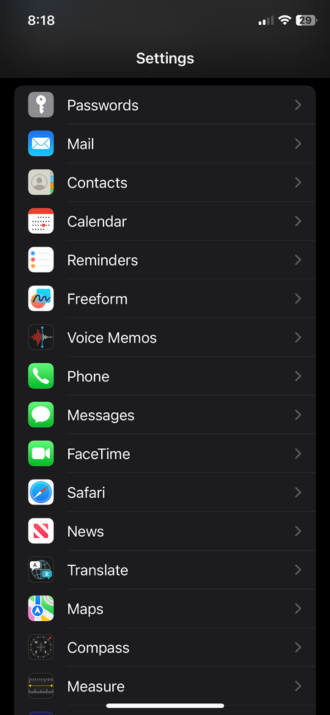
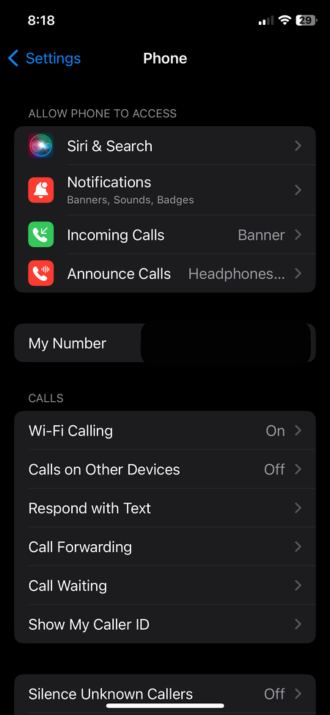
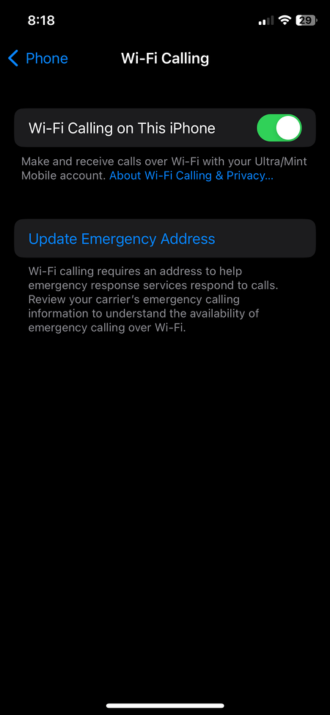
Why do I need to provide an emergency address for Wi-Fi calling?
Enabling an emergency address gives first responders an address in the event you cannot provide one and your device’s automatic location information isn’t available.
Enable Wi-Fi calling on Android
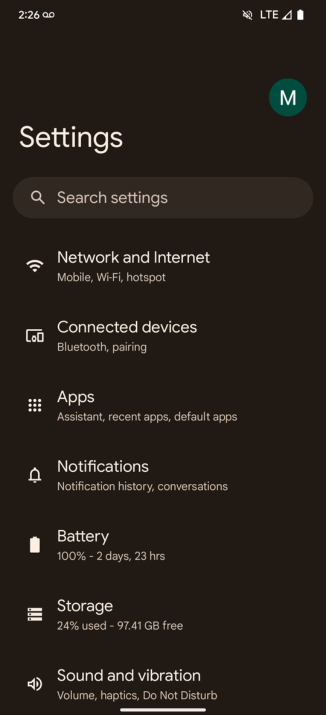
- Tap Settings.
- Tap Network & Internet or Connections (depending on your device).
- Tap Mobile network or SIM card & network.
- Tap Wi-Fi Calling.
- Toggle the switch to turn on Wi-Fi calling.
- If prompted, enter your address for emergency services.
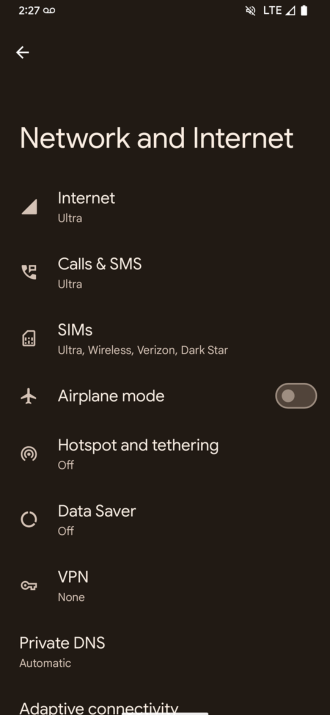
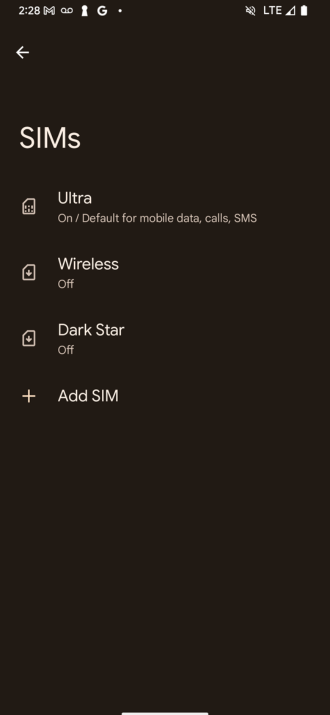
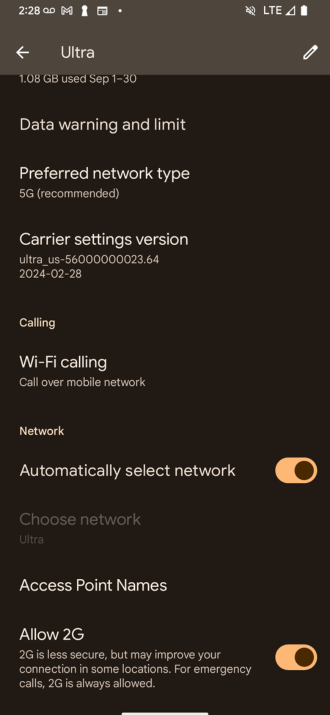
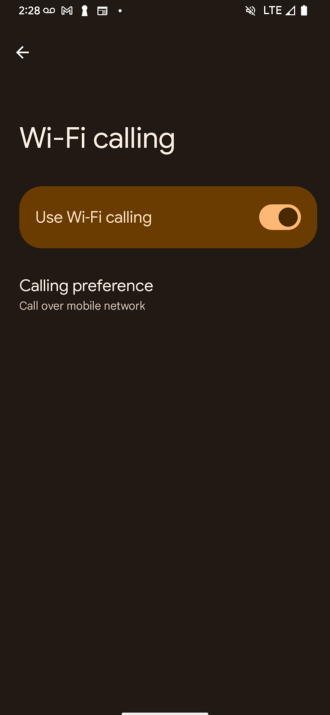
How to turn off Wi-Fi calling
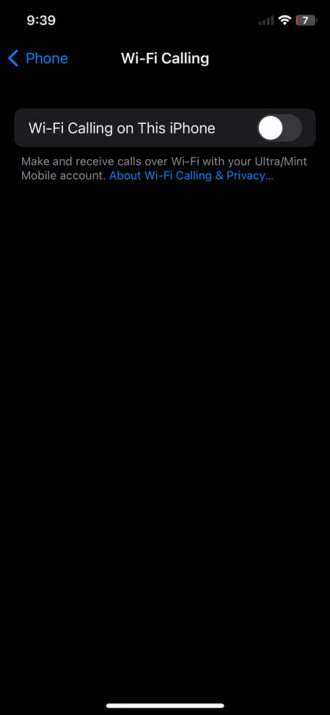
Disable Wi-Fi calling on iPhone
- Tap Settings.
- Tap Phone.
- Tap Wi-Fi Calling.
- Toggle the switch to turn off Wi-Fi Calling on This iPhone. If the switch is gray, that means Wi-Fi calling is off.
Disable Wi-Fi calling on Android
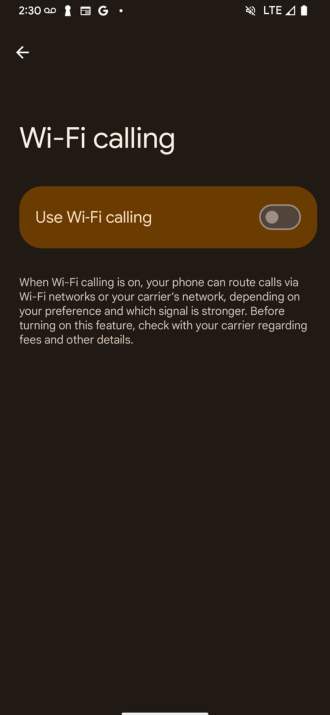
- Tap Settings.
- Tap on Network & Internet or Connections.
- Tap Mobile network or SIM card & network.
- Tap Wi-Fi Calling.
- Toggle the switch to turn off Wi-Fi calling.
Do I want Wi-Fi calling on or off?
Wi-Fi calling works on virtually every network and plan type and is compatible with most modern smartphones. We recommend the “set it and forget it” approach—turn Wi-Fi calling on and avoid missing calls and texts without thinking about it. This will be especially helpful if you have a limited amount of minutes on your plan.
If you’re having trouble getting your Wi-Fi calling to work, it’s best to contact your carrier to find the specific issue.
Trevor Wheelwright

Thousands of cell phone plans unpacked. All the facts. No surprises.


.png?w=160&h=160&usm=20&usmrad=0.8&fit=crop "Cell Coverage Near You: Who Has the Best 5G Network?")





.png?w=280&h=280&usm=20&usmrad=0.8&fit=crop "The Best Cheap Phone Plans for 2026: We Tested Them All to Help You Save")


