
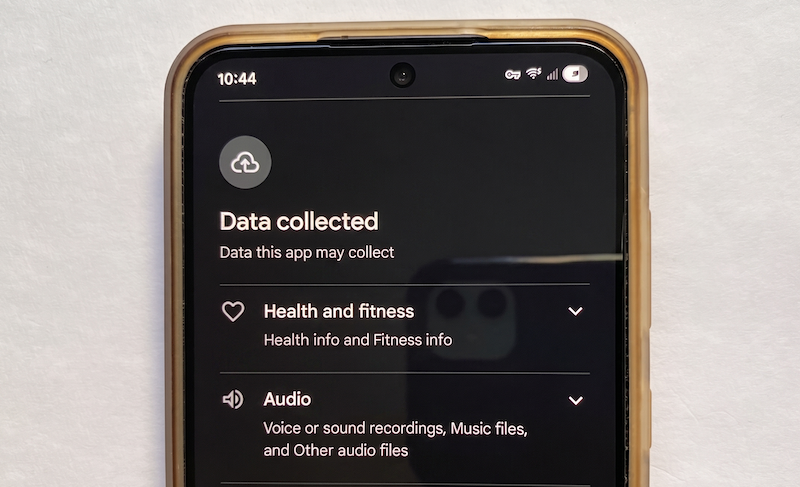
Think about the last app you downloaded. You probably ignored the long chunk of text in the little box that popped up labeled “Terms and Conditions,” and just tapped agree. We all do it.
In fact, WhistleOut polled over 1,000 mobile users, and only 2 in 10 people actually read a privacy policy before clicking agree. But you just signed away sensitive information on your phone. And most of us have signed hundreds of them.
Read on to find out what data your favorite apps are actually tracking, and the best practices when it comes to data sharing.
Why you can trust WhistleOut
.svg)
15+
years of mobile industry experience

900+
published wireless guides

35+
firsthand carrier reviews
We've been around since the birth of the iPhone. Along the way, we've learned how to spot the best deals for your wallet (and your sanity). We spend our days researching informative guides and writing insightful reviews on every kind of wireless plan, distinguishing what matters from what doesn't. We played around with these plans before recommending them, ensuring they're worth your hard-earned money.
Want to know more? Check out how we review every cell phone plan we rank.
All apps collect data, but some collect data necessary to function, while others collect everything they legally can. Apps can track up to 14 distinct data categories (or over 200 individual data points). That includes a range of different information, like your location, contacts, photos, financial information, IP address, and more.
But not all data tracking is unnecessary. In many cases, it’s essential for an app to function correctly. Google Maps without location tracking is just a static map, and Spotify without listening history wouldn’t learn what you want to hear next.
However, many apps collect non-essential (and usually personal) information quietly and sell it. Third parties, like marketers, data brokers, and even political organizations, then use that information, causing more security risks.
These are the most popular apps that harvest tons data right from your phone:
4 apps that collect scary amounts of data from your phone
1. Facebook and Instagram (Meta apps) map your face, time your scroll, and browse with you
Meta isn’t only interested in posts you like or reels you heart. Just know that when you accept the terms and grant all permissions, the Meta apps (especially Facebook and Instagram) track your biometric patterns, keyboard rhythms, and everything you do outside the app too.
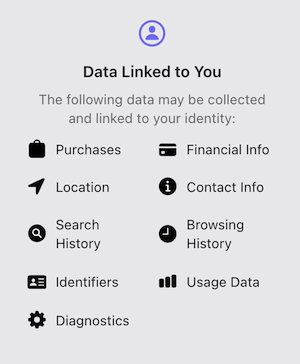
Image: App Store
Most people think logging out of Facebook or Instagram protects them (spoiler: it doesn’t). What makes Meta the most invasive app entity is the fact that most of its data harvesting happens after you’ve left the app entirely. Meta’s data privacy policy calls it “off-app activity.” When you browse a clothing website, read a news article, or use a recipe app, that site most likely has a tiny piece of Meta’s code embedded on its pages—the Meta Pixel. It acts like a silent observer and notes what you clicked on, how long you stayed, and if you added something to your cart. That information is then sent back to Meta, even if you haven’t opened Facebook or Instagram all day.
But you don’t even need to be an Instagram or Facebook user. Meta’s own privacy policy states, “We receive this information whether or not you’re logged in or have an account on our Products.” If you have ever visited a site with a Meta Pixel (and you almost certainly have), Meta has a file on you. Even social media resisters have shadow profiles stockpiled by Meta filled with data.
How do I stop ad tracking on Instagram?
If you haven’t already, open Instagram and follow these steps to turn off ad tracking outside Instagram.
- Tap your profile in the bottom bar.
- Open your profile settings by tapping the three bars at the top right.
- Select the Accounts Center and locate Your information and permissions.
- Tap Your activity off Meta Technologies.
- Clear your past activity and turn off future activity.
Meta is stockpiling your images for your biometric digital avatar
Meta uses your phone’s camera and your uploaded content to perform a “visual analysis”, which includes age and identity profiling. Meta recently confirmed it uses AI to scan your photos, Reels, Stories, and profile pictures for visual clues like bone structure, facial proportions, and even relative height (excuse me?). While the company claims this is to verify age and protect teens, it’s realistically performing a constant biometric scan of your physical features.
If you use Instagram filters, you’re also giving the app permission to map your facial geometry and hand movements in real-time—recording the distance between your eyes, the curve of your smile, and the bend of your fingers. Your social media apps are essentially creating a permanent biometric template of you.
But Meta’s tracking goes far beyond your face. You don’t need a physical keyboard for the company to analyze how you type; Meta tracks how you interact with your touchscreen to build a behavioral fingerprint. Specifically, the app tracks your scroll and hover patterns. Every time you pause on something that catches your eye, Meta records it. This tells Meta which images, headlines, or products grabbed your visual attention, even if you didn’t like, share, or comment on them.
Mets knows your devices… all of them
If that wasn’t enough, Meta uses your phone’s built-in sensors to figure out exactly what you’re doing at any given moment. The gyroscope and accelerometer can tell whether you’re walking, driving, sitting at a desk, or lying in bed. Even the barometer (the sensor that measures air pressure) can detect which floor of a building you’re on. Combined, these inputs let Meta infer not just what you’re doing, but where and when.
Yes, Instagram knows when you’re doomscrolling in bed at midnight.
But here’s where it gets really sketchy. Meta doesn’t just track one device. It tracks all of them—and links them together. Imagine you shop for a blender on your laptop while your phone sits on the couch, logged into Facebook. Your laptop’s browser pings the Meta Pixel on the shopping site. Meanwhile, your phone has already reported its IP address and Wi-Fi network to the Facebook app. Meta connects those two data points and realizes the blender search and the phone belong to the same person. Now your laptop activity becomes part of your mobile profile.
You don’t need to be actively using Facebook or Instagram for any of this to happen. Your phone, running these everyday apps, is already the most powerful data-harvesting device in your pocket. It really makes you want to switch to a dumbphone, right?
You’re paying too much for your phone plan
If you haven’t checked your phone bill lately, now’s a good time. Smaller carriers run on the exact same networks as the big three—just at a fraction of the price. You could cut your monthly bill significantly just by switching, without giving up coverage or data.
Here are some of the most popular affordable plans right now:
|
Visible

$25 Visible Plan
$25.00/mo
Taxes & Fees included
|
|
Mint Mobile

Unlimited Data Plan
$10.00/mo
$60 for 6 months of service
|
|
Verizon

Simplicity Plan
$30.00/mo
+ Taxes & Fees. Price includes AutoPay & Bring a Number discount
|
2. Pinterest knows you’re pregnant before you’ve told anyone
Most social media apps look at your past (what you liked, shared, or commented on), but Pinterest looks at your future. People do not browse Pinterest to complain or argue; they browse to plan. They create vision boards for dream kitchens, secret wedding inspiration, nursery color schemes, and home renovation mood boards—and a long list of things to buy shortly after.
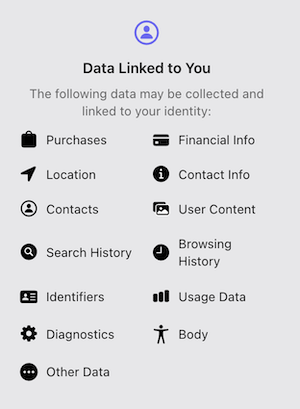
Image: App Store
Pinterest calls this “intent-based targeting” because users openly organize their future plans into public (or semi-public) boards. Pinterest’s AI can detect pregnancy, engagement, marriage, a cross-country move, or even a career change before you tell your friends or family. If you start pinning nursery colors, baby-safe cribs, and breastfeeding pillows, Pinterest quietly tags your profile with a parenting intent profile. That profile is then sold to baby-product advertisers before you have even taken a pregnancy test. The same logic applies to wedding vendors (venues, dresses, rings) and real estate (mortgage calculators, moving checklists, paint swatches).
Pinterest knows your life trajectory before you do, and they aren’t hiding that fact.
The Pinterest privacy policy openly admits that creative liberties are taken while collecting data: “If you create a board about travel, we may infer you are a travel enthusiast. We may also infer other information, such as your education or professional experience.”
Never worry about running out of data
An unlimited data plan means you never have to ration out data until the end of the month. Plus, now unlimited data plans are budget-friendly, so you don’t have to cut back on your sweet-treat spending either.
Check out the most popular unlimited phone plans available today:
|
Visible
$25 Visible Plan
$25.00/mo
Taxes & Fees included
|
|
Mint Mobile
Unlimited Data Plan
$10.00/mo
$60 for 6 months of service
|
|
Verizon
Simplicity Plan
$30.00/mo
+ Taxes & Fees. Price includes AutoPay & Bring a Number discount
|
Pinterest records every pixel for big-picture ads
Pinterest uses Visual Search Analysis, which is a form of AI-driven computer vision that scans the actual pixels inside every image you save, zoom, or hover over. If you save a photo of a mid-century modern chair, Pinterest doesn’t just tag you with the generic label. Instead, AI analyzes the specific silhouette, leg taper, and upholstery texture to build a psychological profile of your aesthetic taste.
Pinterest doesn’t just track what you like; it tracks why you like it. Over time, Pinterest can determine whether you prefer warm or cold color temperatures, organic or geometric shapes, minimalist or maximalist arrangements, and vintage or futuristic styles. All this makes for better-aligned ads from (you guessed it) third-party companies using your data.
Pinterest watches what you dream about, predicts when you will act on those dreams, and sells that roadmap to the highest bidder—all before you utter a single word to another human being.
Have you turned off personalized apps in Pinterest?
Unfortunately, Pinterest is going to sell your data if you keep using it. But you can follow these steps to opt out of excessive data harvesting:
- Open Pinterest and navigate to your account settings.
- Tap Privacy and data.
- Toggle off all personalization options.
3. McDonald’s tracks where you eat, and where you go next
The McDonald’s app is a tracking beacon disguised as a way to buy a cheap McDouble, and it does it through a tactic called geoconquesting. McDonald’s draws a virtual fence around a rival like Burger King. If your phone has location permissions activated (necessary to even use the app), it detects when you enter that parking lot. Seconds later, you get an offer for a $2 Big Mac at the McDonald’s 0.5 miles away. McDonald’s is trying to steal you from the competition in real time, which is known as geoconquesting.
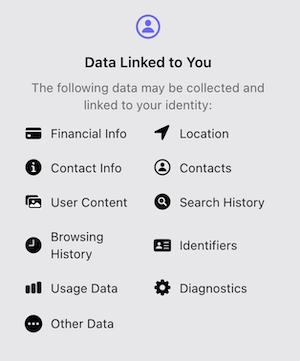
Image: App Store
The app tracks your precise location using GPS, Wi-Fi, and Bluetooth beacons inside the restaurants too. McDonald’s privacy policy lays this out: “Our online services and in-restaurant technology may collect information about the location of your mobile device or computer using geolocation and technology such as GPS, Wi-Fi, Bluetooth, or cell tower proximity.” The golden arches claim that these accesses are necessary for the “Ready on Arrival tech,” so that as your phone approaches the drive-thru, the system starts cooking your food.
But that means McDonald's can geofence your own home.
If you always get hungry around 10 PM (since it probably has your kitchen pinged), the app notices that pattern and can send late-night offers exactly when you’re most likely to want them. A fast-food app shouldn’t know your nightly routine. But McDonald’s does.
What Reddit says about McDonald’s app permissions
Reddit users are outraged with the necessary permissions McDonald’s requires to use the app. u/LogicalConstant states: “I now have to use PRECISE location on my location services to receive my own rewards! McDonald’s does not need access to my precise location for me to grab a breakfast sandwich… It’s an information grab.”
4. Google Chrome is the browser we all love to hate
Everyone knows Google sells your data. That’s not surprising. What is surprising is how Chrome collects it—through sensors that have nothing to do with browsing, without ever asking your permission.
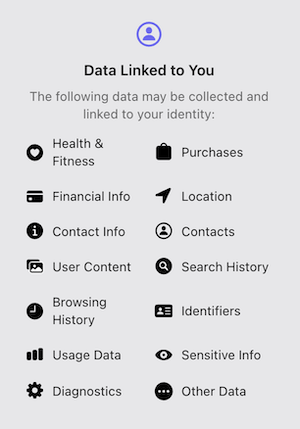
Image: App Store
Take your phone’s physical hardware sensors. Chrome can read the ambient light sensor, which is the tiny tool that auto-adjusts your screen brightness. That may not sound serious, but the subtle changes in light intensity as you move your hand or watch a video can be reconstructed as images of what is in front of your display (a.k.a., you). The light sensor effectively becomes a crude camera, and Chrome never asks for camera permission because, technically, it’s not using the camera.
Chrome also accesses the accelerometer and gyroscope to determine whether you are walking, driving, or lying in bed. Advertisers use this information to tailor their products to your real-time activity. A person walking might see an ad for a nearby coffee shop, while someone lying down at 2 a.m. might get sleep aids or late-night snack ads. Google’s own privacy policy admits this practice, though vaguely: “Your device may have sensors that can be used to better understand your location and movement. For example, an accelerometer can be used to determine your speed and a gyroscope to figure out your direction of travel.”
Nothing in Chrome is safe, either.
Incognito mode does nothing to stop data collection. It only prevents Chrome from saving your history locally on your device. Google still sees everything you search and every site you visit.
Is data tracking and collecting legal?
The short answer is yes. You tapped “Agree” without reading the terms, and that tap gives companies legal permission to collect your data. The question isn’t whether companies are breaking the law (because they aren’t), but whether you understand what you are agreeing to before you tap.
The legal landscape is changing slowly. Some states are now requiring opt-in permission instead of opt-out. But until those protections reach everyone, the most effective tool you have is your own awareness. Read the permission pop-ups, check your settings, and ask yourself whether a free app is worth the data it is taking.
How to check your app permissions on iPhone and Android
Both iPhone and Android have built-in tools to see what your apps are accessing, but most people have never opened them. Take 10 minutes to follow these steps and double-check your permissions and tracking.
How to check app permissions on iPhone
- Open your phone’s Settings.
- Tap Privacy & Security.
- Open the App Privacy Report.
This shows you exactly which apps have been contacting which third-party domains in the past seven days—including domains your apps contact when you’re not actively using them. It’s one of the most revealing features Apple has added in years, and it’s off by default. Turn it on.
How to turn off tracking on iPhone
- Open your phone’s Settings.
- Tap Privacy & Security.
- Find Tracking and turn off Allow Apps to Request to Track.
Every future app loses the ability to ask you to opt in to cross-app tracking. For apps already installed, you can review and revoke tracking permissions individually in the same menu.
How to check app permissions and tracking on Android
- Go to Settings.
- Find and tap Security and privacy to see your privacy dashboard.
- Then tap Permissions used in the last 24 hours.
You’ll see a 24-hour timeline showing every app that accessed your location, microphone, camera, contacts, or other sensitive data. If an app you haven’t opened recently appears on that list, that’s worth investigating.
Dangerous data collection from apps: FAQ
Is it legal for apps to collect and sell my data?
Yes, it’s legal for apps to collect and sell your data in most U.S. states. When you tap “Agree” on a Terms and Conditions screen, you are giving legal consent for the data practices described in that document (even if you didn’t read it).
What’s the difference between “Data Linked to You” and “Data Used to Track You”?
“Data Linked to You” means the information is tied to your real identity, while “Data Used to Track You” is specifically about cross-app and cross-site tracking, where your data is shared with outside companies to follow your behavior beyond the app itself.
Does turning off GPS stop apps from knowing my location?
No, turning off GPS doesn’t entirely stop apps from knowing your location. Apps that have been granted Wi-Fi or Bluetooth access can also infer location data. Turning off GPS reduces precision, but it doesn’t eliminate location tracking completely.
Do free apps collect more data than paid apps?
Paid apps can and do collect data too, but their business model does not depend on it in the same way, so checking the app’s privacy label is the most reliable guide regardless of price.
Jessica Santero
Staff Writer

Thousands of cell phone plans unpacked. All the facts. No surprises.





.png?w=280&h=280&usm=20&usmrad=0.8&fit=crop "The Best Cheap Phone Plans for 2026: We Tested Them All to Help You Save")


