
To get the most from your Android or iPhone, you need the right apps—ones that will help you organize your life, navigate the world, and sometimes just pass the time.
We do the dirty work of sifting through millions of apps to bring you the best new apps for Android and iPhone every month—so you can avoid the duds that take up valuable storage on your device.
We gathered all of our picks from across the year, so you can explore the best options to improve your phone.
Want to see what we loved last year? Check out our top apps from 2024.
How we pick the best apps for 2025
- Easy to
use
Great apps simplify your phone. We selected the tools that don't require a complicated instructional manual. -
Affordability
The internet is filled with expensive price tags, but we're not buying what they're selling. We leaned into inexpensive, quality apps. Extra points if they're free! - Hands-on
testing
We played around with these before recommending them, ensuring they're worth your download.
If you want to learn more about how we evaluate and test apps, you can read our detailed methodology for reviewing apps.
Best Entertainment Apps

RunPee
Frequent pee-ers can rejoice.
Free on the Google Play Store and the App Store.
Be warned, what I’m about to tell you may be considered TMI, but I am a frequent pee-er. Always have been. And before you start to worry, yes, I’ve been to the doctor, and no, there’s nothing wrong with me. I just have a tiny bladder. And for the most part, this has never really been a big deal for me. It doesn’t interrupt my day as much as you would expect, and it doesn’t annoy me all that much. It’s just my life.
But all of that changes when I go to the movies.
I think most people will agree that movies are best experienced on the big screen while eating extremely overpriced popcorn that doesn’t taste as good as it used to (seriously, what’s wrong with movie theater popcorn nowadays?) But if you are a frequent pee-er like me, going to the movies can be a very anxiety-inducing experience. You want to fully enjoy the film, but you also really don’t want to miss something important because you chose the wrong time to run and pee (no pun intended).
If my movie experience sounds similar to yours, you’ll be happy to know that I found the best solution to our shared problem: RunPee, an app that tells you exactly when it’s safe to take a bathroom break during a movie. And spoiler alert, it’s an absolute game-changer.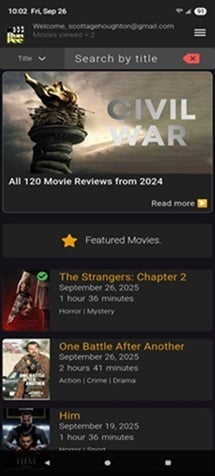
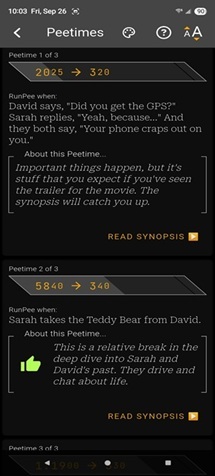
Image: Scott Houghton | WhistleOut
Here’s how it works:
You search for the movie you’re about to see (they’ve got a ton, including new releases), and the app tells you exactly when to go to the bathroom. They give you very detailed time stamps and specific cues like “When the villain says, ‘You’ll regret this,’” so you don’t have to guess. It also provides a quick summary of what happens during your bathroom break, so you can come back fully caught up. It even has crowd-sourced reviews of each movie from other app users, which is a really nice feature.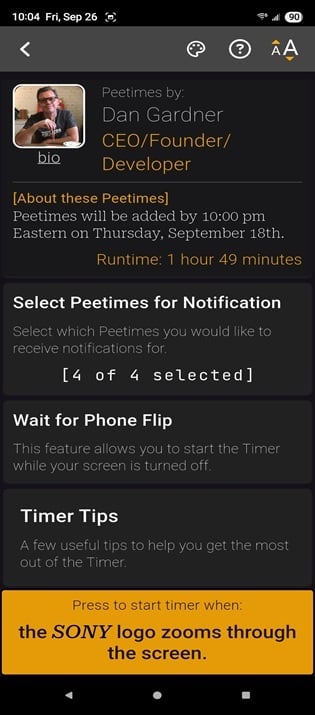
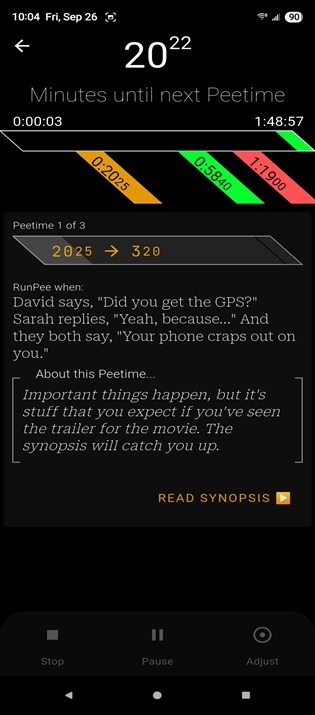
Image: Scott Houghton | WhistleOut
There’s even a built-in timer that will vibrate in your pocket when it’s time to go (just be sure to give the app permission to access your phone’s alarm system). Something to note, however, is that I found it rather difficult to distinguish between the pee notification and a regular text notification. My advice would be to read through the scene descriptions and timestamps so you have a better idea if the buzz in your pocket is a reminder for you to run and pee (pun intended that time) or a text from your grandma.
Overall, this app delivers exactly what it promises. I’d recommend it without hesitation to anyone with a small bladder. Honestly, I’d even recommend it to anyone with a normal-sized bladder. It’s that useful. In fact, this might just be my new favorite app, and I’ll happily champion it to anyone willing to listen.Best of October 2025
Recommended by Scott Houghton
Best Finance Apps

Orbit
Visualize where your money is going.
Free from the Apple App Store. Premium version available with a one-time $9.99 fee.
If you need help tracking your subscriptions and bills, Orbit might be a great app to check out. It’s a new subscription tracker app that shows your bills as planets orbiting around a sun. Each orbit level shows whether your bill is monthly or annual, and planets are sized based on the cost. It’s a great way to visualize how your monthly bills and subscriptions are impacting your wallet.
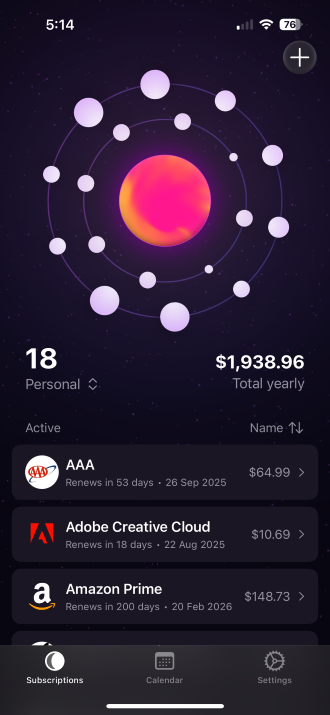
Image: Max McCaskill
When creating new entries, you can add them manually or import them through a copy of your most recent bill if you’re a premium subscriber. Adding the name of your bill to the app will allow it to automatically search for a logo to add with your entry. Surprisingly, Orbit’s logo options weren’t simply limited to the largest companies and brands. While it easily found the logos for services like Amazon Prime and Microsoft Office, it also found the logo of a smaller regional newspaper I subscribe to in North Carolina.

Image: Max McCaskill
Within your entry, you can customize the price, how often you’re charged, place the bill into different categories, and even pick a specific payment method. From there, you can use all these fields to filter your orbit on the main interface. For example, you can filter to only see bills paid by a specific credit card or within a monthly billing cycle.
Orbit also sends notifications and offers homescreen widgets to remind you of upcoming bills. Some features—such as unlimited subscriptions, automatic bill importing, and homescreen widgets—are part of Orbit Plus, the app’s premium service. Unlocking these features costs a one-time payment of $9.99. Without it, you’re limited to five subscriptions. I liked the app enough to purchase Orbit Plus, and I appreciate that it’s a one-time fee, not a new monthly subscription to add to my tracker.
If you’re like me, you’re wary of connecting apps to your bank accounts or credit cards to monitor your subscriptions. Before downloading Orbit, I relied entirely on a Google Sheet with all this information listed out in individual cells. Luckily, Orbit offers excellent privacy settings and lives entirely on your device. There’s no account linked to your information, and it doesn’t collect any of your personal data. That does mean it’s missing some of the more handy features that other apps have, like the ability to cancel a subscription directly from the app. However, if you’re concerned about privacy or keeping your financial accounts safe, it’s a great alternative.
Overall, I found Orbit met my needs and was simple to use. I’d recommend it to anyone who wants to track their subscriptions and bills.
Best of August 2025
Recommended by Max
McCaskill

YNAB
For big spenders and penny pinchers alike.
Free one-month trial on the Google Play Store and the App Store.
To use this app, you need:
- iOS 17 or later versions for Apple devices
- 10.0 or later for Android devices.
Summer is over and it’s time to start gearing up for the new academic year. For many families, back-to-school sales usually mean overspending and underbudgeting on both backpack basics and stylish swag. After almost a decade of teaching, I have a love-hate relationship with school-time shopping. More often than not, I spend too much on surplus supplies because I can’t resist the smell of a new composition book. Besides, you can never have too many blue pens, right?
If you get caught up in sales and spend more than you should, check out You Need A Budget—the finance app that actually holds you accountable for your personal expenses. Whether you want to cut down on shopping, build your emergency fund, or invest for retirement, YNAB (pronounced why-NAB) shows you your spending habits. No more hiding behind your credit card and ignoring your banking app until the end of the month. YNAB will notify you if your budget is in danger of reaching zero, helping you stay mindful of your monetary goals with every transaction.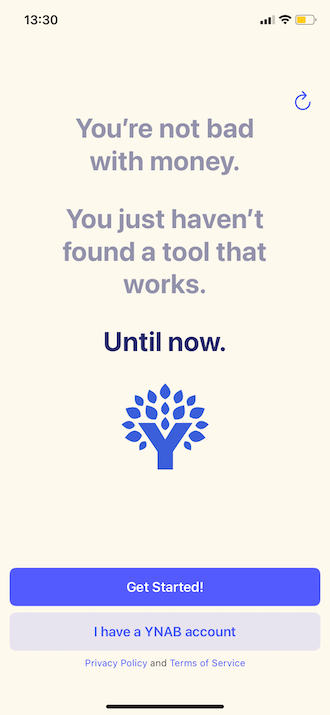
Image: Jessica Santero | WhistleOut
Ironically, you need to spend money to save money with YNAB. YNAB costs $14.99/month or $9/month if you opt for a yearly subscription, which may seem counterintuitive. But I’ve found that paying for a service encourages me to actually use it. If it were totally free, I probably wouldn’t have bothered completing my trial and would have ended up deleting it. That said, YNAB does offer a month-long free trial to give you a feel for the app. In only three weeks, I’ve already doubled my savings despite spending more than usual on summer vacation bookings.
All you need to do is set up an initial budget and choose your goals. You can always edit and modify each item if your financial hypotheses aren’t working out, but YNAB will show you whether you’re in the green. Better yet, YNAB gives you advice on how to save even more with automatic budget adjustments.
YNAB is intuitive and easy to use. It makes personal finances simple with a series of clicks. Setting up YNAB can take as much (or little) energy as you’re willing to put into the app. You can input your weekly, monthly, or yearly expenses manually by typing them in, or you can directly link your bank accounts to the app.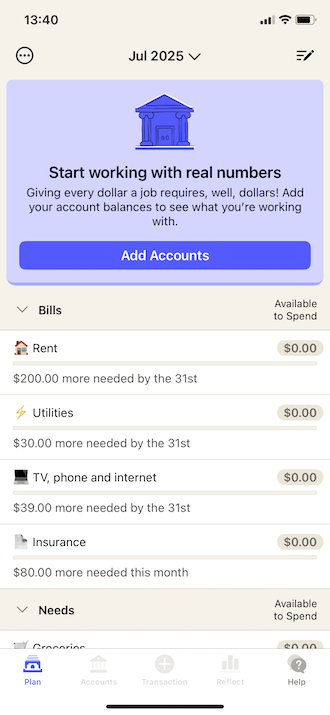
for automatic input.
Image: Jessica Santero | WhistleOut
The disciplined users who type in every purchase, as is my case, are forced to think twice before spending. I’ve completely eliminated my Costco cookie allowance (and addiction) thanks to YNAB. Otherwise, you can link your various accounts to see your spending and investments all in one app at the same time.
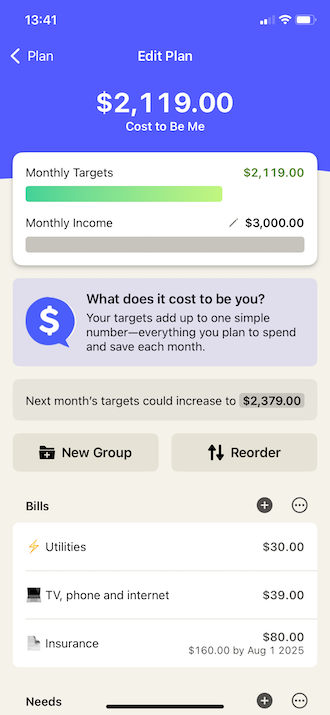
Image: Jessica Santero | WhistleOut
Not only does YNAB show you how much and where you’re spending, but it also shows how your money grows. Since you can link all of your accounts to the app, from banking to investment and retirement, YNAB shows you all your money’s movements on a single screen. That doesn’t mean you can make transactions in the app or log into your accounts; YNAB simply shows you the number of transactions to maintain extra security.
All in all, I recommend YNAB for big spenders and penny pinchers alike. I’m a meticulous person with my spending, but I indulge and splurge in small (but frequent) quantities. YNAB has helped me break the habit because I see exactly where those frivolous indulgences could have been saved. Instead of spending on my bi-weekly sundae and chocolate-chip cookie, I savor seeing that money sent to my emergency fund.
Best of August 2025
Recommended by Jessica
Santero
Best Food &
Cooking Apps

MealBoard
Let MealBoard do the boring steps so you can get cooking
Free app on Apple iOS and free through MealBoard.com.
Some days I would rather take a raccoon’s approach to my dinner prep—hiding in the corner of my dark kitchen while guzzling sleeves of Ritz crackers without an end in sight. Oddly, my husband doesn’t love this approach, or my random hissing sounds when he interrupts me. I found MealBoard as a way to get our dinner habits to a healthier, easier, and cheaper place.
If you want help building out your meal plans, MealBoard can give you a helpful hand:
- Translating those far-too-long recipe pages on websites
- Scheduling your meals through the week and month
- Making grocery lists (with one click)
- Tracking what you have in your pantry (I finally stopped having three bottles of mustard in my refrigerator)
MealBoard works well for
- Busy go-getters who want to streamline meal prep
- Forgetful cooks who can never remember where they saved that yummy recipe
- Exhausted workers who don’t want to copy over every ingredient to a shopping list
.png "MealBoard recipe screen")
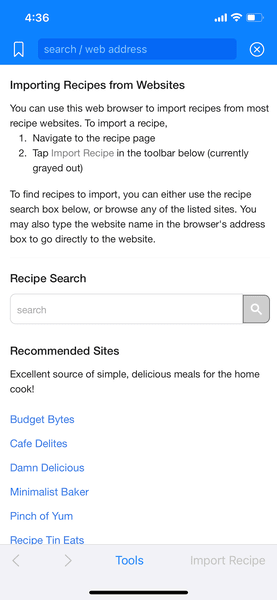
Image: Aaron Gates
My favorite, favorite feature on MealBoard goes through any URL of a recipe page and takes out only the parts that matter: meal info (like size and prep time), ingredients and amounts, and cooking steps. With one click of the Import button, a blogger’s fond memory of their grandparents vineyard changes into an accurate and concise recipe for your next meal.
For me, the app has had about a 97% accuracy rate when identifying the right steps and ingredients of a recipe. On the very rare times it has mistaken something as part of the recipe, it still gives you a review page where you can edit, remove, or add any info.
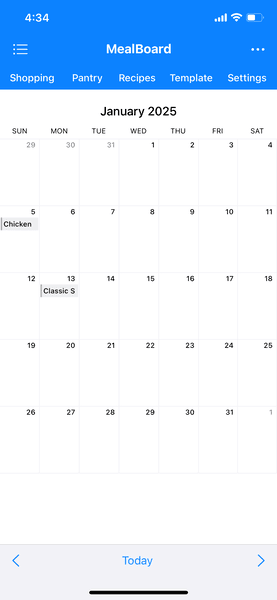
Image: Aaron Gates
Once you have the recipes loaded into the app, you can add as many as you want to any days on the calendar. The simple calendar interface means you can review your meal planning with a quick glance.
And when you’re ready, you can quickly translate everything into a grocery list. From the shopping list tab, you can sync meals from any date range in its calendar. Once the list is there, it’s an easy tap to check off or remove any items you already own. Now you’re ready to hit the aisles, with each entry reminding you the amount you need and what recipe it will be for.
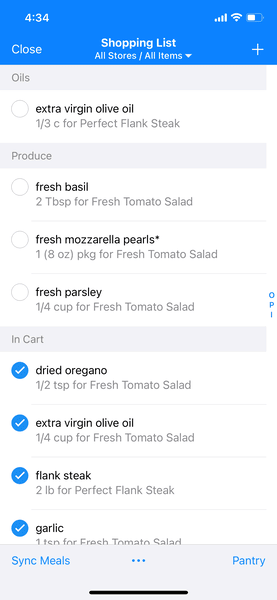
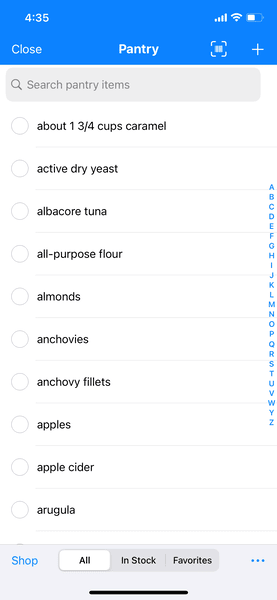
Image: Aaron Gates
Finally if you update what you have in your pantry, MealBoard will auto-check these items on your shopping list, saying you have them “in stock.” It can also move any checked items from the list to the pantry after you purchase them—a game changer, if you take the time to keep it accurate. I sadly haven’t used this feature as much, but that’s on me. So just know it’s a great feature but more administration lift than its other features.
Overall, MealBoard is a clean and helpful app that can spare you a lot of the slog you can feel when meal prepping. Plus, the app saves any new recipes before you make them, so you won’t forget where to find them next time.
Best of March 2025
Recommended by Aaron Gates
Best Gaming Apps

Peridot
Hatch your next pet... digitally.
Free on the Google Play Store and the App Store.
I don’t have to worry about cleaning up after my new dot…my domesticated mythical Peridot, that is. Hatch a completely unique virtual pet and grow alongside your new pal in augmented reality. Originally released by Niantic in 2023, Peridot is reminiscent of Tomagatchi crossed with Neopets and thrown into AR. Upon hatching, you’ll name and customize your creature. You can choose to accept your dot as it hatches, or alter its appearance with randomized parts from a menagerie of critters. I’ve seen unicorn horns, peacock tails, golden scales, and even gills on a few visiting dots. My little Razzle-dazzle has a narwhal horn, snowflake tail, and butterfly ears.
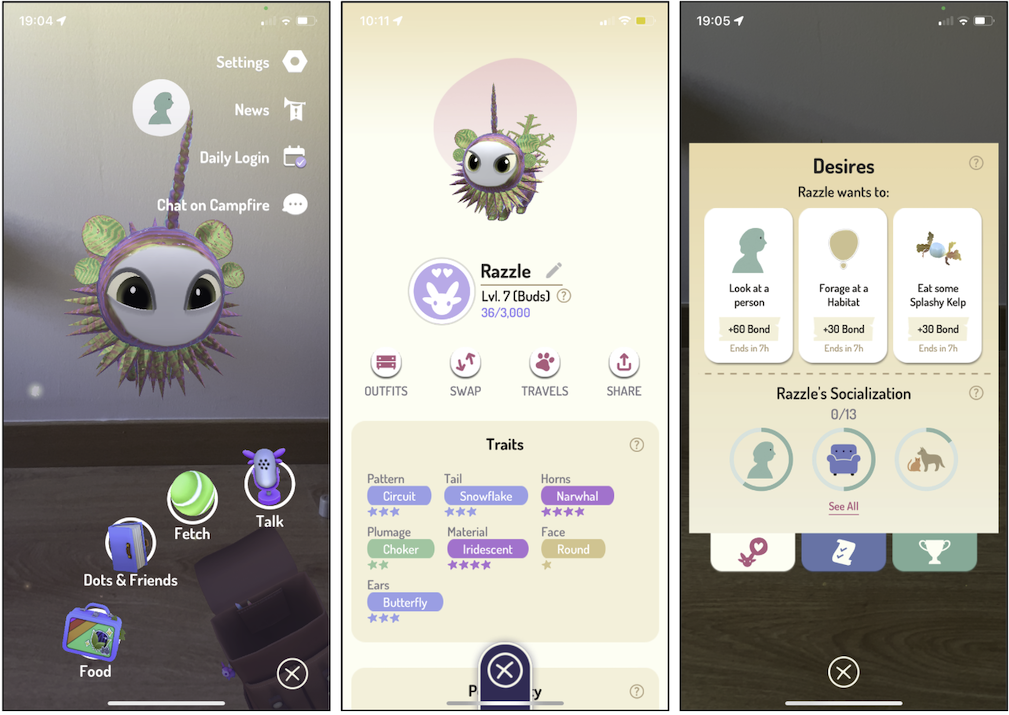
Image: Jessica Santero
Take care of your dot’s needs and desires by foraging for supplies. By drawing a circle on different objects or surfaces you can command your dot to forage for materials, unearthing food items like sandwiches, irresistible dotnip, and even toys to play with. My personal favorite is the speckled 90’s ball that appears from hardwood floors. Try out different materials for different items, like grassy patches (or a bundle of bananas in a pinch), ocean waves, and tree bark. Use these items to maintain your dot and fill his or her needs being hunger and happiness. Earn bonus points or Peridough (Peridot cash) by completing your dot’s desires, from food cravings to outdoor exercise. You can then use your earnings to purchase other items to use with your dot.
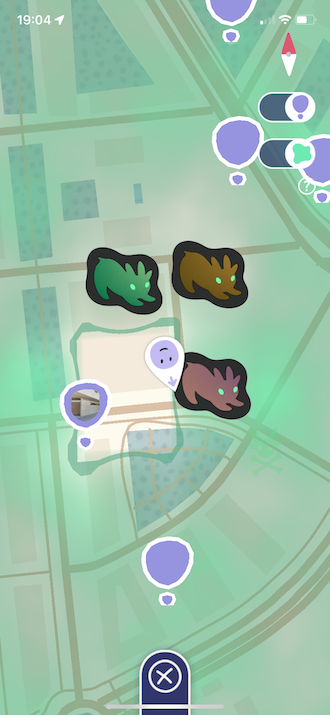
Image: Jessica Santero
While your dot may be domesticated, you are tasked with the mission of rescuing feral dots. You can start with the feral dots in your area, or venture out to rescue even more. These dark feral dots then become your best friends and potential mates for your dot when you decide to start breeding. Create a Niantic account with your email to access all Peridot features like virtual visiting, and access more items in the pet shot. Naturally, you can set up play-dates with other dots in your area with the app’s visit feature.
I have a confession: I’ve been considering adopting a real pet, but the convenience of my dot has convinced me otherwise.No waking up early at the weekend, no cleaning up after your animal, no loose hair woven into my leggings. I still get the satisfaction of interacting with a little four-legged friend (albeit through augmented reality) with adorable boops and booty shakes. Peridot is fun for all ages but is definitely geared towards younger players since there isn’t much more to this app than taking care of digital pets.
Best of May 2025
Recommended by Jessica Santero
Phantolex
Can you NOT guess the word?
Free from Apple
Phantolex is a creative new take on word games for iPhones.
You play against a friendly ghost named Casp, taking turns building words one letter at a time. However, unlike most other word games or puzzles, your objective is to avoid building words. The objective of each round is to force Casp to build a word first.

Image: Max McCaskill
This sounds complicated at first, but it’s not once you get the hang of it. During the first game, you select any letter you want to be in your word. From there, you and Casp take turns placing new letters to the left or right of your growing word. To win, get Casp to build a word before you do.
In the example below, I selected the letter B first. Casp then chose the letter L. I responded with a U and Casp finished with an E, which spelled BLUE and won me the round. This is a very simple example, and the words get much more complicated as the game progresses.
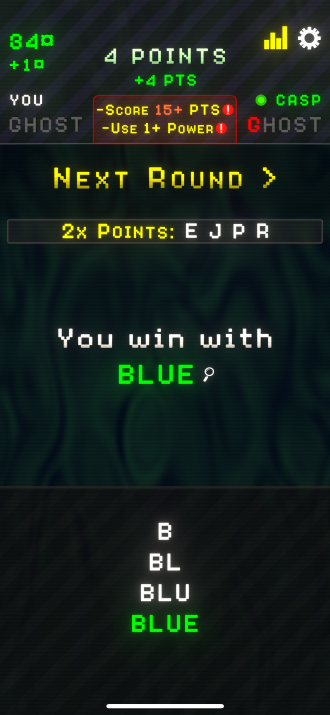
Image: Max McCaskill
There are 10 different levels of difficulty, with multiple rounds on each level. As you advance higher, you must use longer words and more difficult letters. To win each level, you must beat Casp five times. This is handily tracked by illuminating the letters spelling GHOST at the top of your screen. If Casp beats you first, you lose and fall back down to Level 1. It’s an all-or-nothing game.
You also can’t guess or make up words. If you place a random letter, Casp can challenge you to immediately spell a word with the letters so far. If you can’t do it, you lose that round. That feature works both ways, so you can also challenge Casp if you think the app is bluffing. There are also “Powers” that can help you, such as skipping a turn or getting a hit, but they require points you earn each round.
Overall, Phantolex is a lot of fun and requires a bit more strategy than typical word games. You’ll think about specific words and how prefixes and suffixes can be used to your advantage. The game doesn’t require an account to play, so data privacy isn’t an issue. It’s also free, and as of right now, there are no ads. It feels like an old-school app from the early days of the App Store before games were overrun with pay-to-play features and relentless advertising.
Phantolex is rated 4.7 out of 5 on the App Store with 85 ratings and is currently recommended as one of the best new games. Overall, if you’re looking for a new twist on word games, Phantolex is worth a spot on your iPhone.
Best of January 2025
Recommended by Max
McCaskill
Shapez
Try this minimalist factory game
Free from Apple and Google Play Store
If you’re looking for a new strategy or puzzle game, Shapez might be for you. It’s a minimalist factory game that requires players to build conveyor belts and machinery to create specific shapes. While it might sound simple, some shapes require multiple steps including rotations, changing colors, and even changing size. All this leads to a complicated web of conveyor belts streaming across your screen to manufacture the perfect shape for your factory.

Image: Max McCaskill
Shapez uses an open-board concept for each level. You can place items anywhere you want to create the best-designed factory. Each level requires the delivery of a specific number of shapes. As you progress, you unlock new types of machines and the delivery orders get larger. However, new levels don’t erase your old factory. You must constantly upgrade and rebuild your designs to meet the new level’s requirements.
The first seven levels of Shapez are free to see if you like the game's concept. You can buy access to the rest for a one-time payment of $1.99. I enjoyed Shapez and felt the game worked well overall. The controls are easy to understand and there’s a tutorial to walk you through the controls. My only gripe is that loading into the game is a bit slow, sometimes reaching 15-20 seconds. That said, there is a loading progress bar at the bottom of the screen, so you know the game isn’t frozen.
Shapez has been out for over a year, but it's started to gain popularity over the past few months. It’s rated 4.5 out of 5 on the Apple App Store with over 800 ratings. The Google Play Store gives it a 4.4 out of 5 with almost 5,000 reviews. The app also doesn’t require any personal data. There’s no multiplayer feature and your games are saved directly to your device. I enjoyed Shapez enough to get the premium version and unlock the entire game. I felt it was a perfect distraction game for times when I can’t connect to Wi-Fi, like when traveling on an airplane.
Best of February 2025
Recommended by Max
McCaskill
Best Health
& Fitness Apps

Honestly
Wellbeing Coaching right from your phone.
Available for download from the Google Play Store and the Apple App Store.
If you’re anything like me, you’ve probably gone down the rabbit hole of finding the perfect journaling routine. You’ve watched all the YouTube videos, bought a stack of beautiful notebooks, and found the perfect pen (shout out to all the PILOT Razor Ultra-Fine 0.33 mm Point pen lovers out there)—only to journal for a few days, then never pick it up again.
That’s why I was intrigued to try out Honestly, an AI-powered journaling app designed to make journaling easier and habitual. So I gave it a shot, and I honestly—no pun intended—really liked it.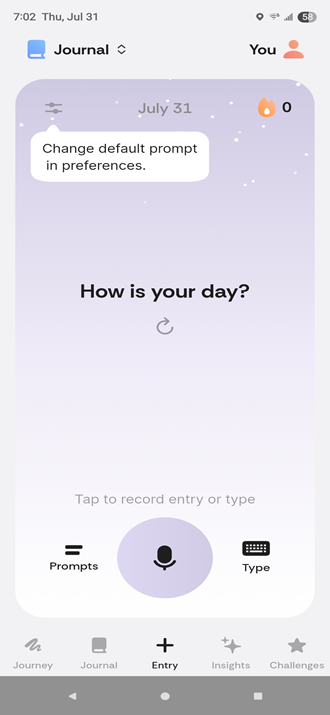
Image: Scott Houghton
Upon opening the app, you are greeted with a simple interface that immediately prompts you to start a new entry. The default prompt simply asks, “How is your day?” But if you’re like me and find that prompt a tad bit boring, you can change the default prompt to something more inspiring.
Honestly also gives you the option for either a typed entry or a voice-recorded one. This is great for the days when writing out an entry by hand feels like a barrier. Plus, the app transcribes your voice recording so you get the best of both worlds.
The biggest thing that sets Honestly apart from other similar apps is its AI features. And before you completely write this off as just another AI app, give me a chance to explain these features, because honestly–pun intended this time–they are actually pretty cool.
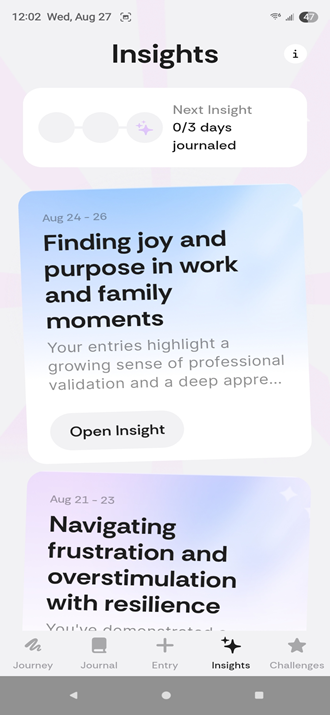
Image: Scott Houghton
Honestly’s two main AI features are reflections and insights. After each journal entry, the AI analyzes what you’ve written and prompts you to reflect more deeply on your thoughts. For example, if you mention being stressed at work, it may ask why you felt that way. Then, after every three entries, the AI reviews them together and generates a broader insight into your experiences. While I occasionally found these insights somewhat bland and surface-level, I think they still add value by encouraging you to step back, notice patterns in your entries, and approach your experiences with a little more perspective.
Honestly also incorporates a mood tracker, which I found to be insightful. However, I will say that, depending on the tone of your voice when doing a voice-recorded entry, the AI could misinterpret your mood. This happened to me a couple of times during the month, but it is very easy to change the mood to a more accurate one if needed.
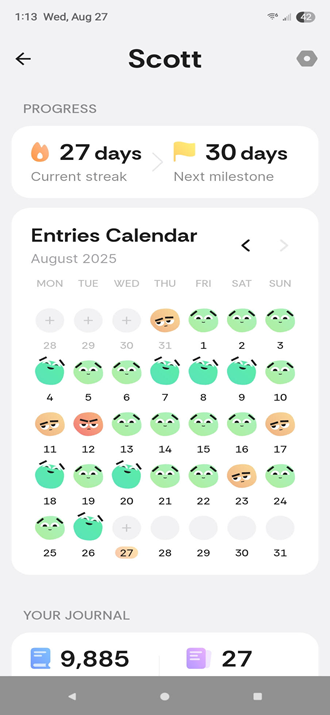
Image: Scott Houghton
Now, I understand that some people might be hesitant to bear their souls to an AI agent, which, to be fair, is a valid concern. For those who fall into that camp, the best option is to stick with the free version of the app and avoid the $35/year premium upgrade that includes the AI features.
When all is said and done, I recommend Honestly for people who are looking for a barrier-free entry into journaling. Because of its entry options and prompts that push you to think and reflect more deeply, it really lends itself to people who have always wanted to be a habitual journaler but have always struggled to get started. After using the app this month, I feel more prepared and excited to continue my journey into the world of journaling.Best of October 2025
Recommended by Scott Houghton
Mapy.com
A must for any outdoor enthusiasts.
Free on the Google Play Store and the App Store, and is available for smartphones, tablets, laptops, and smartwatches.
Requirements:
- iOS 16 or later versions for Apple devices
- 9.0 or later for Android devices
Mapy.com is the fool-proof navigation app outdoor enthusiasts need. As an avid trail runner and cyclist, I’ve tried them all: Maps, Google Maps, AllTrails, and top sport-tracker Strava. However, most sports GPS apps disable offline maps and block off the best routes with premium subscriptions. Mapy.com is completely free, allows downloading offline maps, and guides you around the world.
Apart from trails, Mapy can help you find restaurants, ATMs, accommodations, highways, and much more—all within a tap’s reach. You can use the Mapy webpageon your computer or laptop, but the app is ideal for nature lovers, city sightseers, and all-around adventurists.
Image: Jessica Santero | WhistleOut
Although Mapy was founded in 2011 as Mapy.cz, it was recently rebranded as Mapy.com in 2025 with the addition of an easy-to-use app. I’ve been using the Mapy app for about three months now, and couldn’t be happier. Start by picking your method of transport (by bike, car, or even on foot) and setting your start and finish points. Otherwise you can choose from the “Nearby Trips” in your area for inspiration.
Personalize your path with different map settings, such as:
- Outdoor and Base with color coded paths.
- Satellite for detailed imagery.
- Winter for icy areas.
- Traffic if you choose to ride on the roads.
.png "Screenshots of Mapy.com map options.")
Image: Jessica Santero | WhistleOut
You can even save and download your route for free to take on the go. Since Mapy.com uses your GPS location, even without cell service or Wi-Fi, you can keep track of where you are on the map.
Mapy shows much more than hiking and biking trails: find famous monuments, natural wonders, and all types of transport hubs. Mapy is a worldwide service, so you can explore whether in your daily routine or abroad on vacation. I plan on using Mapy on every trip I take, whether I take my bike or not!.png "Screenshots of Mapy.com icons on map.")
Image: Jessica Santero | WhistleOut
Mapy does offer a premium subscription which allows users to create folders on their app homescreen. For example, say I’m planning a trip to Galicia in Northern Spain and I want to mountain bike along the Camino de Santiago. With Mapy’s premium feature, I could route my trails ahead of time and keep them in one location (similar to My Maps by Google with saved locations, but on trail-heavy maps).
I used to worry about getting lost while off the beaten path, but not anymore with Mapy. It has saved me many times while navigating paths and trails all around my local area, and even given me the confidence to venture out further. The only downside is having to stop and unclick my pedals to look at the map, but you can connect Mapy to your smartwatch and have your map on hand (literally) at all times.
Best of July 2025
Recommended by Jessica Santero
Calmer
This app may help you deal with anxiety.
Free from the Apple App Store and the Google Play Store. Premium features with paid subscription.
I’m always on the lookout for apps that can help my mental health. With that mission in mind, I recently came across Calmer, an app that claims it can improve your mental health by reducing anxiety and granting relief from panic attacks. It does this by providing a free mental fitness plan, guided breathing exercises, education about the causes of anxiety, and a selection of features designed to help calm you during a panic attack. The developers claim their techniques are backed by research conducted at institutions like Johns Hopkins University and the Mayo Clinic. Still, they are also quick to point out that the app shouldn’t serve as a replacement for professional medical help.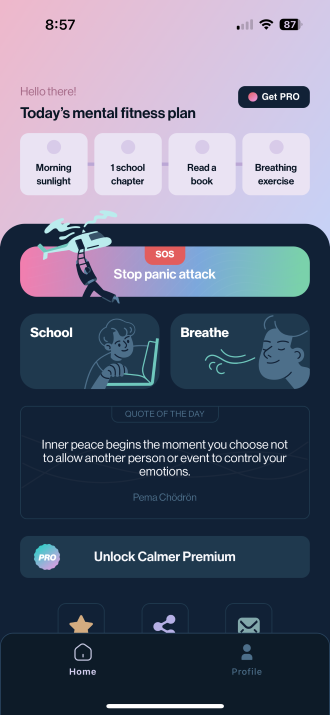
Image: Max McCaskill
When users want to reduce their anxiety during the day, they can select a guided breathing exercise. There are three different options stretching from around one minute to 10 minutes. When you select them, the app gives instructions on how to complete the exercise, then walks you through the time limit and tells you when to breathe. I found the breathing exercises were particularly helpful and easy to understand. I’ve used some of these techniques for anxiety before in other settings, so it’s nice to have an app that can help me keep track of the time while doing them.
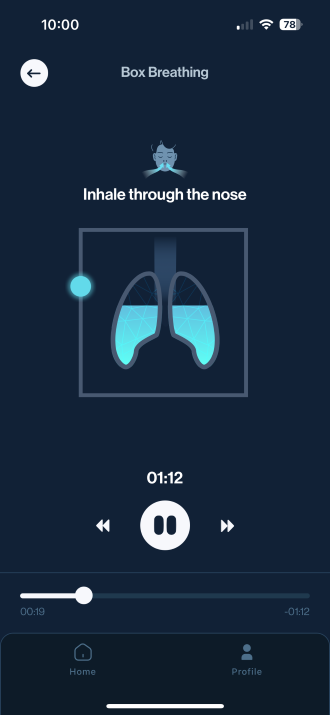
Image: Max McCaskill
When users are having a panic attack or large amounts of anxiety, they can click a large “SOS” button. That brings up a new set of guided options to help walk people through their panic attacks. One of the options is affirmations, which is a series of note cards to scroll through that can help reframe negative thoughts and reminds users to breathe.
The app interface is simply designed and easy to understand. It doesn’t feel as cluttered as competitor mental health apps, like the Calm app, which is almost overwhelming with all the different collections it recommends. Calmer’s mechanics also work well, and the app never crashed while I was using it.
One of the other major benefits is that most of Calmer’s features are free. There is a premium mode available for $9.99/month (or $44.99/year), but many of the breathing exercises are available for free. Most of the educational content and some of the panic attack features are locked behind the paywall. For someone like me with mild anxiety who mainly uses the simple breathing exercises, I haven’t found a reason to pay for Calmer Premium.
When you create your account, Calmer does ask for some information about your current mental health. As far as I could tell, your answers don’t impact your experience within the app. Still, some users may not like the idea of filling out this information, but Calmer maintains in its Privacy Policy that it doesn’t use third-party services that collect your information. Plus, the app is currently ad-free except for the option to enable Calmer Premium. While the app is only a few months old, it’s already been downloaded thousands of times on the Google Play Store and App Store, and is currently rated as a 4.8 out of 5 on both.
If you have anxiety and want help to help keep it in check throughout the day, Calmer is worth a shot. It’s certainly helped me monitor my anxiety and reduce it when it flares up.
Best of July 2025
Recommended by Max McCaskill
Sleep Cycle
Catch some quality ZZZs with this all-in-one nocturnal aid.
Free from Apple and Google, with paid features available
The Sleep Cycle App improves your sleep and tracks your patterns with in-depth analytics.
This app has been transformative in improving my sleep quality and overall health. It offers various white noise options, essential for people like me who need complete silence to fall asleep. (I highly recommend the ocean waves and heavy rain soundscapes.) It tracks your sleep patterns and movements through your phone’s microphone or through a motion sensor directly within the app itself.
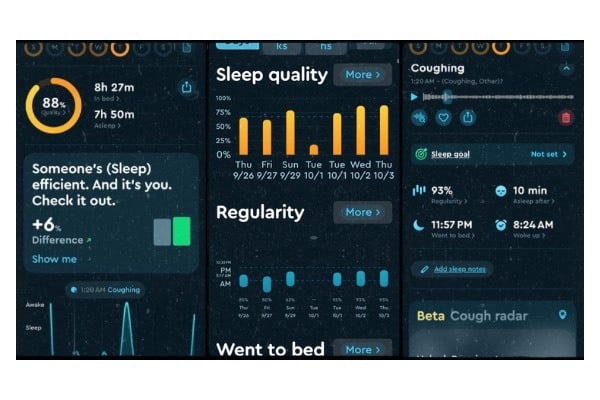
Image: Aletta Cooke
What makes this app stand out is its smart wake-up function, which detects the lightest phase of your sleep by tracking your REM cycles. Waking up in the middle of a REM cycle can cause that dreaded morning grogginess. With Sleep Cycle, you wake up feeling more refreshed by avoiding waking during this stage entirely.
It also tracks how many hours of sleep you get each night, week, or month. For those curious about premium features, the Pro version includes additional soundscapes, relaxation aids, smartwatch integration, and advanced sleep insights based on tracked data.
And if you love hitting the snooze button? There’s even an intelligent snooze feature that gently wakes you up with a gradual increase in volume. Sweet dreams, indeed!
Best of January 2025
Recommended by Aletta
Cooke

Lifestack: Circadian Calendar
Hack your daily energy levels.
Free from the Apple App Store. Free trial with paid subscription.
If you need an app to help you feel better and be more productive, Lifestack might just be what you’re looking for. It uses your Apple Watch and health data to track your circadian rhythm. This allows you to determine when you’re most productive during the day, so you can focus your energies at the right time. It’s essentially a way to biohack your daily planner to put the most energy-intensive tasks during the time of day when you can best handle them.
When setting up Lifestack, it asks for your goals and analyzes your past Apple Health data to determine your circadian rhythm. It assigns you a “type” based on when your energy peaks. For example, the data showed that I tend to stay up late and am most active in the late afternoon to evening. Lifestack declared me a “Night Type” and showed my energy peaks around 4 PM.

Image: Max McCaskill
Lifestack then used that measurement to plan a custom daily planner. It tells me when I should warm up to prepare for the day, when I should focus on in-depth work, and my peak energy times for active tasks. There are also optional extra “energy boosts” you can add to your day. These are things that can help kickstart your energy and focus, like hydration breaks, walks, and workouts. The app automatically tells you the best time to do them based on your plan. There’s also a limited AI scheduling feature that allows you to add your work hours and eating routine to further refine your plan.
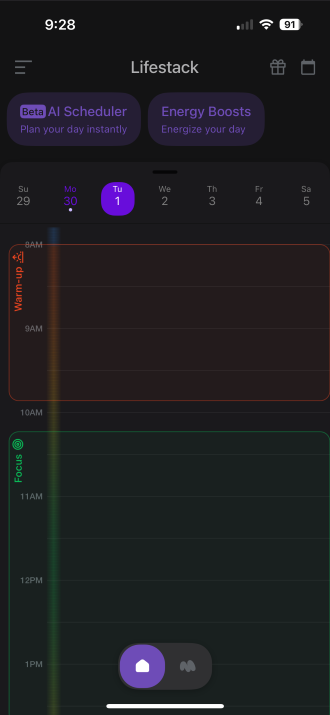
Image: Max McCaskill
To Lifestack's credit, it nailed my personality and when my energy peaks. I am a night owl and tend to be most productive in the late afternoon or even at night. The app also integrates with other apps—like Google Calendar or Trello—to help you plan your day and to-do lists. In my time testing the app, I did notice that I’m more productive during my energy peaks. Lifestack also acknowledges that everyone’s routine is different, so it was also nice to have a health app that didn’t pester me for staying up late every night. I don’t know that the app actually made me more productive, but I did like the data it provided.
Overall, Lifestack is designed well and easy to understand. You do have to give the app access to your Health app, but it seems to mainly focus on your sleep and exercise data. You also aren’t required to integrate the system with your other apps or give additional data to the app's AI.
Lifestack offers a free seven-day trial, but then requires a paid subscription of $4.99/month. This was my biggest issue with the app. I don’t think there are enough features currently in Lifestack to keep me as a paying subscriber. Instead, I used the free trial as a chance to build my plan and track my circadian rhythm, then deleted it after the trial ended. If you have a consistent schedule, it’s doubtful that your routine will change enough to have a special app constantly tracking your energy and sleep levels. That said, the app is still new, so this may change as time goes on and new features are added.
If the idea of biohacking your daily schedule to match your routine and energy levels sounds appealing, Lifestack is worth a shot.
Best of July 2025
Recommended by Max McCaskill
Best Lifestyle Apps

Focus Friend
Manage your time more efficiently with this cute bean.
Free from the Apple App Store and Google Play Store.
If you’re someone who follows tech news, you may have seen several stories over the past few weeks about Focus Friend, a new app from internet content creator Hank Green. It’s a focus timer to help with screen addiction, and has gone viral for being adorable. You create a timer within the app, and during that time, you’re not allowed to use your phone. After reading about it, I decided to give it a try to see if it was worth the hype.

Image: Max McCaskill
Where Focus Friend gets its charm is the bean character that holds the app together. This is your “focus friend.” You get to name the bean—I named mine Pinto—and while your timer is ticking down, it knits socks for you to sell for decorations. Whenever you go somewhere else on your phone, it unravels the bean’s project, making it sad and preventing you from collecting rewards. While it may sound like a simple concept, it is surprisingly effective.
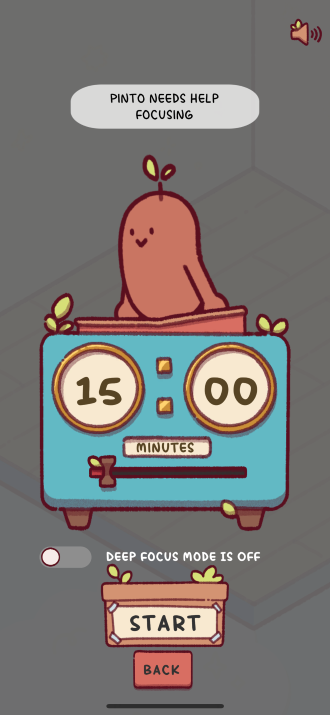
Image: Max McCaskill
I’ve used several different focusing apps over the years, and this has become one of my favorites. It’s easy to use and has kept me mostly on track with my screentime during testing. That said, it’s not perfect. The app generally works on the honor system, meaning you have to manually let it know when you screw up and use your phone. There is a “Deep Focus” mode that allows the app to block notifications and track what you do, but it doesn’t always work correctly. Plus, Deep Focus mode requires access to your settings, which privacy-conscious people may not like.
Focus Friend is free, but it also offers a pro subscription that unlocks a few additional features. However, virtually all of the paywalled aspects of the app are cosmetic items or a currency to buy them, so most people don’t need to sign up.
If you’re struggling with doomscrolling or smartphone addiction, Focus Friend is worth a look. Even if it doesn’t completely solve your problem, it will at least make you realize how many times a day you’re picking up your phone. Plus, who doesn’t want a cute little bean friend that lives in their phone?
Best of October 2025
Recommended by Max McCaskill

Bluesky
Do you miss old Twitter? This app may be for you.
Free from the Apple App Store and the Google Play Store.
Social media is depressing. Sites like X, Facebook, and Instagram seem to purposely push divisive content and have weakened user protections, resulting in a constant barrage of troll accounts and AI slop. Luckily, there are alternatives. Bluesky is an X clone that originated with Jack Dorsey and the Twitter team. After Elon Musk purchased Twitter in 2022, Bluesky separated and became its own social media app.
I originally joined Bluesky during the beta in 2023, but only recently has the app experienced enough changes for me to recommend it to other people. One of the biggest developments is that there is finally a large enough user base for it to feel like a real social media network. At the beginning of the year, it crossed the threshold of 30 million active users, which is larger than competitor sites like Truth Social and Mastodon. In April, Bluesky also officially launched a verification badge system for notable accounts, adding an additional level of trust.
For a social media app, Bluesky has the feel of classic Twitter. There’s an endless feed to scroll through, and many of the top X accounts have set up alternative accounts on Bluesky. The accounts you see are based on who you follow, not an arbitrary pay-for-visibility system. There is also exclusive content from news agencies that have migrated their feed to Bluesky and shut down their X accounts, like NPR and The Guardian.
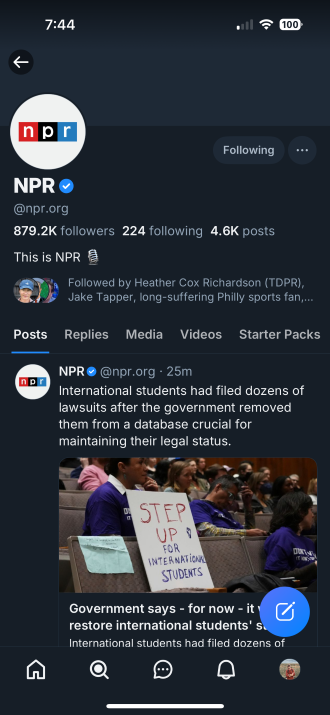
Image: Max McCaskill
As for the user experience, it’s pretty solid. New users can access “starter packs,” which are groups of accounts that post about the same topic. This includes serious topics like politics and journalism, but also more fun hobbies like college football or astronomy. Bluesky also boasts strong user protection features, including the ability to totally block someone (a feature that X now lacks). Plus, the new verification badges mean that you can trust the content you see from those accounts is legitimate.
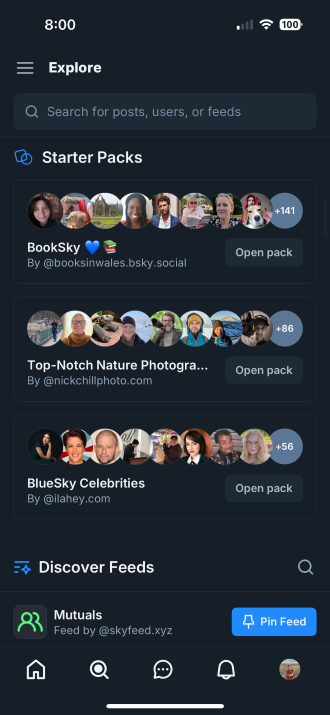
Image: Max McCaskill
The mechanics of the app also work well. There are security features like two-factor authentication to keep your account safe. Plus, it offers a smooth experience, and the app has rarely crashed in the three years I’ve used it. Finally, creating an account is completely free. There’s no premium subscription model to worry about or a way for people to pay to ensure their posts show up on your feed.
Overall, if you’re an X addict but are currently displeased about the state of the platform, Bluesky might be just the alternative you’re looking for.
Best of May 2025
Recommended by Max McCaskill

Corner
Crowdsource your next fun night out.
Free from the Apple App Store (not yet available from Google Play Store).
Living in a relatively large-ish city (I’m in San Diego, CA), I do my best to stay on top of all the fun stuff to do, see, and eat (mostly eat) in my neck of the woods. But whether it’s because I tend to gravitate toward what I already know and love, or because new places keep popping up seemingly overnight, it can be hard to keep up with the cool kids and find new places to try.
Enter the Corner app. Corner is a crowdsourced lifestyle app that helps you discover businesses and hangout spots in your (or any) area, from bookstores to beaches and everything in between. Start by telling Corner what your interests are; it will then generate a map highlighting some of those location types near you to get you started.

Image: Lauren Hannula
You can search any city or neighborhood and browse the resulting map, or you can search for specific places you’ve heard of and save them to your list. There’s also a “Near You” menu where you can see spots that others in your area have recently added. When you tap on a location, you’ll access photos and quick blurbs from people who have already been there, as well as see who else has marked it as a spot to check out. As you continue to add places to your favorites and “must-try” lists, Corner gets to know your vibe and will recommend spots to check out.

Image: Lauren Hannula
I’ve found Corner super helpful in two ways: Firstly, it’s helped me replace the massively long and not-very-easy-to-browse list in my iPhone’s Note app of all the San Diego restaurants I want to try. Now, I’ve saved them in Corner and separated them by category, like “Cafés” and “Favorites.”
Secondly, Corner has been awesome for planning an upcoming trip to Berlin. Having never been there before, I can easily map out cafés, restaurants, bookstores, and cultural activities that locals recommend and frequent. The map view is great to see their distance from my hotel, and the list view makes it easy to tap into each individual location to get the address and details.
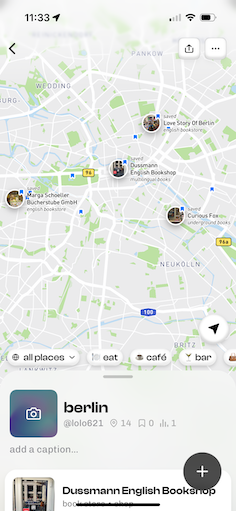
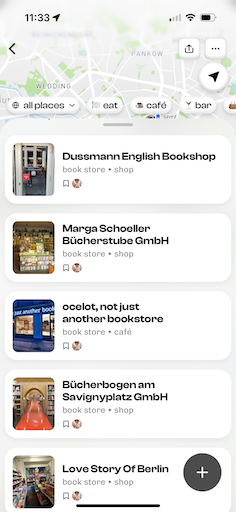
Image: Lauren Hannula
I have a couple of gripes—namely, that for some places, you have to already know they exist to search them and add them to your map (not awesome for visiting a brand-new place). One of my favorite independent goods stores, for example, didn’t show up automatically on my map. If I didn’t know it was there to search for and add, I would miss it entirely, which means tourists visiting my neighborhood will likely miss it, too. It would be great if the developers could add smaller icons for each spot someone has previously marked, and use the larger icons for the most popular/saved places.
Secondly, you can’t adjust your lists to be in any sort of custom order. So if I want to adjust my list places in the order of importance that I want to check them out, I have to go and specifically save them in reverse order, so that the last thing I save appears at the top of the list. There should be a way to just drag and drop the order of your saved places.
Apart from those issues, though, I think Corner is a great find, especially if you’re in an area where it’s already gained a ton of traction.
Best of April 2025
Recommended by Lauren Hannula

EverythingWeather
Get National Weather Service forecasts straight to your phone.
Free from the Apple App Store.
If you’re looking for an informative weather app that isn’t polluted with ads, EverythingWeather might be for you. Its creator—Cory Mottice—is a meteorologist with the National Weather Service (NWS), but the app is not affiliated with the agency. That said, it does use the agency’s data. You’ll find things like current conditions, forecasts, radar, and NWS weather reports in an easy-to-navigate app.
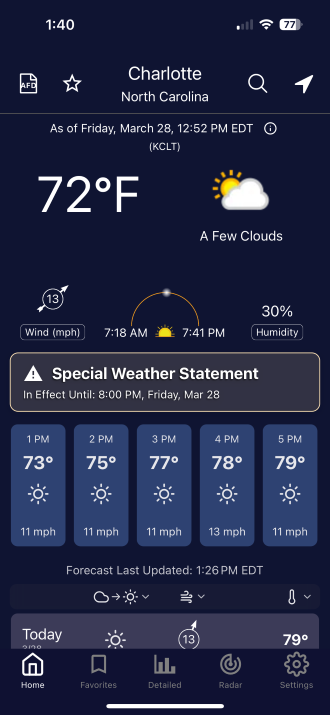
Image: Max McCaskill
EverythingWeather has all the normal features you’d expect in a weather app. There is current data, weekly forecasts, and a customizable radar. You can also add storm areas to your radar view, allowing you to track storms and see where the biggest dangers are. The app is still being expanded, so it’s not perfect yet. Eventually, you’ll also be able to add current storm warnings and winter storm severity information directly onto the radar.
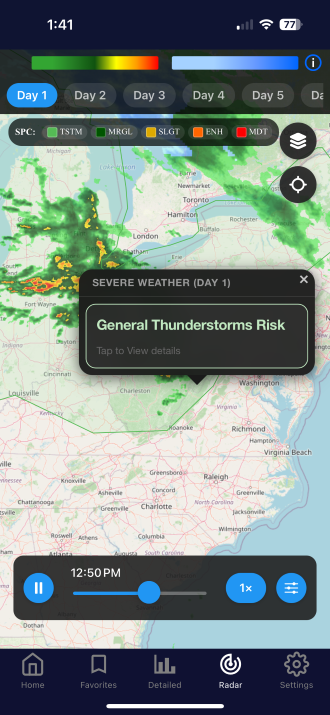
Image: Max McCaskill
I’ve had a good experience with EverythingWeather over the past month. It’s missing the clutter found on apps like Wunderground and The Weather Channel. That said, hardcore weather fans may miss some of the more in-depth features that EverythingWeather currently lacks, like live satellite and cloud cover information.
As far as your data is concerned, EverythingWeather doesn’t need any information other than your location, which is standard for a weather app. It’s also free, with no features locked behind a paywall as of right now. Overall, if you’re tired of the commercialized apps, EverythingWeather is a great alternative built straight from the mind of a meteorologist.
Best of April 2025
Recommended by Max
McCaskill
My Veggie Diary
Track your emotions, whether you’re in a sour-lemon, pleased-peach, or wilted-lettuce mood
Free from Apple and the Google Play Store
(Also available for smartphone, tablet, and
desktop)
Apple users: This app requires iOS 13 or later.
My journaling hiatus has come to an end, and I couldn’t be happier—all thanks to My Veggie Diary. When it comes to jotting down emotions and sentiments, there’s honestly no better way than with fun and funky vegetable stickers. Track your emotions, whether you’re in a sour-lemon, pleased-peach, or wilted-lettuce mood with a simple tap. As a horticulturist at heart, I’m naturally thrilled with veggie-mojis. I can identify with a spicy chili pepper more than with a list of context-nuanced vocabulary. After three weeks of testing, I’m committed to seeing my veggie patch grow (and thrive) because I’m keeping My Veggie Diary.
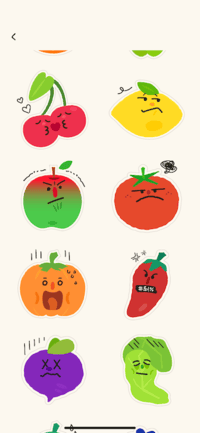
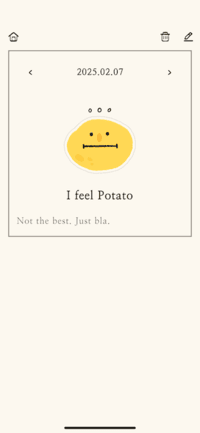
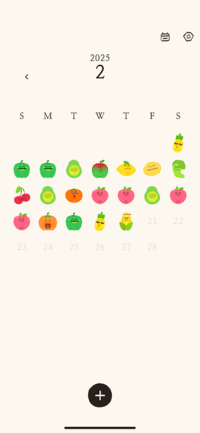
Image: Jessica Santero
Yes, I like to talk to tomatoes, and if squash can make you smile too, then My Veggie Diary is your ideal journaling app (any VeggieTales fans?). It’s simple and intuitive to use yet entertaining enough to make you want to continue using it. Completely ad- and hassle-free, use the font and design of your choice, even assign a passcode to protect your innermost existential-endive or angry-apple thoughts. Allow notifications, if you so desire, to make sure journaling is a part of your daily routine. You can also rewrite past days, or delete your entry altogether; but you can’t skip ahead in time on the calendar.
While My Veggie Diary hit the app store in 2021 (predating the overrated and overanalytic journaling app How We Feel, recent updates have brought even more fruity friends to the bunch. I’d like to see even more stickers added, or even “in season” stickers, rotating with the seasonality of certain vegetables. But that might be asking too much for a very niche legume-loving crowd. All in all, I appreciate the simplicity of this app, allowing me to write about my day without any frills.
*This app doesn’t share data with third parties nor is data collected
linked to you.
Best of March 2025
Recommended by Jessica
Santero

Age of Pomodoro: Focus Timer
This isn’t your run-of-the-mill focus timer, but a productivity pocket empire
Free with in-app purchases on Google Play and the App Store.
*Requires Android 5.0 or later, iOS 11 or later versions, and is available for iPhone, iPad, and Mac.
Be productive in more ways than one with this focus timer that allows you to build an empire by limiting your screen time. Your Age of Pomodoro empire begins as a series of connected hexagonal tiles with different tasks and corresponding wait times. Think of Catan, but with adorable 16-bit pixel figures and animations accompanied by harpsichord melodies and troubadour tunes. In order to cultivate or construct on each tile, you need to complete focus wait times. But don’t open any other apps or else the timer stops. Clear forests for wood, chisel stone at the quarry, build and expand your empire with distraction-free productivity.
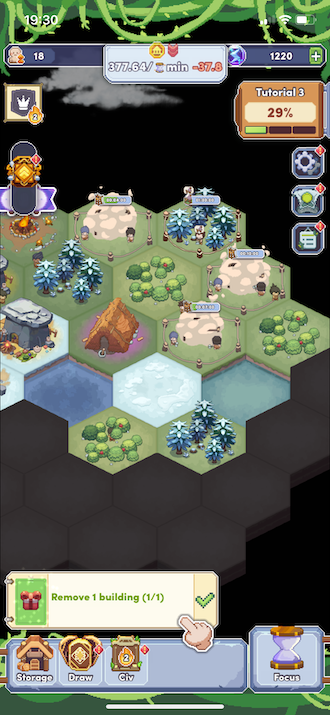
Image: Jessica Santero
Once you make it past the lengthy tutorials to master the skills of construction, expansion, and development, you can continue advancing your civilization through historical milestones. The highlight of this app is your control over how much time you want to exchange for construction. Click on the hourglass Focus button to set a timer. If you exit the timer screen or open another app it automatically pauses (but you can lock your screen no problem).
The amount of time you can set ranges from 5 minutes upwards of 3 hours. You can choose a specific tag or label to indicate what your focus time was dedicated to, and even activate strict mode blocking certain apps you mark on a whitelist. Your favorite apps could never be blacklisted, but are counterproductive when trying to focus.

Image: Jessica Santero
Released on December 8, 2024, Age of Pomodoro: Focus timer is the ideal idle game for consistent players that need an incentive to stay productive. It fuses the gaming world with your personal workload to help you disconnect all-the-while staying connected.
If you’re like me and need set blocks of time to really hunker down and work uninterrupted, this app would help you out. Breaking daunting tasks down by time increments helps boost productivity, and knowing there’s new advancements in my civilization awaiting me is very motivating. Although it isn’t the Sid Meier’s Civilization gaming series, it’s still fun to keep advancing through milestones.
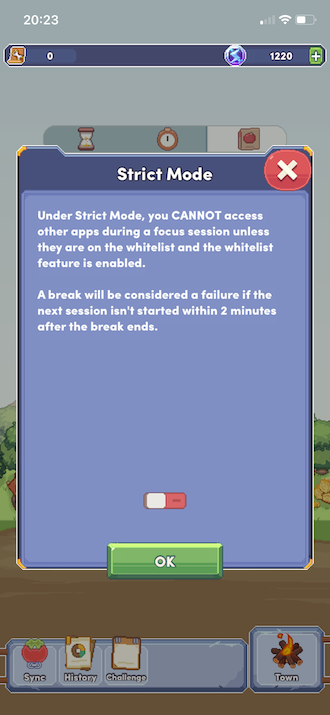
Image: Jessica Santero
If you have doubts about whether a focus app may be useful, check out Age
of Pomodoro. This low-maintenance game-like tool may help you be more
productive and limit your screentime. Dedicate more time to work while
playing Age of Pomodoro.
Best of February 2025
Recommended by Jessica
Santero

Forest
Grow your productivity and a cute forest at the same time
$3.99 on Apple and free on Google (with paid features available)
If you’re like me, you often struggle to stay focused. Whether it’s boredom or exhaustion, every time I sit down to get work done, the draw of my phone calls to me like a siren hiding among the rocky shores of procrastination. (Too dramatic? Maybe. One man’s dark watery abyss is another man’s tide pool… or whatever Plato said.)
I just don’t have the self-control to set a bare-bones timer and work with pure willpower. Trust me, or at least trust my therapy bills. Instead, Forest gives me a cute digital tree as a reward when I succeed. (Did I mention it’s cute?)
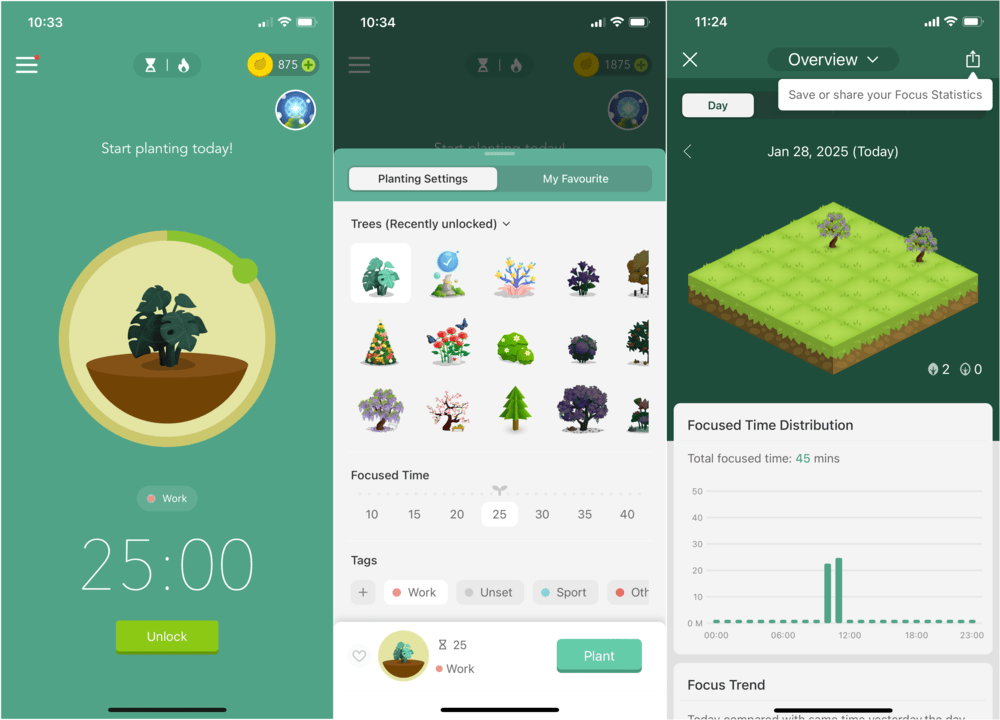
Image: Aaron Gates
How does it work? When you want to focus, you’ll open the app, select a plant to grow, and choose a length of time to stay focused. Once you start the timer, Forest will remind you to set your phone aside and get to work. If you manage to stay off your phone for the selected time, pow! You’re rewarded with a vibrant tree planted in your forest.
However, if you do open your phone (and ignore Forest’s reminders to stay focused), you’ll fail your focus time, and the tree will dry up and die. A bummer for sure, but it actually makes me more watchful to not get distracted. Who would want an innocent, angelic (digital) tree shrub to die because of their failures? Only monsters, that’s who.
You’ll also earn coins from various tasks, like successful timers, daily focus goals, and achievements. These coins let you shop for new trees to plant and new sounds to use to help you enter a flow of concentration.
The app even lets you sync with friends and work together on joint timers and forest plots.
Is this app for you? If you like earning cute rewards and seeing progress as you complete tasks, Forest won’t let you down. I’ve been using the app for years (got me through college), and even if I don’t use it for a while, I always come back when it’s crunch time.
Best of February 2025
Recommended by Aaron Gates
PlantIn
Find out all about that cool plant in your neighbor's yard.
Free from Apple and Google; subscription options available
If you've ever been curious about plants around you, PlantIn is here to help. It's basically like having a botanist in your pocket—snap a photo of any plant, tree, flower, or even mushroom, and the app will tell you what it is.
It’s incredibly easy to use. Take a photo, and PlantIn’s AI gets to work,
matching it against its database. You'll get the species name, where it comes
from, and even its USDA hardiness zone (aka whether it'll survive in your
area). The identification is surprisingly accurate, especially for common
plants and flowers.
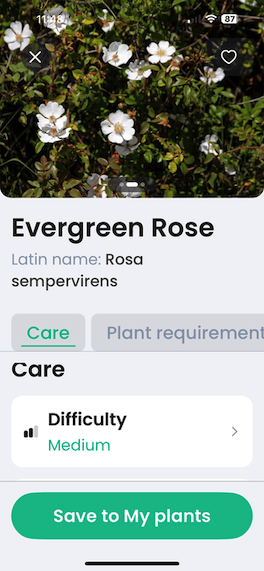
Image: Aletta Cooke
The free version gives you plenty to work with: You can identify plants, get basic care guides, and check if your plant might be sick. If you go premium, you can chat directly with actual botanists about specific plant problems, though honestly, most casual gardeners will do just fine with the free version. One of the best features is the ability to keep track of your own plants, with reminders for watering and care notes.
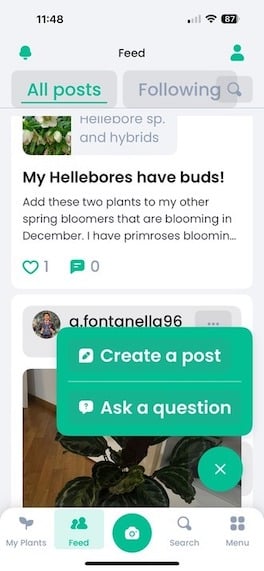
Image: Aletta Cooke
The free version gives you plenty to work with: You can identify plants, get basic care guides, and check if your plant might be sick. If you go premium, you can chat directly with actual botanists about specific plant problems, though honestly, most casual gardeners will do just fine with the free version. One of the best features is the ability to keep track of your own plants, with reminders for watering and care notes.
The whole interface is clean and intuitive, whether you're a first-time plant parent or an experienced gardener. You can also choose to post in the community scroll and interact with other users, either getting feedback, troubleshooting, or simply showing off your gorgeous plants.
While the premium features are solid, they might be a bit pricey if you're just getting into plants. Most home gardeners will find the free version hits all the right spots for basic plant ID and care needs. The premium botanical consultation is nice to have, but if you're dealing with ongoing plant issues, you might get more value from building a relationship with your local garden center. Whether you’re just starting to grow your green thumb, or regularly venture into nature, PlantIn is the perfect companion to get all your floral questions answered on demand.
Best of January 2025
Recommended by Aletta
Cooke
Best Shopping Apps

Upside Cash Back
Get money back on your money spent with this free rewards app
Upside gives you cash back on your spending routine. It’s the only rewards app I trust.
Do you pay for gas? Is the grocery store one of your frequent stops? Maybe you take out dinner on the weekends? If so, you should already be using Upside. By partnering with local businesses, Upside brings you cash back when you spend at gas stations, grocery stores, and restaurants.
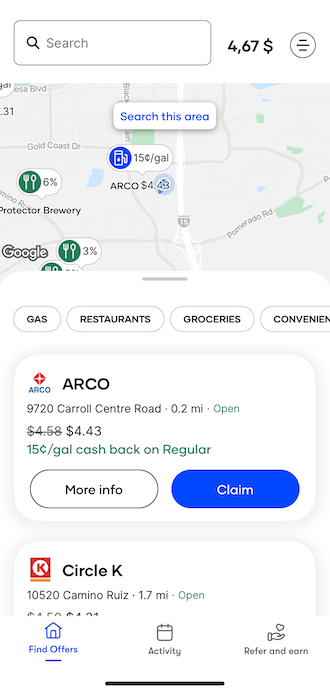
Image: Jessica Santero
Reward your lifestyle with passive savings through Upside. Enjoy your favorites and get money back with Upside’s serious savings: recently, I earned $0.19 per gallon on regular gas at Circle K, 23% cash back at Five Guys, and 2% back on my morning coffee at Dunkin.
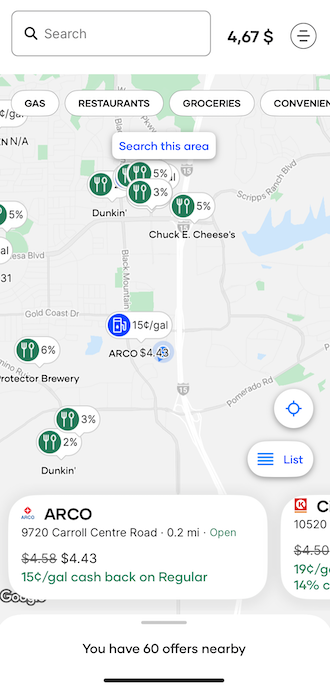
Image: Jessica Santero
Using Upside is easy. Open Upside’s map and search for offers by either entering a zip code or activating location services to see promotions near you. Tap the blue “claim” button or upload a receipt later to get your money back.
The best part is that Upside rewards accumulate on top of your regular credit card rewards. If your VISA gives you cash back on gas, you’ll still earn that—along with Upside’s $0.19 a gallon. Your rewards balance is displayed at the top of your home screen, and you decide when to cash out.
All you need to get started is a debit or credit card. I'm always skeptical about the privacy settings for apps, so I was relieved to find that users control the information Upside is allowed to access.
(P.S.: I did an entire review on how much I love this app—you can read more about it there.)
Best of January 2025
Recommended by Jessica
Santero
Best Technology Apps
Moonlitt
Track the stages of the moon with this new space app.
Free from the Apple App Store with extra paid features.
If you’re someone who loves watching the night sky, Moonlitt is an app you need to try. I’ve used several of these kinds of apps, like Star Tracker and SkySafari, but Mootlitt has quickly become one of my favorites. It’s an app designed to help you track the moon. You can see its different phases, position in the sky, when it rises and sets, and even what it will look like at different times and days in the future. It’s perfect whether you’re a stargazer, into astrology, or have a niche hobby like astrophotography.

Image: Max McCaskill
Moonlitt includes an elegant and simplistic interface. If you give the app access to your location, the moon in the center of the screen spins as you hold your phone, helping you orient your view to the moon’s current position. You can also drag the slider on the right side of the screen to see how the moon will progress across the sky. There are also no ads cluttering up the app, giving it a sleek and modern look.
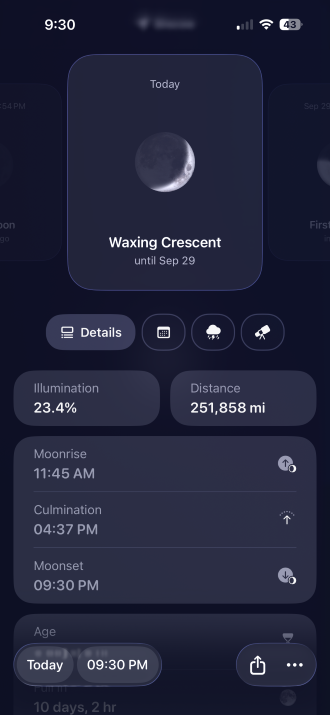
Image: Max McCaskill
You can also access things like additional map layers, the age of the moon, its distance from the earth, and constellation information by using tabs at the bottom of the screen. If you pay for Moonlitt Pro, which is $19.99/year, you can also unlock things like augmented reality to help you find things in the sky, an extensive lunar calendar, weather reports, and home screen widgets.
The app is intuitive and extremely easy to use. As far as privacy is concerned, it only needs access to your location so it can track the moon, making it extremely safe overall.
Moonlitt has only been around for a few months, but it’s already gotten the attention of Apple. The App Store has labeled it as an “App of the day,” and it’s currently rated as a 4.7 out of 5 with around 200 reviews. While it’s not currently available on Android, it is compatible with most of Apple’s other products, including the Mac, iPad, Apple Watch, and Vision Pro. That means if you’re deep into Apple’s ecosystem, you can use this app across all your favorite devices.
Overall, Moonlitt is a great new app for exploring the night sky. While it may not change your life, there are enough features in it to keep you entertained and looking forward to finding the moon every night.
Best of October 2025
Recommended by Max McCaskill
LingoClip
Sing your way to fluency in your next language.
Free on the Google Play Store and the Apple App Store (also has a subscription tier available)
I wish I had LingoClip as a foreign language teacher. Learning a new language is challenging at any age, but with LingoClip’s gamified lyrics, you can easily pick-up catchy vocabulary to your favorite tunes. Choose from over 10 different languages—including Spanish, Portuguese, French, and German—and bop along with 3 game modes. You can fill-in-the-blanks with multiple choice options, type in your answer to focus on spelling, or dare to sing along in karaoke.
.png "Screenshots of song gameplay.")
.png)
Image: Jessica Santero
I only tried the free version, but if you are learning a language or have young learners at home, I recommend a LingoClip subscription. Music really is the best reinforcement tool for language learning, not only because it’s fun and engaging, but because there’s a song for everyone. From top pop hits, to seasonal songs, there’s a melody for all music fans. The only downside to the free version is that you can only play three songs a day and your song selection is limited.
Image: Jessica Santero
Hence my recommendation (from an 8-year-experienced teacher) for a subscription. LingoClip offers a monthly subscription for $6.99/month, or an annual subscription for $41.99, making it $3.50/month. Despite the free subscription's limitation, I was hooked immediately. Throughout the month I was using LingoClip, I also noticed they host special event playlists for users. For example, the third week of March was dedicated to Queens of Music, highlighting songs by female artists like Britney Spears or Taylor Swift for English learners.
Although LingoClip originates from the well-known LyricsTraining webpage from 2017, its recent appearance in the app store brings an ad-free, simplified user interface for all to enjoy. Brush up on your rusty Italian or endeavor to learn a new language with LingoClip; just sing along and get lost in the beat!
Best of April 2025Recommended by Jessica Santero
Lingopie
"The most fun I’ve had while traveling."
You can try out Lingopie with a free 7-day trial. After, it's pricing looks like this:
- 3-month plan for $41.97 (or $13.99/month)
- 1-year plan for $83.88 (or $6.99/month)
- Lifetime subscription for $229 (which you only pay for once).
As a long-time ESL teacher, watching shows in another language is easily the best passive way to learn a language. But sometimes the actors speak too fast or subtitles zoom by in a flash. If you really want to learn languages from your couch, check out Lingopie. Lingopie is a language learning specific streaming subscription service. Choose the language you want to learn, and Lingopie gives you access to original version titles and cartoons, as well as the latest releases. I tested Lingopie’s one-week free trial in Italian and was shocked at how useful it was.
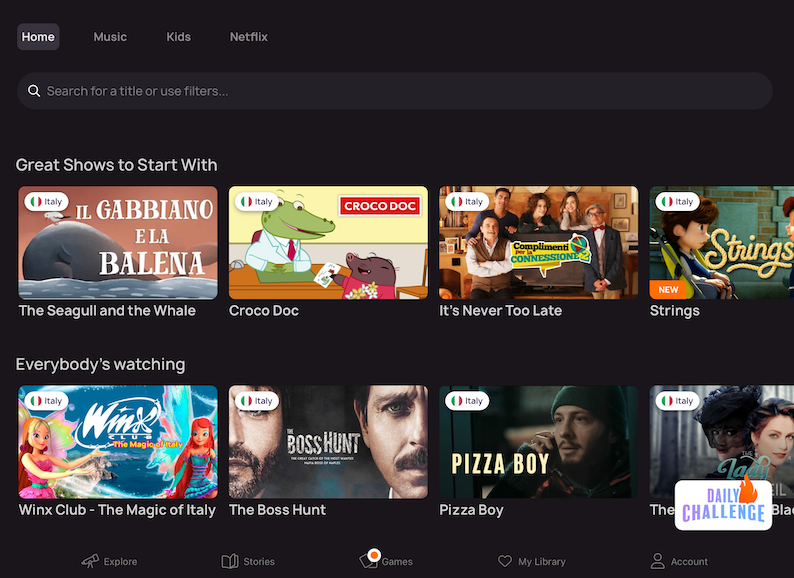
Image: Jessica Santero | WhistleOut
Although it was founded in 2021, Lingopie remains unique among streaming subscription services because it focuses language learning through popular media. Choose from 14 different languages (including Spanish, Italian, Japanese, and Greek) to start learning with your favorite characters and actors. But here’s the best part: You get total control over your subtitles.

Image: Jessica Santero | WhistleOut
Choose to have an additional translation appear with your subtitles, tap words to add to your language glossary, listen to specific phrases multiple times, and check our pronunciation by repeating and recording lines. I really enjoyed the option to have subtitles and a translation on-screen while I watched Winx. That way, I could see what was being said in Italian and how it translated to English. Plus, you can add Lingopie as a Chrome extension to use with Netflix and Disney+. With a simple tap, you can connect your other accounts to Lingopie to give your subtitles a much-deserved boost.
In fact, I recommend all language educators look into a lifetime subscription to Lingopie because it turns a passive exercise like watching a movie into an interactive cultural experience. The translations are easy to see (when activated), and you could ask students to repeat sentences for Lingopie’s pronunciation judges to correct. The same goes for parents on family movie night, too. For only $6.99/month with thyearly plan, Lingopie is cheap and brings langauge learning into your daily routine.
Image: Jessica Santero | WhistleOut
Lingopie is ideal for learners who watch a lot of TV, frequently stream on a tablet or smartphone, or rely on Netflix/Disney+ for entertainment. You really do need to use a tablet for the best experience and to fully interact with the subtitles. So if you don’t have one, it isn’t worth paying for Lingopie. However, young learners and language teachers should jump on Lingopie right away.
Best of October 2025
Recommended by Jessica
Santero

Brainscape
Master any subject with intelligent flashcards
Free from Apple and Google play store.
Brainscape Pro typically costs $5.99 (USD) per month or $59.99 (USD) per year, with a lifetime access option at $129.99 (USD).
Looking to level up your learning game? Brainscape might just be your new best friend. This clever flashcard app uses something called spaced repetition—fancy talk for showing you the right cards at the right time to help you remember better. It's like having a personal tutor who knows exactly when you need to review things.
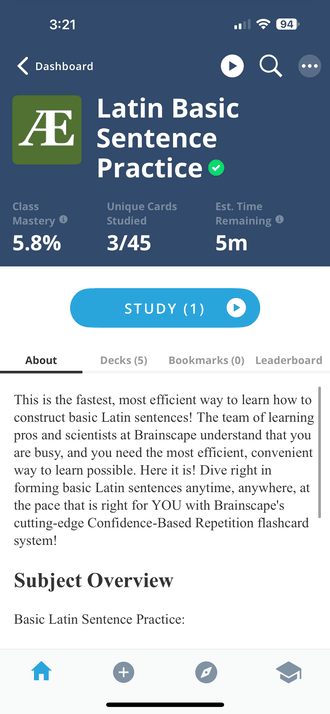
Image: Aletta Cooke
What's great about Brainscape is that you're not starting from scratch. There are tons of ready-made flashcard decks for pretty much anything you want to learn, from picking up a new language to studying for your medical exams. And if you're feeling creative, you can make your own decks with pictures, text, and even audio. Want to study with friends? No problem—sharing decks is super easy.
Your privacy matters
Before reviewing Brainscape, I had another app in consideration for this month’s review. However, during testing, I discovered that this app shared user data with third parties without clearly disclosing it or providing an opt-out option. In addition, it engaged in covert behavioral tracking, which raised significant privacy concerns for me. Since privacy is one of the core safety standards we evaluate in apps, I looked for an alternative that met those requirements—and that’s what led me to Brainscape.
Brainscape not only provides an effective learning experience with intelligent flashcards, but it also upholds stronger privacy standards, allowing users to focus on studying without compromising their data security.
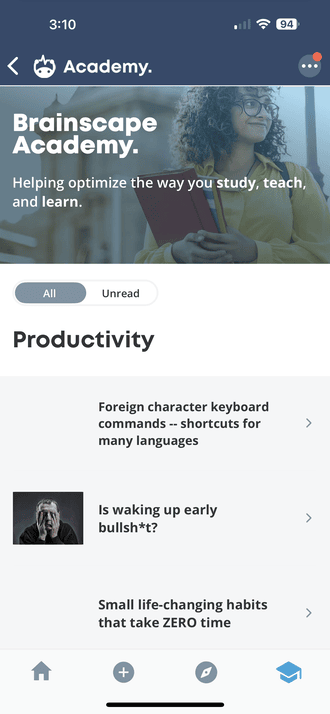
Image: Aletta Cooke
Brainscape Academy makes studying even easier with pre-made courses tailored to what you're interested in learning. Whether it's mastering a new language, acing an exam, or diving into a new subject, their intelligent flashcard system helps you retain information faster using spaced repetition.
And for me? I can finally, finally finish learning Latin!
You can get started with the free version, which honestly gives you quite a bit to work with. If you're serious about studying, the Pro version kicks things up a notch with features like making your own fancy decks and tracking your progress in detail. It'll set you back $5.99 USD per month, $59.99 USD for a year, or $129.99 USD for lifetime access.
Best of March 2025
Recommended by Aletta
Cooke

Openvibe
Combine your social media feeds
Free from Apple and Google Play Store
With the slow death of X (formerly Twitter), most of my friends have fled the “everything app” for social media platforms that aren’t quite as depressing. Unfortunately, this has made it difficult for me to keep up with all of them. I was forced to make accounts for platforms like Threads, Mastodon, and Bluesky, yet scrolling through all of them took up a lot of time. Luckily, Openvibe has helped solve that problem by streamlining most of my alternative social media accounts in one place.

Image: Max McCaskill
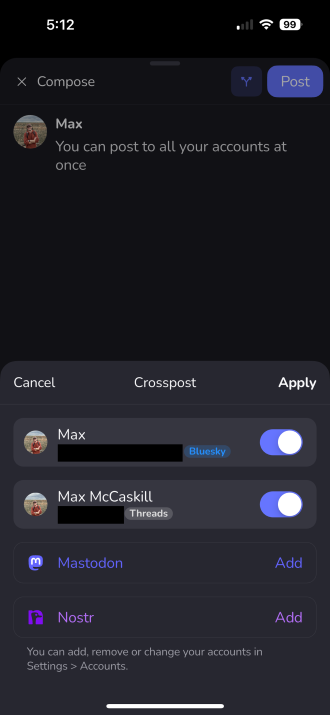
Image: Max McCaskill
Openvibe is a social media app, so your privacy isn’t exactly guaranteed. That said, your accounts are secure. You don’t create an Openvibe account, so all of your login credentials are stored on your device.
The app is free and doesn’t have any ads. I will note that sometimes it takes a moment for it to start, but that’s because it’s logging in and putting together a feed from up to four different social media accounts. Openvibe is rated 4.2 out of 5 on the Apple App Store and 3.9 out of 5 on the Google Play Store. My experience on an iPhone 14 Pro was seamless, but some Android users have reported the app can be buggy. Overall, if you’re looking for a way to consolidate your social media feeds, Openvibe is a great start.
Best of March 2025
Recommended by Max
McCaskill
Finally conquer your reading list, once and for all
Free from Apple and Google Play Store
Pocket Premium typically costs $4.99 (USD) per month or $44.99 (USD) per year if you choose the annual subscription.
Pocket is a convenient tool for saving and organizing online articles, videos, and other content. It allows users to read or watch their saved items later—ideal for anyone who dislikes juggling multiple browser tabs. The app also syncs across devices, so content added on a phone can be accessed from a tablet or computer.
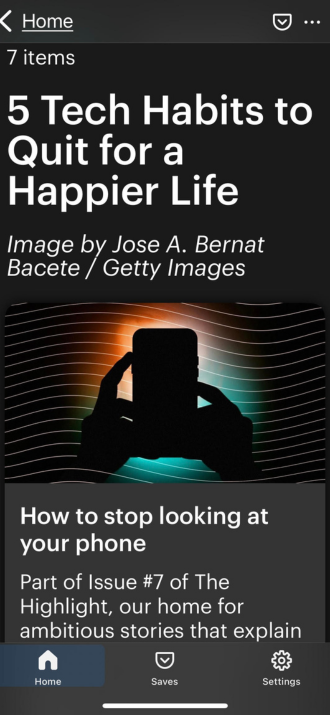
Image: Aletta Cooke
Text-to-speech is included, allowing users to listen to saved articles on the go, and Pocket’s recommendation feature helps surface new content based on reading habits. Creating an account requires basic information (like an email address), and there is no need to share extensive personal data.
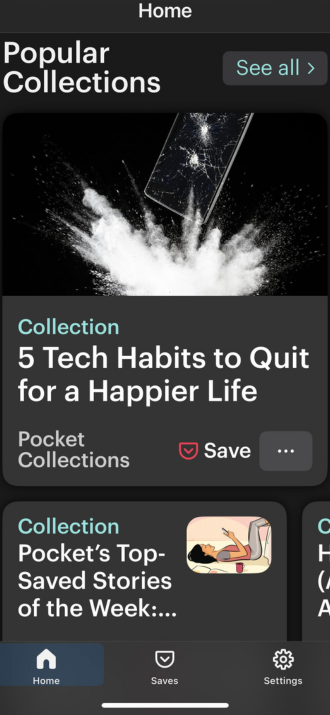
Image: Aletta Cooke
Pocket offers a free version that lets you save and read as many articles or videos as you like. For power users, the Premium version unlocks advanced search, unlimited highlight storage, and an ad-free experience. The cost is approximately $4.99 USD per month or $44.99 USD per year.
Overall, Pocket remains a top choice for anyone looking to streamline how they save and revisit online content. Its combination of generous free features and a reasonably priced Premium option makes it a strong contender among “read-it-later” apps.
Best of February 2025
Recommended by Aletta
Cooke
ReadingBar
Say goodbye to eyestrain.
ReadingBar is only available on the App Store for Mac.
Price: $4.99.
To use this app, you need MacOS 10.13 or later versions.
I can see clearly now that ReadingBar has remedied my eyestrain. Working online is taxing on my vision, leaving me with thick and blurry eyes, and leading to a throbbing afternoon headache. I’ve tried all the current fads for eye health: red-tinted filters, blue-screen lenses in my glasses, face-scrunching and hard blinks every hour. None of them worked; then I discovered ReadingBar.
ReadingBar is basically the digital equivalent of a bookmark you probably used to underline each line in your book as a kid. It’s quite literally a colorful bar that hovers over your mouse to highlight your text. You can also assign a screen tint to contrast the bar even further.
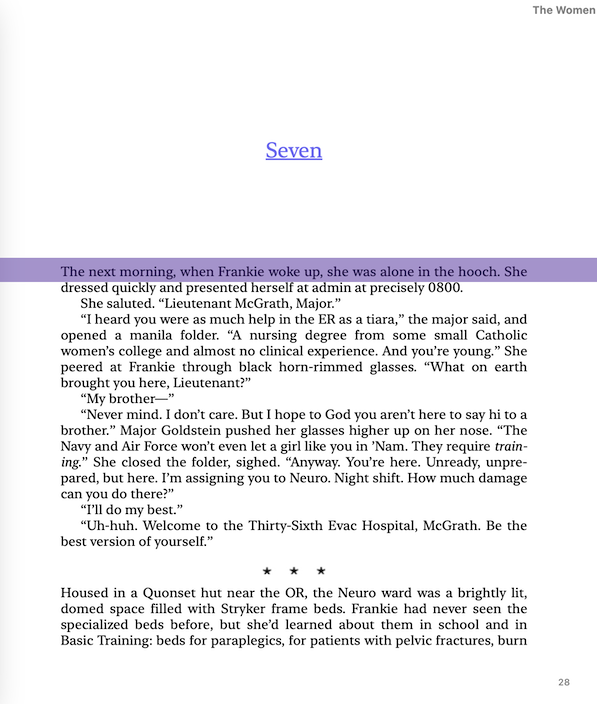
Image: Jessica Santero
Customize and personalize your ReadingBar preferences under settings, including: the style, width, and color of the bar itself, and the screen tint you wish to pair it with. For example, I prefer a mostly transparent teal or purple bar with a single line width that spans the length of my screen, and floats slightly above my mouse. When my computer enters dark mode as nighttime approaches, I also add a reddish screen tint to really make the words on my screen pop. The spotlight feature is also handy when I’m sharing a document on my screen in a work meeting so I can easily highlight certain text or graphics.
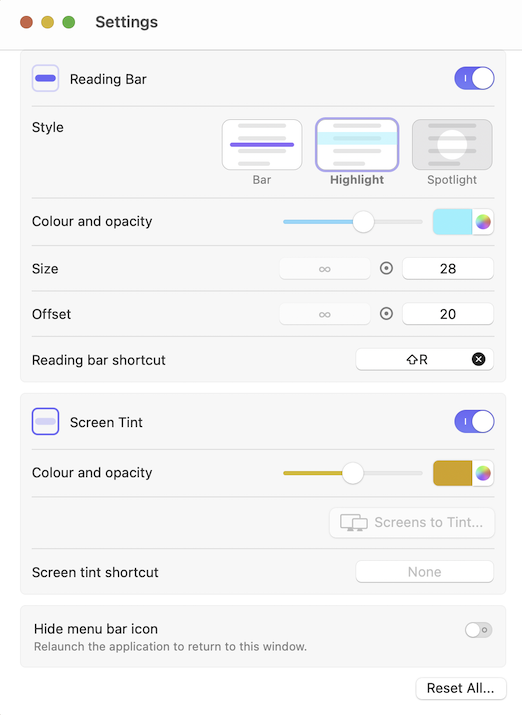
Image: Jessica Santero
Available only for Mac users, ReadingBar costs a single payment of $4.99 and lives among your launchpad apps or pinned to your menu bar. You can add a shortkey, like ⇧R, to activate or deactivate it with simple click too. It may seem simple or even silly, but ReadingBar is seriously underrated and far more useful than I could have imagined. I use ReadingBar for everything, from reading, writing, and editing, in both my personal and professional life.
Given how many hours I spend staring at a screen, ReadingBar is absolutely worth the money. My eyes are no longer dry and itchy, nor do I get regular headaches anymore. ReadingBar has helped me be more productive as I write and edit my online articles. I used to suffer page blindness—basically when I see words in front of me, but no longer read them—but with ReadingBar I can focus and concentrate more efficiently. That said, if you don’t regularly read or write online, this app might not be for you.Best of July 2025
Recommended by Jessica Santero
Best Travel Apps

Pinplanet
"The most fun I’ve had while traveling."
Free on the Google Play Store and the App Store. Available for smartphones and tablets.
Pinplanet is the most fun I’ve had while traveling since bullet journaling. Created in 2022 by founders Harout Boujakjian and Anna Sullivan, Pinplanet is a social interactive pin map. By joining the pin-community, you can connect with travelers, read up on the best travel destinations from like-minded individuals, or find inspiration for your next big trip.
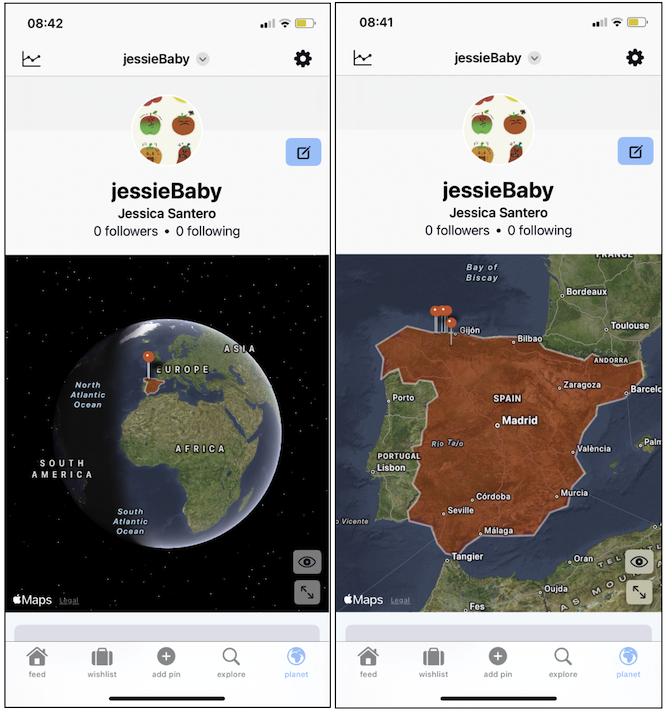
Your pins automatically save when you mark a spot.
Image: Jessica Santero | WhistleOut
To use Pinplanet, you’ll need to create a travel profile with an email address to start collecting pins along your journey. You can choose to post publicly or keep your information private, whether for privacy concerns or gatekeeping your top spots. Along with geotags, you can write short 500-character descriptions, add an emoji rating (from a tear-streaked face to star eyes of wonder), attach up to 12 photos to your pinstop album, and even add local hotspots or other worth-it activities.
I added 6 pins to my Pinplanet over my two-week holiday in Northern Spain and Portugal. The thrill of adding a new pin and short description was surprisingly satisfying and motivating. Collecting pins and seeing the red dots multiply across my Pinplanet quickly became the highlight of traveling to a new location. It also served as a great way to keep a record of where I had been and how my experience was. I used the app to find my next stops along the coast and even found a few hidden surf spots thanks to Pinplanet.
All-in-all, Pinplanet is the simplest and most holistic social media platform I’ve encountered. Not only did I appreciate the honest reviews from average tourists like myself, but I found Pinplanet to be a simplistic yet effective way to document my travels without the need for pen and paper. I’ve since used the app to show my friends and family about my trip and share the photos I uploaded. So not only is Pinplanet great for planning and using on the road, but I’m still enjoying the app even after arriving home.Best of October 2025
Recommended by Jessica
Santero
How WhistleOut reviews apps
WhistleOut determines the best apps for Android and iPhone based on the following criteria:
- Easy to use: We search for apps that enhance the user experience, improving the power of your phone and making your life less complicated. The apps we recommend are intuitive, allowing users to put them to use as soon as they open them.
- Affordability: We're not interested in adding one more monthly subscription to your credit card bill. We select apps that charge minimal download fees and tend to favor apps that don't charge anything.
- Hands-on testing: Our writers download and test every app we recommend, running basic tests for user experience, functionality, and utility.
Our mobile experts scour the app stores every month, looking for the best new apps for Android and iPhone. Before recommending an app, we use the app for at least one full workday, testing its basic functionality and evaluating whether or not it delivers on its promises. From there, we weigh the app's pros and cons then determine whether or not it's a worthwhile download for basic cell phone users.
Find a better phone plan
Thousands of cell phone plans unpacked. All the facts. No surprises.


.png?w=280&h=280&usm=20&usmrad=0.8&fit=crop "Best Cell Phone Deals for June 2026: Get the New iPhone 17 for Free")



