


iPhone
All skeptics of rewards programs should try Upside—the only app I trust to give me money back on my spending routine. There’s no catch or confusing fine print, only real savings and cash back.
Upside gives you money back on your spending habits, allowing you to save on gas, restaurants, and convenience stores with one tap. I’m a natural skeptic and was initially wary of sharing my spending trail and personal bank information with the app, but in my time with the app I’ve become the biggest promoter of Upside’s rewards programs. After using Upside for the past three months, I wholeheartedly recommend this app for card users everywhere.
Why you can trust WhistleOut
.svg)
15+
years of mobile industry experience

900+
published wireless guides

35+
firsthand carrier reviews
We've been around since the birth of the iPhone. Along the way, we've learned how to spot the best deals for your wallet (and your sanity). We spend our days researching informative guides and writing insightful reviews on every kind of wireless plan, distinguishing what matters from what doesn't. We played around with these plans before recommending them, ensuring they're worth your hard-earned money.
Want to know more? Check out how we review every cell phone plan we rank.
How I tested Upside: Cash Back—Gas & Food
I've used Upside for the past three months to thoroughly evaluate its rewards program, and I’m keeping it.
The features I tested included the following:
- Selecting promotions and offers from Upside’s interactive map
- Claiming rewards by both tapping the offer and uploading a receipt
- Changing cards within the app
- Cashing out my rewards into my bank account
The bottom line
Upside’s transparency and simple user interface make saving when you spend fast and easy. A quick check on Upside for promotions before making a purchase can save you money, whether it’s a few cents a gallon of gas or 20% on your favorite meal. Although Upside requires a bank card to earn rewards, the savings are genuine. They even stack with your credit card’s rewards.
I’ve already saved $56 on gas in three months. That’s enough to convince me to keep the app on my phone—and to keep using it.
What is the Upside cash-back app?
Upside is a free rewards app available through the App Store and Google Play. By partnering with over 50,000 locations, Upside brings you the best offers and promotions at gas stations, restaurants, and convenience stores. All you need to do is claim savings when you use the app at participating locations.
Use Upside in three simple steps. First, check out the offers and promotions in your area. You can either allow the app to access your location or add a zip code into the search bar. Second, make a purchase and pay with the same bank card (either debit or credit, but I recommend the latter). Lastly, claim the offer by either clicking the blue bar on the promotional offer or uploading a picture of your receipt after the fact.
When viewing the offers in the app, note that the prices listed reflect the final prices after cash back has been applied. You’ll pay full price at the time of purchase, but you’ll save with your cash back reward.
Upside was created in 2015 with the mission of combating rising gas prices, and has continued to bring promotions to consumers ever since. The numerous offers on the app depend on where you’re using it: I’ve found everything from 22¢/gallon on regular gas to 23% cash back at Five Guys.
Upside is unique among rewards apps because it allows you to earn rewards in addition to your credit card’s typical rewards. For example, my preferred credit card earns 5% back on gas, which I combine with Upside’s offers to get double the rewards.
Streaming and data usage
Will using Upside eat up your data? To an extent, yes. Steaming of any kind, whether you're browsing the interactive map or claiming offers, will use up data more quickly. For some perspective, one session to claim an offer uses about 1KB to 5KB of data. That's a very small amount, but if you are worried about data usage, check out some of these tips:
- Opt for Wi-Fi vs. cellular data when you can.
- Check out the best apps for monitoring your data usage.
- Learn more about data usage.
Alternatively, you can upgrade to an unlimited data plan and stream to your heart's content. Browse some of our favorite, affordable unlimited plans from these smaller carriers, otherwise known as MVNOs.
|
#1
|
Visible

$25 Visible Plan
$25.00/mo
Taxes & Fees included
|
|
#2
|
Mint Mobile

Unlimited Data Plan
$25.00/mo
$75.00 upfront payment for 3 months (equals to $25.00/month). Intro pricing for new customers only.
|
|
#3
|
US Mobile

Unlimited Starter Plan
$25.00/mo
$20/mo. for 6 months; $25/mo. thereafter
|
How to get Upside’s rewards
Upside is completely free, but you'll need to upload your bank card information. While I was nervous about sharing that delicate financial info with the app, I was reassured when I read the Terms & Conditions: Upside only uses your data to confirm your purchase and then send your reward. The user has control over other data information that may be shared, including location services and search history. You decide what to share, with the only essential requirement being your card details.
You can cash out and send your rewards to your bank account whenever you want, but I’d advise waiting until you reach at least $10. Upside charges a $1 fee on cashing out amounts less than $10; it only takes me two trips to the gas station to reach that amount.
There are multiple payment options via Upside. The app accepts payments made on a debit or credit card, but you can also accept your rewards cash back through your bank, PayPal, and eligible gift cards.
Upside app features
Upside’s offers are seemingly endless. Since Upside’s promotions are AI-generated, they constantly change based on Upside’s partnerships with local businesses and your personal spending habits. Hackernoon has detailed how AI has been integrated into the personalization process on Upside to cater to your spending habits.

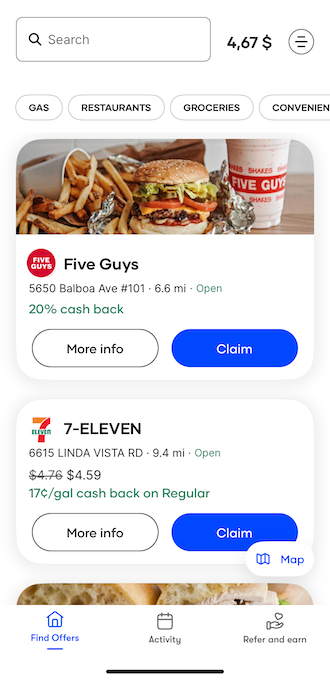
Upside’s main feature is the interactive map on the homepage. You can search for Upside partners by location or by category. But the offers aren’t always the same; they vary depending on the time of day and season. I’ve seen the savings at my local gas station double on holidays.
My experience on Upside

I had always been skeptical of rewards programs and had previously avoided them. That said, Upside has saved me money for doing daily tasks, which has been great for my monthly budget. Considering that, I plan on keeping it. The app itself has a very simple setup and requires no extra effort to claim offers. The rewards are generally recognized and reflected in the app within a week of making purchases at eligible locations, and cashing out is seamless as well.
In my three-month trial, I recommended Upside to everyone I know. (In fact, some of my closest friends and family members are probably tired of hearing about it.) Upside is not only for big spenders, but consistent consumers spending on staples and basic necessities.
Although Upside boasts top-tier security and data encryption, I still recommend using a credit card rather than a debit card. The added security of a credit card prevents risks while making any transactions. While debit cards directly process and deposit money from your account, credit cards need processing time and approval. This period gives members the opportunity for potential fraud alerts and purchase protection.
Meet your new favorite app (that you don't even know about yet)
With over 50,000 new apps released every month, how can you possibly find that hidden gem that will bring your life a smidge more joy?
Leave it to us!
From gaming to gardening, we're constantly testing the latest and greatest apps that we actually want to use on our own phones. Check out our most recent finds in our monthly roundup of the best new apps for iPhone and Android.
Is Upside worth checking out?
Upside is absolutely worth checking out. Few apps hold a permanent position on my phone, but Upside’s staying.
I already use my credit card for all of my purchases, and Upside has allowed me to earn rewards on top of my credit card rewards. Since I started using it for gas, I’ve been saving $50/month, earning me a free tank of gas every month. Not bad for a few MB of storage on your phone.
How WhistleOut reviews apps
Our mobile experts scour the app stores every month, looking for the best new apps for Android and iPhone. Before recommending an app, we use it for at least one full month, testing its basic functionality and evaluating whether or not it delivers on its promises.
- Easy to use: Great apps should be intuitive to use. We select the tools that don't require a complicated instructional manual.
- Affordability: The internet is filled with expensive price tags, but we're not buying what they're selling. We lean into inexpensive, quality apps. Extra points if they're free!
- Hands-on testing: We play around with these before recommending them, ensuring they're worth gigabytes.
From there, we weigh the app's pros and cons and then determine whether or not it's a worthwhile download for the wider population of cell phone users.
Jessica Santero
Staff Writer

Find a better phone plan
Thousands of cell phone plans unpacked. All the facts. No surprises.


.png?w=280&h=280&usm=20&usmrad=0.8&fit=crop "Best Cell Phone Deals for June 2026: Get the New iPhone 17 for Free")



