
Whether we're talking about your home internet plan or your cell phone plan, unlimited data is the gold standard. If you're frequently using AI tools, gaming, or streaming high-definition video on your devices, nothing else will suffice.
However, smaller households that use the internet only for browsing and occasionally watching Netflix can get away with a data cap of 1TB (or even less, if necessary). Meanwhile, cell phone users who aren't constantly scrolling TikTok or Facetiming with family members can make do with a 10 or 20GB plan.
We'll go over everything you need to know, including how to measure internet data usage per month.
How much internet data do you need?
According to a recent report from OpenVault, the average internet data usage per household is 664.2GB per month. But due to the increasing bandwidth demands of AI and streaming, that number is rising.
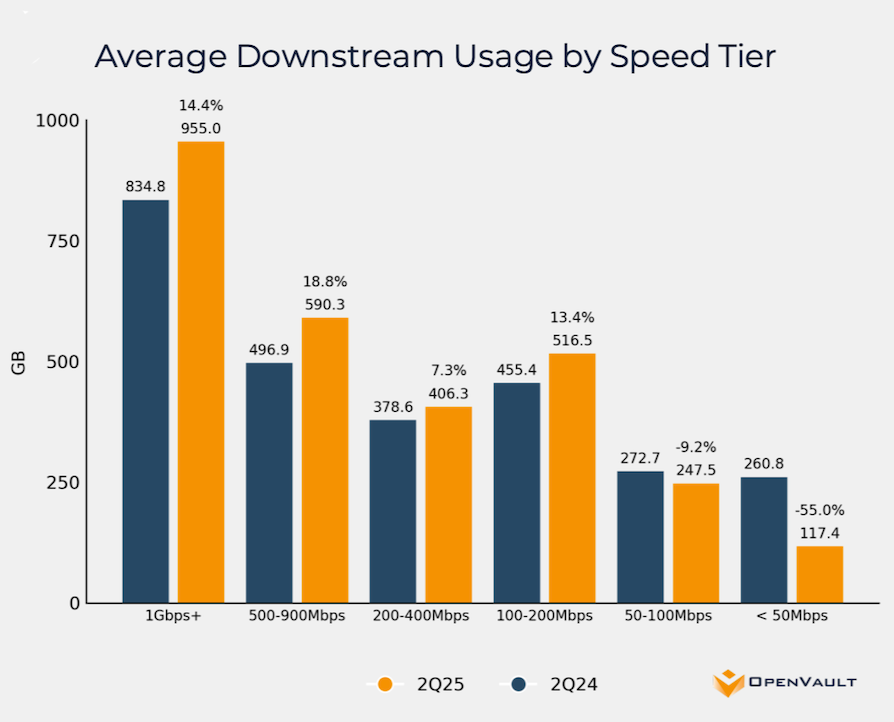
Source: OpenVault
If you have a high-speed home internet plan in a household of four or more people, you'll want to stay well above that average number. Most fiber- and cable-based internet companies offer unlimited data plans, which is ideal. But even a plan with a 1TB data cap could also work, as long as you're not downloading huge files or watching 4K TV every night.
When it comes to cell phone plans, you can often get away with a lower data cap. If you manage to connect to a Wi-Fi network when you're at home and at work, you can save significant bandwidth, meaning you only need mobile data for when you're out and about. Still, most users will require at least 10GB to get them through the month, if not more.
How to estimate your monthly data usage
The easiest way to estimate internet data use or mobile data usage is to add up all your daily activities (you might want to go grab a calculator!). Here's a look at what many everyday activities will cost you in terms of data usage.
Average data usage
| Internet activity | Data size (on average) |
|---|---|
| 20KB | |
| Email (with attachment) | 300KB |
| Downloading a song | 4MB |
| Browsing the web | 15MB per hour |
| 100MB per hour | |
| 156MB per hour | |
| 360MB per hour | |
| Streaming standard-definition (SD) video | 700MB per hour |
| Streaming high-definition (HD) video | 2.5GB per hour |
| Streaming ultra-HD (4K) video | 5.8GB per hour |
| Streaming music | 72MB per hour |
| Online gaming | 80MB per hour |
Here's a real-life example that can help you get an idea of how your home internet data usage might rack up in a single day.
- Two hours of HD-quality streaming: 5GB
- One hour of scrolling Instagram and Twitter: 500MB
- Three hours of streaming music: 216MB
- Two hours of gaming: 160MB
- One video game automatic update: 7GB
- Other small internet activities (browsing, email, etc.): 100MB
- Total daily usage: 13GB
All of that adds up to about 330GB per month. If you have other people in your household, multiply that number by each person in your household, and the data requirement rises quickly. This is why I'm recommending unlimited data home internet and cell phone plans.
What does "internet data" mean?
"Internet data" refers to the amount of information sent between the web and your connected devices. Every time you use the internet for anything—browsing, streaming, gaming, emailing, etc.—you are using internet data that is associated with your account.
Digital data like this is measured in megabytes (MB), gigabytes (GB), and even terabytes (TB). A gigabyte is 1,000 megabytes, and a terabyte is 1,000 gigabytes.
What's the difference between internet speed and internet data?
Internet speed refers to how fast data is transferred from the web to your devices, whereas internet data refers to how much data is transferred.
If you have a gigabit-speed fiber internet connection, it will take just a few seconds to download a 1.4GB file. If you're downloading the same file using your 4G mobile phone connection, it will take a lot longer. But, in both cases, you're still downloading the same amount of data: 1.4GB.
Customers with really fast internet connections could end up using more internet data just because they don't realize how much content they are streaming/downloading. But in an era when most home internet plans come with unlimited data, this isn't a major concern. Households that do a lot of streaming, gaming, or working from home will definitely want to max out their speeds.
If you're experiencing sluggish internet, the problem is likely due to your internet plan or equipment, not how much data you're using.
What is a data cap, and why does it matter?
A data cap is a limit on how much high-speed data you can use before your ISP or carrier imposes limits on your internet access. If your internet plan includes a data cap, several things could happen, depending on your plan and whether it's a "hard cap" or a "soft cap":
- A "hard cap" could result in your internet service being cut off completely, requiring you to purchase additional gigabytes to get back online, or an overage fee levied for exceeding your allotted data.
- A "soft cap" can result in your ISP significantly throttling your data speeds to the point of unusability, depending on your situation.
Be sure to read the fine print of your internet plan to understand whether you have a cap and, if so, what kind you might be dealing with.
Unlimited data vs. data-capped internet plans
As stated above, most home internet plans now offer unlimited data. That's especially true for cable and fiber. Wireless internet (like 5G home internet plans) and satellite internet (like Starlink) are still likely to have data caps.
If you're on an old internet plan with a data cap, we recommend looking around for other options. There may be another provider that offers a better plan with unlimited data. This is especially true in urban and suburban areas.
Your options for internet service providers depend on where you live, so we recommend plugging your address into our search engine to see what the best options are in your area.
Internet data: FAQs
What is a data cap?
If your internet plan has a data cap, it means you can only use a certain amount of data before your ISP imposes some sort of barrier to access. Once you hit your cap, which can be anywhere from 1GB to 1,000GB or more, you could see your internet speeds reduced or your internet connection cut off completely.
How do I track my internet data usage?
Most internet companies have an app that you can download on your phone. These apps usually provide a very simple way to track your data usage throughout the month. If your ISP doesn't offer an app, contact customer service to find out how to track your data.
What happens if I exceed my data cap?
If you exceed your internet data cap, your speeds can be "throttled" or slowed down. In some cases, you might lose your internet connection until your next billing cycle.
What activities use the most data?
Home data use can rack up from many different activities, but the most common culprits are high-definition (HD and 4K) video streaming, big file downloads (like video games or game updates), and social media scrolling (Instagram, TikTok).
Lauren Hannula
Managing Editor

Enter your address to find the best internet providers available in your area.

Related Articles


.jpg?w=160&h=160&usm=20&usmrad=0.8&fit=crop "Viasat vs Hughesnet Internet Plans Compared")
Related Topics
InternetPopular Topics
Internet Spectrum Internet Xfinity Research and Reports AT&T T-Mobile News Verizon MINTernet App ExplainersInternet Providers by State
- Internet in Alabama
- Internet in Alaska
- Internet in Arizona
- Internet in Arkansas
- Internet in California
- Internet in Colorado
- Internet in Connecticut
- Internet in Delaware
- Internet in District of Columbia
- Internet in Florida
- Internet in Georgia
- Internet in Hawaii
- Internet in Idaho
- Internet in Illinois
- Internet in Indiana
- Internet in Iowa
- Internet in Kansas
- Internet in Kentucky
- Internet in Louisiana
- Internet in Maine
- Internet in Maryland
- Internet in Massachusetts
- Internet in Michigan
- Internet in Minnesota
- Internet in Mississippi
- Internet in Missouri
- Internet in Montana
- Internet in Nebraska
- Internet in Nevada
- Internet in New Hampshire
- Internet in New Jersey
- Internet in New Mexico
- Internet in New York
- Internet in North Carolina
- Internet in North Dakota
- Internet in Ohio
- Internet in Oklahoma
- Internet in Oregon
- Internet in Pennsylvania
- Internet in Rhode Island
- Internet in South Carolina
- Internet in South Dakota
- Internet in Tennessee
- Internet in Texas
- Internet in Utah
- Internet in Vermont
- Internet in Virginia
- Internet in Washington
- Internet in West Virginia
- Internet in Wisconsin
- Internet in Wyoming


.jpg?w=280&h=280&usm=20&usmrad=0.8&fit=crop "Verizon Fios Internet vs. Optimum Internet")

.jpg?w=280&h=280&usm=20&usmrad=0.8&fit=crop "Viasat vs Hughesnet Internet Plans Compared")


.jpg?w=280&h=280&usm=20&usmrad=0.8&fit=crop "gFiber vs. AT&T Fiber: Which internet is better for you?")


