
To find the best internet plan where you live, you'll want to:
- Determine which providers are available at your address
- Choose the best available connection type
- Figure out how much speed you need
- Determine your data needs and check for caps
- Compare pricing and read the fine print
- Consider bundles and discounts
The quickest way to find your best internet plan is to enter your zip code in our search tool below to find plans, providers, and connection types specific to your location.
For example, when I was looking for the best internet service at my address, I got 42 results, which I listed from lowest to highest price, as you can see here.
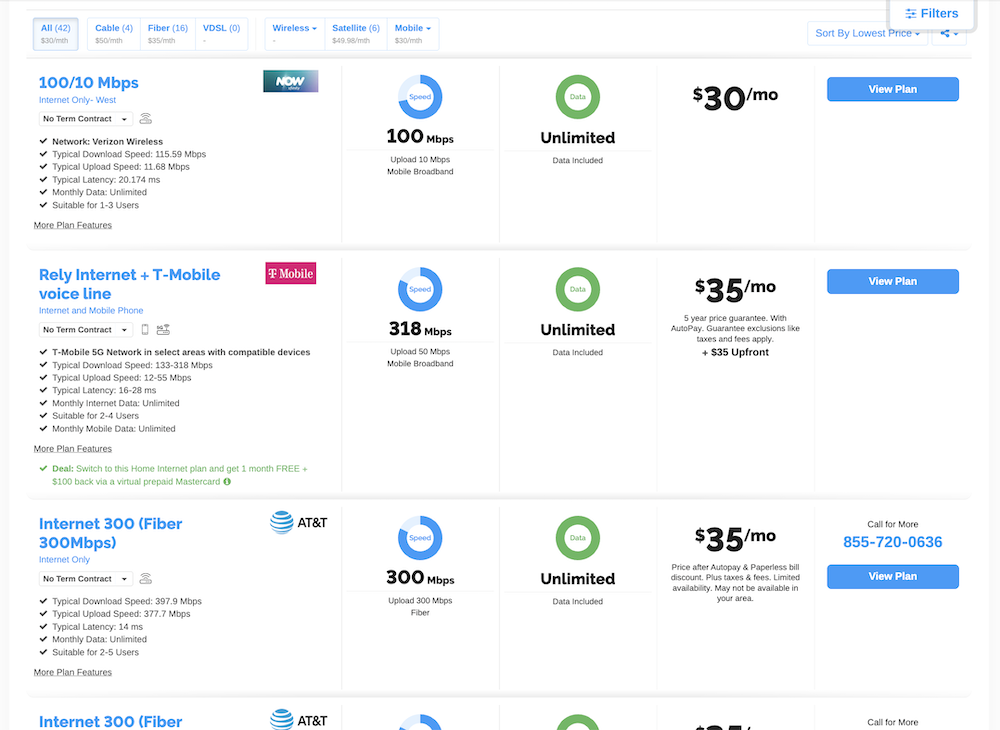
Image: Lauren Hannula
You can also filter your results by the metrics that matter to you, such as speed, data cap, and service type (fiber, satellite, DSL, etc.). Sort the results by popularity to see which plans are most popular in your neighborhood, based on other people like you who have used our search tool.
Step 1: Determine which providers are available at your address
Internet service is highly location-specific, even down to the neighborhood. This is due to the infrastructure that supports different connection types—some neighborhoods have fiber networks built out, for example, while others rely on cable only. If you're in a rural area, you may only have access to satellite internet as your best option.
Your first order of business is to determine which ISPs serve your specific address and check out which connection types are available (more on that shortly). If you're unsatisfied with your current options, note that mobile wireless providers are quickly expanding the service area of their 5G-based internet networks. We recently tested T-Mobile's 5G home internet service and came away pleasantly surprised with its speeds and reliability, even compared to our tester's cable-based daily driver internet plan.
Step 2: Understand the different types of internet connections
Not all ISPs connect you to the internet in the same way. In fact, there are four different home internet types these days: cable, fiber, 5G home internet, and satellite. (There's also DSL internet but it's largely a legacy connection, as it's being quickly phased out by all major providers for residential service.)
- Fiber internet is undoubtedly the fastest and most reliable connection type, but it is not available in all locations. It can also be expensive.
- Cable internet is one of the cheapest most widely available connections, offering super fast download speeds. The upload speeds and reliability aren't quite as good as fiber, but if it's the only option in your area, you should still see plans that meet the needs of most households. Just note that if you use a lot of data, you might need to watch out for data caps and choose a plan with a higher one or unlimited data (more on that below).
- 5G home internet is a newer option that offers customers fast internet via 5G cellular towers—the same as the internet you get on your cell phone. This removes the hassle of installing a wired connection and offers a very convenient alternative to those with good cell service but not a lot of wired internet options in their area. It can also be very affordable, especially for existing wireless customers.
- Satellite internet has come a long way in recent years, with companies like Starlink offering better reliability and speeds.
Some internet providers offer multiple ways to connect, whereas others stick to a single type of service. If you're lucky enough to have multiple connection options in your area, choose the one that supports the activities you care most about—if, for example, you do a lot of live streaming, or you work remotely and take Zoom meetings regularly, you may want to opt for fiber internet, which supports faster upload speeds and reduces lag (i.e., the dreaded video freeze). If you only use your home internet for basic activities like email and browsing the web on just a couple of connected devices, a basic cable plan should be perfectly sufficient.
Step 3: Figure out how much speed you need
Understanding how much internet speed you need can take a little bit of calculating. First, it's helpful to get a benchmark by running an internet speed test. Knowing your current internet speeds (and whether they currently work well for you) will help you decide how to choose a future internet plan.
Now that you know your current speed, let's figure out how much you actually need. Think of it like ordering a pizza for your whole household: There's only so much pizza to go around, and you need to decide on a size that will leave everyone satisfied.
Here's a high-level look at some common internet tasks and their minimum recommended speeds for a smooth experience.
| Activity | Download speeds |
|---|---|
| Working from home (including video conferencing) | 25Mbps |
| Watching streaming video | 25Mbps (4K UHD) 10Mbps (HD) 5Mbps (SD) |
| Listening to music | 1Mbps / 7–20Mbps (lossless audio) |
| Online gaming | 4–20Mbps |
| General web browsing and email | 3–5Mbps |
| Social media | 5Mbps |
Here's an example of how your data speeds get used up. Assume all of these activities are happening at the same time under your roof:
- Zoom meeting: 25Mbps
- Playing Fortnite: 10Mbps
- Two concurrent Netflix streams: 50Mbps
- Scrolling through TikTok via Wi-Fi: 5Mbps
- Total bandwidth usage: 90Mbps
If you don't maintain that internet speed, you'll notice Zoom meetings lagging, Netflix videos buffering, and Fortnite kill-streaks ending.
We actually recommend that you aim for speeds a little higher than you think you need. That's because you might need to download a huge video game or operating system update at any given time, which will eat up your bandwidth. Also, with cable and wireless connections, speeds can fluctuate pretty widely throughout the day, so you might not always get the speeds you pay for.
Also to consider when comparing internet speeds are latency and upload speeds. Low latency is essential for a good online gaming experience, and fast upload speeds are important for activities like video conferencing and uploading large files. The fastest internet connections tend to have low latency and high upload speeds; some slower cable plans and wireless connections might struggle.
What do Mbps and Gbps mean?
When comparing internet plans, you'll notice internet speeds advertised with Mbps or "megabits per second." These are like the miles per hour in your car. A gigabit (Gb) is 1,000 megabits. So, 1Gbps is faster than 999Mbps.
Step 4: Determine your data needs and check for data caps
Most internet plans these days come with unlimited data. This is especially true for fiber and 5G internet plans. However, there are some exceptions, which is why it's important to evaluate how much data your household uses. If the only plans available in your area all include data caps, you only want to pay for what you truly need.
Take a look at your last few internet bills and see how much data you used in a given month. Using myself as an example, I work remotely and therefore am browsing, writing, on Zoom calls, and downloading/uploading large files for 9–10 hours per day; I often also have music streaming while I work, or sometimes I'll have YouTube TV streaming in the background instead. In the evening, we typically have at least two smartphones and one computer connected to the internet, as well as at least one TV streaming movies or live television simultaneously. For my household of two people, our average data usage is around 1,000GB per month, give or take.
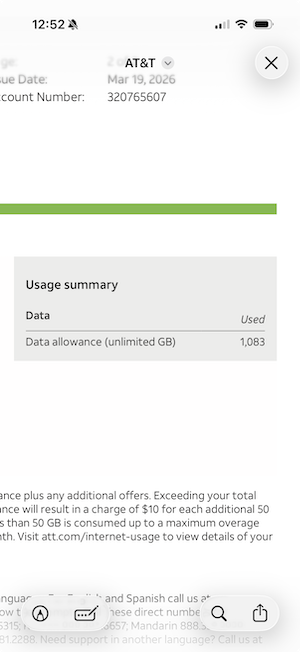
Image: Lauren Hannula
I have unlimited data included on my AT&T fiber plan, and most fiber plans follow suit. Some cable internet plans still include data caps, though they're usually 1TB or more, which is more than enough for even multi-usage households. Still, it's important to be aware in case the plan you're interested in offers a lower cap—satellite internet data caps, for example, can be much more restrictive (some in the 100–500GB range).
Step 5: Compare pricing and read the fine print
Internet plan pricing depends on several factors, and not all of them are immediately evident in the advertised cost. Some factors to be aware of include:
- Promotional vs. standard pricing: Many internet plan prices are actually advertising a promotional price, which stays in place for 1–2 years before increasing to whatever the standard price actually is. The fine print will say something like, "For the first 12 months," which indicates that you need to dig further to understand what the plan price will rise to once those 12 months are up.
- Equipment costs: Several ISPs include free internet equipment (like a modem/router) as part of the plan price, but might charge a monthly equipment rental fee of $10 or more. Often, any fees like this are on top of the advertised price. Read the fine print carefully to understand whether you'll have to pay to use the modem they give you—if you can't easily find that information via the ISP's posted information, call them before signing up.
- Start-up/installation fees: Some ISPs charge a one-time fee for installation or "start up" when you sign up for service. These fees can range widely, from as little as $10 to as much as $100 depending on whether new infrastructure is required.
- Early termination fees: While many internet companies offer contract-free plans, some will require you to sign up for a year of service or more. Even if you do sign a contract, you can cancel your service, but you might face hefty early termination fees.
Make sure you fully school yourself on how to read an internet contract before you choose your plan. You can also look for the FCC broadband labels, which make it easy to see all of this info in one place.
FCC broadband labels explained
The FCC broadband labels, or "nutritional facts," are a helpful way to see the most important information about an internet plan in one place. They display the overall monthly price, break down exactly which fees and costs make up that price, and show the performance you can expect from the plan.

Image: Kevin Kearney
The Nutrition Label will tell you whether the price is a promotional or "introductory" rate, helping you determine whether you can rely on that monthly cost or whether it will eventually rise. There is also a section for "Additional Charges & Terms," where you can find typically hidden fees like installation costs, equipment rental fees, and termination fees. Note that you may or may not be able to see taxes included in the cost—in the example above, taxes vary by location, which means they will likely be added to the $60 monthly price after the fact.

Image: Kevin Kearney
Broadband Nutrition Labels also show the typical download and upload speeds, latency, and data cap you can expect with your plan. These will often span a rather wide range, and we suggest erring on the side of caution rather than expecting to always reach the advertised peak speeds on the Nutrition Label. You'll also see how much monthly data the plan includes and whether there are any throttling or deprioritization stipulations.
Jump over to our guide to the Broadband Nutrition Labels for a much more in-depth breakdown and some tips to make sure you're getting the absolute best bang for your buck.
Step 6: Consider bundles and discounts
Many of the biggest internet companies are also cell phone and cable TV providers. That means you can often bundle multiple services together to get a better deal.
Look for companies that might offer a bundle or a discount for existing customers. You can also reach out directly to your existing cell phone or cable company to see if they offer internet deals.
The most popular internet providers in 2026
While every internet provider has its pros and cons, the most popular providers tend to be those with a large footprint across the United States, and therefore offer greater access and more plan variety. In 2026, three of the most consistently popular ISPs are AT&T, Xfinity, and Spectrum.
|
#1
|
Xfinity

1 Gig
$50/mo
Internet price guaranteed for 5 years. Price includes $10/mo autopay and paperless discount.
|
|
#2
|
Verizon Fios

300 Mbps
$30/mo
with AutoPay
+ $99 Upfront
|
|
#3
|
Spectrum

Spectrum Internet® 100
$30/mo
for 1 year
+ $20 Upfront
|
|
#4
|
Kinetic

100 Mbps
$19.99/mo
for 1 year with AutoPay
|
|
#5
|
AT&T

Internet 300 (Fiber 300Mbps) + AT&T Wireless
$35/mo
Price after eligible wireless service discount & Autopay & Paperless bill. Discounts start within in 3 bills.
|
AT&T
AT&T is available to more than 70% of homes across the country (across all connection types, including fiber and fixed wireless), so there's a decent chance you can get its internet service in your neighborhood. The downside is that only a fraction of those homes will have access to fiber internet plans specifically. If you already have AT&T fiber in your area, you can get fast internet plans without any data caps or monthly router fees. I've had AT&T fiber internet for the last 6 years, even transferring my internet plan when I moved from Texas to California—that's how much I love my internet service.
AT&T Internet plans range from $55/month for a 300Mbps fiber connection up to $155/month for fiber internet that can reach speeds up to 5Gbps. Note that AT&T no longer offers DSL plans to new customers.
Xfinity
Xfinity covers 41 states in the nation with internet access, including Washington D.C. My colleague, Tyler, has used Xfinity internet for over a year and regularly gets download speeds around 500Mbps. He even got a promotional discount that brought his gigabit internet bill down to $70/month, and says he didn't have to pay for a modem.
Xfinity internet plans start at $45/month and offer both cable and fiber-powered connections, depending on what's available in your area. Speeds and pricing vary by location, but plans can reach up to 2Gbps on the high end.
One of the best perks of going with Xfinity is the ability to bundle services and save. For example, Xfinity internet customers can add Xfinity Mobile, and new internet subscribers currently get one line of Mobile Select included for the first year.
Spectrum
Spectrum is available in 41 states, making it one of the largest internet providers in the country. Its network is primarily cable-based—technically a hybrid fiber-coaxial (HFC) setup, meaning fiber handles most of the journey to your neighborhood before switching to coaxial cable for the final stretch to your home. That architecture keeps download speeds high, but results in upload speeds that are noticeably slower than what you'd get from a full fiber provider. Pure fiber-to-the-home service is only available within a small portion of Spectrum's overall footprint, so most customers will be on the cable tier.
Spectrum internet plans start at $30/month for the first year, so make sure you understand what your price will be after the introductory period—prices typically increase by $20/month on the base plan and up to $35/month on higher tiers.
Plan speeds range from 100Mbps up to 2Gbps, depending on your location. All plans include a free modem and no data caps. One of the better perks of going with Spectrum is the mobile bundling option. New Spectrum Internet customers currently get one full year of Spectrum Mobile service included with their plan. Spectrum Mobile is only available to Spectrum Internet subscribers, so it's worth factoring in if you're already looking to consolidate your phone bill.
Finding the best internet plan: FAQ
How do I find out which internet providers are in my area?
The easiest way to find all of the internet providers in your area is to use WhistleOut's search tool. It will show you a full list of all the ISPs in your area, which you can sort by speed, price, or other features, like connection type.
What is the average cost of internet service in 2026?
The average monthly cost of internet in 2026 is around $75 per month, though this depends on factors like connection type, data allowance, and speed tier.
What internet speed do I need for streaming, gaming, or working from home?
The best internet speeds for data-intensive activities like streaming, gaming, and remote working are:
- Working from home: At least 50Mbps
- Gaming: At least 25Mbps (low latency is also important)
- Streaming: At least 5Mbps for SD, 10Mbps for HD, and 25Mbps for 4K
What is an FCC broadband label?
FCC broadband labels are simple charts that, like a nutritional label on your food, tell you all of the basic information about an internet plan. These "Broadband Facts" include details such as monthly price, additional charges, and typical speeds.
What is the difference between introductory and regular internet pricing?
Some internet plans come with a lower "promotional" or "introductory" price that lasts for the first 12–24 months of service. These prices can be steeply discounted to make a specific plan seem appealing. After a specific period of time, the price on these plans will revert to "regular" or "standard" pricing, which can be $20, $40, or even $100 more per month. For this reason, it's important to understand your internet plan before you sign up (and track when your promo period ends!).
Lauren Hannula
Managing Editor

Enter your address to find the best internet providers available in your area.

Related Articles


.jpg?w=160&h=160&usm=20&usmrad=0.8&fit=crop "Viasat vs Hughesnet Internet Plans Compared")
Related Topics
InternetPopular Topics
Internet Spectrum Internet Xfinity Research and Reports AT&T T-Mobile News Verizon MINTernet App ExplainersInternet Providers by State
- Internet in Alabama
- Internet in Alaska
- Internet in Arizona
- Internet in Arkansas
- Internet in California
- Internet in Colorado
- Internet in Connecticut
- Internet in Delaware
- Internet in District of Columbia
- Internet in Florida
- Internet in Georgia
- Internet in Hawaii
- Internet in Idaho
- Internet in Illinois
- Internet in Indiana
- Internet in Iowa
- Internet in Kansas
- Internet in Kentucky
- Internet in Louisiana
- Internet in Maine
- Internet in Maryland
- Internet in Massachusetts
- Internet in Michigan
- Internet in Minnesota
- Internet in Mississippi
- Internet in Missouri
- Internet in Montana
- Internet in Nebraska
- Internet in Nevada
- Internet in New Hampshire
- Internet in New Jersey
- Internet in New Mexico
- Internet in New York
- Internet in North Carolina
- Internet in North Dakota
- Internet in Ohio
- Internet in Oklahoma
- Internet in Oregon
- Internet in Pennsylvania
- Internet in Rhode Island
- Internet in South Carolina
- Internet in South Dakota
- Internet in Tennessee
- Internet in Texas
- Internet in Utah
- Internet in Vermont
- Internet in Virginia
- Internet in Washington
- Internet in West Virginia
- Internet in Wisconsin
- Internet in Wyoming


.jpg?w=280&h=280&usm=20&usmrad=0.8&fit=crop "Verizon Fios Internet vs. Optimum Internet")

.jpg?w=280&h=280&usm=20&usmrad=0.8&fit=crop "Viasat vs Hughesnet Internet Plans Compared")


.jpg?w=280&h=280&usm=20&usmrad=0.8&fit=crop "gFiber vs. AT&T Fiber: Which internet is better for you?")


