
Having the right home internet equipment is essential for fast, reliable streaming, gaming, remote work, and more. In most cases, a home internet setup includes a modem and a Wi-Fi router, but may also include other devices such as a mesh system, a signal extender, or a mobile hotspot.
We'll go over everything you need to know about modern internet equipment in this guide, whether you have a cable, fiber, satellite, or 5G home internet connection. We'll also discuss the pros and cons of owning your own internet equipment versus renting from your internet service provider (ISP).
What is internet equipment?
Internet equipment is the hardware required to connect your home to your internet provider's servers and, consequently, get you online.
Your internet equipment setup will look different depending on the type of internet you have, starting with your main connection point: a coaxial cable for cable internet, a fiber-optic cable for fiber internet, or a satellite dish for satellite internet. After that, most basic home internet setups will require just two components: a modem and a router.
However, there are additional hardware options that you can get to boost performance, including:
- Modem-router combo devices
- Wi-Fi signal extenders
- Mesh networks
- Mobile hotspots
- Satellite receivers
Modems vs. routers vs. gateways
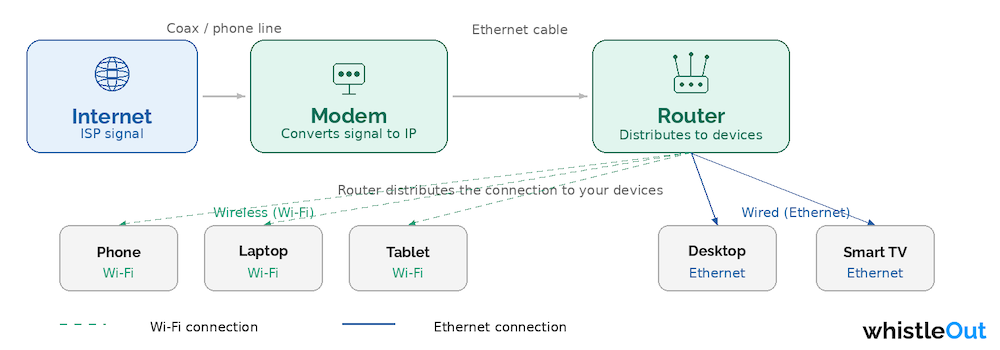
Image: WhistleOut
Let's talk about the basics of home network hardware: modems and routers. While both are essential for most home internet users, there are key differences between them.
What is a modem?
A modem is a device that connects directly to your internet source and makes the data "readable" by your devices by converting electrical signals into Ethernet data. If you have a wired internet connection, like cable, a compatible modem connects directly to the network via a coaxial cable. If you have wireless internet, such as 5G or satellite, your modem will connect to the wireless network.
For fiber internet connections, your modem is an Optical Network Terminal (ONT) that essentially functions like a traditional modem but converts light pulses into Ethernet data.
All ISPs will offer a modem as part of their service when you choose an internet plan, though you can opt to purchase your own. We'll go into the pros and cons of renting versus buying equipment, but just note that if you're purchasing your own modem, be sure to find one that is compatible with your ISP and your internet speed. For example, a modem rated for 500Mbps won't be able to handle a gigabit (1,000Mbps) internet plan.
While you can plug your devices directly into an internet modem using an Ethernet cable, most people prefer to set up a home Wi-Fi network. This involves something called a router.
What is a router?
A router is a piece of home network hardware that connects directly to your modem and creates a Wi-Fi network, acting as a sort of "door" for all the internet traffic. Rather than connecting your device (like your computer or phone) directly to your modem to reach the internet, the router broadcasts the internet signal throughout your home, allowing multiple devices to connect at once.
While connecting to the internet via a router is generally a bit slower than a direct Ethernet connection, the latest router technology supports Wi-Fi 6, which can reach speeds of over 9Gbps (and Wi-Fi 7 is right around the corner). That is fast enough to support over 100 devices simultaneously.
Keep in mind that your internet speeds will be fastest and your latency lowest if your device is close to the router, so be sure to place your router in a central location within your home.
What is a gateway?
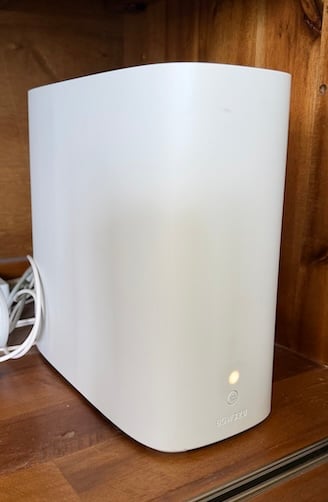
Image: Lauren Hannula | WhistleOut
Gateways are modem-router combo devices. These combos will connect directly to the internet and create a Wi-Fi network.
A gateway modem-router combo device can be more convenient, especially if you rent your equipment from your ISP and don't expect to upgrade any part of your home internet network in the coming years.
Quick tip: Got a bigger space? Consider Wi-Fi extenders or mesh systems
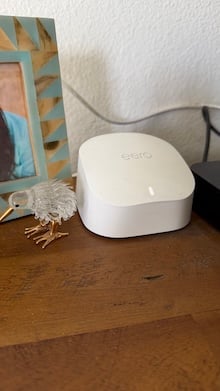
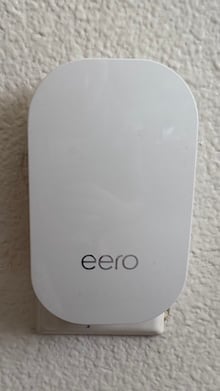
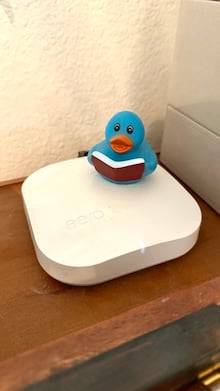
Image: Lauren Hannula | WhistleOut
Router coverage can range from a few hundred to a few thousand square feet, depending on what kind of device you're using. If you want better router range, you can install Wi-Fi extenders or purchase a mesh system.
To ensure I have whole-home connectivity, I use the Eero mesh Wi-Fi system throughout my house. I have a router in my living room that's connected to my gateway, and beacons and extenders in my bedroom, home office, and garage (a girl's gotta stream her favorite sports from the garage gym!).
Renting vs. buying internet equipment
Many internet service providers will provide a modem and router (or a modem-router gateway) to their customers. If you're lucky, this equipment will be free, but often there's an ISP equipment fee, typically costing $10/mo. or more. Let's go over some of the pros and cons of renting versus buying a modem or router.
Renting equipment from your ISP
Pros:
- Rental equipment is always compatible with the service
- Cheaper upfront cost (sometimes equipment rental is even free)
- Easy to install
- Professional installation often available
Cons:
- Costs add up over time
- Equipment may not utilize the latest and fastest technology
- Less personalized control over network
In some cases, you might be required to rent equipment from your ISP. This is more often the case for specialized internet types, like satellite or 5G internet, where third-party equipment isn't common.
Buying your own equipment
Those who are a little tech savvy might prefer to buy and set up their own equipment. Here are the pros and cons of that route.
Pros:
- Get the latest network hardware (faster modem, better Wi-Fi range)
- Pay less in the long run
- Have more personalized control over how your network functions
- Upgrade specific equipment whenever you want (e.g. buy a new modem but keep your old router)
Cons:
- Third-party equipment may not be compatible
- Higher upfront cost
- Requires self-installation
What internet equipment do you actually need?
The type of internet equipment you need depends on your connection type. However, in most cases, the only essential piece of internet equipment is a modem. Without a modem, you won't be able to plug your devices into the internet at all.
Most people will also want a router so they can create a Wi-Fi network that's easy to access from anywhere in the home.
For most internet types, you can purchase a modem and a router for less than $100. However, it's important to check with your ISP to ensure you're buying compatible equipment.
Internet equipment FAQs
Do I need both a modem and a router?
Technically, you don't need both a modem and a router. The only piece of equipment that is truly essential for connecting to your home internet is a modem, which you can plug your device directly into using an Ethernet cord. However, most people will want a router as well, because it lets multiple devices connect to a Wi-Fi network at once.
Can I use my own modem with any ISP?
In many cases, ISPs allow customers to use their own modems to connect to their network. Be sure to check with your specific ISP to see if your equipment is compatible. Buying your own modem, router, and other equipment can give you a faster, more reliable connection and be cheaper in the long run.
Is renting internet equipment worth it?
For many people, the convenience of renting equipment from your ISP is worth it. When you rent, you don't have to worry about buying the right kind of modem or router, and you don't have to pay a bunch of money up front. However, the equipment rental fees can add up over time.
Does fiber internet use a modem?
Most fiber internet connections don't use a traditional modem. Instead, they use something called an Optical Network Terminal (ONT) that serves a similar purpose.
Lauren Hannula
Managing Editor

Enter your address to find the best internet providers available in your area.

Related Articles


.jpg?w=160&h=160&usm=20&usmrad=0.8&fit=crop "Viasat vs Hughesnet Internet Plans Compared")
Related Topics
InternetPopular Topics
Internet Spectrum Internet Xfinity Research and Reports AT&T T-Mobile News Verizon MINTernet App ExplainersInternet Providers by State
- Internet in Alabama
- Internet in Alaska
- Internet in Arizona
- Internet in Arkansas
- Internet in California
- Internet in Colorado
- Internet in Connecticut
- Internet in Delaware
- Internet in District of Columbia
- Internet in Florida
- Internet in Georgia
- Internet in Hawaii
- Internet in Idaho
- Internet in Illinois
- Internet in Indiana
- Internet in Iowa
- Internet in Kansas
- Internet in Kentucky
- Internet in Louisiana
- Internet in Maine
- Internet in Maryland
- Internet in Massachusetts
- Internet in Michigan
- Internet in Minnesota
- Internet in Mississippi
- Internet in Missouri
- Internet in Montana
- Internet in Nebraska
- Internet in Nevada
- Internet in New Hampshire
- Internet in New Jersey
- Internet in New Mexico
- Internet in New York
- Internet in North Carolina
- Internet in North Dakota
- Internet in Ohio
- Internet in Oklahoma
- Internet in Oregon
- Internet in Pennsylvania
- Internet in Rhode Island
- Internet in South Carolina
- Internet in South Dakota
- Internet in Tennessee
- Internet in Texas
- Internet in Utah
- Internet in Vermont
- Internet in Virginia
- Internet in Washington
- Internet in West Virginia
- Internet in Wisconsin
- Internet in Wyoming


.jpg?w=280&h=280&usm=20&usmrad=0.8&fit=crop "Verizon Fios Internet vs. Optimum Internet")

.jpg?w=280&h=280&usm=20&usmrad=0.8&fit=crop "Viasat vs Hughesnet Internet Plans Compared")


.jpg?w=280&h=280&usm=20&usmrad=0.8&fit=crop "gFiber vs. AT&T Fiber: Which internet is better for you?")


