
Wi-Fi extenders allow you to reproduce your Wi-Fi internet signal in areas of your home where it's weak. These units are generally more affordable than mesh networking systems, though not quite as effective for bigger spaces. In this article, we'll tell you everything you need to know about WiFi extenders and point out some of the best units on the market.
If the Wi-Fi signal coming from your router isn't adequately covering all areas of your house, you'll want to consider a Wi-Fi extender. These nifty little units help to reproduce the signal coming from your router, giving you a connection where you didn't have it before. However, they're not without their drawbacks, particularly the degradation of the Wi-Fi signal that occurs when you use these units.
In this guide, we'll tell you how Wi-Fi extenders work and how they differ from mesh networking systems, and describe some of our favorites.
What Are Wi-Fi Extenders?
Wi-Fi range extenders reproduce a wireless signal, helping provide coverage in areas of your home that your router's signal area can't quite reach. These units tend to be relatively affordable (at least compared to mesh systems) and easy to set up. They're decent solutions for moderately sized homes, but don't work so well if you're really far away from the router. Also, Wi-Fi extenders deliver speeds that are generally half of what you get from your main router, and require you to log into a separate network.
Wi-Fi Extenders: Pros & Cons
- Relatively affordable
- Reliably extend your the coverage range of your Wi-Fi signal
- Easy to set up
- Not as effective for bigger houses or spaces
- Deliver speeds that are generally half as fast as what you get from router
- Use separate network SSID that you have to log into
Wi-Fi Extenders vs. Mesh Networks
Wi-Fi extenders essentially repeat the core Wi-Fi signal coming from your router, whereas mesh systems are like supplementary routers. Mesh networks really do work well—we've got Google Wi-Fi units in our office and they provide reliable coverage—though they tend to be quite expensive compared to Wi-Fi extenders. A decent extender can run as cheap as $50, whereas you're talking hundreds of dollars for a system of mesh units.
Wi-Fi extenders vs. mesh networking systems
Wi-Fi extenders
- Relatively cheap
- Easy to set up
- WiFi speeds half as fast as source
- Use separate SSID requiring login
Mesh systems
- Can cover large houses and buildings
- Stronger signal
- Single wireless network—same SSID
- Comparatively expensive
Best Wi-Fi Extenders
A word you'll commonly see in Wi-Fi extender reviews is "throughput." This is the rate at which a communication signal is reproduced. Our top picks here all feature best-in-class throughput (and low prices and easy setups).
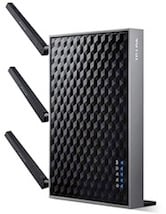
TP-Link AC1900 WiFi Range Extender (RE580D)
This is very reasonably priced no-frills extender with excellent throughput performance.
It lacks USB connectivity and parental controls, but in terms of providing reliable WiFi coverage, it gets the job done.
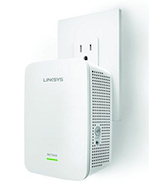
Linksys RE6700 AC1200 Amplify Dual Band WiFi Range Extender
This is another affordable unit that, while lacking certain features, delivers good throughput and is easy to install. One feature it does have is "Spot Finder" technology to quickly find the right location for the unit.
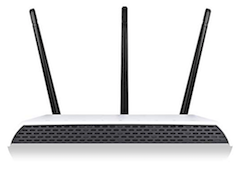
Amped Wireless AC1750 WiFi Range Extender (RE1750A)
Amped Wireless' AC1750 is exceedingly easy to install and delivers good throughput, allowing for up to 12,000 square feet of additional Wi-Fi coverage. The AC1750 allows you to connect up to 5 devices—i.e. smart TVs, gaming consoles—into the wired unit's wired ports. Definitely one to consider.
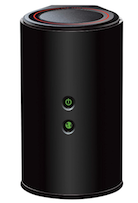
D-Link WiFi Dual Band Range Extender DAP-1650
D-Link's attractive-looking and reasonably-priced DAP-1650 offers stellar 5GHz performance and four Gigabit LAN (ethernet) ports. As with all of the other units on this list, the DAP-1650 is exceedingly easy to set up, with one reviewer saying he had it up and running in 60 seconds.
When to Replace Your Router Or Modem
We've covered Wi-Fi extenders and how they can help reproduce your Wi-Fi signal, but if you're having problems in close proximity to the source, it might be time to get a new router.
Finding the Best Internet Plan
If you've done everything you can in terms of hardware and still not getting the kind of internet speed and reliability you need, you'll want to review your internet plan and provider and consider switching to a new one. Our internet plan comparison engine makes doing this a cinch. Simply type in your address and press "search." You'll be presented with all of the internet plans available in your area.
Chris Holmes
Staff Writer

Enter your address to find the best internet providers available in your area.

Related Articles


.jpg?w=160&h=160&usm=20&usmrad=0.8&fit=crop "Viasat vs Hughesnet Internet Plans Compared")
Related Topics
InternetPopular Topics
Internet Spectrum Internet Xfinity Research and Reports AT&T T-Mobile News Verizon MINTernet App ExplainersInternet Providers by State
- Internet in Alabama
- Internet in Alaska
- Internet in Arizona
- Internet in Arkansas
- Internet in California
- Internet in Colorado
- Internet in Connecticut
- Internet in Delaware
- Internet in District of Columbia
- Internet in Florida
- Internet in Georgia
- Internet in Hawaii
- Internet in Idaho
- Internet in Illinois
- Internet in Indiana
- Internet in Iowa
- Internet in Kansas
- Internet in Kentucky
- Internet in Louisiana
- Internet in Maine
- Internet in Maryland
- Internet in Massachusetts
- Internet in Michigan
- Internet in Minnesota
- Internet in Mississippi
- Internet in Missouri
- Internet in Montana
- Internet in Nebraska
- Internet in Nevada
- Internet in New Hampshire
- Internet in New Jersey
- Internet in New Mexico
- Internet in New York
- Internet in North Carolina
- Internet in North Dakota
- Internet in Ohio
- Internet in Oklahoma
- Internet in Oregon
- Internet in Pennsylvania
- Internet in Rhode Island
- Internet in South Carolina
- Internet in South Dakota
- Internet in Tennessee
- Internet in Texas
- Internet in Utah
- Internet in Vermont
- Internet in Virginia
- Internet in Washington
- Internet in West Virginia
- Internet in Wisconsin
- Internet in Wyoming


.jpg?w=280&h=280&usm=20&usmrad=0.8&fit=crop "Verizon Fios Internet vs. Optimum Internet")

.jpg?w=280&h=280&usm=20&usmrad=0.8&fit=crop "Viasat vs Hughesnet Internet Plans Compared")


.jpg?w=280&h=280&usm=20&usmrad=0.8&fit=crop "gFiber vs. AT&T Fiber: Which internet is better for you?")


