
Image: Max McCaskill
Starlink is a satellite internet service owned by SpaceX. It uses low-orbit satellites to beam internet connectivity to locations around the globe.
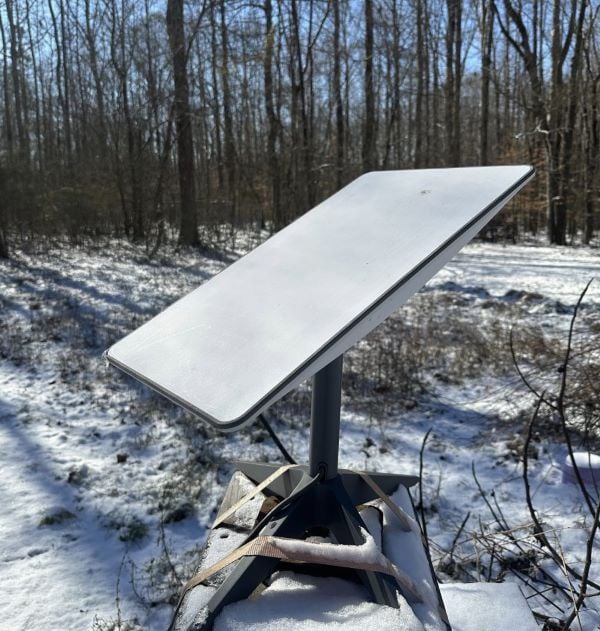
I’ve had Starlink as my home internet service in rural North Carolina for three years. It’s completely upgraded my internet experience. My download speeds average around 150Mbps and I regularly use it for remote work, PC gaming, and streaming.
For people in remote areas with few other internet connectivity options, Starlink is likely the best service you’ll find. That said, it’s extremely expensive and requires some technical knowledge to set up. If you live in a suburb or city with access to connection types like fiber, cable, or 5G home internet, Starlink probably won’t outshine these other internet options.
Let’s dive into my experience with Starlink and see if it’s the right internet for you.
How I tested Starlink
Starlink is my home internet provider. I repeatedly tested the service and grounded my findings with my experiences over the past three years. This longtime use has allowed me to do everything from self-installing my satellite dish to testing my download speeds in hurricanes and ice storms.
The features I tested include the following:
- Installing the Starlink dish
- Testing the Starlink app
- Speed testing in different types of weather
- Streaming videos
- Playing video games, including Counter-Strike: Global Offensive and Sea of Thieves
- Working remotely and placing Zoom calls
- Interacting with Starlink customer service
The bottom line
Starlink is one of the best internet options for rural customers like me. While you may experience brief slowdowns during bad weather or times of peak usage, it consistently offers fast download speeds and wide availability. Just note that Starlink comes at a high cost due to its expensive equipment and pricey plans.
Why you can trust WhistleOut
.svg)
15+
years of mobile industry experience

900+
published wireless guides

35+
firsthand carrier reviews
We've been around since the birth of the iPhone. Along the way, we've learned how to spot the best deals for your wallet (and your sanity). We spend our days researching informative guides and writing insightful reviews on every kind of wireless plan, distinguishing what matters from what doesn't. We played around with these plans before recommending them, ensuring they're worth your hard-earned money.
Want to know more? Check out how we review every cell phone plan we rank.
Starlink plans and pricing
Starlink offers three residential plans: the Residential 100 Mbps plan, the Residential 200 Mbps plan, and the Residential MAX plan which offers speeds up to 400 Mbps.
Starlink plan options
| Residential 100 | Residential 200 | Residential MAX | |
|---|---|---|---|
| Premium data | Unlimited | Unlimited | Unlimited |
| Advertised speeds | 100Mbps | 200Mbps | 400Mbps |
| Equipment cost | $199 for installation $10/month after |
$199 for installation $10/month after |
$599 |
| Plan prices | $50/month | $80/month | $120/month |
| View at Starlink | View at Starlink | View at Starlink |
Most customers will be happy with the Residential 100 plan. This is the plan I have and the main focus of this review. It’s built for a regular home internet connection and includes an unlimited data allotment with advertised download speeds of up to 100Mbps.
The Residential plans start at $50/month, but you must also purchase a Starlink Kit to access the service. The kit costs $10/month and includes:
- Starlink satellite dish
- Gen 3 router
- Dish kickstand
- Connectivity and power supply cables
- Power supply unit
Starlink Roam plans
Starlink Roam offers you a customizable plan designed for travelers. You can use Roam when your vehicle is moving, and the monthly service can be paused when you aren’t traveling and needing it. If you want a mobile form of Starlink’s service for your RV, boat, or backpacking trip, this is the plan to check out.
What makes Roam unique is the ability to pick different plans and equipment models. For backpackers, a 100GB plan starts at $55/month and the Starlink Mini—a smaller portable dish—costs $599. For customers with an RV or maritime users, a standard kit starts at $349 and the Roam Unlimited plan is $175/month.
How I rated Starlink: WhistleOut’s metrics

Fact-checking Starlink's claims
Here at WhistleOut, we review all internet service providers using the same five metrics: price, value, download speeds, availability and reliability, and customer service. Each metric is assigned a one-point star value to calculate the carrier's overall score.
Starlink's ratings were:
- Price: 3 out of 5
- Value: 4 out of 5
- Download speeds: 4 out of 5
- Availability and reliability: 4.5 out of 5
- Customer service: 2 out of 5
Being a long-time Starlink customer has allowed me to experience its services in the real world, ensuring my findings and recommendations stay grounded in actual usage.
Price
Starlink is one of the most expensive options for internet service. Not only is the Residential plan pretty pricey, starting at $50/month, but the $299 upfront cost for equipment also won’t appeal to many customers.
Overall, Starlink is generally more expensive than other satellite internet providers—such as Viasat and HughesNet—and can’t compete with the price points offered by connectivity types like fiber and 5G home internet. That said, it is the fastest option among satellite providers. If you need satellite internet, it might be worth paying the higher price.
Score: 3 out of 5 stars
Value
Starlink is a solid value for satellite internet because it’s widely available and offers fast download speeds. As I outline below, competitors like Viasat and HughesNet are generally cheaper than Starlink, but their technical makeup results in a less reliable and often slower experience—and the "cheaper" price is still a good chunk of change out of your pocket.
To be clear, Starlink is only an actual value when compared to other satellite providers. Terrestrial internet like fiber is generally cheaper and faster, but it’s less widely available outside of urban areas. For customers who can’t access those other services, Starlink is the best option, if you can afford it.
Score: 4 out of 5 stars
Data speeds
Starlink claims to offer download speeds stretching from 25–220Mbps. I regularly achieve speeds of 175Mbps and higher, though you should note your speed will fluctuate throughout the day.
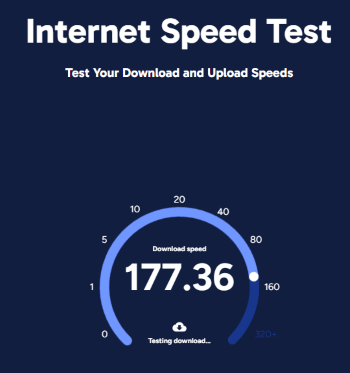
hardwired ethernet connection.
Image: Max McCaskill
Satellite internet speeds are somewhat inconsistent and there are multiple factors to keep in mind. One potential factor is disruptions between your dish and Starlink’s low-orbit satellites. These disruptions could be thick clouds or a tree branch in your dish’s point of view.
Starlink also designates certain times as “peak hours.” These hours are when most people heavily use their service and usually stretch between 6 p.m. and 11 p.m. local time. High numbers of users can strain the network and slow down speeds for everyone.
Outside of peak hours and with a clear view of the sky, my internet is consistently around 150Mbps. In bad weather or during peak hours, I’ve seen my speeds drop to 20Mbps and slower. That said, 20Mbps is still usable, and the speeds are rarely slow enough for me to notice there’s a problem.
Score: 4 out of 5 stars
Availability and reliability
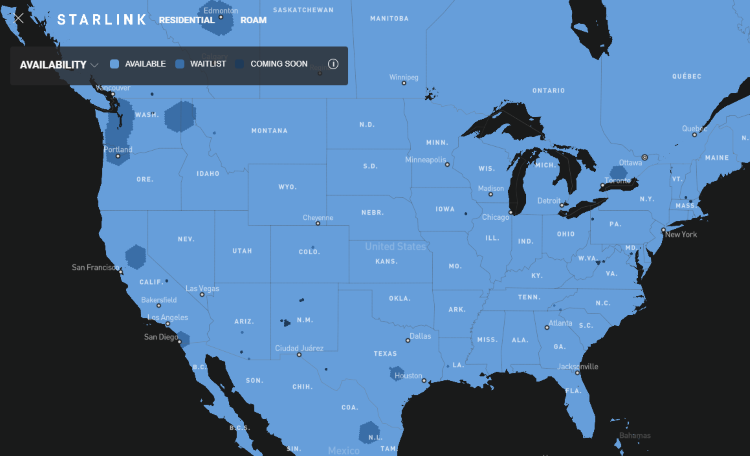
Image: Max McCaskill
One of the best features of Starlink is its widespread availability. When the service was originally announced, customers had to join years-long waitlists as the satellite constellation grew. Today, those lists rarely happen. In some areas of the country, Starlink is “sold out” until more satellites are added—but most customers can sign up immediately.
Starlink's service is also available on your phone if you have a plan with T-Mobile. Although it isn't fully rolled out, the T-Mobile Starlink beta is currently open to customers from all carriers for free.
Score: 4.5 out of 5 stars
Customer service
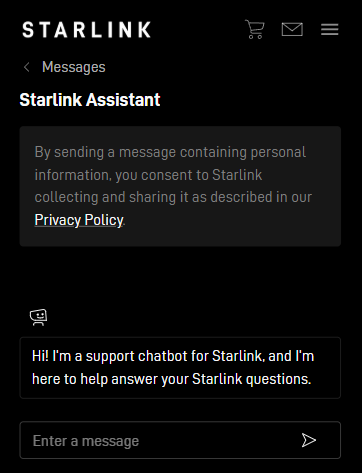
Image: Max McCaskill
Starlink is not a good choice if you’re uncomfortable managing your technology. You must self-install your satellite dish and Starlink doesn’t provide service technicians to help you set up. Starlink’s customer service options also fall short compared to other providers. Your main point of contact is an AI chatbot. There’s no customer service phone line or online chat to reach a human representative.
I will note that in three years, I’ve never had a reason to reach out to Starlink’s customer service. I did speak with the chatbot for this review and found it helpful, but every problem I’ve encountered could be solved by simply unplugging the dish and restarting the system. That said, if you prize in-depth customer service, you’ll need to look elsewhere.
Score: 2 out of 5
Signing up with Starlink
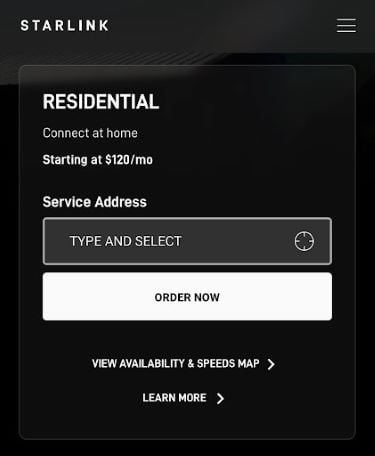
Image: Max McCaskill
Signing up with Starlink is simple. You’ll need to visit Starlink’s website and type in your address. Starlink will tell you if your location is eligible for service and what plan options are available.
You must pay for your dish and any additional fees at checkout. You can also add on extra equipment options available, like wall mounts or mesh Wi-Fi adapters. Your monthly bill won’t start until after the service is activated or 30 days after delivery. A Starlink kit usually takes one to two weeks to arrive after completing your order.
What is the Starlink Congestion Charge?
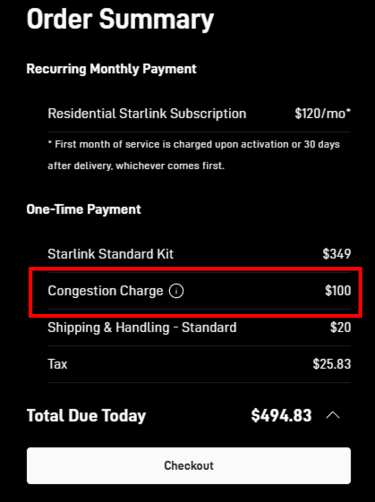
Image: Max McCaskill
The Starlink “Congestion Charge” is a one-time $100 fee added to new subscriptions in areas with a high number of existing customers. Having too many users in one grid can slow data speeds due to network congestion. Starlink uses this extra fee to discourage new customers from purchasing a unit. To avoid it, simply wait a few months until Starlink has expanded its satellite constellation to handle more volume in your area.
Self-installing my Starlink dish
You might feel intimidated by the idea of installing the system yourself. (I was.) Truthfully, it’s pretty easy, and the instructions are printed in the box the Starlink equipment ships in.
Picking a location
In the United States, you’ll want to make sure the location of your dish has an unobstructed view of the north or northeastern sky. The Starlink app has features that use your device’s camera to point you in the right direction and find potential obstructions. After installation, the dish itself will constantly scan for obstructions and alert you in the app if one is found.
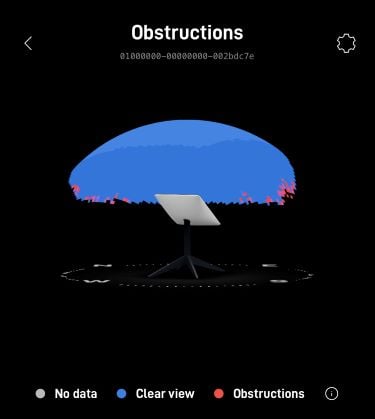
Image: Max McCaskill
You don’t have to worry about being extremely precise in your orientation. Previous dishes had a built-in motor to find the perfect angle and direction, but you can simply point current dishes in the correct direction based on the Starlink app.
Powering on the dish
Once you’ve picked a spot and mounted your dish, you’ll need to plug in the power and Starlink signal cables into the dish and router. Each cable is shaped differently, so there’s no need to worry about plugging a cord into the wrong place. After plugging in the power cord, your Starlink will automatically start searching for a signal and your router will turn on. Note that it may take up to 30 minutes to get online once you power on your Starlink equipment.
Setting up the Starlink router
After your dish is up and running, you should see the “Starlink” Wi-Fi signal coming from your router. Connect to this Wi-Fi signal and you’ll be prompted to set up a new network name and password. From there, any additional changes can be made in the Starlink app.
Managing my Starlink plan
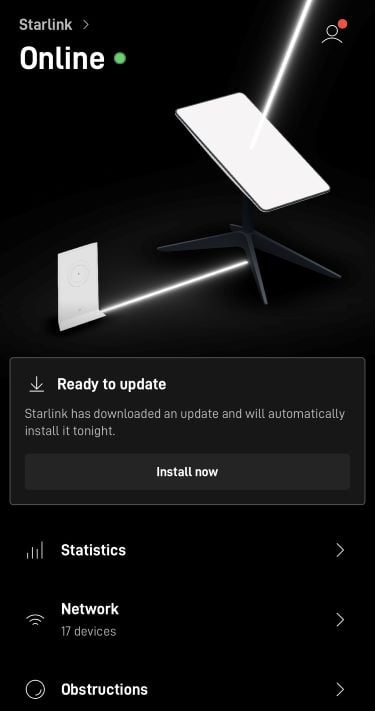
Image: Max McCaskill
You manage your entire service using the Starlink app. You can see your outage statistics, the devices currently using your network, any obstructions at your dish, and your data speeds. It also allows you to manually enable specific features on the Starlink dish, such as the snow melting feature or network updates.
You’ll also use the app to contact customer service with the Starlink chatbot if you need assistance.
Did I like Starlink internet?
I’ve been extremely impressed with Starlink internet. As someone from a rural area, the only internet I could previously get was DSL through my phone line. It was extremely slow and almost unusable when more than one person connected to it. Getting Starlink has completely changed my online capabilities. Now I can easily work remotely, stream in HD, and play competitive online multiplayer games.
Connectivity
Starlink offers excellent connectivity and I rarely experience any kind of service outages. The dish also performs well in all kinds of weather conditions. Thunderstorms may slow your speeds, but it has to be an extremely thick cloud to completely knock out the connection.
The service also performs well in extreme weather. Impressively, Starlink has managed to keep a connection throughout hurricane landfalls and during major winter storms. The dish even keeps itself free of ice and snow with its self-heating feature.
Gaming and streaming
Gaming and streaming also work well on Starlink. I regularly play online PC video games such as Counter-Strike: Global Offensive and Sea of Thieves with my friends. When I first got the service, I sometimes encountered lagging speeds during peak usage hours. However, as Starlink has added more satellites, I rarely notice that problem anymore.
Starlink streams movies and TV shows with no problems. The service has even helped me save money by letting me drop an expensive satellite TV plan from DISH Network and sign up for a cheaper streaming plan from YouTube TV instead.
|
Starlink
Residential MAX
$130/mo
Available in select locations
+ $369 Upfront
|
Starlink vs. the competition
Starlink’s chief rivals are Viasat and HughesNet. Both providers have made recent changes to their offerings to compete with Starlink’s service, but they’re still generally slower. That said, budget-conscious customers should strongly consider them as they offer service at a lower price point.
Starlink vs. Satellite competitors
| Starlink | HughesNet | Viasat | |
|---|---|---|---|
| Data allotment | Unlimited No data cap |
Unlimited 200GB priority |
Unlimited 850GB priority |
|
Average download speed |
100Mbps | 100Mbps | 41Mbps |
| Equipment cost | $299 | $14.99/month | $15/month |
| Installation method | Self-install | Technician required | Technician required |
| Price | $120/month | $84.98/month | $81.22/month |
| View plan | View plan | View plan |
HughesNet’s satellite technology is different than Starlink's. HughesNet’s satellites travel on a geostationary orbit. That’s a fancy way of saying they stay in one spot in the sky and transmit a signal to one place. The drawback of this method is that the satellites must be much farther away from Earth, which can slow down speeds. Starlink uses low-orbit satellites that are constantly moving around. Because the satellites orbit much closer to Earth, Starlink generally offers faster and more reliable speeds than HughesNet.
On the other hand, HughesNet clocks in cheaper at $84.98/month for its top-tier Elite plan. Both services offer unlimited data, but Starlink doesn’t have a data cap while HughesNet may slow your speeds after using 200GB of data. HughesNet also offers lower up-front costs since the equipment is a $14.99/month rental compared to Starlink’s $299 kit. Finally, HughesNet’s technicians install the dishes for free, so it’s a friendlier option for nontechnical people.
|
Hughesnet

Elite
$79.98/mo
($64.99 plan + $14.99 modem)
for 12 months. Service plan availability varies based on geographic area. All plans are subject to the Hughesnet Subscriber Agreement.
+ $99 Upfront
|
Viasat uses the same geostationary satellite setup as HughesNet, so it also suffers from slower speeds and a less reliable signal when compared to Starlink. That said, Viasat is much more affordable than Starlink with its Unleashed plan coming in at $81.22/month. Viasat’s plan includes unlimited data, but the provider may slow your speeds if you use more than 850GB in a 30-day period—which only really matters to high-data users. Starlink’s plan is truly unlimited with no cap, though.
As for equipment, Viasat allows customers to rent equipment for $15/month or they can purchase it outright for $250. Viasat also requires a professional installation since the dish must be pointed at a specific location in the sky. Unfortunately, this installation may cost up to $500.
|
Viasat

Viasat Unleashed
$51.22/mo
with promotion, $99.99/mo. thereafter.
|
Starlink vs. 5G home internet
While Starlink might be one of the best options for satellite internet, there is another service type for customers who can’t connect to a fiber or cable network. 5G home internet uses wireless signals from cell phone towers to offer high-speed internet plans. Some of them—like Verizon’s 5G Home Plus—can reach 1,000Mbps speeds in certain areas.
AT&T, Verizon, and T-Mobile all offer their own 5G home plans that can be bundled with your wireless service. These plans' speeds are often faster than satellite internet and have a lower starting cost.
|
Verizon

5G Home
$50/mo
with AutoPay
|
|
AT&T

Internet Air
$55/mo
Price plus taxes and fees. AutoPay & Paperless bill req’d. Not available in all areas.
|
Recap: I recommend Starlink for rural customers
I recommend Starlink for rural customers who have no other options for high-speed internet. Starlink is the best satellite internet service currently available. It offers fast download speeds and excellent connectivity in all kinds of weather. I’ve been happy with my service and have no intention of changing providers any time soon.
That said, Starlink isn’t all perfect. Its expensive equipment and pricey plans mean that customers on a budget might want to look at HughesNet or Viasat instead. Additionally, it does require a certain amount of technical knowledge since you must install the whole system yourself.
Finally, if you have other options for internet—such as cable or fiber—Starlink should not be on your list of potential internet services. While it is a neat service, Starlink is designed for people who have no other options. Cable and fiber plans generally cost you less, offer faster speeds, and give you much more reliability than any kind of satellite internet.
Starlink: FAQs
What is the difference between Starlink Residential and Starlink Roam?
Starlink Residential is for customers who want a fixed home connection at one address, while Starlink Roam is for travelers and nomads who need internet on the move across multiple locations. Residential gets you higher network priority and typically lower monthly rates, while Roam gives you the flexibility to pack up and go, with the trade-off of deprioritized speeds during peak hours.
Does Starlink work in bad weather?
Starlink holds up well through most everyday weather, including light rain, snow, fog, and wind, which are generally no problem. But heavy rain, wet snow, and severe storms can cause temporary slowdowns or brief outages. Service almost always bounces back once the worst of it passes.
Does Starlink work in heavily wooded areas?
Starlink can work in wooded areas, but it needs a clear, unobstructed view of the sky to perform well. So if tall trees are in the way, you'll likely need to mount the dish higher on your roof, a pole, or a tower to clear the treeline. Before you buy, use the free Starlink app to scan your property for obstructions so you know exactly what you're working with.
What is the Starlink demand surcharge, and do I have to pay it?
The demand surcharge is a one-time fee Starlink charges new customers in high-demand areas where network capacity is strained. It can range from $100 to $1,500 depending on your location. If it applies to your address, you'll need to pay it upfront to activate service, though it's refundable within Starlink's 30-day trial window.
Max McCaskill
Sr. Staff Writer

Enter your address to find the best internet providers available in your area.

Related Articles


.jpg?w=160&h=160&usm=20&usmrad=0.8&fit=crop "Viasat vs Hughesnet Internet Plans Compared")
Related Topics
InternetPopular Topics
Internet Spectrum Internet Xfinity Research and Reports AT&T T-Mobile News Verizon MINTernet App ExplainersInternet Providers by State
- Internet in Alabama
- Internet in Alaska
- Internet in Arizona
- Internet in Arkansas
- Internet in California
- Internet in Colorado
- Internet in Connecticut
- Internet in Delaware
- Internet in District of Columbia
- Internet in Florida
- Internet in Georgia
- Internet in Hawaii
- Internet in Idaho
- Internet in Illinois
- Internet in Indiana
- Internet in Iowa
- Internet in Kansas
- Internet in Kentucky
- Internet in Louisiana
- Internet in Maine
- Internet in Maryland
- Internet in Massachusetts
- Internet in Michigan
- Internet in Minnesota
- Internet in Mississippi
- Internet in Missouri
- Internet in Montana
- Internet in Nebraska
- Internet in Nevada
- Internet in New Hampshire
- Internet in New Jersey
- Internet in New Mexico
- Internet in New York
- Internet in North Carolina
- Internet in North Dakota
- Internet in Ohio
- Internet in Oklahoma
- Internet in Oregon
- Internet in Pennsylvania
- Internet in Rhode Island
- Internet in South Carolina
- Internet in South Dakota
- Internet in Tennessee
- Internet in Texas
- Internet in Utah
- Internet in Vermont
- Internet in Virginia
- Internet in Washington
- Internet in West Virginia
- Internet in Wisconsin
- Internet in Wyoming


.jpg?w=280&h=280&usm=20&usmrad=0.8&fit=crop "Verizon Fios Internet vs. Optimum Internet")

.jpg?w=280&h=280&usm=20&usmrad=0.8&fit=crop "Viasat vs Hughesnet Internet Plans Compared")


.jpg?w=280&h=280&usm=20&usmrad=0.8&fit=crop "gFiber vs. AT&T Fiber: Which internet is better for you?")


