
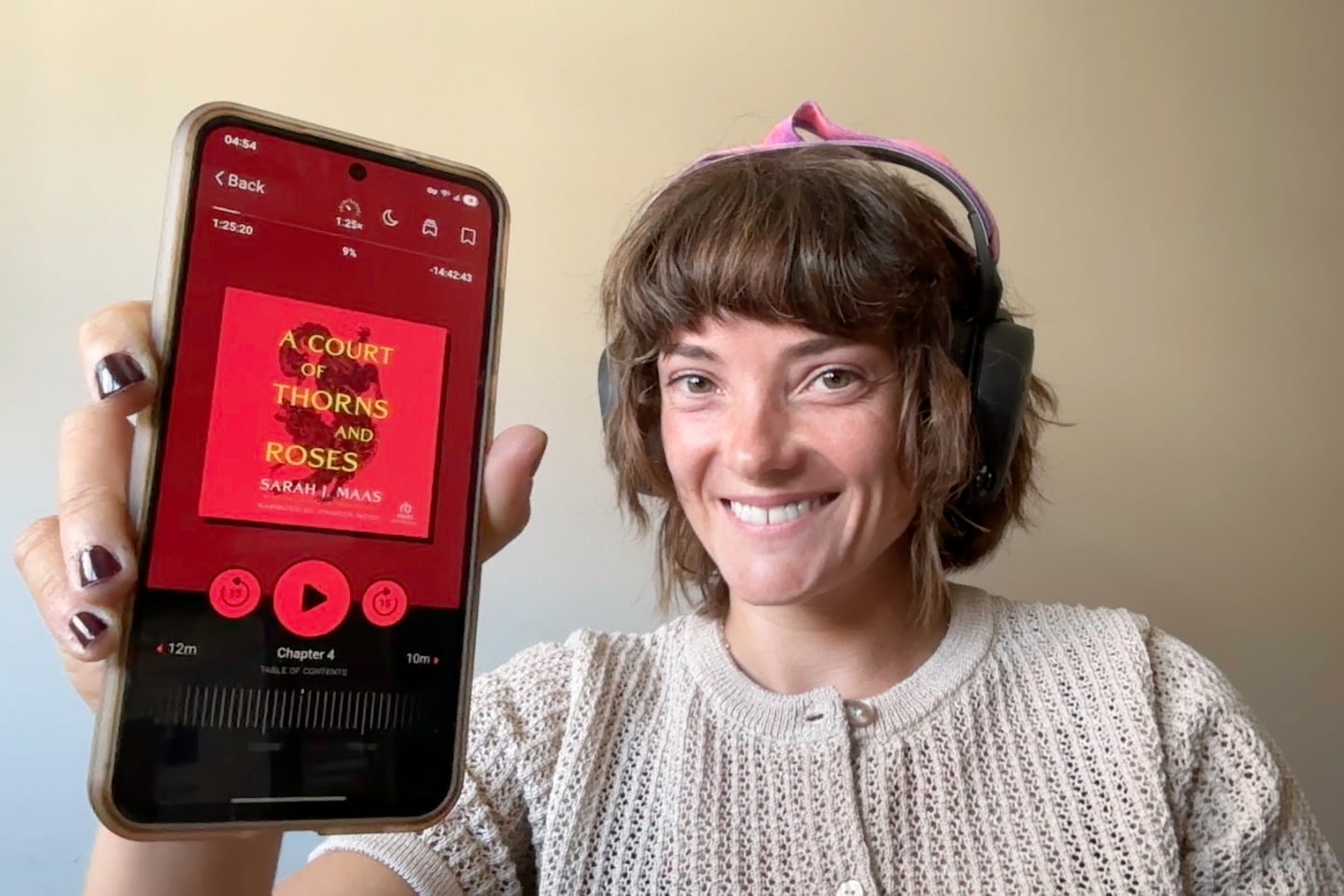
Summer is the best excuse to finally tackle your reading list—but the right app makes all the difference between actually finishing a book and just scrolling through TikTok again. I tested 10 major reading apps myself to find the ones that actually make reading fun again. Whether you're looking for free ebooks, manga, a place to write, or something to keep the kids busy on long car rides, I've found the best app for you.
You don't need to pay a premium for the top-notch reading apps, either. My top picks cost absolutely nothing. So don't think twice; this is your sign to get back into reading this summer.
Continue on to find the right app for every kind of reader on your list—including yourself.
Audiobooks use more data than you'd think
Can your data plan keep up with streaming audiobooks on the beach all summer long? If you're planning to listen to audiobooks on the go, make sure you have enough data for every chapter—especially if you’re away from Wi-Fi.
Switch to an unlimited data plan, so your summer fun isn’t cut short unexpectedly. Check out the most popular plans with affordable unlimited data below:
|
Visible

$25 Visible Plan
$25.00/mo
Taxes & Fees included
|
|
Mint Mobile

Unlimited Data Plan
$25.00/mo
$75.00 upfront payment for 3 months (equals to $25.00/month). Intro pricing for new customers only.
|
|
XFINITY Mobile

Mobile Select Plan
$0.00/mo
(for the first year of service) <br>Regular rate of $30/mo. thereafter
|
Best book apps at a glance
| App | Available for | Best for |
|---|---|---|
| Libby | iOS, Android, web | Unlimited free ebooks and audiobooks |
| Seriatim | iOS, Android | Readers with dyslexia or ADHD |
| Goodreads | iOS, Android, web | Tracking your reading and discovering what to read next |
| Wattpad | iOS, Android, web | Fan fiction and community writing |
| Manga Plus | iOS, Android, web | Manga readers who want official, free chapters |
| Teach Monster | iOS, Android | Parents who want to read with grade schoolers |
Why you can trust WhistleOut
.svg)
15+
years of mobile industry experience

900+
published wireless guides

35+
firsthand carrier reviews
We've been around since the birth of the iPhone. Along the way, we've learned how to spot the best deals for your wallet (and your sanity). We spend our days researching informative guides and writing insightful reviews on every kind of wireless plan, distinguishing what matters from what doesn't. We played around with these plans before recommending them, ensuring they're worth your hard-earned money.
Want to know more? Check out how we review every cell phone plan we rank.
1. Libby: The best free reading app of all time

- Free with a library card
- Available for iOS and Android
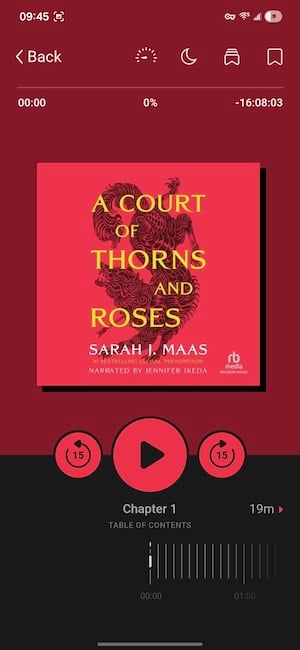
Libby is the best book-reading app, and I honestly wouldn't know what to do without it. I clock over 1,000 hours on Libby each year and average about 3 hours every day.
All you need is a library card from a participating branch, and Libby hands you access to a massive catalog of ebooks and audiobooks—all completely free. I listen to non-fiction at the gym, romance novels on long runs, crime fiction on highway drives, and I've even re-read Harry Potter in Portuguese on hikes. Libby isn't just a reading app—it's a full entertainment system I literally carry everywhere.

Images: Jessica Santero (left), Kevin Kearney (left) | WhistleOut
Setting up Libby on your phone only takes a few minutes to start listening. Just download the app, find your library in the search bar, and enter your library card number. Most major U.S. public library systems are already connected for instant access to endless listening. Once you're set up, you can browse by genre, check what's available right now, or place holds on titles that are currently checked out.
The only downside to Libby is the wait times. Popular titles (especially newly released bestsellers like Fourth Wing) can have holds that stretch for weeks or even months. I've sat on a 16-week waitlist before. It's not ideal, but you just have to wait your turn.
If you still aren't using Libby, you're missing out on the best free resource for personal growth, self-improvement, and endless entertainment.
Luckily, Libby knows if you're an active reader and rewards you with "Skip-the-line" loans. If there's a long waitlist on your hold, Libby will usually let you read one of your books on hold instantly, but you have to be quick. Basically, you jump to the front of the line for seven days. That's more than enough time to finish your book if you're a serious listener. That way, wait lines don't always seem that bad, since you usually always have something to tide you over.
Having to wait is the only trade-off for free access to a library that rivals any paid subscription service.
What Reddit says about Libby
Libby has a way of pulling lapsed readers back in. A thread on r/LibbyApp titled "Libby is a blessing" struck a chord this year, with users sharing how the app made reading feel possible again. u/-xrainbow-britex captured it perfectly, writing: "I used to be an avid reader but with two little kids, I was struggling to imagine how I could work reading into my life again. Libby has made it possible for me to listen to audiobooks while I do other things. It's good to be back!"
Read anywhere in the U.S. for less with Visible
Libby's library goes wherever you do—your data plan should too. Visible runs on Verizon's network, so you get the same coast-to-coast coverage at a fraction of the price. Not to mention unlimited data, no contracts, and no surprise fees on your bill.
Here are the most popular Visible plans available now:
|
Visible
$25 Visible Plan
$25.00/mo
Taxes & Fees included
|
|
Visible
$35 Visible+ Plan
$35.00/mo
Taxes & Fees included
|
|
Visible
$45 Visible+ Pro Plan
$45.00/mo
Taxes & Fees included
|
2. Goodreads: My go-to for book suggestions (that don't suck)

- Free
- Available for iOS and Android
Goodreads isn't a reading app in the sense that you don't open ebooks. It's a reading companion that tracks what you've read, what you want to read, and what the rest of the internet thinks about all of it.
Not sure how to update your apps?
Keeping your apps up to date ensures you're always getting the latest features, bug fixes, and security improvements. Learn how to update the apps on your iPhone and your Android. It takes less time than you think.
I go to Goodreads whenever I'm stuck in a reading rut. After a string of disappointing books, I'll browse the ratings and reviews until something catches my attention—and it works every time. The last book I picked up based on a Goodreads rabbit hole was Remarkably Bright Creatures by Shelby Van Pelt, and I loved it. I haven't been steered wrong yet by Goodreads recommendations (knock on wood).

Image: Kevin Kearney | WhistleOut
The Reading Challenge keeps me accountable, too. Set a goal at the start of the year (say, 24 books), and Goodreads tracks your progress, tells you if you're ahead or behind pace, and even cheers you on. Plus, with the changing seasons, Goodreads suggests titles that align with the time of year to earn even more badges. It turns reading into something with stakes, which sounds ridiculous until you realize you've read 18 books in a year because you didn't want to fall behind.
The community recommendations connect you to a greater book-loving community. You can follow friends, see what they're reading in real time, and browse curated shelves by genre, mood, or even specific tropes (enemies-to-lovers, slow burn, you name it).
It's the closest thing to having a book club in your pocket, without the pressure of accidentally picking a flop.
What Reddit says about Goodreads
The annual Reading Challenge keeps Goodreads users coming back year after year, and the weekly "What are you reading?" thread on r/goodreads shows just how active the community stays. u/AnxiousADHDpanda summed it up, stating, "Listening to In The Lives of Puppets by TJ Klune… I'm trying to check off as many of the challenges as I can! I just read The Midnight Library and I loved it!"
3. Seriatim: The reading app designed for people who struggle to read
- Free
- Available for iOS and Android
Sometimes I can’t see what’s on the page in front of me. Maybe too much screentime or tired eyes are at fault, but there are days when I struggle with a page of text.
Seriatim is the best ebook reader app for your eyes because it shows you one sentence at a time. That's the whole idea—no pages, no paragraphs, no wall of text to stare down before you've even started. For anyone who finds a standard ebook layout overwhelming or distracting, Seriatim completely removes that barrier. You control the pace and the presentation, and reading doesn't feel like a chore.

Image: Jessica Santero | WhistleOut
Font, line spacing, and reading speed are all adjustable on Seriatim, so you can fine-tune it to exactly what works for you. You can even customize the color of the screen. I always choose a red-tinted screen since I like to read before bed.
Seriatim encourages inclusive reading and has a specific font for dyslexic readers to avoid mixing up letters while reading. I personally like the dyslexic font and a sweeping animation for the text. It also fits the app to your entire screen, which helps minimize distractions from notifications that might catch your eye.
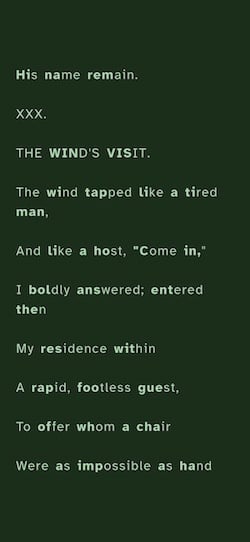
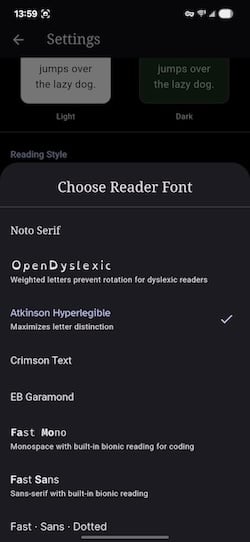
Image: Jessica Santero | WhistleOut
Seriatim is very practical because you can import your own EPUBs or PDFs. That means any book you already own can get the dyslexia-friendly treatment. The app itself isn't limited to a specific library catalog or a paid subscription. You can read the old classics pre-installed in the app or bring your own files.
It's so good, it's one of 2026's best apps of the year. If you've ever given up on reading because the format felt impossible, Seriatim is worth giving it another shot.
What Reddit says about Seriatim
Seriatim has picked up serious momentum in the neurodivergent community on r/AutisticWithADHD while users searched for ways to actually follow through on reading more. u/samelove101 discovered how Seriatim could help, sharing, "There's this app, Seriatim, that shows you one sentence at a time. I think this can be helpful bc seeing a wall of text can feel overwhelming or be distracting. Adding reading, even just a sentence to your routine can be helpful."
4. Wattpad: Where writers and readers meet (the good, the bad, and the provocative)

- Free (Wattpad Premium from $5.99/month)
- Available for iOS and Android
Wattpad has a long track record of launching writers who end up on bestseller lists, and that's because Wattpad's community is engaging in a way most reading platforms aren't. Both Netflix hits The Kissing Booth and After started on Wattpad, and you just might be the next big name in entertainment. Choose to read stories in installments, or try your hand at writing.
I used to write on Wattpad back in college when I was taking a flash fiction course. (No, flash fiction isn't what it sounds like—it's super short fiction pieces around 200 words.) The feedback I got from Wattpad readers was insightful and immediate, and there's something about that interaction that makes the writing feel worth doing. Getting comments on your pieces while someone reads your work is addictive and makes any writer feel seen.
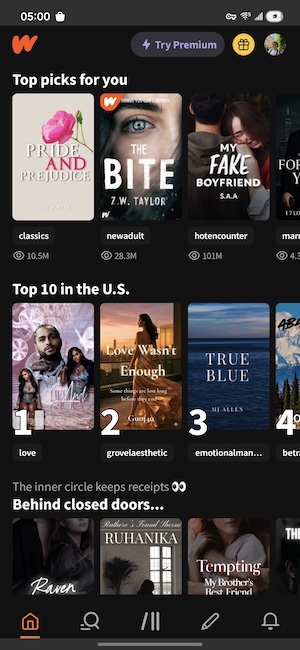
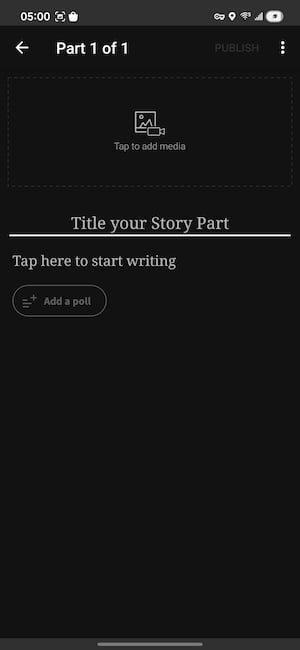
Image: Jessica Santero | WhistleOut
That said, Wattpad is an open community. So if you're looking for something to read, go in with your eyes open. Most of Wattpad's content skews toward fan fiction, and a good chunk of it has sexual undertones. It is not a curated editorial experience. Wattpad is a user-generated platform, which means quality varies wildly. You can find some really great stories, but you might have to sift through quite a few not-so-great ones too. Browse by genre, check the tags before you commit to a story, and you'll find something worth your afternoon.
What Reddit says about Wattpad
Long-time Wattpad users have a lot of feelings about how the platform has evolved, but the feature that’s most loved is the comments section. One user on the subreddit r/Wattpad mentioned that what makes Wattpad different from every other reading app is reader feedback, explaining, "Wattpad's biggest plus for me was the interaction in the comments cause it felt like you were watching a movie with friends commenting… I love the comments per paragraph."
Stream, scroll, and discover your next read on the fastest 5G network
Wattpad never stops updating—your connection shouldn't slow you down. Mint Mobile runs on T-Mobile's 5G network, one of the fastest in the U.S., so you're never waiting on a story to load. And at Mint's prices, you'll wonder why you didn't switch sooner.
Here are Mint's latest (and greatest) plans:
|
Mint Mobile
Unlimited Data Plan
$25.00/mo
$75.00 upfront payment for 3 months (equals to $25.00/month). Intro pricing for new customers only.
|
|
Mint Mobile
5GB Data Plan
$10.00/mo
$30.00 upfront payment for 3 months (equals to $10.00/month). Intro pricing for new customers only.
|
|
Mint Mobile
15GB Data Plan
$15.00/mo
$45.00 upfront payment for 3 months (equals to $15.00/month). Intro pricing for new customers only.
|
5. Manga Plus: Free chapters from the hottest series
- Free
- Available for iOS and Android
Manga Plus is official, and it's the best app to read manga chapters for free. You get access to the biggest selection of hit series in manga history, including One Piece, My Hero Academia, and Jujutsu Kaisen. I used it for a year to read through One Piece chapters. For anyone who wants to get into manga without paying, this is the place to start.
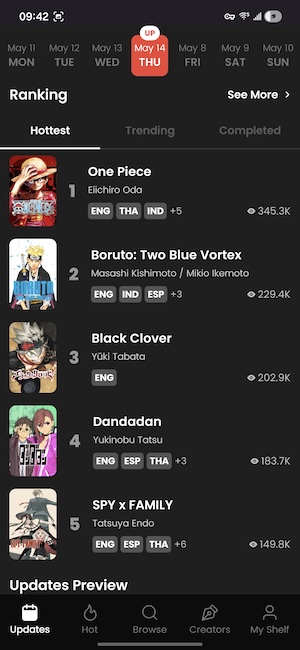
Image: Jessica Santero | WhistleOut
The only condition for using Manga Plus is that each chapter can only be read once for free. Once you've opened a chapter, that's your one shot to read it, so make sure you're paying attention the first time. If you go back to re-read a chapter you already opened, you'll hit a paywall. It's a little unforgiving, but that's the price of free official content.
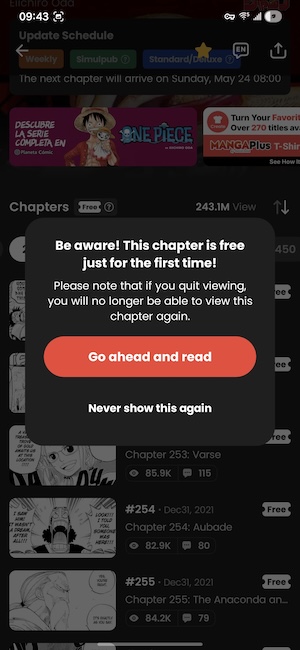
Image: Jessica Santero | WhistleOut
Manga Plus also only gives you the first few chapters and the most recent chapters of any series. The middle chapters of a long-running story are locked unless you subscribe. For something like One Piece with over a thousand chapters, that's a significant gap. That's why Manga Plus works best for older completed series or for following something from the beginning as it publishes.
What Reddit says about Manga Plus
Manga Plus’ chapter access is the most debated issue in the Manga Plus community. Reddit user u/Bubbly-Education465 on r/manga laid out exactly what new users need to know: "The app is legit (it's official) as well as free. But there is a catch—only the first three chapters and the last three recent chapters are available. It’s missing the in-between story and arcs. Long series will not [be] worth reading." Just know that you won’t have every chapter on the app, but it’s useful for following newer publications as they’re released.
Reading manga on a bigger screen is a completely different experience
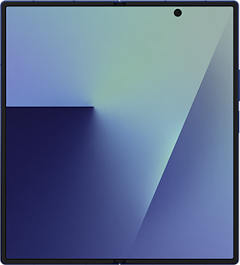
Manga panels are filled with tons of details you might miss if you're squinting at a small phone screen. A foldable phone changes everything about the reading experience, immersing you in the story. Unfold it, and you've got a near-tablet-sized display in your pocket.
Here are the best foldable phone deals available right now:
Pixel 10 Pro Fold 256GB
- 8 inch display
- Rear Cameras: 48MP, 10.5MP, 10.8MP
- Front Cameras: 10MP, 10MP
Pixel 10 Pro Fold 512GB
- 8 inch display
- Rear Cameras: 48MP, 10.5MP, 10.8MP
- Front Cameras: 10MP, 10MP
Galaxy Z Fold7 5G 512GB
- 8 inch display
- Rear Cameras: 200MP, 10MP, 12MP
- Front Camera: 10MP

6. Teach Monster: The best reading app for kids
- Free (in-app purchases available)
- Available for iOS and Android
Teach Monster: Reading for Fun is like Animal Crossing for kids, but with monsters and goblins instead of villagers, and reading tasks mixed into the quests. You're a new monster in town who needs to help the community recover stolen books from the library, and the tasks you complete along the way involve reading things like recipes and instructions to move the story forward.
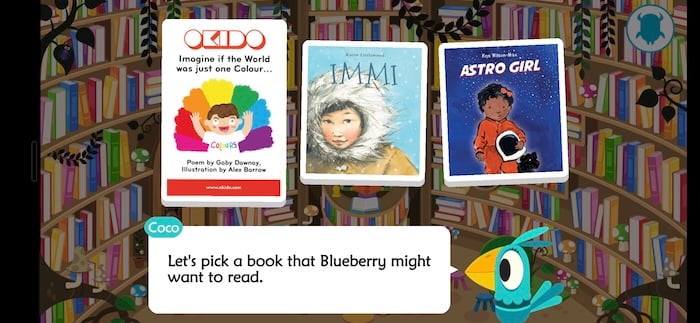
Image: Jessica Santero | WhistleOut
Compared to other app alternatives for young readers, it's a great resource to encourage grade-schoolers to read. The language is simple, and the characters have frequent conversations for players to sound out. There are excerpts from many classics to spark an interest in reading more stories as well. This app also highlights the value of books, since the main plot point is saving them.
Teach Monster is unique and holds attention better than most. It would also make an excellent English comprehension tool for beginner language learners who want something interactive to practice with. This app is perfect for a young reader who already reads full sentences and needs something to do this summer that doesn't involve brain rot.
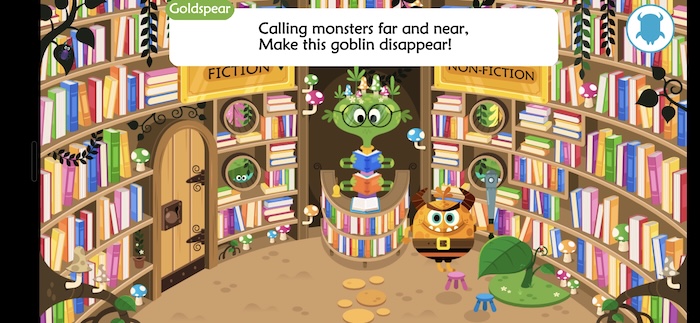
Image: Jessica Santero | WhistleOut
It isn't a perfect app, though. While the idea is reading-focused, the reality of this app is more play-focused. The characters' speech bubbles aren't narrated, which means kids already need a reading foundation going in. This app isn't designed to teach a child how to read from scratch. It's a gamified reading task more geared towards showing how fun books are, with some reinforcement activities. Mom or Dad also needs to be around to help teach what "goblin" means in case that's too advanced for their little one.
Plus, I could easily see kids tapping through screens and moving monsters around without absorbing much of the text at all. So make sure you're listening for your reader's voice as they sound out the text boxes and go through the reading tasks.
What Reddit says about Teach Monster
Parents on r/kindergarten recommend Teach Monster as one of the few kids' reading apps that doesn't feel like homework. u/Ssssnaaake gave it a glowing review, saying, "It is so much fun. It's an RPG that teaches reading. Kiddos don't even realize it's teaching them as they play. 'Secret homework' as Peter Usborne would say. They earn books for completing quests to help the villagers… and it has a read-along for kiddos that need help. Can't say enough good things."
Best reading apps FAQ
Is Libby really free?
Yes, Libby is completely free as long as you have a library card from a participating public library. If you don't have one, most library systems let you sign up for a digital-only card online at no cost.
Which reading apps are completely free?
Libby, Goodreads, Seriatim, Wattpad, and Manga Plus are all free to download and use. Libby requires a library card, and Manga Plus has some chapter restrictions, but none of them require a paid subscription to get started.
Which app is best for reading difficulties?
Seriatim is the best option for anyone who struggles with dyslexia, ADHD, or text-heavy layouts—it displays one sentence at a time so there's never a wall of text to contend with.
What is the best app for reading manga for free?
Manga Plus by Shueisha is the best official, free option for reading manga. It's legitimate, carries major series like One Piece and Jujutsu Kaisen, and is published directly by Shueisha. Just know that access is limited to the first few chapters and the most recent releases of any given series.
What is the best reading app for kids?
Teach Monster: Reading for Fun works well for grade schoolers who already know how to read and need something engaging over the summer. It's not designed to teach reading from scratch—kids need a solid foundation going in.
Jessica Santero
Staff Writer

Find a better phone plan
Thousands of cell phone plans unpacked. All the facts. No surprises.


.png?w=280&h=280&usm=20&usmrad=0.8&fit=crop "Best Cell Phone Deals for June 2026: Get the New iPhone 17 for Free")



