
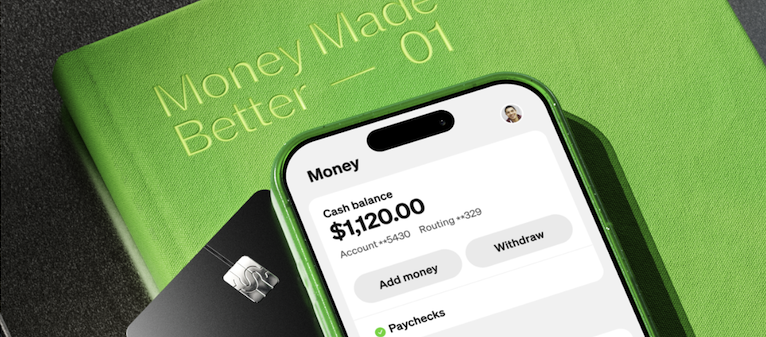
Tax season used to mean one thing: Paying someone else too much to do it for you. But Cash App helps you file your own taxes free of charge. Not only can you file your taxes for free, but you can actually earn $5 in the process.
Yes, you read that right. Cash App's referral process means you can earn $5 by doing your taxes.
Whether you're already using Cash App to split the dinner bill or you're downloading it specifically for tax season, the platform makes filing painless and profitable.
What is Cash App?
Technically, Cash App is a peer-to-peer payment service, which is just a fancy way of saying it lets you send money directly to other people without going through a bank.
But Cash App does much more than money transfers. You can also buy and sell stocks, invest in Bitcoin and other cryptocurrencies, and file your taxes completely for free. It's like if your wallet, your investment account, and your tax software all lived in one app.
Start with the $5 referral bonus: Getting paid to file
Now for the part that makes this even better: You can earn $5 just for filing your taxes through Cash App.
Here's how to claim your bonus:
- Download the Cash App mobile app first from the App Store or Google Play Store.
- Enter a referral code when you create your account. This step is crucial—you can't add a referral code later. You can get a referral code from a friend on the app or find a code online from Reddit groups or even YouTubers—just make sure you trust where it's coming from.
- File your taxes using the Cash App website at cash.app (not through the mobile app).
Cash App's $5 bonus activates if you use the app within 14 days of activating your account. What counts as using the app? You can either send money through it or, for our purposes, file your taxes through the website. Once you complete your filing, you'll get $5 deposited directly into your Cash App account.

Image: Jessica Santero | WhistleOut
Other tax services charge you $60, $100, or even $200 to file. Cash App not only does it for free, but gives you a way to earn money too. It's not a gimmick or a bait-and-switch—it honestly allows your tax filing to earn you money. You decide what to do with your bonus. You can transfer it to your bank, send it to a friend, or let it sit there until next time you need to pay someone back.
Important: If you skip downloading the app or forget to enter a referral code before filing, you'll still file for free, but you'll miss out on the $5. So if you want to maximize your return—both from the IRS and from Cash App—follow the three steps above in order.
Every penny counts: Get a cheaper phone plan
If you're looking to save money during tax season (and who isn't?), don't stop at free tax filing. Your cell phone bill is probably one of the easiest places to cut costs without sacrificing service. Switching to a more affordable phone plan can save you hundreds of dollars a year—money that could go straight into your savings or pay down debt.
Compare plans below to find a better deal:
|
#1
|
Visible

$25 Visible Plan
$25.00/mo
Taxes & Fees included
|
|
#2
|
Mint Mobile

Unlimited Data Plan
$25.00/mo
$75.00 upfront payment for 3 months (equals to $25.00/month). Intro pricing for new customers only.
|
|
#3
|
XFINITY Mobile

Mobile Select Plan
$0.00/mo
(for the first year of service) <br>Regular rate of $30/mo. thereafter
|
How to add a referral code to your Cash App account
If you're new to Cash App, you need to enter a referral code when you first create your account to qualify for the $5 bonus. You can get a referral code from friends or family who use the app or from others online looking to share the wealth.
Once you have your referral code, here's exactly how to enter it:
- Download Cash App from the App Store.
- Open the app and tap Sign Up.
- Enter your phone number or email address.
- Create a unique username (your $cashtag).
- Link a bank account or debit card.
- Tap your profile icon in the upper right corner.
- Scroll down and select Enter Referral Code.
- Type in the referral code and tap Add.
Once you've entered the code, you're all set to file your taxes and claim your $5 bonus.
- Download Cash App from the Google Play Store.
- Open the app and tap Sign Up.
- Enter your phone number or email address.
- Create a unique username (your $cashtag).
- Link a bank account or debit card.
- Tap your profile icon in the upper right corner.
- Scroll down and select Enter Referral Code.
- Type in the referral code and tap Add.
Once you've entered the code, you're all set to file your taxes and claim your $5 bonus.
Remember: You can only add a referral code when you first create your account. If you've already signed up for Cash App without entering a code, you won't be able to add one later.
Get ready to file your taxes with Cash App
Cash App tax filing is genuinely free, but only if you use the web portal. If you try to file directly through the mobile app without following the right steps, you might miss out on keeping it completely free.
Head to Cash App's homepage in your web browser. From there, you can create your account and access the tax filing feature without any hidden fees or upgrade prompts. The interface guides you through a series of straightforward questions, and you upload your W-2 as you go. The system is smart enough to detect what additional forms you need—whether that's interest earned from your bank, HSA contributions, or other deductions.
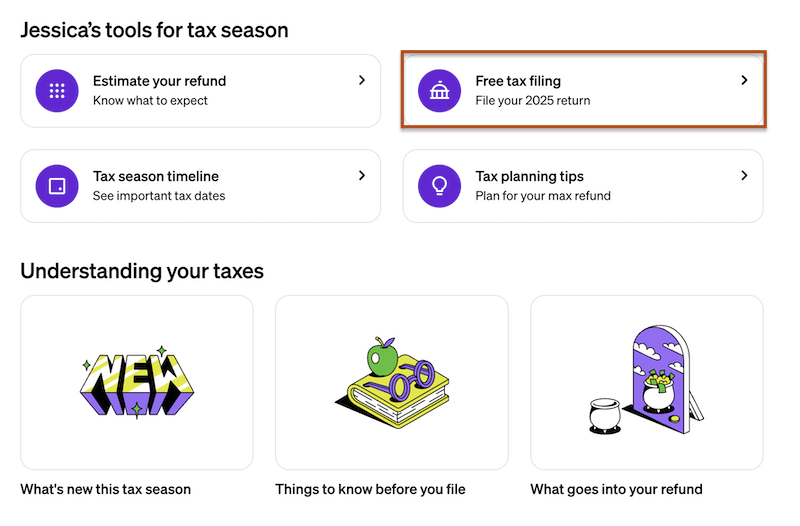
Image: Jessica Santero | WhistleOut
The whole process feels less like navigating tax software and more like answering a helpful questionnaire. No jargon, no confusing screens, and no pop-ups. Just clean, simple tax filing that actually respects your time and your wallet.
What you need to file your taxes
Before you dive into tax filing, make sure you have everything ready. Cash App makes the process smooth, but you still need the right documents on hand. Here's what you'll need:
Essential documents
- Social Security Number (SSN): This is required for all tax filings. Make sure you have it handy for yourself and any dependents you're claiming.
- W-2 forms: Your employer should have sent you a W-2 by the end of January. This shows your wages and the taxes withheld from your paychecks throughout the year.
Additional documents you might need
- Bank interest statements: If you earned interest from a savings account or other financial institution, you'll need documentation showing how much you earned.
- 1099 forms: If you did any freelance work, contract gigs, or earned interest from a bank account, you'll receive 1099 forms. These report income that wasn't part of a traditional W-2.
- HSA or FSA contribution records: Health Savings Account and Flexible Spending Account contributions can be written off, so have those records ready if applicable.
- IRA contribution statements: If you contributed to a traditional IRA, this can reduce your taxable income.
- Childcare expenses: If you paid for daycare or childcare, gather receipts and provider information for potential credits.
The beauty of Cash App's system is that it prompts you as you go. You don't need to guess which forms apply to you. The app asks targeted questions and tells you exactly what to upload based on your answers. It's like having a tax preparer walking you through the process, except you're doing it yourself and keeping all your money.
Step-by-step: How to file your taxes with Cash App
Ready to get started? Here's exactly how to file your taxes for free using Cash App's web portal:
- Go to the Cash App homepage.
- Click Sign Up in the upper right-hand corner of the page.
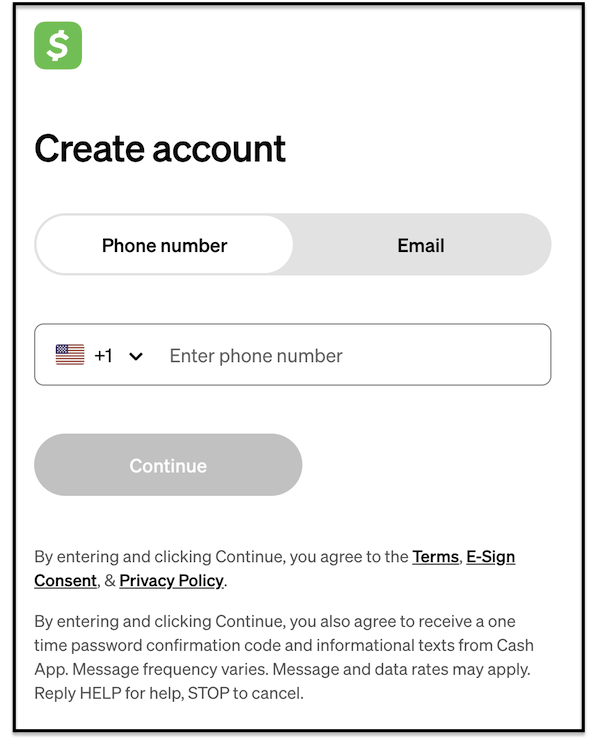
Image: Jessica Santero | WhistleOut
- Enter your phone number or email.
- Add your personal details (including the last 4 digits of your Social Security Number).
- Enter the verification code sent to you.
- Go to the menu and click Tax Filing.
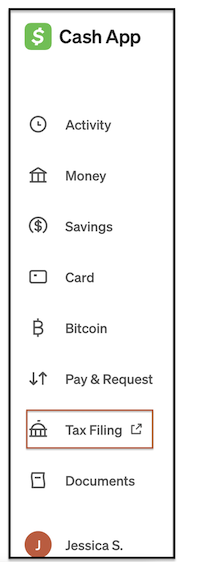
Image: Jessica Santero | WhistleOut
- Follow the prompts and answer the questions. Cash App will guide you through the rest.
The process is straightforward, and Cash App walks you through every step without hidden fees or confusing upgrade prompts.
My experience: Filing taxes in 90 minutes
I'll be honest—the thought of paying TurboTax $80 or sitting in an H&R Block office is exhausting. Cash App changes that completely.
From start to finish, filing my taxes took exactly 90 minutes. And that includes the time I spent hunting down my W-2 in my email and double-checking my bank interest statement. The actual filing process was smooth, intuitive, and dare I say... kind of pleasant?
The app walked me through every step with clear questions and no confusing tax jargon. When it asked about interest income, it told me exactly where to find that number on my bank statement. When it needed my HSA contributions, it explained what qualified and what didn't. I never felt lost, and I never felt like I was being upsold.
If you've been dreading tax season, this is your sign to just get it done. Cash App makes it painless, free, and even profitable.
Filing taxes with Cash App: FAQs
Do I really get paid $5 to file my taxes?
Yes! If you download the Cash App mobile app and enter a referral code to your profile, you'll receive $5 in your Cash App account after filing your taxes.
What's the difference between filing on the app and the website?
Both the Cash App mobile app and the website offer free tax filing, but there's a key difference. To guarantee free filing with no hidden fees, use the web portal at cash.app.
Is Cash App tax filing really free?
Yes, Cash App tax filing is completely free when you use the web portal.
What documents do I need to file my taxes with Cash App?
At minimum, you'll need your Social Security Number and your W-2 form from your employer. Depending on your situation, you may also need 1099 forms (for freelance income), bank interest statements, HSA or IRA contribution records, student loan interest statements, and childcare expense receipts.
How WhistleOut reviews apps
Our mobile experts scour the app stores, looking for the best new apps for Android and iPhone. Before recommending an app, we use the app for at least one full workday, testing its basic functionality and evaluating whether or not it delivers on its promises.
- Easy to use
Great apps simplify your phone. We selected the tools that don't require a complicated instructional manual. - Affordability
The internet is filled with expensive price tags, but we're not buying what they're selling. We leaned into inexpensive, quality apps. Extra points if they're free! - Hands-on testing
We played around with these before recommending them, ensuring they're worth your download.
From there, we weigh the app's pros and cons and then determine whether or not it's a worthwhile download for the wider population of cell phone users.
Jessica Santero
Staff Writer

Find a better phone plan
Thousands of cell phone plans unpacked. All the facts. No surprises.


.png?w=280&h=280&usm=20&usmrad=0.8&fit=crop "Best Cell Phone Deals for June 2026: Get the New iPhone 17 for Free")



