

There are several ways to pay your T-Mobile bill: online, through the T-Life app, by phone, in store, or by mail. We'll walk you through each method step by step, plus how to set up AutoPay and save money every month.
Where to find your T-Mobile account number
You'll need your account number handy for some payment methods. Here's where to find it:
- On your paper bill, it's printed at the top.
- In your T-Mobile account online, it's on your main dashboard.
- In the T-Life app, under the Manage tab.
Paying your T-Mobile bill online
The fastest and easiest way to pay your T-Mobile bill is online. You can either pay through the T-Mobile website or the T-Life app. You can also pay as a guest on T-Mobile's guest pay website without logging in, which is helpful if you're paying on someone else's behalf.
Through your T-Mobile account
- Sign in to your account at T-Mobile's website.
- Select Pay Bill.
- Enter or confirm your payment amount.
- Add your payment method (bank account, credit or debit card, Apple Pay, or gift card).
- Select Continue, review your details, then click Agree & Submit.
Paying with the T-Life app
You can easily pay your T-Mobile bill with a few simple taps in the T-Life app, which is available for both iOS and Android.
Follow these steps to locate and pay your bill:
- Open the T-Life app and sign in.
- You then have two options:
- Either tap Bill on the homescreen; OR
- Tap the Manage tab in the bottom bar.
- Select Make a payment.
- Confirm your payment amount, specify your payment method, and date.
- Select Agree & Submit.
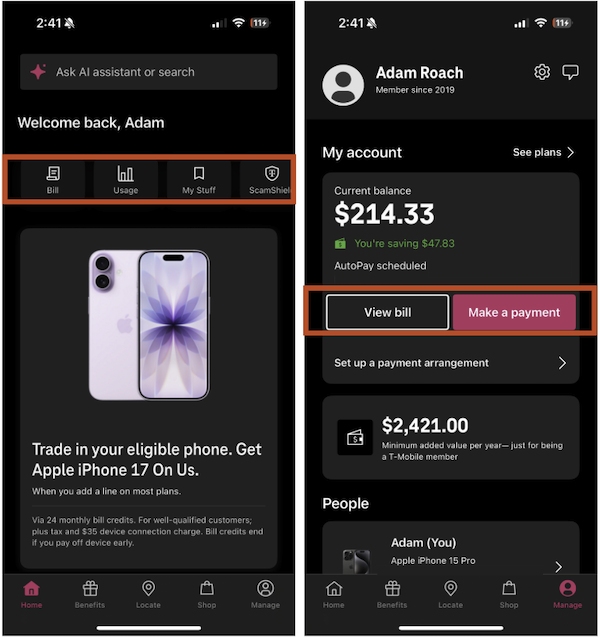
Image: Adam Roach | WhistleOut
Want a closer look at what's actually on your bill? Our T-Mobile wireless bill breakdown is a good place to start.
Paying your T-Mobile bill by phone
Paying online isn't your only option. You can also pay your T-Mobile bill over the phone. Follow these steps to call in your bill payment.
Heads up: Paying through T-Mobile Customer Care comes with a $10 payment support fee. If you call in, the rep will likely walk you through paying via T-Life instead to help you avoid it.
- Dial 611 from your T-Mobile phone, or call (800) 375-1126 from any phone.
- Select the Make Payment prompt.
- Choose your payment type and follow the prompts.
- Make sure to write down your confirmation number when you're done.
Need to reach a real person? Here's how to get a human at T-Mobile customer service.
Paying your T-Mobile bill in store or by mail
In store
Use the store locator to find a T-Mobile location near you. Keep in mind there's a $5 payment support fee for in-store payments.
The rep may walk you through paying via the T-Life app on the spot to save you the charge, so do yourself a favor and check out how to pay in the T-Life app above.
By mail
Send a check or money order (payable to T-Mobile) with your payment stub to:
T-Mobile
P.O. Box 742596
Cincinnati, OH 45274-2596
Make sure to include your account number on the check and give it at least five business days to process.
Setting up AutoPay on T-Mobile
If you'd rather set it and forget it, AutoPay is the way to go. Plus, AutoPay saves you $5 per line, per month just for enrolling. On a four-line family plan, that's $20 back in your pocket every month without doing anything differently.
- Log in to your account either through T-Mobile's website or in the T-Life app.
- Go to Bill and select AutoPay or Set up a payment arrangement.
- Choose your payment method and confirm enrollment.
The discount applies when you pay with a bank account, debit card, or eligible T-Mobile credit card. The T-Mobile credit card is worth a look if you want to earn rewards on top of your monthly savings.
Bundle and save on phone and internet
If you're already paying a T-Mobile phone bill, you could simplify things even further by bundling it with T-Mobile 5G Home Internet.
Starting at just $35/month, you can consolidate your bills and save each month. That's one bill, one payment, one less thing to think about every month.
|
T-Mobile

Rely Internet + T-Mobile voice line
$35/mo
with AutoPay. Plus taxes and fees.
+ $35 Upfront
|
|
T-Mobile
Amplified Internet + T-Mobile voice line
$45/mo
with AutoPay. Plus taxes and fees.
+ $35 Upfront
|
Want to cut your phone bill in half? Try a T-Mobile MVNO
A mobile virtual network operator, or MVNO, runs on a major network (like T-Mobile's) without owning its own towers. That means you get the same coverage at a lower price. If your bill is feeling steep, it's worth knowing your options.
If you aren't sure where to start looking, we have some recommendations to point you in the right direction:
- Mint Mobile is one of our top picks on T-Mobile's network, with some of the cheapest prepaid unlimited plans around, solid 5G coverage, and free calling to Canada and Mexico.
- Google Fi is great if you travel, especially since its premium unlimited plan has some of the best international perks we've seen at any price point.
- On a tighter budget, Tello offers flexible plans from no-data tiers all the way up to unlimited at prices that are genuinely hard to beat.
Here are the most popular T-Mobile MVNOs right now:
|
Mint Mobile

Unlimited Data Plan
$10.00/mo
$60 for 6 months of service
|
|
US Mobile

Unlimited Starter Plan
$10.00/mo
|
|
Tello

Unlimited Text, 300 Minutes, and 2GB Plan
$8.00/mo
|
Pay your T-Mobile bill: FAQs
What is the easiest way to pay my T-Mobile bill?
The easiest way to pay your T-Mobile bill is either online through the T-Mobile website or through the T-Life app. Both are free, available 24/7, and take just a couple of minutes.
Can I pay my T-Mobile bill without logging in?
Yes, you can pay your T-Mobile bill without logging in. Just use T-Mobile's Guest Pay option. You just need the account phone number and billing zip code for the account.
Does T-Mobile charge a fee to pay by phone or in-store?
Yes, T-Mobile charges a $10 fee to pay by phone, and in-store payments carry a $5 fee. However, paying online, through the T-Life app, or by mail is always free.
How do I set up AutoPay on T-Mobile?
To set up AutoPay for T-Mobile, just log into your T-Mobile account (or open the T-Life app), go to Bill, and select AutoPay or Set up a payment arrangement. Link a bank account, debit card, or eligible T-Mobile credit card and confirm.
Jessica Santero
Staff Writer

Thousands of cell phone plans unpacked. All the facts. No surprises.





.png?w=280&h=280&usm=20&usmrad=0.8&fit=crop "The Best Cheap Phone Plans for 2026: We Tested Them All to Help You Save")


