

Sideloading apps on an iPhone in the United States is possible, and the easiest way to do it is with Apple's own TestFlight app. TestFlight lets you install beta versions (or versions still in development) of apps before they reach the App Store. For iPhone users who want to download unofficial apps, the Apple ecosystem is tricky to navigate, but TestFlight is the most foolproof option. Other methods exist, but they take far more setup and come with way more risk.
I tested three different ways to sideload apps on my iPhone 11, and TestFlight was by far the best. This method allows you to turn your iPhone into an open-source tool that's compatible with alternative app sources.
If you're new to the idea, brush up on what sideloading is in our guide first.
How to sideload apps on iPhone with TestFlight
You can sideload apps on an iPhone (safely) by using Apple's TestFlight app as a mediator. Follow these steps to begin sideloading on your own iPhone with TestFlight:
- Download TestFlight from the App Store.
- Find a beta to join.
- Developers usually share TestFlight invites on their official website, in their newsletter, or on their verified social media accounts. Look for a button or link labeled "Join the beta" or "Beta testing."
- Open the developer's invite and link your iPhone.
- If the developer gave you a redeem code instead, open TestFlight, tap Redeem, and enter the code.
- Tap Accept in TestFlight, depending on the link.
- Tap Install to add the beta app to your home screen.
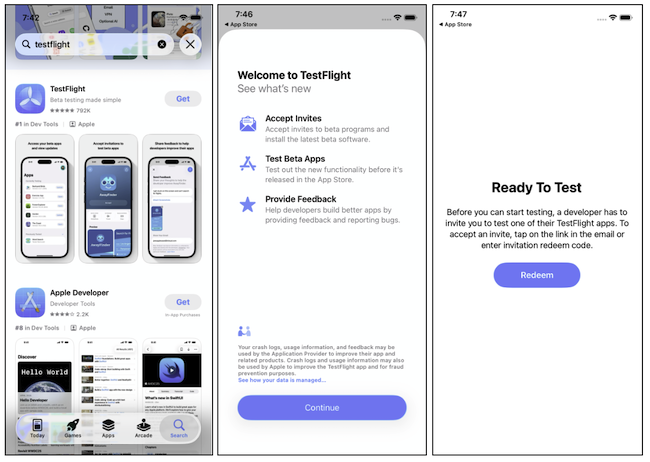
Images: Jessica Santero | WhistleOut
Beta code usually expires after 90 days, so you'll need to reinstall the beta in TestFlight as the developer releases it. For example, I tested Signal's beta code to see all of the latest features on the best messaging app (in my opinion).
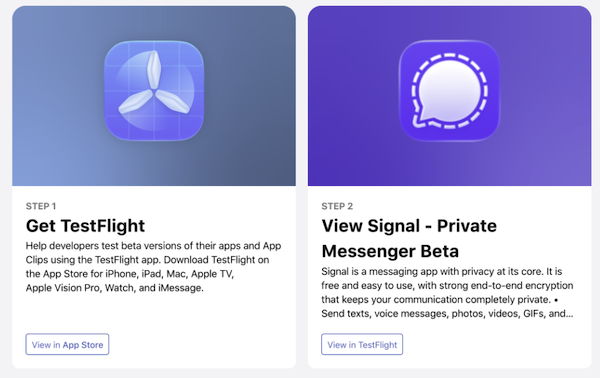
Image: Signal
Want more control over the apps you download? Join Android
If you want to install apps from outside the official store, Android gives you far more freedom than an iPhone. You can install apps from a developer's website or a third-party app store by turning on a single setting, with no computer or seven-day refreshes required.
Check out the most popular Android phones right now and the best deals available on each:
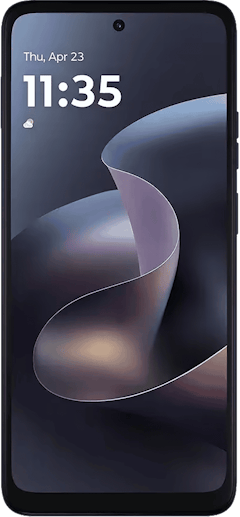
Moto G 5G (2026) 128GB
- 6.7 inch display
- Rear Cameras: 50MP, 2MP
- Front Camera: 32MP
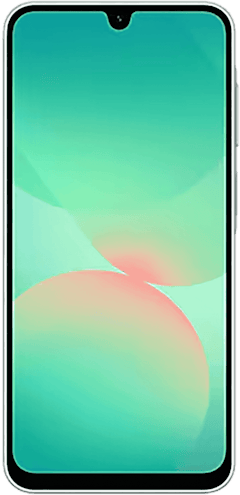
Galaxy A26 5G
- 6.7 inch display
- Rear Cameras: 50MP, 8MP, 2MP
- Front Camera: 13MP
Galaxy A27 5G 128GB
- 6.7 inch display
- Rear Cameras: 50MP, 5MP, 2MP
- Front Camera: 12MP

Be careful where your TestFlight links and redeem codes come from
TestFlight is safe, but only if you trust the developer behind the invite. Scammers have abused TestFlight before, although it isn't easy given Apple's security is much stricter. Stick to invite links and redeem codes from a developer's official website, newsletter, or verified social media account. And skip any code that comes from a stranger in your DMs, a dating app match, or an exclusive investment offer.
Are there other ways to sideload apps on iPhone?
Other ways to sideload apps on iPhone exist, but they're built for developers and tinkerers (closer to hackers, really).
- Apple's Xcode software can install an app from a Mac (if you have its source code).
- Or you can use a free open-source tool called SideStore to sideload apps with your own Apple Account. But you need a specific VPN to do it, and you'll still need to pay for a monthly subscription.
So save yourself the hassle and just opt for a premium app subscription instead of trying to sideload with a subscription VPN.
Apple and sideloading outside the U.S.
You can sideload apps on an iPhone, but full alternative app stores aren't available in the United States. Apple only offers alternative app distribution in Brazil, Japan, and the European Union, and your Apple Account region must be set to one of those places while you're physically located there. That's why U.S. iPhone users are limited to TestFlight and developer tools.
Will sideloading void your iPhone warranty or brick your phone?
Sideloading with TestFlight won't brick your iPhone or affect your warranty, since it's Apple's own tool and doesn't change iOS. The worst case is usually a beta app that crashes or expires before the developer releases a new build.
Jailbreaking, however, is a different story. Jailbreaking an iPhone is the process of breaking Apple's operating system to remove its built-in restrictions. Most people jailbreak their iPhones to download apps from alternative sources for pirated copies of premium versions.
Because jailbreaking modifies iOS to remove Apple's restrictions, it can cause issues. Apple's warranty doesn't cover problems caused by unauthorized changes to iOS, and a jailbreak can block software updates or leave your phone unstable.
If a beta app starts acting strangely, delete it from your iPhone right away.
iPhone sideloading: FAQ
How do you sideload apps on iOS?
You can sideload apps on iOS in the United States with Apple's TestFlight app. Download TestFlight from the App Store, then open a developer's invite link or enter a redeem code to install the beta app.
Can you sideload apps on iPhone without jailbreaking?
Yes, you can sideload apps on iPhone without jailbreaking. TestFlight installs beta apps without modifying iOS, and it's the easiest option for most people.
Does sideloading void your iPhone warranty?
Sideloading with TestFlight doesn't void your iPhone warranty, since it's Apple's own tool. Jailbreaking is the bigger risk, because Apple's warranty doesn't cover problems caused by unauthorized changes to iOS.
Can sideloading brick your iPhone?
Sideloading through TestFlight won't brick your iPhone. The usual worst case is a beta app that crashes or expires.
Is sideloading apps on iPhone safe?
Sideloading apps on iPhone with TestFlight is safe when the invite or redeem code comes from a developer you trust. Scammers have used fake TestFlight invites to spread malicious apps, so avoid codes from strangers or unverified sources.
Why you can trust WhistleOut
.svg)
15+
years of mobile industry experience

900+
published wireless guides

35+
firsthand carrier reviews
We've been around since the birth of the iPhone. Along the way, we've learned how to spot the best deals for your wallet (and your sanity). We spend our days researching informative guides and writing insightful reviews on every kind of wireless plan, distinguishing what matters from what doesn't. We played around with these plans before recommending them, ensuring they're worth your hard-earned money.
Want to know more? Check out how we review every cell phone plan we rank.
Jessica Santero
Staff Writer

Thousands of cell phone plans unpacked. All the facts. No surprises.
Related Articles


Related Topics
Operating Systems ExplainersPopular Topics
Featured App Reviews iOS News Coverage Device Reviews Device Explainers Carrier Explainers App Roundups T-Mobile


Free iPhone 18 Pro, up to $1,200 off, with a trade-in in any condition or a line switch on Experience Beyond


.png?w=280&h=280&usm=20&usmrad=0.8&fit=crop "Best Cell Phone Deals for October 2026: Get the New iPhone 18 Pro for Free")





