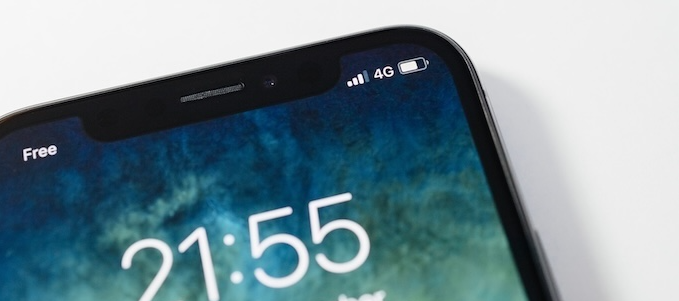

Your phone can connect to both 4G and 5G networks, but you may want to toggle (or switch) between them to save on your device’s battery life or get faster download speeds. Turning off 5G is as easy as toggling a button in your settings app. Here's why you might want to turn 5G off on your smartphone and steps to follow for iPhone and Android devices.
Reasons to turn off 5G on your phone
5G is the fifth generation of mobile technology, offering faster and more reliable cellular connections than ever before. 5G can deliver mobile internet speeds up to 10 times faster than older generations of network technologies like 4G LTE or 3G.
However, there are a couple of drawbacks that might make you consider turning off 5G on your device; namely, limited 5G coverage and significant phone battery drain while connected to a 5G network.
Limited 5G coverage
Although all three major networks—AT&T, T-Mobile, and Verizon—provide 5G coverage, the expanse of their 5G network maps is still very limited in the United States. You may have 5G access in your mobile service plan, but you may notice slower service speeds due to coverage gaps. Here’s the breakdown of 5G coverage by major carriers:
- T-Mobile has the largest 5G network, covering 53.79% of the country.
- AT&T’s 5G network is in second place at 29.52% nationwide coverage./li>
- Verizon’s 5G covers just 12.77% of the United States.
As evidenced by these numbers, your carrier’s 5G network may not offer the most service near you; that’s when 4G LTE comes in handy to help you get the more reliable speeds available.
Is 4G faster than 5G?
5G is currently the fastest network technology available. At its best, 5G could reach up to 10Gbps download speeds—100 times faster than 4G, which capped out at 100Mbps.
But your actual 5G speeds depend on the type of 5G signal spectrum you’re connected to and which carrier network you’re connected to. In some cases, 4G may appear faster if there isn’t strong 5G coverage near you.
You can compare 5G speeds across T-Mobile, Verizon, and AT&T or learn more about 5G spectrum technology through our guides.
Battery drain
You may notice your battery drains faster when connected to 5G; it all depends on your provider's 5G network. Your phone will connect if a 5G network is available, or keep searching until it finds one. If there’s a coverage gap in the network, your phone will continue searching and in turn uses more battery life.
To get the best connections, you can toggle between 5G and 4G LTE networks under your phone’s settings. You can do so manually by selecting the network you want to use, or better yet, you can choose Smart Data Mode. For iPhones, this option is titled “5G Auto,” and for Android devices, you’ll see it labeled “5G Preferred.” This hybrid network option allows you to balance data speed and battery life by dynamically switching between 5G and 4G LTE networks. Your phone will automatically choose the best and fastest network given your location and data needs, ultimately giving you more battery life when possible.
Does your battery life dwindle faster than expected? Maximize your phone’s life span and try out these tips to improve your battery life.
How to turn off 5G on an iPhone
If your phone is having trouble connecting to a 5G network, you can toggle and turn off 5G to get a smoother mobile experience. Follow these simple steps to turn off 5G on your iPhone.
- Open your Settings app.
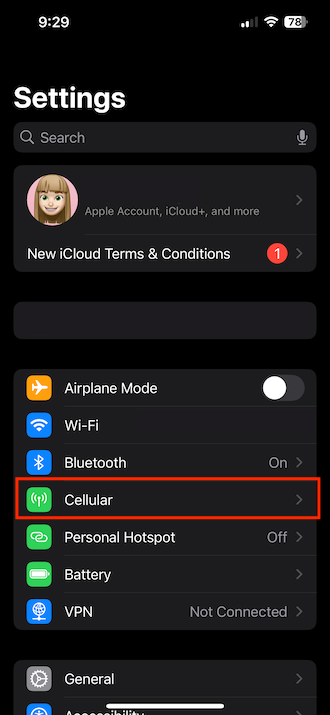
Image: Daphne Kelly - Select Primary SIM or Cellular Data Options.
- Tap Voice and Data, and tap LTE to turn off 5G.
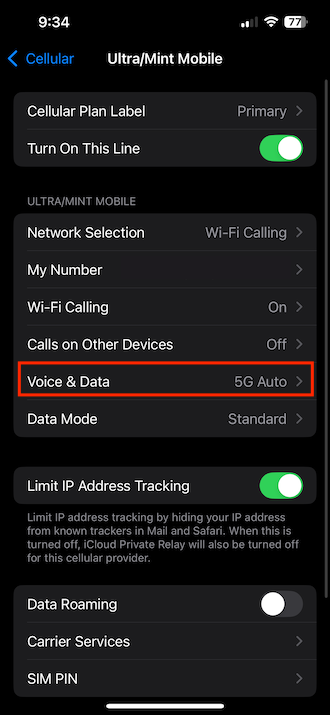
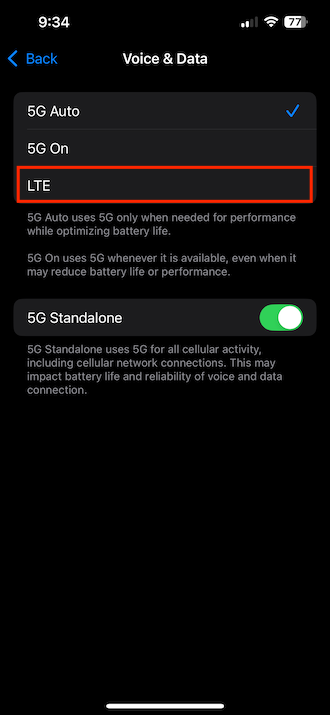
Image: Daphne Kelly
Watch our "How to Enable OR Disable 5G on Your iPhone" video
Subscribe to our YouTube channel for more videos like this one! Learn about switching providers, scoring the best unlimited data deals, and more.
If you have a limited data plan, activate Low Data Mode on your iPhone to save your data. This feature can be found on iPhone models 13 or later, and limits how much data apps can use for automatic updates, refreshes and video streaming.
If you run out of data quickly, consider switching. Check out our guide to the best unlimited data phone plans and stop worrying about data limits.
How to turn on 5G for iPhone
If you want to reconnect to your 5G network, or if you haven’t yet enabled your phone to do so, here’s how to turn on 5G for an iPhone.
- Open your Settings app.
- Tap Cellular or Mobile Data, depending on your phone.
- Select Primary SIM or Cellular Data Options.
- Tap Voice and Data.
- Select 5G On or 5G Auto.
How to turn off 5G on an Android device
If you have a Samsung or Google Pixel device, follow these three steps to turn off 5G on your Android device. Older Android versions may differ slightly.
- Open your Settings app.
- Tap Network and Internet or Connections.
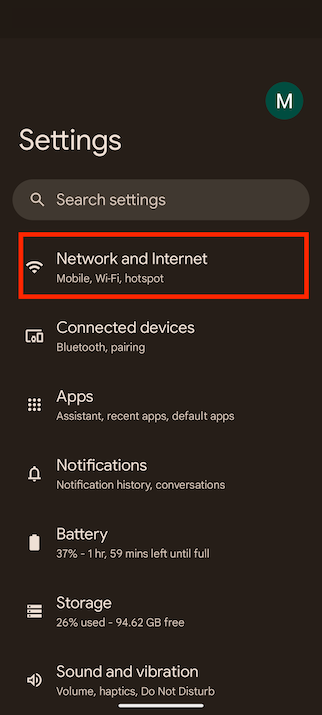
Image: Max McCaskill - Tap Mobile networks or SIMs.
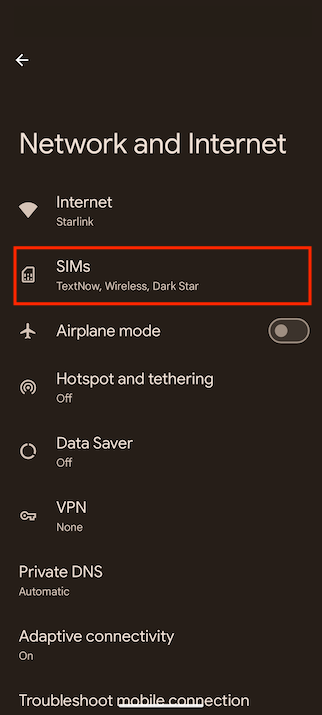
Image: Max McCaskill - Tap Network mode or Preferred network type.
- Tap LTE.
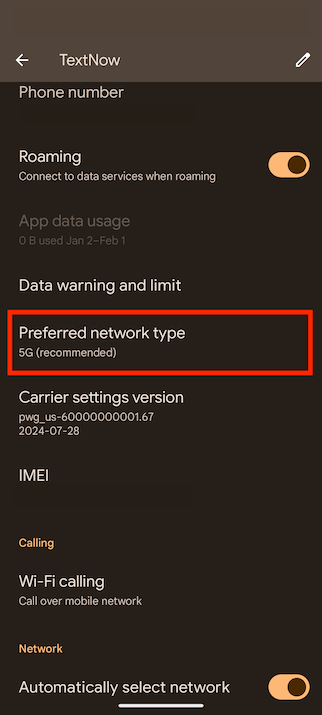
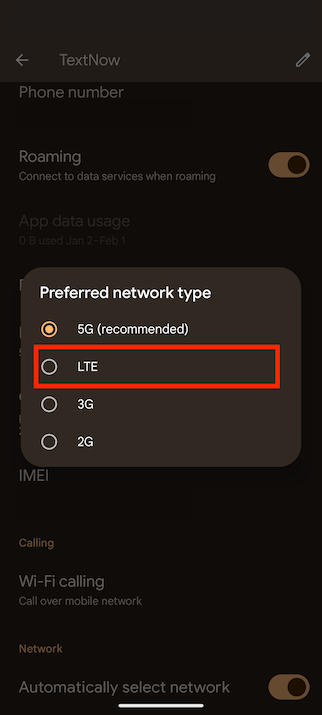
Image: Max McCaskill
Expert tip: Optimize your power-saving mode
Extend your Android device’s battery life span by disconnecting 5G while in power-saving mode. That means when your phone is left with less than 10% battery life, your phone won’t use extra battery trying to connect to a 5G network. You may experience slower speeds since 4G LTE isn’t as fast as 5G, but it could extend your battery life.
Here’s how you can turn off 5G in power-saving mode.
- Open your Settings app.
- Tap Power Savings.
- Toggle on Turn off 5G.
How to turn on 5G on Android
If you got rid of 5G and want to turn it back on, toggle your preferred networks under settings. Here’s how to turn on 5G on Android.
- Open your Settings app.
- Tap Network and Internet or Connections.
- Tap Mobile networks or SIMs.
- Tap Network mode or Preferred network type.
- Tap either 5G or 5G Preferred.
If your plan doesn’t offer 5G access, it’s time to switch carriers. 5G is quickly becoming the preferred network from all carriers for its speeds and reliability. Boost your slow mobile data speeds without breaking the bank by opting for a 5G-powered MVNO.
|
#1
|
Visible

$25 Visible Plan
$25.00/mo
Taxes & Fees included
|
|
#2
|
Mint Mobile

Unlimited Data Plan
$10.00/mo
$60 for 6 months of service
|
|
#3
|
US Mobile

Unlimited Starter Plan
$10.00/mo
|
FAQs
Should I use LTE or 5G?
Whether you should use LTE or 5G depends on your location and carrier. Different carriers have different network coverage and may offer better or worse coverage near you. If your carrier has limited 5G coverage in your area, you can opt for LTE.
Do phones automatically have 5G?
Not all phones automatically have 5G, but you can easily check to see if your phone can connect to a 5G network. Check out our guides on which iPhones are 5G compatible and what 5G Samsung phones are available.
Can my phone connect to 5G?
To know if your phone can connect to a 5G network, you can look at your device's cellular settings. Follow these steps to see your phone's network settings on Android devices and iPhones.
How do I know if my phone is on 5G or 4G LTE?
If you want to know if your phone is currently on 5G or 4G LTE, you can check your device's network settings. Here are the steps to check your network connection on Android devices and iPhones.
Why is 5G slow?
5G can appear slow if your carrier has limited 5G network coverage in your area, meaning your phone might have difficulties searching for and connecting to a 5G network. If you experience issues with 5G in your area, you can turn off 5G on your Android device or iPhone.
Jessica Santero
Staff Writer

Thousands of cell phone plans unpacked. All the facts. No surprises.





.png?w=280&h=280&usm=20&usmrad=0.8&fit=crop "The Best Cheap Phone Plans for 2026: We Tested Them All to Help You Save")


