
The S Pen is the feature that makes Galaxy Note and Galaxy S Ultra devices different from everything else in Samsung's lineup. Most of the Good Lock suite customizes surfaces that every Galaxy user interacts with—navigation, notifications, the lock screen. Pentastic is the module that exists specifically for the people who actually pull the S Pen out and use it.
It's part of Samsung's Good Lock suite and its scope is narrow by design: Every feature targets the S Pen experience specifically. If you don't use an S Pen, there's nothing here for you. If you do, and you've found the default Air Command interface or pointer behavior slightly off, Pentastic is the fix.
What is Pentastic?
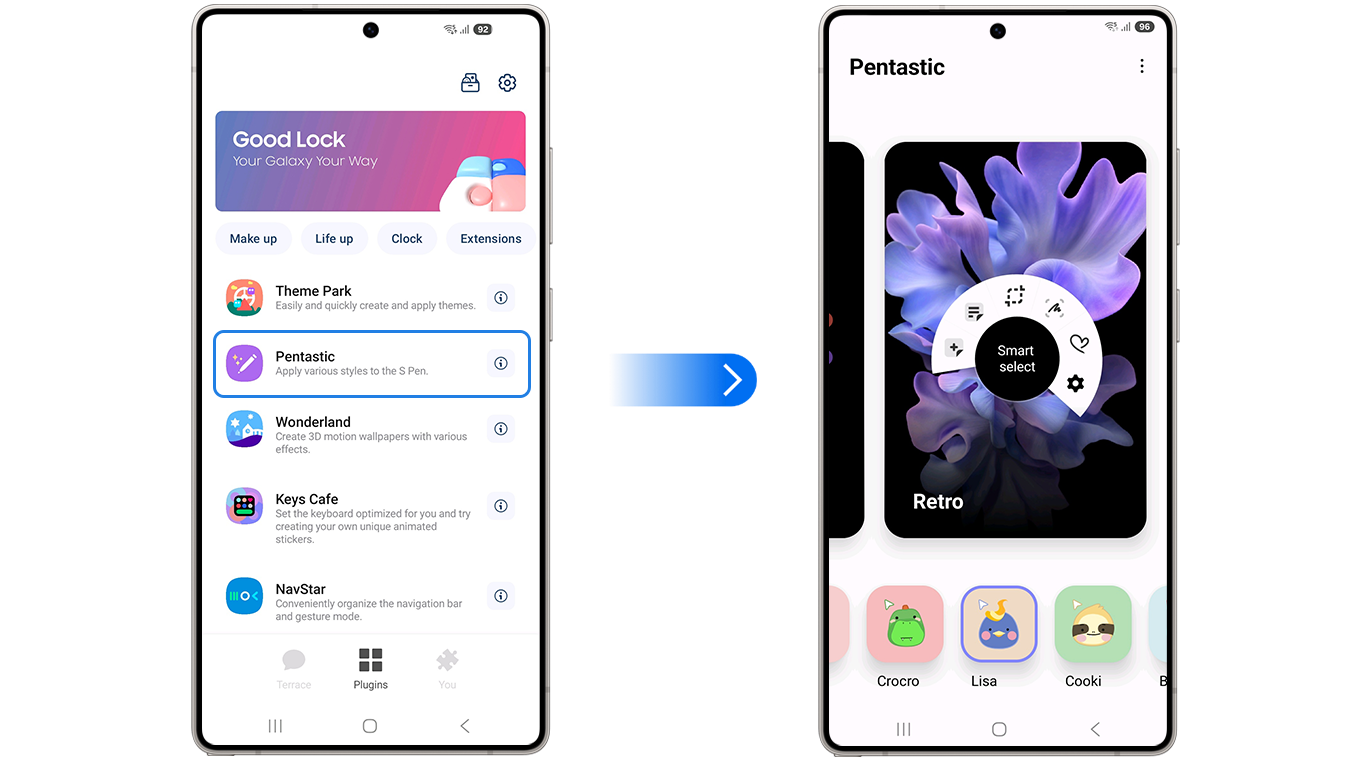
Image: Samsung
Pentastic is a free Good Lock module for Galaxy S Pen devices that lets you customize the Air Command radial menu's visual style and shortcut order, change the S Pen pointer's shape, size, and color, add a double-tap screen shortcut, and replace the S Pen silo ejection sound with custom audio.
What is Air Command?
Air Command is the radial shortcut menu that appears when you hover the S Pen near the screen or press the Air Command button. By default, it shows a fixed set of Samsung's S Pen app shortcuts in a preset order. Pentastic lets you change the visual style of the Air Command interface and reorganize its shortcuts into whatever order matches how you actually use them.
This matters more than it sounds for regular S Pen users. If you primarily use the pen for Samsung Notes and screen writing, having those in the top two positions means less wrist movement every time Air Command opens. The visual restyling is secondary to the functional reorganization—but if you're running a coordinated Good Lock theme across your device, having Air Command match it is a detail worth having.
The S Pen pointer: a small change with a visible daily impact
When the S Pen hovers near the screen without touching it, a cursor appears—the S Pen pointer. Samsung's default is a small circle. Pentastic lets you change its shape, size, and color. It's a cosmetic change, but the pointer is something you see constantly during S Pen use, and having it in a color or style that's easier to track on your specific wallpaper or content is a genuine usability improvement.
For users who take notes on a lot of light-background documents or white note-taking apps, a darker or more saturated pointer color makes it easier to see exactly where the pen tip will land before contact. For dark backgrounds, a lighter pointer does the same. It's a detail that only S Pen users will care about, which is exactly who Pentastic is for.
The double-tap shortcut: an extra input most users don't know exists
Pentastic adds a gesture that Samsung doesn't expose by default: A double-tap on the screen with the S Pen tip triggers a configurable shortcut. This is an additional input method beyond the pen button, and it works while the pen is in contact with the screen rather than hovering.
The practical use is as a quick-access trigger within pen-heavy workflows. If you write notes and frequently need to switch to a specific tool—the eraser, a particular brush, a different app—double-tap can be mapped to that action and removes the need to lift the pen and reach for a button or menu. It's a workflow shortcut that adds an input without requiring hardware changes.
The silo sound
When you eject the S Pen from its silo, Samsung plays a small default sound. Pentastic lets you replace it with custom audio. This is, objectively, not a productivity feature. It's the kind of detail that exists because the Good Lock suite is built by people who think carefully about every interaction the pen involves, including the satisfying tactile-plus-audio moment of pulling it out.
If you're the kind of person who uses an S Pen enough to warrant installing a dedicated customization module for it, the silo sound is exactly your kind of detail.
How to get Pentastic
- Cost: Free
- Available on: Samsung Galaxy Note series, Galaxy S Ultra series, and Galaxy Tab S with S Pen—via Galaxy Store
- Requires: Good Lock main app installed first and an S Pen-compatible device
- Not applicable on: Galaxy devices without a built-in or supported S Pen
Pentastic only works on Galaxy phones. Here are the best phones to run it on.
Pentastic only works on Samsung Galaxy devices, so if you're not already in the ecosystem, here are the most popular Galaxy phones worth considering:
Moto G 5G (2026) 128GB
- 6.7 inch display
- Rear Cameras: 50MP, 2MP
- Front Camera: 32MP

Galaxy A26 5G
- 6.7 inch display
- Rear Cameras: 50MP, 8MP, 2MP
- Front Camera: 13MP

Galaxy A27 5G 128GB
- 6.7 inch display
- Rear Cameras: 50MP, 5MP, 2MP
- Front Camera: 12MP

Galaxy A37 5G 128GB
- 6.7 inch display
- Rear Cameras: 50MP, 8MP, 5MP
- Front Camera: 12MP

Edge (2026) 128GB
- 6.3 inch display
- Rear Cameras: 50MP, 50MP, 10MP
- Front Camera: 50MP

Pentastic: FAQ
Does Pentastic work on all Galaxy phones with an S Pen?
Pentastic is compatible with Galaxy Note series, Galaxy S Ultra series, and Galaxy Tab S models that include a built-in S Pen silo—it's not designed for devices that use a separately purchased S Pen without a dedicated silo.
Can Pentastic change which apps appear in Air Command?
Pentastic controls the visual style and shortcut order of Air Command—adding or removing apps from the Air Command shortcut list is handled through Samsung's standard Air Command settings rather than Pentastic specifically.
Does the double-tap shortcut interfere with normal S Pen writing?
The double-tap gesture is timed to distinguish it from regular writing strokes—a single tap, drag, or normal pen movement doesn't trigger it, though sensitivity can be adjusted within Pentastic's settings.
Is Pentastic useful on Galaxy tablets with S Pen support?
Galaxy Tab S models with built-in S Pen support are compatible with Pentastic, and the Air Command and pointer customizations are relevant regardless of whether the device is a phone or tablet.
Scott Houghton
Jr. Staff Writer

Thousands of cell phone plans unpacked. All the facts. No surprises.





.png?w=280&h=280&usm=20&usmrad=0.8&fit=crop "The Best Cheap Phone Plans for 2026: We Tested Them All to Help You Save")


