
Every screen time app I'd used before Shift had one thing in common: a sneaky workaround. Hit the ignore button on your 30-minute Instagram limit and you're scrolling again without a second thought. Shift is the one app in WhistleOut's best screen time apps roundup that seriously doesn't have one.
It's controlled from your desktop, not your phone, and once a session starts, blocked apps are gone until the timer ends.
Shift
- Price: $150 one-time purchase
- Platforms: iOS, Android
Less screen time means less data. Are you paying for more than you use?
Most Americans use far less than their unlimited data allowance each month. If you're cutting screen time, there's a good chance a cheaper plan covers everything you actually need.
Compare the best cheap plans with the data below.
|
XFINITY Mobile

Mobile Select Plan
$0.00/mo
(for the first year of service) <br>Regular rate of $30/mo. thereafter
|
|
Astound Mobile

Unlimited Data Plan
$0.00/mo
+ $14.99 Upfront
|
|
TextNow

Free Flex Plan
$0.00/mo
+ $4.99 Upfront
|
What is Shift?
Shift is a screen time app you configure from a desktop interface that removes access to distracting apps for the duration of a scheduled session. On iPhone, it physically removes blocked apps from your home screen. On Android, it locks them at the system level. There is no override button on your phone, no PIN to enter, and no settings menu to reverse mid-session. If you want to undo a session, you have to go back to your laptop.
Not sure how to update your apps?
Keeping your apps up to date ensures you're always getting the latest features, bug fixes, and security improvements. Learn how to update the apps on your iPhone and your Android. It takes less time than you think.
Why desktop control changes everything
Most screen time apps fail because the person who set the limit is the same person who can remove it. Shift breaks that loop by moving the controls off the device you're trying to limit. Your phone becomes a read-only environment during a session. Whatever you blocked stays gone until the timer ends, no exceptions.
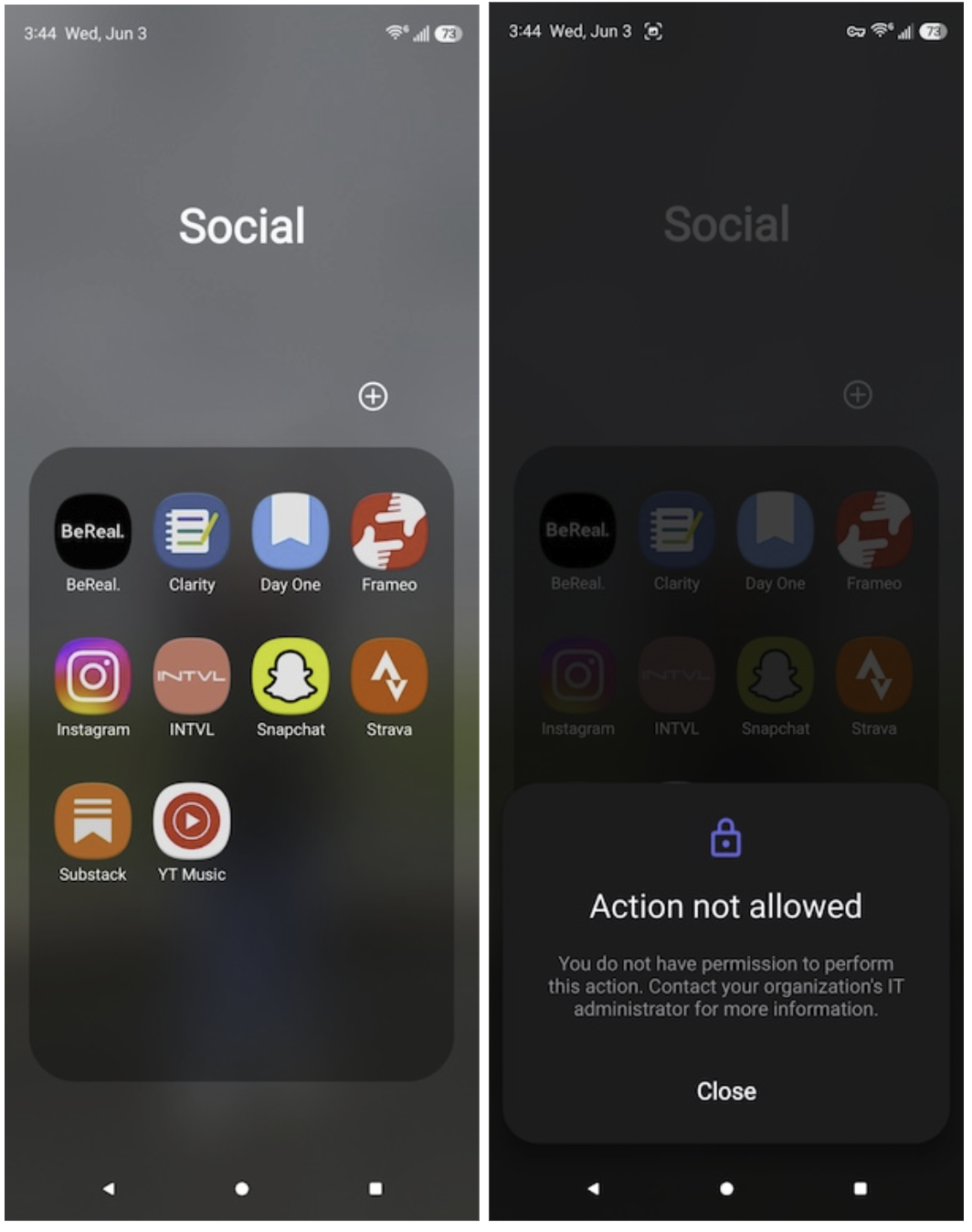
Image: Scott Houghton | WhistleOut
WhistleOut writer Scott Houghton tested Shift on his Galaxy Z Fold5 and reported cutting his screen time by around 90%. He'd been trying for years despite trying multiple alternatives. "I have tried so many of these types of apps but have never had any luck because of how easy it is to bypass them," he said. "This app doesn't allow you to bypass it, so in my opinion, it works the best."
Setup requires unlocking developer options on Android, which takes a few minutes but only happens once. WhistleOut has a step-by-step guide if you need it. After that, scheduling sessions is straightforward from the desktop dashboard.
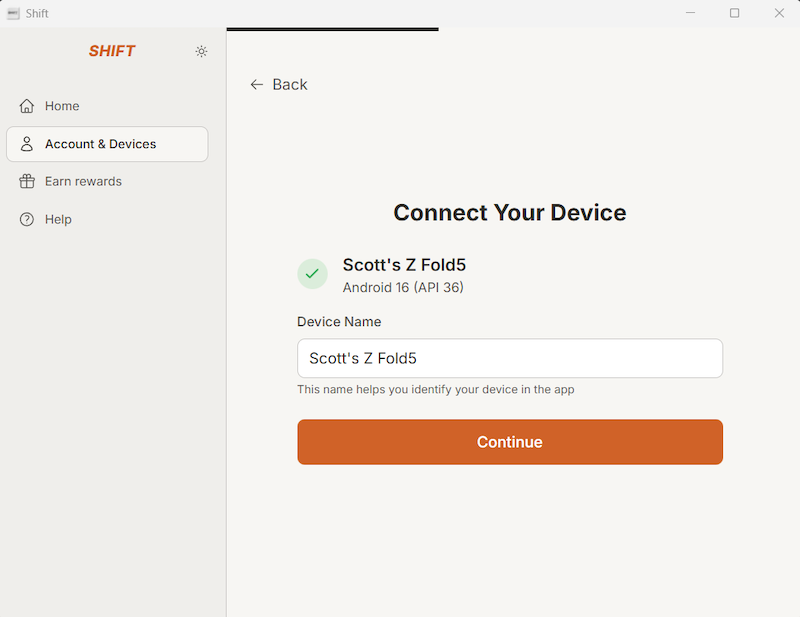
Image: Scott Houghton | WhistleOut
Shift also includes built-in AI content moderation that flags and blocks questionable images on otherwise permitted sites, making it a strong option for families with teenagers. It's not purely a social media blocker, but explicit content gets filtered in the background without any extra configuration.
Is $150 worth paying for a screen time app?
$150 is a significant price for an app. If you haven't already burned through every free option available, it's probably not where you should start. But if free tools have consistently failed you because of how easy they are to bypass, Shift is the only option that removes that possibility entirely. The investment is the accountability, and it's high enough that you take it seriously.
Switch to a T-Mobile MVNO and keep the same coverage for less
T-Mobile MVNOs run on the same nationwide network and typically cost significantly less per month. If you're on T-Mobile and paying full rate, a quick comparison could save you a meaningful amount every billing cycle.
|
Mint Mobile

Unlimited Data Plan
$25.00/mo
$75.00 upfront payment for 3 months (equals to $25.00/month). Intro pricing for new customers only.
|
|
Google Fi Wireless

Unlimited Premium for 1
$32.50/mo
|
|
US Mobile

Unlimited Premium Plan
$39.00/mo
|
How we tested Shift
- Tested on a Samsung Galaxy Z Fold5 across multiple weeks of daily use
- Configured work-hour blocks and overnight schedules via the desktop dashboard
- Attempted every available bypass and override method to verify the lockout claim
- Evaluated the AI content moderation feature across commonly visited sites
- Compared screen time stats before and after Shift against results from multiple prior screen time apps
Why you can trust WhistleOut
.svg)
15+
years of mobile industry experience

900+
published wireless guides

35+
firsthand carrier reviews
We've been around since the birth of the iPhone. Along the way, we've learned how to spot the best deals for your wallet (and your sanity). We spend our days researching informative guides and writing insightful reviews on every kind of wireless plan, distinguishing what matters from what doesn't. We played around with these plans before recommending them, ensuring they're worth your hard-earned money.
Want to know more? Check out how we review every cell phone plan we rank.
Shift app: FAQ
Can you bypass Shift?
No, once a session starts, there is no PIN, override button, or settings menu on your phone to undo it. Changes can only be made from the desktop interface.
Does Shift work on iPhone and Android?
Yes, Shift is available for both iOS and Android. On iPhone it removes apps from your home screen during a session; on Android it locks them at the system level. Android setup requires enabling developer options first.
Is Shift worth the $150 price tag?
For most people who haven't exhausted free options yet, no. But if you've consistently bypassed every free screen time tool, the one-time cost delivers an accountability level that software-only apps can't match.
Is Shift good for families with kids?
Shift works well for families because children can't override sessions from the device itself, and the built-in AI content moderation filters explicit material passively without extra setup.
Jessica Santero
Staff Writer

Find a better phone plan
Thousands of cell phone plans unpacked. All the facts. No surprises.





