In a nutshell, RCS messaging is the modern replacement for SMS texts. It’s packed with fan-favorite features like read receipts and typing indicators, as well as high-quality photo sharing. Best of all, it’s all built into your default messaging app.
Unlike alternative messaging platforms like WhatsApp—which require internet accounts and separate apps—RCS works directly through your phone carrier, just like regular texting. This means it uses your existing phone number and doesn’t force you to sign up for another service.
It’s now widely supported on both Android and iPhone, making cross-platform texting smoother and eliminating the age-old Android and iPhone broken group chats. In fact, if your phone runs on the latest iOS or Android software, you probably already have RCS enabled. It’s also ideal for businesses due to its interactive interface and secure transit encryption.
Learn how RCS works, what its benefits are over SMS, and whether it's safe to use.
What is RCS text messaging?
RCS stands for Rich Communication Services, and is a feature-rich messaging protocol that upgrades traditional older standards (SMS/MMS) for mobile communication. SMS (short message service) traditionally worked for texts, and MMS (multimedia messaging service) let you send images or videos, but both rely on cellular networks. Since RCS messaging uses data to transmit messages via your mobile data setup or Wi-Fi, your texts and images aren’t limited or compressed. This uncompressed messaging means you can send your friends and family texts longer than 160 characters (finally!) and any of your high-quality images and photographs without fear—your messaging app won’t lower their quality.
Using mobile data (or Wi-Fi) for RCS messaging is a major advantage because it enables advanced features that traditional SMS simply can’t support. Since SMS relies on older cellular networks, it’s limited to basic text and low-quality media. But with RCS using data, you get faster delivery, capacity for high-resolution photos and videos, read receipts, typing indicators, and improved encryption—all while avoiding carrier SMS fees. Plus, it works seamlessly over Wi-Fi, so you can stay connected even with a weak cellular signal. Essentially, data-powered RCS brings messaging into the modern era.
Get cheap unlimited data
Since RCS messaging relies on mobile data to send messages, you might want to consider switching to an unlimited data plan. Many people don't realize that you can get unlimited data for half the price of what the Big Three offer by going with a much cheaper MVNO (mobile virtual network operator).
We recommend Mint Mobile and Visible as our top MVNOs for cheap unlimited data, as well as top speeds, premium data, and unlimited talk and text to boot.
Available on 3 Major 5G Nationwide networks in select areas and compatible devices
10GB mobile hotspot data
whistleOut Exclusive:Get this plan for only $45 for 3 months ($15/mo.) with new number activation OR $5 off per month for 6 mo. (up to 3 lines) OR 30 Days FREE Trial
RCS messaging offers many features that both enrich user interface and add security to your messaging platform, whether you use Apple’s Messages or Android’s Google Messages.
RCS brings these modern messaging features to your default texting app.
Device-inclusive group chats: For Android and Apple users alike, RCS messaging eliminates the messaging rift between different devices, offering better interoperability for improved cross-platform messaging.
No character limits: Unlike SMS’s 160-character limit, RCS messaging doesn’t have a limit.
Typing indicators: Show real-time input status as you type across Android and iOS devices.
Read receipts: You can now see a "Read" status on messages with timestamps (if you dare to enable them).
High-quality media support: RCS messaging allows you to send high-resolution images, videos, GIFs, audio, and interactive elements directly within your device’s messaging app. RCS permits sending images up to 100MB.
Smart reply suggestions: Choose context-aware quick responses for streamlined interactions.
Deep linking: Tap links in messages to open them directly in external applications; you’ve probably seen this feature when you click a link on Instagram.
Apart from the interface upgrades with RCS messaging, the added security features makes RCS messaging ideal to keep you information (and images) protected:
Secure transit encryption: RCS boasts the most secure encryption while in transit, making your information more difficult to hack while most vulnerable.
Verified sender authentication: Verified sender IDs ensure mobile subscribers know who they’re talking to, enhancing trust and engagement. Google Messages RCS also supports end-to-end encryption for added security, but note that Apple users can only count on secure transit encryption.
Google wallet integration: Get direct access to payments, tickets, and passes within the messaging interface for your thriving businesses.
How does RCS text messaging work?
Traditional SMS piggybacks on cellular control channels as small packets, while MMS forces compressed files through data sessions. RCS bypasses this entirely by transmitting full-quality messages as standard internet data (LTE/5G/Wi-Fi)—functioning like a messaging app but carrier-integrated. This shift enables modern features while still maintaining compatibility with older SMS and MMS when needed.
What is the difference between RCS, SMS, and MMS?
Basically, SMS and MMS send texts and media through your carrier, while RCS uses your data or Wi-Fi to send both faster and with better quality.
SMS is the oldest and most basic form of text messaging, relying on cellular networks (not data) to send plain text up to 160 characters. It doesn’t support images, videos, or group chats—just simple, unencrypted messages. Since SMS works on all mobile phones, even without internet, it’s widely used as a fallback when data isn’t available. However, it lacks modern features like read receipts or typing indicators.
MMS, on the other hand, extends SMS by sending media (like photos, videos, or audio clips) and slightly longer text, but it’s still limited by carrier restrictions, which is why you end up with low-quality compression files. Group messaging technically works with MMS, but features are pretty basic compared to modern apps. Like SMS, MMS operates over cellular networks and lacks encryption, making it less secure.
Unlike SMS/MMS, RCS requires internet access but offers a more advanced experience similar to apps like WhatsApp—while still working through your phone’s messaging app. Think of it like iMessage, but for all devices, finally bridging the gap between Android and iPhone messaging.
Why use RCS messaging?
Pros:
Device inclusive, meaning both Android and Apple users can enjoy interactive features.
Super secure transit encryption.
No limits on texts or media.
Fun features like typing indicators and read receipts.
Send messages via Wi-Fi or your mobile data.
Cons:
No end-to-end encryption for Apple yet (currently in beta testing so hopefully soon).
Uses mobile data when you aren’t connected to Wi-Fi, so your basic talk and text plan won’t cut it.
RCS messaging is ideal because it works seamlessly across Android and iOS devices, delivering full interactive features like group chats and media sharing for all users independent of their chosen device. Just make sure whoever you’re messaging has RCS enabled.
Security is also more robust with RCS messaging, with mandatory transit encryption. That means your information is protected when most vulnerable. Although Apple users should be cautious since end-to-end encryption is still not available for iPhone. Verified business messaging authentication also keeps you safe by eliminating spoofing risks.
Limits no longer apply to messaging because RCS allows unlimited text length and high-quality media. Most importantly, adaptive compression optimizes delivery without sacrificing quality. If you use WhatsApp or other alternative messaging apps, you’ll still suffer diminished image quality if you download through the app.
If typing indicators and read receipts are a must-have in your messaging experience, RCS has them. You can even use smart replies and message reactions for a better overall interactive experience, and all features work consistently across devices and carriers too.
Who can use RCS messaging?
RCS messaging is supported on Android and Apple devices, but you’ll need to have the latest software installed.
You can use RCS messaging if your phone is:
An iPhone compatible with iOS 18 or newer versions, including models as early as the iPhone XR, XS, and 11, up to the most recent 16 series and 16e.
An Android compatible with Android 5.0 (Lollipop) or subsequent versions. If you aren’t sure, any Android from 2014 or more recent is RCS compatible, including the following:
Nexus 4 and later models
Samsung Galaxy S5 and newer models, including the new S26 series
RCS messaging is more secure than old-school SMS, but there are still some gaps you should know about, especially when texting between Android and iPhone. On Android phones using Google Messages, your one-on-one RCS chats are protected by end-to-end encryption, meaning only you and the person you're texting can read them.
However, group chats and messages sent to other apps (including Apple’s RCS messaging for iPhone) don’t get this full protection. iPhone-to-Android texts might only be secured while in transit, more like regular email than locked-down apps like iMessage or WhatsApp. So while RCS is definitely safer than SMS, it’s not quite as secure as some other messaging options, at least not yet. For more information on how to keep your texts and other data secure, check out our guide to data privacy in 2026.
How to Enable RCS messaging
To enable RCS messaging on your Android phone, follow these steps:
Open Google messages.
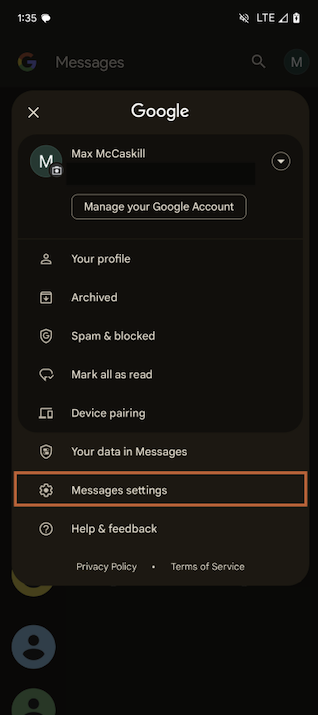
Tap your profile and choose Messages settings
Once you tap your profile, select Messages settings.
Image: Max McCaskill
.
Tap RCS chats and toggle on RCS chats.
Tap and toggle on RCS chats on Android devices.
Image: Max McCaskill
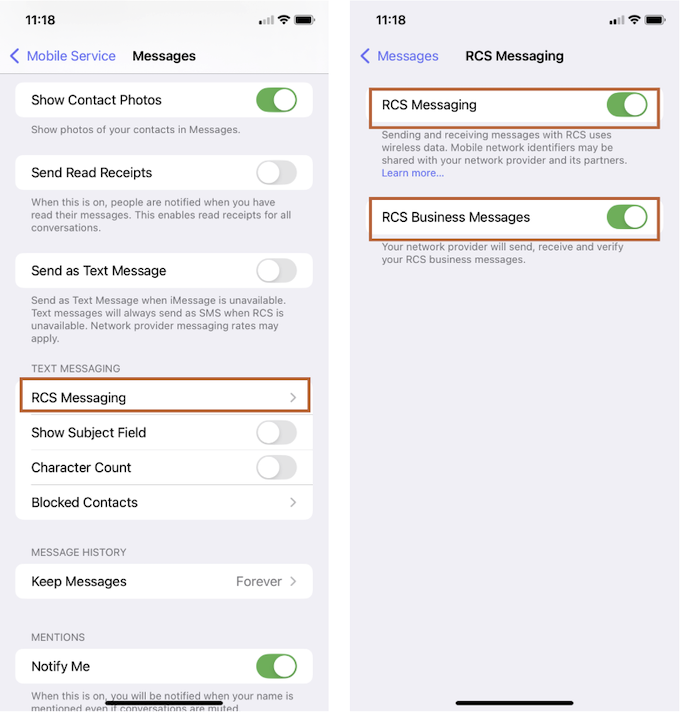
Turn on RCS messaging on your iPhone in a few simple steps:
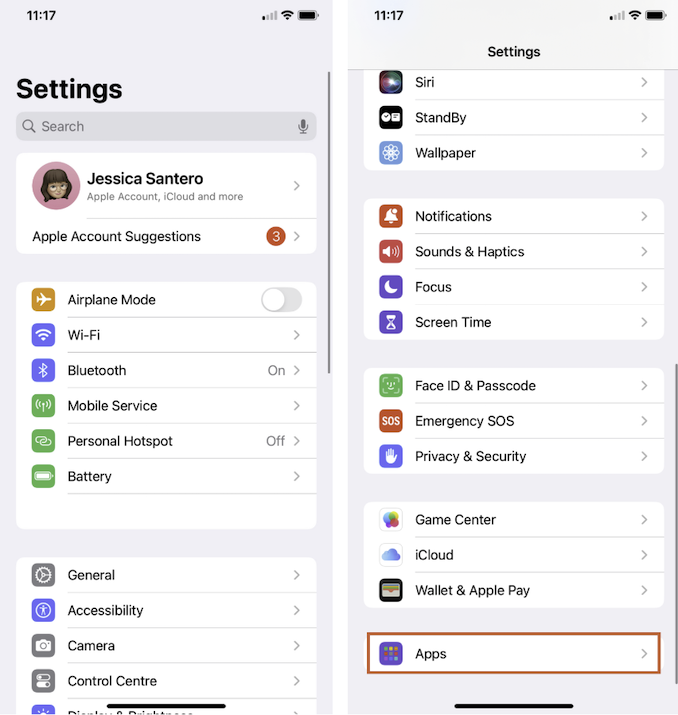
Under Settings, scroll down and tap Apps.
Find Apps under your phone’s settings.
Image: Jessica Santero
Tap Messages.
Scroll down and find Messages.
Image: Jessica Santero
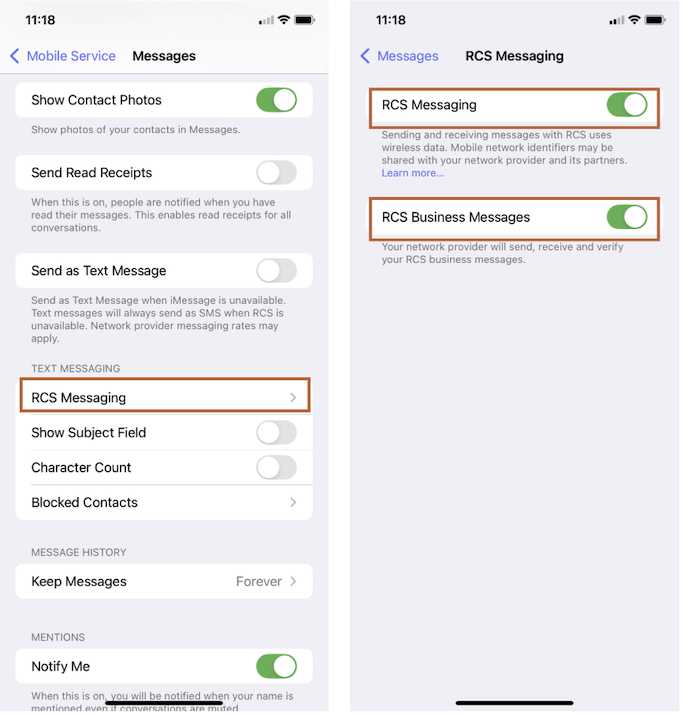
Under RCS Messaging, Toggle on RCS Messaging.
Tap and toggle on your iPhone’s RCS messaging.
Image: Jessica Santero
RCS messaging: FAQs
How do I check if my phone supports RCS messaging?
You can check if your Android phone supports RCS messaging by opening Google Messages, tapping your profile, Message settings, and RCS messaging where it will state if RCS is not supported. Otherwise, you’ll be able to toggle on TCS messaging.
Does Apple support RCS messaging?
Yes, Apple supports RCS messaging on iPhones with iOS 18 or newer versions installed.
How do I turn off RCS messaging?
You can turn off RCS messaging on an Android device by opening Google Messages, tapping your profile, Message settings, RCS messaging, and tapping the toggle to switch off RCS messaging.
Jessica Santero
Staff Writer
Jessica is a Staff Writer for WhistleOut and the site’s resident app expert. Her coverage frequently includes hands-on comparisons of popular app categories, such as translation, navigation, and dating apps, to evaluate how they perform in real-world mobile use.
Our editorial guides stem from our expertise, not any brand's influence. We independently test plans and apps, review providers, and break down topics so you can make the best choice with confidence.
Sharing data with carriers when searching for plans
WhistleOut’s internet coverage check requires that we verify serviceability at your address with carriers. When you click to purchase, we only pass verified addresses to a carrier and your address is loaded into the carrier’s shopping cart so that you can easily complete the purchase.
As part of California Consumer Privacy Act (CCPA) you are able to select that we do not sell this data to the carrier - this will also prevent us from validating your coverage with a carrier and setting up the address with the carrier if you choose to purchase.
Do not sell my data (address)
WhistleOut uses anonymous cookies to improve user experience on the site. Please review our privacy policy for more information.










.png?w=280&h=280&usm=20&usmrad=0.8&fit=crop "The Best Cheap Phone Plans for 2026: We Tested Them All to Help You Save")


