
Image: Max McCaskill
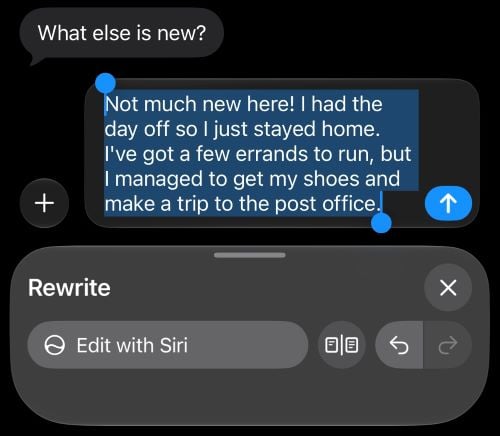
Siri can now write your texts and emails for you. Just describe what you want to say, and Siri drafts the message, then adjusts it if you ask. It's one of the more useful new Siri AI features in iOS 27, but I wanted to know if it actually sounded like me, since that was one of Apple's main promises when announcing the feature.
After testing Write with Siri on real messages, my take is this: It's great for short, routine messages, but longer ones are more hit and miss.
What is Write with Siri?
Write with Siri is a Siri AI feature that turns Apple's Writing Tools into something you can use almost anywhere you type. Writing Tools has been part of Apple Intelligence for a while, but the rebuilt Siri makes it a true generative AI feature.
With Write with Siri, you can:
- Write a draft from scratch based on a description
- Proofread automatically as you type, including in most third-party apps
- Get suggestions to improve something you've already written
How to use Write with Siri
Describe what you want to say, and Siri will write a draft for you. You don't need to give it the exact wording, just the general idea.
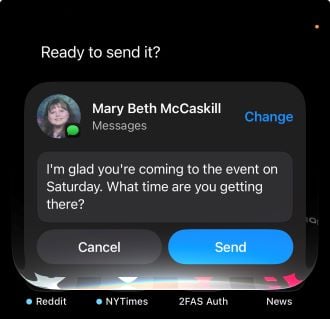
Image: Max McCaskill
If the draft isn't quite right, you can tell Siri what to change instead of rewriting it yourself. For example, you can ask it to "make it shorter" or "sound less formal." It works the other way, too. When I asked Siri to make a casual text more formal, it rewrote the message for me.
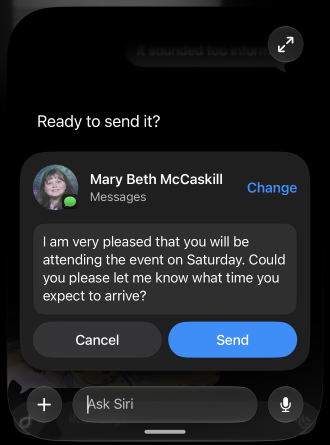
Image: Max McCaskill
If you do choose to use Write with Siri, you should treat anything it writes as a first draft. As an AI assistant, it can make mistakes or mishear what you're saying.
Does Write with Siri sound like you?
Siri is supposed to match how you normally write to each person, including your usual tone and punctuation. If you send your boss short bullet points and your friends rambling texts, Siri should draft accordingly.
During my testing, it mostly sounds like me for shorter messages. Quick texts and simple replies came out close to how I'd actually write them.
It also won't police your language or change what your trying to say. Siri is happy to write swear words if you ask it to, so if you're a bit unhinged in your texts, it can go along with that to match your personality.
Longer messages are more hit and miss, and seem to default to a formal tone. To be clear, the messages were grammatically correct and got the message across, but they often needed some editing to actually match my desired tone.
Where it falls short: Cutoffs, humor, and timing
The most frustrating thing about Write with Siri is that it doesn't wait for you to finish. If you stop talking for a moment while describing what you want, Siri will stop listening and immediately compose the message, even if you're only halfway through. Even if you don't pause, Siri will eventually cut you off if you keep talking, which makes it tough to describe a longer message in one go. Longer texts and emails may take several rounds of discussion.
Beyond that, like any AI, Write with Siri can struggle if you're trying to be snarky or funny, and it may not always understand what you're asking for.
Finally, Write with Siri may save you time with longer messages, but probably not with short responses. Remember that to use Siri, you have to activate the feature, describe what you want, give it a few seconds to think, approve the message, and then send it. For responses with just a few words, it's honestly faster to just type or dictate.
Write with Siri: FAQs
What is Write with Siri?
Write with Siri is a Siri AI feature in iOS 27 that drafts texts and emails for you based on a description. It can also proofread as you type and suggest ways to improve something you've already written.
Can Write with Siri match my writing style?
Write with Siri is designed to match how you write to each person, including your tone and punctuation. In my testing, it mostly sounded like me in shorter messages, but longer messages were more hit and miss.
Does Write with Siri work in third-party apps?
Yes, Write with Siri works almost anywhere you type on your iPhone. Its automatic proofreading also works in most third-party apps, not just Apple's own.
Which iPhones support Write with Siri?
Write with Siri requires an iPhone 15 Pro or newer running iOS 27 with a supported language. That includes the iPhone 15 Pro and Pro Max, every iPhone 16 and iPhone 17 model, the iPhone Air, the iPhone 18 Pro and Pro Max, and the iPhone Duo.
Max McCaskill
Sr. Staff Writer

Thousands of cell phone plans unpacked. All the facts. No surprises.

Related Articles


Related Topics
iOS FeaturedPopular Topics
Featured App Reviews iOS News Coverage Device Reviews Device Explainers Carrier Explainers App Roundups T-Mobile


Free iPhone 18 Pro, up to $1,200 off, with a trade-in in any condition or a line switch on Experience Beyond


.png?w=280&h=280&usm=20&usmrad=0.8&fit=crop "Best Cell Phone Deals for October 2026: Get the New iPhone 18 Pro for Free")




