Netflix has officially ended password sharing for its U.S. customers. As of now, your Netflix account is technically only for members of your immediate household. However, all is not lost. The streaming giant will kindly allow you to share an account with people outside your home for an extra $8.99/month.
If paying a little extra sounds unacceptable, you don't need to cancel your Netflix account yet. There are still things you can do. We've found the best workarounds for you to continue sharing your Netflix account and password (at least for now).
From temporary access codes and VPNs to securing your free account, let's explore how to get around Netflix's password-sharing ban.
What is Netflix's password-sharing ban?
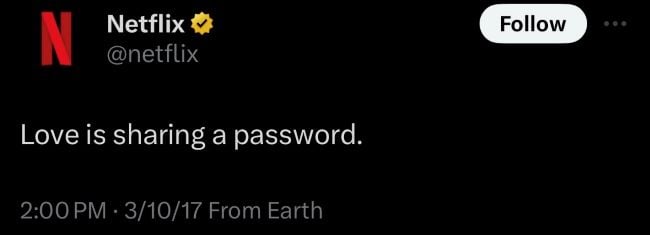
In 2017 Netflix tweeted "Love is sharing your password." These days, things have changed. In 2023, the company decided to eliminate password sharing in a bid to boost subscriber numbers and revenue. Despite customer backlash, Netflix pressed forward and prohibited account sharing with people outside your immediate household.
How does Netflix decide who is in your household? It has nothing to do with your family and friends. Instead, Netflix identifies the main TV or streaming box you use to watch its service and links that device's IP address to your account. Any other devices that access Netflix from that IP address–including TVs, phones, laptops, tablets, or gaming consoles–are part of that household.
Any devices that attempt to log into the Netflix account when outside of the household are blocked from accessing the content unless you upgrade your subscription or give them a temporary code.
Netflix password-sharing workarounds
There are several workarounds for avoiding Netflix's password-sharing ban. Some use features directly built into Netflix's new system, while others rely on some clever internet tactics. Here are the top workarounds you should try:
- Purchase additional user accounts
- Share your account access code
- Use a NordVPN Meshnet
- Log in using the Netflix household Wi-fi
- Stick to the Netflix app
1. Purchase additional user accounts
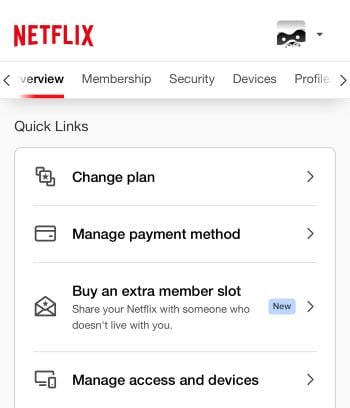
While it is unpopular and irritating, paying to add additional users to your account is the most painless method of continuing to share your Netflix subscription. All you have to do is go into your user profile and invite an "extra member" to use your account. Once that person accepts, they'll have to create their own login and password.
Extra users cost $8.99/month each. However, there are some limits to this process. Only Netflix's Standard and Premium plans can add extra users. The ad-supported Netflix plan is currently ineligible. Additionally, the Standard plan can only add one member and the Premium plan is capped at two.
2. Share your account access code
Netflix understands you want to use your account when you aren't home. With that in mind, it developed a workaround to grant temporary access through an emailed code. Think of it as a type of two-factor authentication. While it's designed for when you're on vacation, you can use it to grant temporary access to your account to people not in your home.
All you have to do is log into the account from a different Wi-Fi network. Netflix will tell you that your device isn't part of this account's household and offer to send a temporary code to the email associated with the account. Once you enter the code you'll have access for seven days.
This is a great method for sharing your account with family members who don't live with you, like college kids in dorms and your parents. Why family members? Because you'll need to speak to the account holder and enter a new access code about once a week. It might be awkward calling your coworker or extended friend at 1 a.m. because you need a new access code to their Netflix account.
3. Use a NordVPN Meshnet
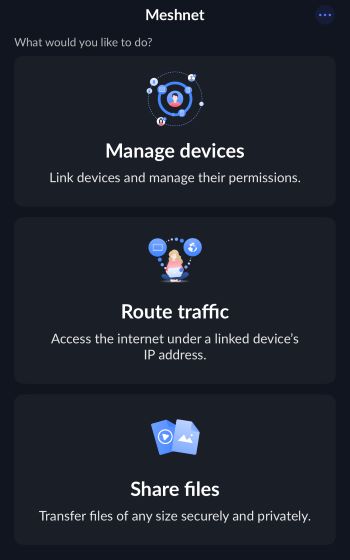
NordVPN is one of our favorite picks for VPN service. It's also perfect for getting around Netflix's password-sharing ban.
The service includes a feature called a Meshnet. It essentially mimics your IP address and tricks Netflix into thinking a device is operating on its home network. It sounds complicated, but Nord will walk you through the process after you sign up for the service. Generally, you just have to download the NordVPN app, turn on the Meshnet, and then log in from external devices.
Meshnet is currently free, though in the past it was a paid feature of NordVPN's plans. If you do go this route, don't be surprised if NordVPN pushes you to sign up for a paid subscription at some point.
4. Log in using the Netflix household Wi-fi
If you're close to the household where your Netflix account holder lives, an easy workaround is to log in to the account on their Wi-Fi network. Remember that Netflix uses IP addresses to determine who is in the same household. By initially logging in on that Wi-Fi network, Netflix will count you as part of that household even after you return home.
There are some potential issues with this method. One is it only works if you live close enough to the account holder to visit them frequently. If you are logged out of the account–or Netflix kicks you off–you won't be able to sign back in until you visit the account holder again. Another problem is this method only works with portable devices like phones and laptops. You don't want to lug your smart TV around in the back of your car just to watch Netflix.
5. Stick to the Netflix app
Netflix's password-sharing ban initially targeted smart TVs and streaming devices like Roku and Amazon Fire Sticks. The Netflix app that lives on your phone or tablet has mostly been ignored. While there are indications Netflix eventually plans to fix the app loophole, for now, you can generally still access any account from the mobile app.
How to get your own Netflix account for free
Don't worry if the methods for getting around Netflix's password-sharing ban are too frustrating. You may be able to get your own Netflix plan for free as a perk with your wireless plan. That said, you should note that phone plans that include streaming perks are typically expensive. You may find getting a Netflix perk isn't worth it. It's often cheaper overall to go with a discounted phone plan and purchase Netflix separately.
Best Netflix and phone plan bundles
US Mobile is one of the cheapest ways to access Netflix if you need a family phone plan. Its Unlimited Premium plan includes a streaming perk for Netflix if you purchase 3+ lines. A four-line plan that includes Netflix will cost you $176/month ($44/line). The plan also offers unlimited premium data, a 50GB mobile hotspot, and access to all three major networks.
US Mobile Unlimited Premium Plan

| Carrier | US Mobile |
|---|---|
| Data | Unlimited Data |
| Type | No Contract |
| Current Deal | Get this monthly plan for only $39 for 6 months of service using promo code ONLY39 OR $5 off per month for 6 months OR 30 Days FREE Trial |
| Total Price |
$39 per month
|
| View Plan |


The cheapest postpaid option for snagging a Netflix subscription with your phone plan is the Verizon Unlimited Welcome plan. Starting at $65/month for one line, It includes unlimited 5G data and coverage on the nation's largest 4G LTE network. Verizon offers additional perks for $10/each, including an ad-supported Netflix and Max bundle. The total cost for securing Netflix this way is $75/month.
Verizon Unlimited Welcome

| Carrier | Verizon |
|---|---|
| Data | Unlimited Data |
| Type | No Contract |
| Total Price |
$65 per month
+ Taxes & Fees. Price includes AutoPay & Paperless discount.
+ $40 Upfront
|
| View Plan |
T-Mobile also offers an ad-supported Netflix plan as a perk with its Experience More plan. This is a premium phone plan, so it includes unlimited premium 5G data, a 60GB mobile hotspot, and a subscription to Apple TV+. While these are excellent features, the plan is expensive at $85/month.
T-Mobile Experience More 2.0

| Carrier | T-Mobile |
|---|---|
| Data | Unlimited Data |
| Type | No Contract |
| Current Deal | Get $800 virtual prepaid MC w/ new line & port-in from eligible carriers to pay off remaining balance OR $200 virtual prepaid MC w/ new line & port-in from eligible carriers |
| Total Price |
$85 per month
with Auto-Pay + Taxes and fees
|
| View Plan |
Max McCaskill
Sr. Staff Writer



.jpg?w=280&h=280&usm=20&usmrad=0.8&fit=crop "Hulu: A complete guide to pricing and plans")