
Metro by T-Mobile is one of the most popular smaller carriers operating on T-Mobile's network. Unfortunately, it's not always the cheapest option. If you've decided to switch away from Metro by T-Mobile, you'll need to make sure your device is unlocked.
For most new phones, Metro by T-Mobile will automatically unlock your device once it meets all the carrier's unlock eligibility requirements. However, if the automatic unlock process fails or you have an older device, you'll need to manually unlock your phone. Generally, this requires you to go into the settings of your device or use the pre-installed Device Unlock app.
We've got all the details on why you should unlock your Metro by T-Mobile phone and the instructions to help you complete the job. Plus, we can also offer the best alternative carriers for Metro by T-Mobile to help you save money while getting the same strong coverage.
Why unlock your Metro by T-Mobile phone?
In most cases, customers unlock their Metro by T-Mobile phone because they want to change carriers. That said, there are other reasons. Metro doesn't offer a strong international roaming perk with its plans, so many customers unlock their devices to purchase travel eSIMs or temporarily switch to another carrier when traveling and vacationing abroad.
Additionally, if you're upgrading your device, you can unlock your old phone if you want to sell it. If your old phone is locked to the Metro network, even doing a factory reset won't allow it to work with another carrier.
Best Metro by T-Mobile alternatives
If you're unlocking your device to switch away from Metro by T-Mobile, consider moving to a carrier like Mint Mobile, US Mobile, or Tello. They offer plans on the same T-Mobile network as Metro at a fraction of the cost. Check out these carriers' popular unlimited plans:
|
US Mobile

Unlimited Starter Plan
$10.00/mo
|
|
Mint Mobile

Unlimited Data Plan
$10.00/mo
$60 for 6 months of service
|
|
Tello

Unlimited Text, Talk, and Data Plan
$25.00/mo
|
Before unlocking: Metro phone unlock requirements
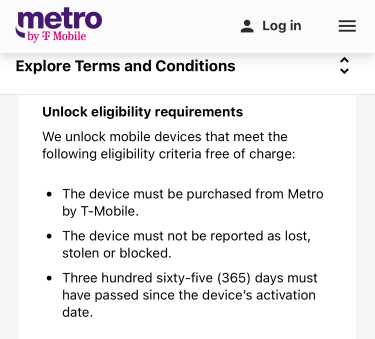
Image: Metro by T-Mobile
Metro by T-Mobile gives you simple unlock requirements, and the carrier is nice enough to unlock most devices automatically—for free. However, Metro also has one of the longest active service periods of any carrier by requiring customers to maintain their service for one year before unlocking a device.
To unlock a Metro phone, your device must:
- Have originally been purchased from Metro by T-Mobile.
- Not been reported as lost, stolen, or blocked.
- Have been in active service for at least 365 consecutive days (one year) from its original activation on Metro's network.
If you had to replace your phone within its warranty period, don't worry—the original activation date will still count as the start of the 365-day period, rather than the date you received your replacement device.
Military exceptions to Metro's unlock policy
Active duty military customers who are prepping for deployment don't have to meet the 365-day active phone service requirement before requesting a Metro unlock code. The carrier understands that you need to stay connected when posted overseas.
To bypass the standard Metro by T-Mobile phone unlock requirements, you'll need to:
- Go in person to a Metro retail store (or have a designated family member go in your place).
- Present your deployment papers as proof of your service and pending deployment.
- Have a sales agent complete your request for a phone unlock.
Once your request has gone through, Metro will unlock your device, and you're ready to use your phone on a compatible international network. Note that it may take a few days for the unlock to be approved since the military exception is a manual process.
How to unlock a Metro by T-Mobile phone
The process for unlocking a Metro by T-Mobile phone depends on the device's operating system and age. In most cases, Metro will automatically and remotely unlock your device after you meet the eligibility requirements. Check your device's settings to ensure it's still locked to the Metro by T-Mobile network before following these steps.
If the automatic unlocking process failed or your device is too old for the automatic process, follow the instructions below to unlock your phone. If you still have problems, contact Metro by T-Mobile's customer service or visit a Metro store.
Unlocking a Samsung device (2019 or newer)
To unlock a Samsung phone from 2019 to the present, follow these instructions:
- Go to the Settings app and find Connections.
- Go to More Connection Settings.
- Select Network Unlock and press Permanent Unlock.
- Wait while your device completes the unlock process.
- Restart your phone.
Unlocking other Android devices or early model Samsungs
To unlock early Samsung models and other Android devices (like Pixels, Motorolas, and Nokias), follow these instructions:
- Go to the Device Unlock app or the pre-installed Unlock app on your phone.
- Follow the app instructions.
- When prompted, select Permanent Unlock.
- Wait while your device completes the unlock process.
- Restart your phone.
Unlocking Apple devices
iPhones from any generation work with Metro's automatic remote unlock process. That said, some customers may have to force the unlock to go through by installing a SIM card from a different carrier or resetting the phone.
To unlock your iPhone from Metro by T-Mobile:
- Verify your iPhone is eligible to be unlocked.
- Connect your iPhone to Wi-Fi.
- Install a non-T-Mobile SIM card. (You may also download a non-T-Mobile eSIM for this step.)
- Follow the SIM card setup procedure and connect to the new network.
- If the new card fails or no SIM is available, backup and reset your iPhone.
Where to take your unlocked Metro phone
If you're happy with Metro by T-Mobile's coverage but unhappy with its prices, there are plenty of other options for the same service. Carriers like Mint Mobile, US Mobile (Light Speed), and Tello use the same T-Mobile towers as Metro. They offer discounted unlimited plans with large data allotments on the nation's largest 5G network. Check out all of T-Mobile's MVNOs or pick from the most popular plans below:
|
Mint Mobile
Unlimited Data Plan
$10.00/mo
$60 for 6 months of service
|
|
US Mobile
Unlimited Starter Plan
$10.00/mo
|
|
Boost Mobile

Unlimited Plan
$10.00/mo
with AutoPay
|
|
Straight Talk

Platinum Unlimited Data Plan
$60.00/mo
+ $4.88 Upfront
|
|
Tello
Unlimited Text, Talk, and Data Plan
$25.00/mo
|
If you're unhappy with Metro by T-Mobile's service, make sure your next carrier runs on the AT&T or Verizon network. Carriers like Visible and Ting operate on the Verizon network, which has the largest 4G LTE coverage area and fast 5G speeds. Carriers like Cricket and Consumer Cellular operate on AT&T's network, which has widespread coverage and excellent reliability. Just make sure to do an IMEI check to ensure your phone will work on a non-T-Mobile network.
|
Visible

$25 Visible Plan
$25.00/mo
Taxes & Fees included
|
|
US Mobile
Unlimited Starter Plan
$10.00/mo
|
|
Spectrum Mobile®

Unlimited
$30.00/mo
+ $20 Upfront
|
|
Cricket

Supreme Unlimited Plan
$55.00/mo
with AutoPay; $60 for the first month.
+ $9.99 Upfront
|
|
Boost Mobile
Unlimited Plan
$10.00/mo
with AutoPay
|
Unlocking Metro by T-Mobile phones: FAQs
Max McCaskill
Sr. Staff Writer

Thousands of cell phone plans unpacked. All the facts. No surprises.





.png?w=280&h=280&usm=20&usmrad=0.8&fit=crop "The Best Cheap Phone Plans for 2026: We Tested Them All to Help You Save")


