

Setting up mobile hotspot on your iPhone is a simple process that includes toggling the feature in your phone's settings. Once enabled, you can connect devices to your iPhone hotspot through Wi-Fi, Bluetooth, or USB.
Mobile hotspot is a great way to connect your devices to the internet while you are away from your home internet. For example, you can use it to connect to the internet on your laptop while you’re on the road or at your favorite park. Keep reading for detailed instructions for setting up hotspot on your iPhone.
Setting Up Mobile Hotspot on iPhone
To set up your mobile hotspot with your iPhone, simply make it discoverable by taking the following steps:
- Go to Settings
- Tap Personal Hotspot
- Toggle on Allow Others to Join
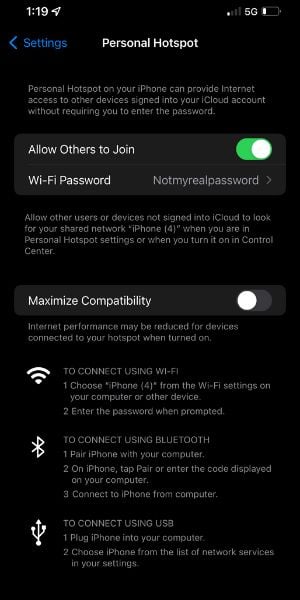
Changing your password
Your phone will have a default password for devices to use to connect to your hotspot. You'll find it right under Allow Others to Join. To change the password, click on it and type out your new password.
Connecting to Your Mobile Hotspot
Once you enable hotspot on your iPhone, you can connect other devices to it with Wi-Fi, Bluetooth, or USB to get an internet signal.
Wi-Fi
To connect via Wi-Fi, open the Wi-Fi settings on the other device you want to connect with and look for your phone. After selecting your phone, enter the password you set for your hotspot.
Bluetooth
If you want to connect a device to your iPhone's hotspot via Bluetooth, go to Settings on your Phone and open Bluetooth. Then, open the Bluetooth setting on the device that you need internet on. Find your phone in the list of available devices and select it to start the pairing.
USB
To connect a device to your iPhone's hotspot with USB, connect your iPhone and the device using a USB cable. On the device you are connecting, go to the network settings and select your iPhone. If you are having trouble connecting via USB, ensure your iPhone has the latest version of iOS.
Best Mobile Hotspot Plans
Your plan must include mobile hotspot service if you want to connect other devices to the internet. Some plans have dedicated hotspot data that does not count towards your general data limit, while others will use your general monthly allotment.
If hotspot access is a priority for you, these are the best mobile hotspot plans from the major carriers:
- T-Mobile's Experience More includes 60GB of hotspot data
- AT&T Unlimited Premium PL includes 60GB of hotspot data
- Verizon Unlimited Ultimate with 60GB hotspot data add-on (extra cost)
With 40GB of data, you can watch about 80 hours of SD video or listen to about 8,000 songs. With 50GB, you can watch around 100 hours of SD video or listen to around 10,000 songs.
|
#1
|
T-Mobile

Experience More 2.0
$85.00/mo
with Auto-Pay + Taxes and fees
|
|
#2
|
Verizon

Unlimited Ultimate (Students)
$85.00/mo
+ Taxes & Fees. Price is for eligible Students with AutoPay & Paperless discount.
+ $40 Upfront
|
|
#3
|
AT&T

Premium 2.0℠
$90.00/mo
+ $35 Upfront
|
If you want hotspot in your plan, but it isn't a priority, you can save money by selecting one of these MVNO offerings:
|
#1
|
US Mobile

Unlimited Starter Plan
$10.00/mo
|
|
#2
|
Mint Mobile

Unlimited Data Plan
$10.00/mo
$60 for 6 months of service
|
|
#3
|
Lyca Mobile

Unlimited Plus Plan
$12.50/mo
Pay $12.50/month for the first 9 months<br>Regular rate is $49/month
|
|
#4
|
Total Wireless (previously Total by Verizon)

Total MAX 5G BYO Plan
$20.00/mo
with AutoPay ($30 for the first month)
+ $0.99 Upfront
|
|
#5
|
Tello

Unlimited Text, Talk, and Data Plan
$25.00/mo
|
|
#6
|
Ting

Unlimited 25 Plan
$25.00/mo
|
|
#7
|
Visible

$25 Visible Plan
$25.00/mo
Taxes & Fees included
|
|
#8
|
Straight Talk

$25 StraightSAVINGS! Plan
$25.00/mo
+ $4.88 Upfront
|
|
#9
|
Cricket

3-Month Unlimited Plan
$25.00/mo
$45 advance payment for 3 months (equals to $15/month)<br>regular rate for 3 months is $120 (equals to $40/month)
+ $9.99 Upfront
|
|
#10
|
Twigby Mobile

Unlimited Talk, Text and Data
$25.00/mo
for the first 3 months then $35.00/month
|
Angelo Ilumba
Senior Writer

Thousands of cell phone plans unpacked. All the facts. No surprises.





.png?w=280&h=280&usm=20&usmrad=0.8&fit=crop "The Best Cheap Phone Plans for 2026: We Tested Them All to Help You Save")


