
One of the newest accessibility features in iOS 17 is Personal Voice. It’s a Live Speech setting on your iPhone that uses AI and machine learning to create an almost perfect replica of your voice. You can use it to speak to people around you and as a voice for phone calls and FaceTime.
While it may sound like something out of science fiction, your iPhone can now communicate using a copy of your voice. That said, this kind of feature raises a lot of questions about privacy and access. Does Apple keep a copy of your voice? Can thieves access it and use it to break into accounts using voice authentication?
We tested Personal Voice to fully understand how it works and all of the security implications that come with it. Let’s dive into iOS 17’s Personal Voice feature and learn whether it’s safe to use.
What is Personal Voice on iPhone?
Personal Voice is an iOS 17 accessibility feature. It creates an artificial voice for your phone that sounds like your real voice. This feature can be used to talk to people around you through the Live Speech text bubble. It can also be used in phone calls and FaceTime if you can’t physically speak into the phone.
Accessibility features are designed to help people with disabilities use technology more easily. Personal Voice is for people who have issues speaking. Apple specifically mentioned this feature was created with ALS (amyotrophic lateral sclerosis) in mind, but you could also create one to keep in case you lose your voice due to a cold. No matter the scenario, your iPhone now has the ability to speak for you in your own voice.
Does Personal Voice actually sound like you?
In my experience testing the feature, I found that Personal Voice does sound a lot like me, but it’s not an exact match. While it has the tone of my voice, it does not have my cadence and can sound a bit robotic at times. It almost sounds like Apple attached the sound of my voice to Siri.
Still, I don’t consider the speech quality to be bad. It’s clear enough for people to tell it’s me, but not so lifelike that people can’t tell it’s a digital voice. It can’t speak with emotion like a human would. The feature is also limited to only saying what you tell it to. It’s not a chatbot and can’t respond to questions on its own.
The imperfections of Personal Voice are probably because of the way it’s created. The process consists of reading 150 prompts into your device. Apple then uses machine learning to extract the individual sounds of your voice and combines them to make millions of words.
How to create a Personal Voice on iPhone
To set up Personal Voice, you’ll first need to make sure you’ve updated your device to at least iOS 17. From there, you’ll need to enable the feature in the Settings app and read 150 different phrases out loud into your device. Afterward, your iPhone will need several hours to build your voice. I recommend doing all this late at night when it’s quiet and letting the process complete while you’re asleep.
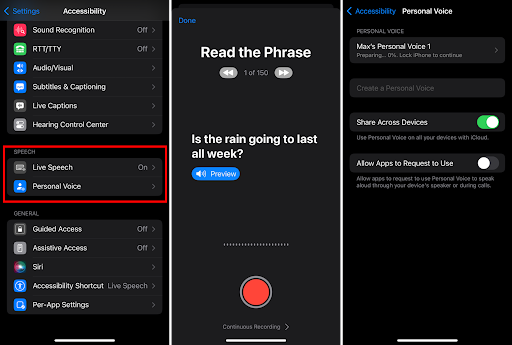
To create a Personal Voice on iPhone:
- Open the Settings app.
- Tap Accessibility.
- Tap Personal Voice.
- Press Create Personal Voice.
- Read the prompts to record your voice.
- Leave your phone plugged in and locked until the process is complete.
How to use Personal Voice
After you’ve created your Personal Voice, you’ll still need to enable the feature on your phone and select your created voice to use it.
To use your Personal Voice:
- Go to the Settings app.
- Tap Accessibility.
- Scroll down to Live Speech.
- Enable Live Speech.
- Pick your Personal Voice from the voice options.
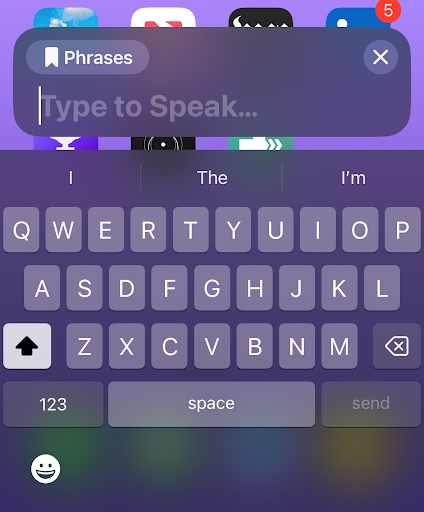
- Rapidly press your Side Button three times.
- Type your message into the chat box.
Is Personal Voice safe?
It can be a bit unsettling to know that your phone can create an almost perfect copy of your voice. I know I was initially creeped out and my first thought was wondering how people could exploit the feature. Remember, there are technologies that use voice authentication as a security measure.
After doing some more digging, the feature seems to be pretty safe. Apple claims that Personal Voice is encrypted and stored on your individual device. It can only be accessed using Face ID, Touch ID, or your passcode. If you decide to share your voice among other Apple products, like a Mac or iPad, Apple will use iCloud to transfer it using end-to-end encryption. Additionally, you can restrict which third-party apps have access to the feature.
Essentially, for someone to use your Personal Voice, they must break into your iPhone or Apple account first. It has the same kinds of protections that you see with credit cards attached to your iPhone’s Wallet. Still, if you decide you don’t like the Personal Voice that you created, you can permanently delete it from your phone.
iPhone data plans
You don’t need mobile data or a Wi-Fi connection to create a Personal Voice. It’s a native software feature. That said, you might need data for some of its uses, like FaceTime calls. No matter how you intend to use Personal Voice, you’ll need a 5G data plan to get the best overall experience out of your iPhone.
We typically think of massive carriers like AT&T, T-Mobile, and Verizon with their expensive plans as your only options for high-speed data. However, there are many better and cheaper choices. Smaller carriers called MVNOs rent service on the big carrier’s networks. Since they don’t have to maintain the towers, they can generally offer much better prices. Many MVNOs offer plans that include 5G access and mobile hotspot data. While these little guys may not have as many perks as the big carriers, you can typically find a plan that’ll meet your needs.
How much data do I need?
Your individual needs depend on how much data you typically consume in a month. If you spend a ton of time streaming and posting on social media, you’ll probably need a larger allotment. The easiest way to figure out your monthly use is to look at your account with your current carrier. The amount is usually listed on a past billing statement or on the carrier’s app.
If you’re unsure how much data you need or are curious about how much data popular apps use, check out our data usage guide.
You can get access to Verizon’s network through Visible. Verizon offers incredibly fast 5G speeds and the largest 4G LTE network in the nation. Visible has competitive unlimited plans. The $30/month Visible+ plan and $40/month Visible+ Pro plan include unlimited premium 5G ultra-wideband data. Plus, it offers an unlimited mobile hotspot with speeds limited to 5-15Mbps. While the hotspot may not be fast enough for things like competitive video games, that speed is perfect for basic web browsing and standard-definition streaming.
Visible $30 Visible+ Plan

| Carrier | Visible |
|---|---|
| Data | Unlimited Data |
| Type | No Contract |
| Current Deal | Get $5/mo. off this Visible+ monthly plan for the first 60 months of service using promo code 5OFF5 with number port-in required |
| Total Price |
$30 per month
Taxes & Fees included
|
| View Plan |

Mint Mobile offers service through T-Mobile’s network, which includes the largest 5G network in the nation. An Unlimited Data plan with 50GB of premium data and a 20GB mobile hotspot for just $30/month ($15/month for new customers). If you use more than 50GB per month, your data is subject to slowdowns, but it will never completely stop. Mint also requires you to prepay for at least three months in advance, but the overall cost is typically much cheaper than other carriers.
Mint Mobile Unlimited Data Plan

| Carrier | Mint Mobile |
|---|---|
| Data | Unlimited Data |
| Type | No Contract |
| Current Deal | Get this unlimited plan for just $10/mo. for the first 6 months of service |
| Total Price |
$10 per month
$60 for 6 months of service
|
| View Plan |
Max McCaskill
Sr. Staff Writer

Thousands of cell phone plans unpacked. All the facts. No surprises.





.png?w=280&h=280&usm=20&usmrad=0.8&fit=crop "The Best Cheap Phone Plans for 2026: We Tested Them All to Help You Save")


